
It is indeed a bit weird to write the "opening" in the last section. However, the beginning of the first article (Numerical Operations) is actually a small opening. It is mentioned that the entire series requires a certain foundation of Shell programming. Therefore, in order to enable readers who do not have a foundation of Shell programming to Reading this series, I came to the end to rewrite this opening chapter. The opening chapter mainly introduces what Shell is, Shell operating environment, basic Shell syntax and debugging skills.
First, let us look at the position of Shell in the entire operating system from the following figure. The outer circle of the figure describes the entire operating system (such as
Debian/Ubuntu/Slackwareetc.), the inner circle describes the core of the operating system (e.g.
Linux Kernel),and
Shelland
GUIAlso serves as the interface between the user and the operating system.
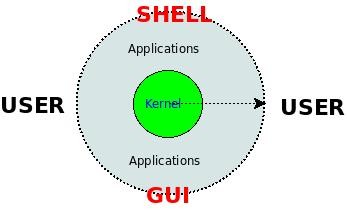
GUIProvides a graphical user interface that is very easy to use and easy to learn; and
ShellIt provides users with a command line interface, receives the user's keyboard input, analyzes and executes the commands in the input string, and then returns the execution results to the user. It may be more complicated to use, but because it takes up less resources, Moreover, after becoming proficient in operation, work efficiency may be improved, and it has the function of batch processing, so it is very popular in some applications.
ShellAs a user interface, it is actually an interpreter (Interpreter, such as in
linuxThe following are more commonly used
Bash), we can view the current
Shell:
$ echo $Shell/bin/bash$ ls -l /bin/bash-rwxr-xr-x 1 root root 702160 2008-05-13 02:33 /bin/bash
The interpreter can not only interpret simple commands, but also interpret a file with a specific syntax structure, which is called a script. How it interprets these commands and script files specifically is not analyzed in depth here. Please see another article I wrote in 2008: "The moment of program execution on the Linux command line."
Since the program can interpret files with a certain grammatical structure, we can follow a certain grammar to write it. What kind of grammar does it have, how to run it, and how to debug it? Below we use
BashLet’s discuss these aspects with an example.
In order to facilitate the following exercises, we first set up a basic operating environment: In a Linux operating system, there is a running
BashThe command line is waiting for us to type the command. This command line can be under the graphical interface.
Terminal(For example
UbuntuVery powerful
Terminator), or it can be a character interface
Console(can be used
CTRL+ALT+F1~6toggle) if you find the current
Shellno
Bash, please replace it with:
$ chsh $USER -s /bin/bash$ su $USER
Or simply type in Bash:
$ bash$ echo $Shell # Confirm /bin/bash
If you do not have a Linux operating system installed, you can also consider using Linux virtual experiment services provided by some public communities, which generally provide remote
Shell, you can pass
Telnetor is
SshLog in to the client to practice.
With the basic operating environment, how to run the commands typed by the user or the script file written by the user?
?
Suppose we have written a Shell script called
test.sh.
The first way is to make sure that the command we execute has executable permissions and then type the command directly to execute it:
$ chmod +x /path/to/test.sh$ /path/to/test.sh
The second method is to directly write the script as
BashThe parameters of the interpreter are passed in:
$ bash /path/to/test.sh
or
$ source /path/to/test.sh
or
$ ./path/to/test.sh
One first
Hello, Worldprogram.
Let's introduce the basic structure of a Shell program to
Hello, WorldFor example:
#!/bin/bash -v# test.shecho Hello, World
Save the above code as
test.sh, and then run it in the above two different ways, you can see the following effects.
Method one:
$ chmod +x test.sh$ ./test.sh ./test.sh #!/bin/bash -v echo Hello, World Hello, World
Method two:
$ bash test.shHello, World$ source test.shHello, World$ . test.shHello, World
We found that there is a difference between the two running results. Why? Here we need to pay attention
test.shThe content of the file, it only has two lines, the second line is printed
Hello, World, both methods achieve their purpose, but the first method prints more content of the script file itself. Why?
The reason is in the first line of the file. When we run the script file directly, this line tells the operating system to use
#!The interpreter and corresponding parameters after the symbol are used to interpret the script file. By analyzing the first line, we found that the corresponding interpreter and parameters are
/bin/bash -v,and
-vIt happens to be to print the source code of the program; but we did not give it when using the second method.
BashPass any additional arguments, so it simply interprets the script file itself.
For other syntax details, please refer directly to "Shell Programming Study Notes", which is Appendix 1 at the back of this book.
Shell language is an interpreted language, and its programming process is somewhat different from that of compiled languages. The basic process is as follows:
design algorithm
Use Shell to write scripts to implement algorithms
Run the script directly
It can be seen that it does not have the troublesome compilation and linking process of compiled languages, but precisely because of this, it is not very convenient to debug when it goes wrong, because syntax errors and logic errors appear at runtime. Below we briefly introduce the debugging method.
You can directly reference: Shell script debugging technology or BASH debugging method.
As an interpreted language, the Shell language can use a large number of existing tools, including numerical calculations, symbolic processing, file operations, network operations, etc. Therefore, the writing process may be more efficient, but because it is interpreted, it needs to be executed during execution. During the process, continuously calling external programs from the disk and switching between processes may have disadvantages in terms of operating efficiency, so we should choose to use Shell or other languages for programming according to the application.
The moment the program is executed on the Linux command line
Linux Shell Programming Study Notes
Shell script debugging technology
BASH debugging methods