
Socket is also called "socket". Applications usually send requests to the network or respond to network requests through "socket", so that hosts or processes on a computer can communicate.
In this chapter, we will teach you how to use the Socket service in the Perl language.
Use the socket function to create a socket service.
Use the bind function to bind the port.
Use the listen function to listen to the port.
Use the accept function to receive client requests.
Use the socket function to create a socket service.
Use the connect function to connect to the socket server.
The following diagram demonstrates the communication process between client and server:
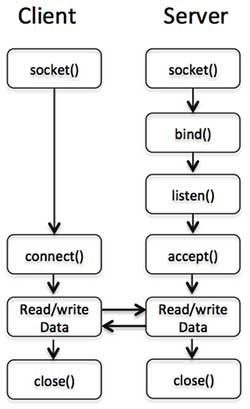
In Perl, we use the socket() function to create a socket. The syntax format is as follows:
socket(SOCKET, DOMAIN, TYPE, PROTOCOL);
Parameter analysis:
The socket created by DOMAIN specifies the protocol set. For example:
AF_INET represents IPv4 network protocol
AF_INET6 means IPv6
AF_UNIX means local socket (using a file)
TYPE Socket types can be classified as SOCK_STREAM or SOCK_DGRAM depending on whether they are connection-oriented or non-connection
PROTOCOL should be (getprotobyname('tcp'))[2] . Specifies the actual transport protocol used.
So the socket function call method is as follows:
use Socket # Define PF_INET and SOCK_STREAMsocket(SOCKET,PF_INET,SOCK_STREAM,(getprotobyname('tcp'))[2]);Use bind() to assign an address to the socket:
bind( SOCKET, ADDRESS );
SOCKET A socket descriptor. ADDRESS is the socket address (TCP/IP) containing three elements:
Address cluster (TCP/IP, is AF_INET, probably 2 on your system)
Port number (e.g. 21)
Network address (e.g. 10.12.12.168)
After a socket is created using socket(), only the protocol used is given to it, and no address is assigned. Before accepting connections from other hosts, bind() must be called to assign an address to the socket.
A simple example is as follows:
use Socket # PF_INET and SOCK_STREAM are defined $port = 12345; # Listening port $server_ip_address = "10.12.12.168";bind( SOCKET, pack_sockaddr_in($port, inet_aton($server_ip_address))) or die "Unable to bind port! n";
or die is executed after failure to bind the address.
Setting the port can be immediately reused by setting the setsockopt() option SO_REUSEADDR.
The pack_sockaddr_in() function converts the address into binary format.
After the socket is bound to an address, the listen() function will start listening for possible connection requests. However, this can only be used when reliable data flow is guaranteed:
listen(SOCKET, QUEUESIZE);
SOCKET: A socket descriptor.
QUEUESIZE: It is an integer that determines the size of the listening queue. When a connection request arrives, it will enter the listening queue; when a connection request is accepted by accept(), it will be removed from the listening queue; when the queue is full, a new connection The request will return an error.
Once the connection is accepted, 0 is returned on success and -1 on error.
The accept() function accepts the requested socket connection. Returns the compressed form of the network address if successful, otherwise returns FALSE:
accept( NEW_SOCKET, SOCKET );
NEW_SOCKET: A socket descriptor.
SOCKET: A socket descriptor.
accept() is usually used in infinite loops:
while(1) { accept( NEW_SOCKET, SOCKT ); .....}The above example can monitor client requests in real time.
The connect() system call sets up a connection for a socket. The parameters are a file descriptor and a host address.
connect(SOCKET, ADDRESS);
The following creates an instance connected to the server socket:
$port = 21; # ftp port $server_ip_address = "10.12.12.168"; connect( SOCKET, pack_sockaddr_in($port, inet_aton($server_ip_address))) or die "Unable to bind port! n";
Next, we use a complete example to understand the application of all socket functions:
Server server.pl code:
Open a terminal and execute the following code:
$ perl sever.pl access start: 7890
Client client.pl code:
Open another terminal and execute the following code:
$ perl client.plI am the information from the server