
Introduction to structure and performance related content
HTML structure css performance javascript behavior web page layout should take into account the principle of separation of structure, performance and behavior. First focus on structure and semantics, and then consider CSS, JS, etc. to facilitate later maintenance and analysis...
The idea of separation of structure and expression
Junior developers' ideas and production methods: divs are nested layer by layer; Intermediate developers' ideas and production methods: remove redundant divs and simplify them; Advanced developers' ideas and production methods: simplify the structure of html to the greatest extent, and then Use css to set it up to reduce the fit between html and css. overflow:
visible default value. The content will not be trimmed and will be rendered outside the element box.
hidden content is trimmed and the remaining content is invisible.
scroll The content will be trimmed, but the browser will display scroll bars to view the remaining content.
auto If content is trimmed, the browser displays scroll bars to view the remaining content.
inherit specifies that the value of the overflow attribute should be inherited from the parent element.
text-indentThe text is indented to the target position, and there is no need to add additional labels to the text. Reduce redundant code
When you get a web design drawing, first pay attention to the text content of the web page and the relationship between content modules.
Focus on writing semantic HTML code instead of thinking too much about the style of the design drawing.
Wait until the html is written according to the content, and then consider the implementation of the style.
Complete the visual effects required by the design drawing without changing the existing structure.
Margin can be a negative value, and through negative values, the content can be moved! Achieve movement in four directions.
In structure (HTML) and style (css), you can first write the content in HTML, and then use margin to move the position to achieve typesetting, reduce the coupling between style and structure, and reduce code
Web page skinning and summary
Minimize html's dependence on css
Web page skinning: same html structure, different css styles
Below are some sharings from Gray Niu WEB students
When we first came into contact with web page production, we learned that html represents structure, css represents style, and javascript represents behavior. In web page production, we have always emphasized the principle of separation of structure and performance. The structure here generally refers to HTML. In addition, separation is Are you talking about writing them in different files and referencing them? Of course not. From the study here, I learned that separation is not only a method but also an idea. In short, it is a two-dimensional coordinate, where the x-axis represents technological development and the y-axis represents web page production needs. Separation is Completed according to technological development and our web page production needs!
For example: For example, if we build a house, HTML is equivalent to the structure of the house, and CSS is equivalent to the later decoration. The web pages are all based on one effect. When we browse the web page, the styles will be different depending on the rendering, so we There are all kinds of pages to browse, so how do we lay out the web pages? First of all, don’t think too much about CSS styles, try to make our HTML structure reasonable, concise and semantic, and then add and improve CSS styles!
When we got the page, different producers had different links to the structure and style. Based on the different depth of understanding of the structure and style, it was tentatively divided into three different levels: primary, intermediate, and advanced;
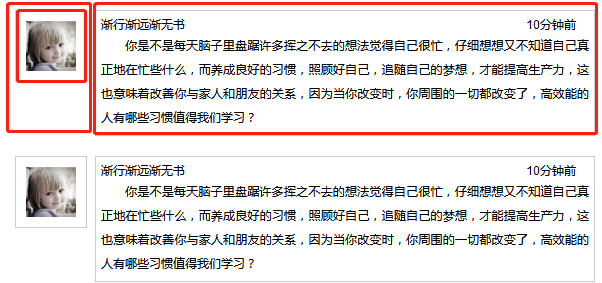
For example, such a common dialog box has three units. First, we need to complete one unit and perform CTRL+V on the other. If a junior producer gets the page, he usually divides it according to the boxes above. A large The div contains 2 small divs, floating left and right, img on the left, p, h and other tags on the right. As for the time factor, it is implemented through position attribute positioning. Let’s explain it with the code below.
<div class="demo1">
            <div class="fl">
                <img src="../../images/head02.jpg" alt="">
            </div>
            <div class="fr">
                <span>10 minutes ago</span>
                <h6>As we travel further and further away, there are no more books</h6>
                <p>
                Do you have many lingering thoughts in your mind every day and feel that you are very busy? If you think about it carefully, you don’t know what you are really busy with. Only by developing good habits, taking good care of yourself, and following your dreams can you Increase productivity, which also means improving your relationships with family and friends, because when you change, everything around you changes. What habits of highly effective people are worth learning?
                </p>
            </div>
        </div>
        <div class="demo2">
                <img src="../../images/head02.jpg" alt="">
            <div class="fr">
                <span>10 minutes ago</span>
                <h6>As we travel further and further away, there are no more books</h6>
                <p>
                Do you have many lingering thoughts in your mind every day and feel that you are very busy? If you think about it carefully, you don’t know what you are really busy with. Only by developing good habits, taking good care of yourself, and following your dreams can you Increase productivity, which also means improving your relationships with family and friends, because when you change, everything around you changes. What habits of highly effective people are worth learning?
                </p>
            </div>
        </div>
        <div class="demo3">
                <img src="../../images/head02.jpg" alt="">
                <span class="time">10 minutes ago</span>
                <h6>As we travel further and further away, there are no more books</h6>
                <p>
                Do you have many lingering thoughts in your mind every day and feel that you are very busy? If you think about it carefully, you don’t know what you are really busy with. Only by developing good habits, taking good care of yourself, and following your dreams can you Increase productivity, which also means improving your relationships with family and friends, because when you change, everything around you changes. What habits of highly effective people are worth learning?
                </p>
            </div>
        </div>
=>3 different demos represent 3 different page structures || Public part display of writing page structure:
/*reset*/
        body,div,dl,dt,dd,ul,ol,li,h1,h2,h3,h4,h5,h6,pre,form,fieldset,input,textarea,p,blockquote,th,td{margin: 0; padding: 0;list-style: none;font:12px/1.5 "Arial", "sans-serif", "Microsoft Yahei", "宋体", "Tahoma"}

        /*Public style*/
        .demo1,.demo2{
            width: 600px;
            margin-top: 20px;
            overflow: hidden;
            margin-bottom: 20px;
        }
        p{
            text-align: justify;
            text-indent: 2em;
            line-height: 24px;
        }
=>Junior Producer css
/*primary*/
        .demo1{
            width: 600px;
            margin-top: 20px;
            overflow: hidden;
        }
        .demo1 .fl{
            width: 100px;
            float: left;
        }
        .demo1 .fl img{
            margin-left: 20px;
            padding: 10px;
            border: 1px solid #ccc;
        }
        .demo1 .fr{
            width:488px;
            float: right;
            border: 1px solid #ccc;
            position: relative;
            padding: 5px;
        }
        .demo1 .fr span{
            position: absolute;
            right:18px;
            top: 5px;
        }
=>Intermediate developer css has a simplified structure compared to the elementary level, removing the div on the left and retaining the part on the right;
/*intermediate*/
        .demo2 .fr{
            width:488px;
            float: right;
            border: 1px solid #ccc;
            position: relative;
            padding: 5px;
        }
        .demo2 .fr span{
            position: absolute;
            right:18px;
            top: 5px;
        }
        .demo2 img{
            margin-left: 20px;
            padding: 10px;
            border: 1px solid #ccc;
        }
=>Advanced producer css: first write the code according to the structure and semantics, and then set the css style, which reduces the fit between css and html (document movement, image movement out, positioning attributes)
/*advanced*/
        .demo3{
            border: 1px solid #ccc;
            width: 488px;
            margin-left: 100px;
            padding: 5px;
            position: relative;
        }
        .demo3 img{
            float: left;
            margin:-6px 0 0 -86px;
            padding: 10px;
            border: 1px solid #CCCCCC;
        }
        .demo3 span{
            position: absolute;
            top: 10px;
            right: 20px;
        }
Conclusion: When you get a web design drawing, you must first observe the relationship between text and content modules, focus on writing semantic HTML code, and do not think too much about the layout style of the design room, wait until the HTML code is edited After completion, consider how to implement it, and strive to complete the visual effects required by the design artwork without changing the existing page structure! (Click to download the complete structure and performance principle code of simple web page layout)
The above is the detailed content of sharing the structure and performance principles of simple web page layout. For more information about the structure and performance principles of simple web page layout, please pay attention to other related articles on downcodes.com!