
The editor of Downcodes will take you to experience ScreenPipe, an open source AI screen recording tool that can completely change the way you work! Say goodbye to tedious meeting records and software switching, ScreenPipe records the screen and audio 24 hours a day, and uses AI intelligent assistance functions to automatically generate notes, reports, and even fill in data, truly freeing your hands. It supports mainstream operating systems such as Windows, Linux and macOS, and its multi-screen recording function also makes it more powerful and practical. More importantly, ScreenPipe attaches great importance to user privacy and data security, and all data processing is performed locally.
Main functions:
●24-hour non-stop recording: Completely records screen activities and audio data.
●Intelligent auxiliary services: Automatically update notes, generate reports, fill in data, etc.
●Instant content overview: Quickly extract key information, grasp key points, and save time.
●Powerful plug-in system: Users can download plug-ins to extend functions, such as automatically generating meeting summaries.
Platform compatibility:
●Supports mainstream operating systems such as Windows, Linux and macOS (below version 15.0).
●Supports multi-screen recording.
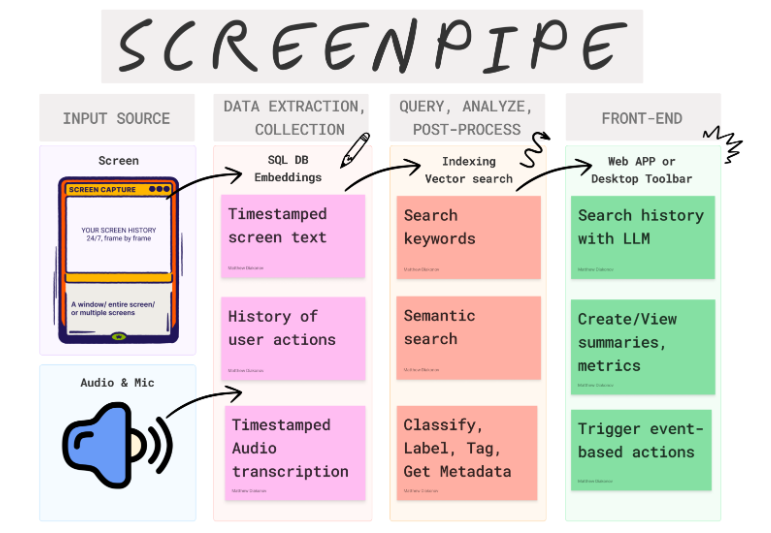
The biggest highlight of ScreenPipe is its powerful AI-driven functionality. Screen recording is no longer just a simple record. It can analyze the collected data, automatically update your Notion notes, generate work reports, and even help you fill in the data of the customer relationship management system. Just imagine, you no longer need to spend a lot of time organizing notes after a long meeting, ScreenPipe has done all the work for you.
In addition to intelligent assistance, ScreenPipe also has many practical functions. It supports multi-screen recording and is compatible with mainstream operating systems such as Windows, Linux and macOS (below version 15.0). For users who need to process a large amount of emails, documents or chat records, ScreenPipe's instant content overview function can quickly extract key information, allowing you to quickly grasp the key points.
More importantly, ScreenPipe attaches great importance to user privacy and data security. All data processing is performed locally, and users have full control over their data without worrying about information leakage.
As an open source project, ScreenPipe provides free and paid versions. The development team is also continuing to update and improve the product, and encourages users to actively participate and obtain free use rights by providing feedback, reporting problems, and even contributing code, so as to jointly create a more perfect screen recording tool.
Project address: https://github.com/mediar-ai/screenpipe
What are you waiting for? Hurry up and experience the new efficient office experience brought by ScreenPipe! Free and paid versions are available for you to choose from, and the open source project also welcomes your participation and contribution!