
1. CSS margin attribute (margin)
The CSS margin property defines the space around an element.
margin clears the surrounding (outer border) area of the element. The margin has no background color and is completely transparent.
Margin can change the top, bottom, left, and right margins of an element individually, or you can change all properties at once.
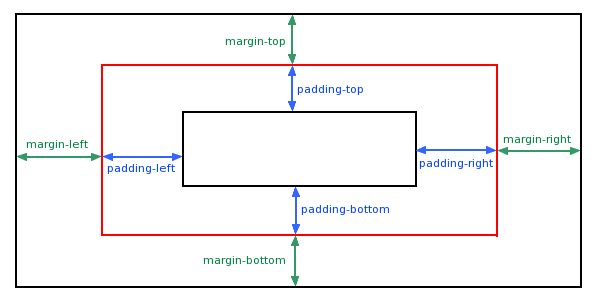
1. Set margins using pixel values (px)
<!DOCTYPEhtml><html><head><metacharset=utf-8/><title>Easy learning of CSS</title><styletype=text/css>p.nomargin{background-color:#FF0000}p.margin{ background-color:#FF0000;margin-top:100px;margin-bottom:100px;margin-left:80px;margin-right:80px;}</style></head><body><p>This is a no Paragraph with specified margin size</p><p>This is a paragraph with specified margin size</p></body></html>Running results:

2. Use the margin abbreviation attribute to set the outer margin (cm value cm, percentage value %)
The margin shorthand property sets all margin properties in one declaration. This attribute can have 1 to 4 values.
Example:
(1)margin:10px 5px 15px 20px;
a. The top margin is 10px
b. The right margin is 5px
c.The bottom margin is 15px
d.The left margin is 20px
(2)margin:10px 5px 15px;
a. The top margin is 10px
b. The right and left margins are 5px
c.The bottom margin is 15px
(3)margin:10px 5px;
a. The top and bottom margins are 10px
b. The right and left margins are 5px
(4)margin:10px;
a. All four margins are 10px
Note: Negative values are allowed.
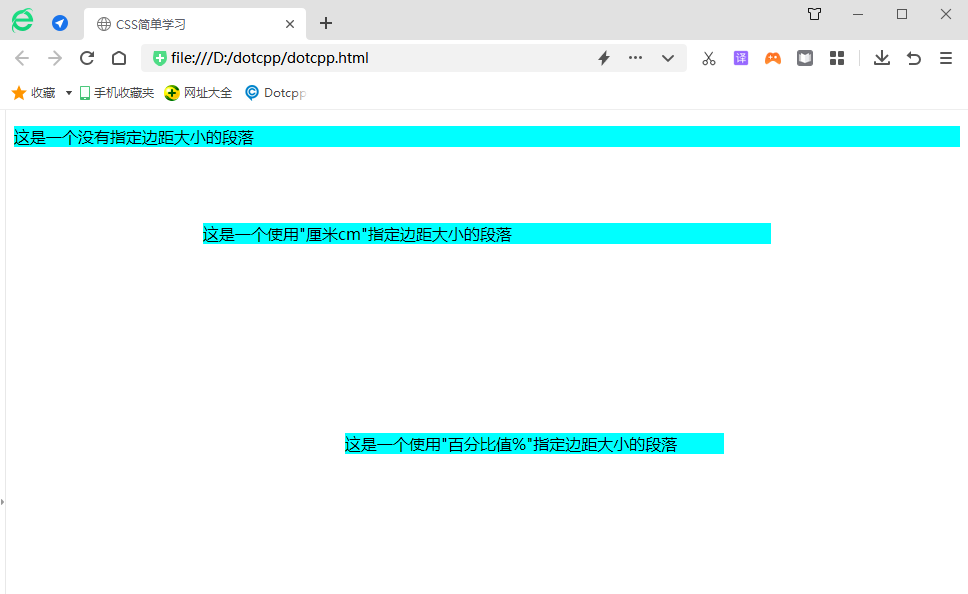
<!DOCTYPEhtml><html><head><metacharset=utf-8><title>Easy Learning of CSS</title><styletype=text/css>p{background-color:aqua;}p.ex1{margin:2cm5cm3cm5cm ;}p.ex2{margin:20%25%30%35%;}</style></head><body><p>This is a paragraph without a specified margin size</p><p>This This is a paragraph whose margin size is specified using "cm cm"</p><p>This is a paragraph whose margin size is specified using "percent value %"</p></body></html>Running results:
2. Margin overlapping or superposition problem
1. Margin collapse means that two or more adjacent margins will be merged in the vertical direction and merged into one margin. There are a few things to note about margin folding:
(1) Margin folding only occurs on block-level elements;
(2) The margins of floating elements will not collapse with any margins;
(3) A block-level element with the overflow attribute set and the value is not visible will not have margins collapsed with its child elements;
(4) The margins of absolutely positioned elements do not collapse with any margins;
(5) The margins of the root element (such as <body>) do not collapse with any other margins.
2. CSS margin overlap and how to prevent it
Border overlap means that the adjacent borders (without any non-empty content, padding, or borders between them) of two or more boxes (which may be adjacent or nested) overlap to form a single border.
The vertically adjacent boundaries of two or more block-level boxes overlap. The resulting border width is the largest of adjacent border widths. If a negative boundary occurs, the negative boundary with the largest absolute value is subtracted from the largest positive boundary. If there are no positive boundaries, the negative boundary with the largest absolute value is subtracted from zero. Note: Adjacent boxes may not be generated by elements with parent-child or sibling relationships.