
In today's digital age, Canva is popular for its powerful design features and user-friendly interface. Whether you are a design enthusiast or a professional designer, you can easily create stunning works through Canva. However, for some non-native English speaking users, language barriers may affect the experience. Therefore, it is particularly important to set the language of Canva to Simplified Chinese. Below is a concise and clear game guide to help you quickly switch the language that can be drawn in Canva to Simplified Chinese.
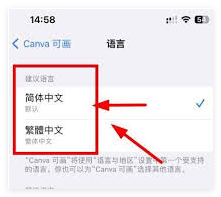
1. Log in to your canva account.
2. Click your profile picture or username in the upper right corner of the screen to enter the account settings page.
3. Find the "Language" option in the settings menu.
4. Select "Simplified Chinese" from the drop-down list.
5. After completing the changes, remember to save the settings.
After completing the above steps, please check whether the Canva interface has changed to Simplified Chinese display. If it is not updated immediately, you can try refreshing the page or logging in to your account again.
- Make sure the network connection is normal so that Canva can load Simplified Chinese resources correctly.
- If you encounter problems during the setup process, you can contact Canva’s customer service for help.
By following the above steps, you can easily set the drawable language of Canva to Simplified Chinese, thereby enjoying a smoother and more convenient design experience.