
[Related recommendations: JavaScript video tutorial, web front-end]
An array ofis a special object, and its difference from ordinary objects is not only the sequential access and storage of elements. Another important difference is that arrays are iterable, that is, you can use for ... of statement to access (iterate) all elements.
We can simply do a small experiment:
let arr = [1,2,3,4,5]for(let val of arr){
    console.log(val)}
code execution results:
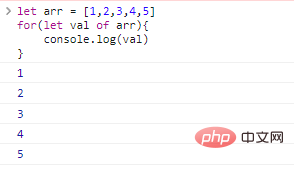
The above code simply uses the iteration feature of the array. When we access the array elements, we do not need to use the subscript of the element.
What happens if we use the for ... of statement on a normal object?
let obj = {
    name:'xiaoming',
    age:12,}for(let para of obj){ //The code will report an error console.log(para)}
The execution effect is as follows:
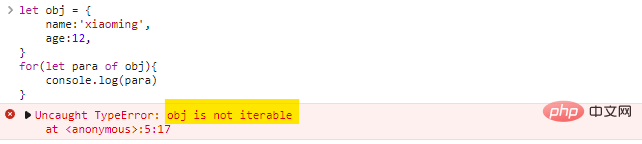
This proves that there is an iterable gap between ordinary objects and arrays. We call objects with iterative functions iterable objects .
If we want an object to be iterable, we must add a method called Symbol.iterator to the object (a built-in Symbol that specifically makes objects iterable).
Method functions include:
for ... of loop to iterate an object, the Symbol.iterator method will be called, and this method must return an iterator (an object with a next() method).for ... of will continuously call the next() method of the iterator to obtain the next element.next() method must conform to the format: {done:Boolean,value:any} . When done:true , the loop ends, otherwise value is the next value.Iterator: Iterator
is a concept borrowed from languages such as
C++. The principle of iterator is like a pointer. It points to an element in the data collection. You can get the element it points to, or you can move it to get other elements. Iterators are similar to the expansion of subscripts in arrays. Various data structures, such as linked lists (List), sets (Set), and maps (Map), have corresponding iterators.Iterators in
JSare specially designed for this operation. The iterator obtained each time always points to the first element initially, and the iterator has onlynext()behavior until the last element of the data set is obtained. We cannot flexibly move the position of the iterator, so the task of the iterator is to traverse the elements in the data set in a certain order .
Implement an iterable object:
let obj = {
    from:1,
    to:5,}obj[Symbol.iterator] = function(){
    //Return an iterator return {
        current:this.from,
        last:this.to,
        next(){
            if(this.current<this.last){
                return {done:false,value:this.current++}
            }else{
                return {done:true}//end of iteration}
        }
    }}for(let para of obj){
    console.log(para)}
code execution effect:
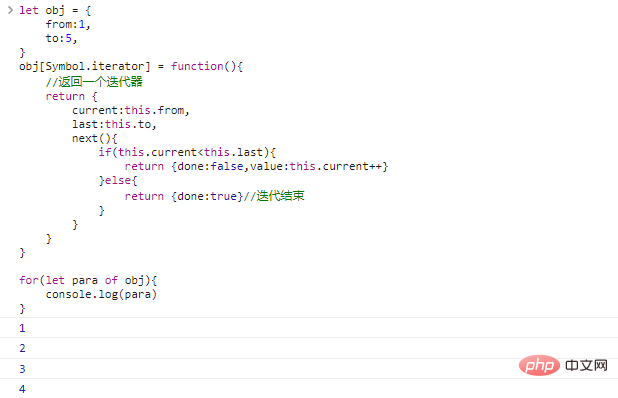
Note that although the above objects can be iterated, the material used for iteration is not an object, but the iterator (also an object) returned by Symbol.iterator .
The above code constructs a built-in function Symbol.iterator() , which returns an iterator object. We can also use another way to implement iterators: make the object itself an iterator:
let obj = {
    from:1,
    to:5,
    [Symbol.iterator](){
        this.current = this.from;
        return this;//Return the object itself},
    next(){//Add a next method to the object if(this.current<this.to){
            return {done:false,value:this.current++}
        }else{
            return {done:true}
        }
    }}for(let para of obj){
    console.log(para)}
The code execution effect is the same as the picture above.
Although the code is more concise by doing this, since no new iterable object is generated, we cannot execute two
for ... ofloops to iterate the same object at the same time, but two parallel iterations are on the same object. is very rare.
We can summarize the concept of iterable objects:
the so-called iterable objects are ordinary objects that have one more method called Symbol.iterator than ordinary objects. This method returns an iterator.
Alternatively, an object with Symbol.iterator and a next method is also an iterable object.
Arrays and strings are iterable. We can easily use for...of statement to iterate the character elements in the array:
let str = '123'for(let c of str){
    console.log(c)}
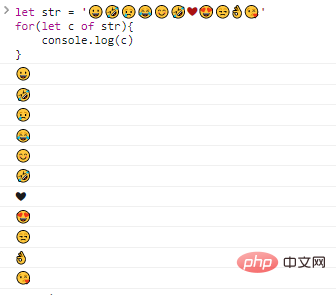
This is also valid for surrogate pairs ( UTF-16 extended characters):
let str = '...'for(let c of str){
    console.log(c)}
The execution effect is as follows:
are not only for...of statements that can use iterators, we can also explicitly call iterators:
let str = '12345'let itr = str[Symbol.iterator]()while(true){
    let result = itr.next()
    if(result.done)break;
    console.log(result.value)}
code execution effect:
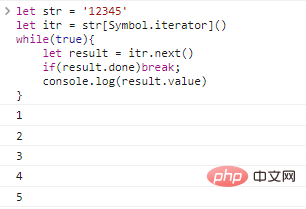
The above code performs the operation of traversing the characters of a string. Don’t you think iterable objects are not so mysterious anymore!
Array-like objects and iterable objects are very similar in terms of traversal functions. Both can conveniently access internal elements, but there are still obvious differences between the two:
iterable iterable objects: objects that implement Symbol.iterator ;array-like array-like object: has a numeric index and has a length attribute;a string is an object that is iterable even though it is an array-like object.
Iterable and array-like objects are usually not arrays. If we want to convert an iterable or array-like object into an array, we need to use the Array.from method.
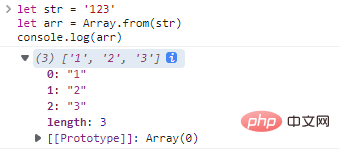
Use Array.from to convert a string into an array:
let str = '123' let arr = Array.from(str)console.log(arr)
The code execution effect is as follows:
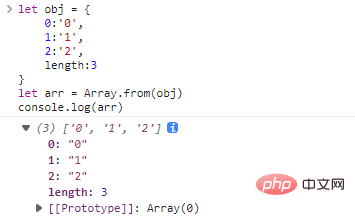
Convert a custom array-like object into an array:
let obj = {
    0:'0',
    1:'1',
    2:'2',
    length:3}let arr = Array.from(obj)console.log(arr)
code execution result:
The complete syntax of Array.from :
Array.from(obj[, mapFunc, thisArg])
mapFunc method will be called on each iterable or array-like element before generating the array. If mapFunc is a member method, you can use thisArg to provide the this pointer. .
For example:
let str = '12345'let arr = Array.from(str,itm=>+itm)console.log(arr)
code execution result:
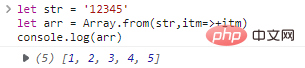
Here, the mapping function is used to convert the character array that should be generated into a numeric array.
for...of syntax are called iterable objects.Symbol.iterator method on the basis of ordinary objects.Symbol.iterator method returns an iterator;next method, this method returns the value of the next element;next method needs to meet the format {done:Boolean,value:nextVal} . When done:true , the iteration ends.Array.from can convert class arrays and iterable objects into arrays. ;
[Related recommendations: JavaScript video tutorials, web front-end]
The above is a detailed explanation of the implementation principles of JavaScript class arrays and iterable objects. For more information, please pay attention to other related articles on the source code network!