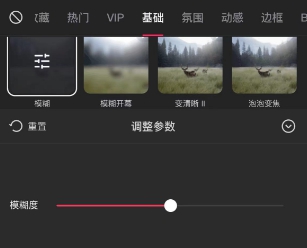
Where is the blur effect of clipping? You only need to find and select the special effects column in the functional area of clipping, then click [Screen Effects] again, and finally find and select the [Basic] category. At this time, you can easily Found the blur effect you wanted.
1. In the expanded editing interface, import the materials that need to be edited and modified one by one. Then, click the " Special Effects " option at the bottom of the screen.
2. In the pop-up special effects list, please click to select " Screen Special Effects ".

3. Next, please confirm that you have successfully entered the " Basic " special effects category.
You can find and preview different types of blur effects by sliding the options of basic effects, such as "Blur", "Diagonal Blur", "Vertical Blur", etc.

4. When you find the blur effect you like, just click to select it, and the video screen will immediately show the corresponding blur effect!