request parser
vements to StringParser Type Hints

ไลบรารี PHP ขนาดเล็กสำหรับการจัดการอินพุตที่ปลอดภัยประเภท
สมมติว่าคุณมีการกระทำที่แสดงรายการบางหน่วยงาน ซึ่งรวมถึงการเพจการสั่งซื้อจากน้อยไปมากหรือมากไปน้อยและการกรองเสริมตามเวลาที่เอนทิตีถูกสร้างขึ้น การกระทำนี้จะมีการแยกวิเคราะห์อินพุตบางชนิดซึ่งมีลักษณะเช่นนี้:
 public function index ()
{
    $ page = $ this -> request -> query -> get ( ' page ' );
    if ( $ page === null || ! is_integer ( $ page )) {
        throw new Exception ( " Parameter page not found " );
    }

    $ order = $ this -> request -> query -> get ( ' order ' );
    if ( $ order === null || ! in_array ( $ order , [ ' asc ' , ' desc ' ])) {
        throw new Exception ( " Parameter order not found " );
    }

    // Optional parameter
    $ createdAt = $ this -> query -> query -> get ( ' createdAt ' );
    if ( is_string ( $ createdAt )) {
        $ createdAt = new DateTime ( $ createdAt );
    } else {
        $ createdAt = null ;
    }
}
เห็นได้ชัดว่ารหัสนี้ไม่ดีมากที่จะอ่านเพราะมันไม่ได้อธิบายมากนัก นอกจากนี้ยังเป็นสิ่งที่น่ากลัวสำหรับสิ่งที่กำลังทำอยู่ และเมื่อคุณไม่ใส่ใจอย่างใกล้ชิดคุณอาจพลาดการตรวจสอบว่างหรือตรวจสอบประเภท
ตอนนี้เปรียบเทียบรหัสด้านบนกับเวอร์ชันนี้:
 public function index ()
{
    $ page = $ this -> queryParameter ( ' page ' )-> int ()-> required ();
    $ order = $ this -> queryParameter ( ' order ' )-> oneOf ([ ' asc ' , ' desc ' ])-> required ();
    $ createdAt = $ this -> queryParameter ( ' createdAt ' )-> dateTime ()-> defaultsTo ( null );
}
นั่นคือสิ่งที่ห้องสมุดนี้เสนอ ช่วยให้คุณสามารถแสดง " การกระทำนี้ต้องใช้พารามิเตอร์หน้าของประเภท int " หรือ " การกระทำนี้มีพารามิเตอร์เสริมที่สร้างขึ้นของประเภท dateTime และจะถูกตั้งค่าเป็นค่าเริ่มต้นหากขาด "
หากคุณต้องการตรงไปที่รหัสตอนนี้คุณสามารถเล่นกับตัวอย่างได้
cd /tmpgit clone [email protected]:mpscholten/request-parser.gitcd request-parsercomposer installcd examplesphp -S localhost:8080นอกจากนี้ยังมีไฟล์ PHP อื่น ๆ อีกหลายไฟล์ภายในไดเรกทอรีตัวอย่าง เพื่อให้มือของคุณสกปรกฉันขอแนะนำเพียงแค่แก้ไขตัวอย่างเล็กน้อย
ติดตั้งผ่านนักแต่งเพลง
composer require mpscholten/request-parser
symfony/http-foundation คลิกที่นี่ServerRequestInterface คลิกที่นี่Request อื่น ๆ ที่เป็นนามธรรม (หรืออาจเป็นเพียงแค่ $_GET และเพื่อนเก่า) ลองดูตัวอย่างนี้ ตัวอย่างต่อไปนี้ถือว่าคุณกำลังใช้ Request Symfony:
 class MyController
{
    use  MPScholten  RequestParser  Symfony ControllerHelperTrait;

    public function __construct ( Request $ request )
    {
        $ this -> initRequestParser ( $ request );
    }
}
จากนั้นคุณสามารถใช้ห้องสมุดเช่นนี้:
 class MyController
{
    use  MPScholten  RequestParser  Symfony ControllerHelperTrait;

    public function __construct ( Request $ request )
    {
        $ this -> initRequestParser ( $ request );
    }

    public function myAction ()
    {
        $ someParameter = $ this -> queryParameter ( ' someParameter ' )-> string ()-> required ();
    }
}
เมื่อทำ GET /MyController/myAction?someParameter=example ตัวแปร $someParameter จะมีสตริง "example"
คุณอาจสงสัยว่าจะเกิดอะไรขึ้นเมื่อเราออกส่วนหนึ่ง ?someParameter เช่น GET /MyController/myAction ในกรณีนี้ $this->queryParameter('someParameter')->string()->required() จะโยน NotFoundException ข้อยกเว้นนี้สามารถจัดการได้โดยแอปพลิเคชันของคุณเพื่อแสดงข้อความแสดงข้อผิดพลาด
ดูตัวอย่าง
ตัวอย่างต่อไปนี้ถือว่าคุณใช้ PSR7 ServerRequestInterface :
 class MyController
{
    use  MPScholten  RequestParser  Psr7 ControllerHelperTrait;

    public function __construct ( ServerRequestInterface $ request )
    {
        $ this -> initRequestParser ( $ request );
    }
}
จากนั้นคุณสามารถใช้ห้องสมุดเช่นนี้:
 class MyController
{
    use  MPScholten  RequestParser  Psr7 ControllerHelperTrait;

    public function __construct ( ServerRequestInterface $ request )
    {
        $ this -> initRequestParser ( $ request );
    }

    public function myAction ()
    {
        $ someParameter = $ this -> queryParameter ( ' someParameter ' )-> string ()-> required ();
    }
}
เมื่อทำ GET /MyController/myAction?someParameter=example ตัวแปร $someParameter จะมีสตริง "example"
คุณอาจสงสัยว่าจะเกิดอะไรขึ้นเมื่อเราออกส่วนหนึ่ง ?someParameter เช่น GET /MyController/myAction ในกรณีนี้ $this->queryParameter('someParameter')->string()->required() จะโยน NotFoundException ข้อยกเว้นนี้สามารถจัดการได้โดยแอปพลิเคชันของคุณเพื่อแสดงข้อความแสดงข้อผิดพลาด
ดูตัวอย่าง
ในการทำให้ someParameter เป็นทางเลือกเราสามารถแทนที่ required() ด้วย defaultsTo($someDefaultValue) :
 class MyController
{
    use  MPScholten  RequestParser  Symfony ControllerHelperTrait;

    public function __construct ( Request $ request )
    {
        $ this -> initRequestParser ( $ request );
    }

    public function myAction ()
    {
        $ someParameter = $ this -> queryParameter ( ' someParameter ' )-> string ()-> defaultsTo ( ' no value given ' );
    }
}
เมื่อทำ GET /MyController/myAction ตัวแปร $someParameter จะมีสตริง "no value given" จะไม่มีข้อยกเว้นใด ๆ เพราะเราระบุค่าเริ่มต้น
โดยทั่วไปคุณระบุชื่อพารามิเตอร์ก่อนตามด้วยประเภทจากนั้นระบุว่าจำเป็นต้องใช้พารามิเตอร์หรือไม่หรือเป็นตัวเลือกด้วยค่าเริ่มต้น
สำหรับตัวอย่างเพิ่มเติมลองดู examples/ ไดเรกทอรีของที่เก็บนี้ มันมีตัวอย่างที่รันได้หลายตัวอย่าง
บ่อยครั้งที่เราต้องการมากกว่าแค่สตริง RequestParser ยังมีวิธีการสำหรับประเภทข้อมูลอื่น ๆ :
 class DashboardController
{
    public function show ()
    {
        $ dashboardId = $ this -> queryParameter ( ' id ' )-> int ()-> required ();

        // GET /dashboard?name=Hello   =>   $dashboardName == "Hello"
        $ dashboardName = $ this -> queryParameter ( ' name ' )-> string ()-> required ();

        // Get /dashboard?name=   => $dashboardName == "default value"
        $ dashboardName = $ this -> queryParameter ( ' name ' )-> string ()-> defaultsToIfEmpty ( " default value " );

        // GET /dashboard?status=private  =>   $dashboardStatus == "private"
        // GET /dashboard?status=public   =>   $dashboardStatus == "public"
        // GET /dashboard?status=invalid  =>   A NotFoundException will be thrown
        $ dashboardStatus = $ this -> queryParameter ( ' status ' )-> oneOf ([ ' private ' , ' public ' ])-> required ();

        // GET /dashboard?createdAt=01.01.2016     =>   $dateTime == new DateTime("01.01.2016")
        // GET /dashboard?createdAt=invalid_date   =>   A NotFoundException will be thrown
        $ dateTime = $ this -> queryParameter ( ' createdAt ' )-> dateTime ()-> required ();

        // GET /dashboard?config={"a":true}     =>   $json == ['a' => true]
        $ json = $ this -> queryParameter ( ' config ' )-> json ()-> required ();

        // GET /dashboard?includeWidgets=true    =>   $includeWidgets == true
        // GET /dashboard?includeWidgets=false   =>   $includeWidgets == false
        // GET /dashboard?includeWidgets=0       =>   $includeWidgets == false
        // GET /dashboard?includeWidgets=abcde   =>   A NotFoundException will be thrown
        $ includeWidgets = $ this -> queryParameter ( ' includeWidgets ' )-> boolean ()-> required ();

        // GET /dashboard?includeWidgets=yes   =>   $includeWidgets == true
        // GET /dashboard?includeWidgets=no    =>   $includeWidgets == false
        $ includeWidgets = $ this -> queryParameter ( ' includeWidgets ' )-> yesNoBoolean ()-> required ();

        // GET /image?scale=2.5   =>   $scale == 2.5
        $ scale = $ this -> queryParameter ( ' scale ' )-> float ()-> required ();
    }
}
ทุกประเภทเหล่านี้ยังมีตัวแปร defaultsTo
| พิมพ์ | ตัวอย่างรหัส | ตัวอย่างอินพุต |
|---|---|---|
| สาย | $this->queryParameter('name')->string()->required(); | 'John Doe' |
| สตริงที่คั่นด้วยเครื่องหมายจุลภาค | $this->queryParameter('names')->commaSeparated()->string()->required(); | 'John Doe,John Oliver' |
| จำนวนเต็ม | $this->queryParameter('id')->int()->required(); | '5' |
| จำนวนเต็มที่คั่นด้วยเครื่องหมายจุลภาค | $this->queryParameter('groupIds')->commaSeparated()->int()->required(); | '5,6,7,8' |
| ลอย | $this->queryParameter('ratio')->float()->required(); | '0.98' |
| ล่องลอยที่คั่นด้วยเครื่องหมายจุลภาค | $this->queryParameter('precipitation')->commaSeparated()->float()->required(); | '0.98,1.24,5.21' |
| วันที่ | $this->queryParameter('timestamp')->dateTime()->required(); | '2016-07-20' |
| DateTime ที่คั่นด้วยเครื่องหมายจุลภาค | $this->queryParameter('eventTimes')->commaSeparated()->dateTime()->required(); | '2016-07-20 13:10:50,2016-07-21 12:01:07' |
| บูลีน | $this->queryParameter('success')->boolean()->required(); | 'true' |
| บูลีนที่คั่นด้วยเครื่องหมายจุลภาค | $this->queryParameter('answers')->commaSeparated()->boolean()->required(); | '1,0,0,1' |
| ใช่/ไม่ใช่บูลีน | $this->queryParameter('success')->yesNoBoolean()->required(); | 'yes' |
| คั่นด้วยเครื่องหมายจุลภาคใช่/ไม่ใช่บูลีน | $this->queryParameter('answers')->commaSeparated()->yesNoBoolean()->required(); | 'y,n,n,y,n' |
| JSON | $this->queryParameter('payload')->json()->required(); | '{"event":"click","timestamp":"2016-07-20 13:10:50"}' |
| json ที่คั่นด้วยเครื่องหมายจุลภาค | $this->queryParameter('events')->commaSeparated()->json()->required(); | '{"event":"click","timestamp":"2016-07-20 13:10:50"},{"event":"add_to_basket","timestamp":"2016-07-20 13:11:01"}' |
$this->queryParameter($name) บอกคอนโทรลเลอร์ว่าเราต้องการพารามิเตอร์การสืบค้น (ทุกอย่างหลังจาก "?" เรียกว่าสตริงการสืบค้น) นี่เป็นสิ่งที่เราต้องการเมื่อต้องรับมือกับคำขอรับ
เมื่อเราจัดการกับคำขอโพสต์เราต้องใช้ $this->bodyParameter($name) เพื่อเข้าถึงฟิลด์ฟอร์มหรือ Payload AJAX
ห้องสมุดช่วยให้คุณสามารถใช้คุณสมบัติการเติมเงินอัตโนมัติอย่างกว้างขวางของ IDE ของคุณ เช่นหลังจากพิมพ์ $this->queryParameter('someParameter)-> IDE ของคุณจะเสนอประเภทอินพุตที่เป็นไปได้ทั้งหมดเช่น string() หรือ int() หลังจากเลือกประเภทเช่น string() IDE ของคุณจะเสนอ required() หรือ defaultsTo(defaultValue) เพื่อระบุพฤติกรรมเมื่อพารามิเตอร์ไม่ได้ตั้งค่า
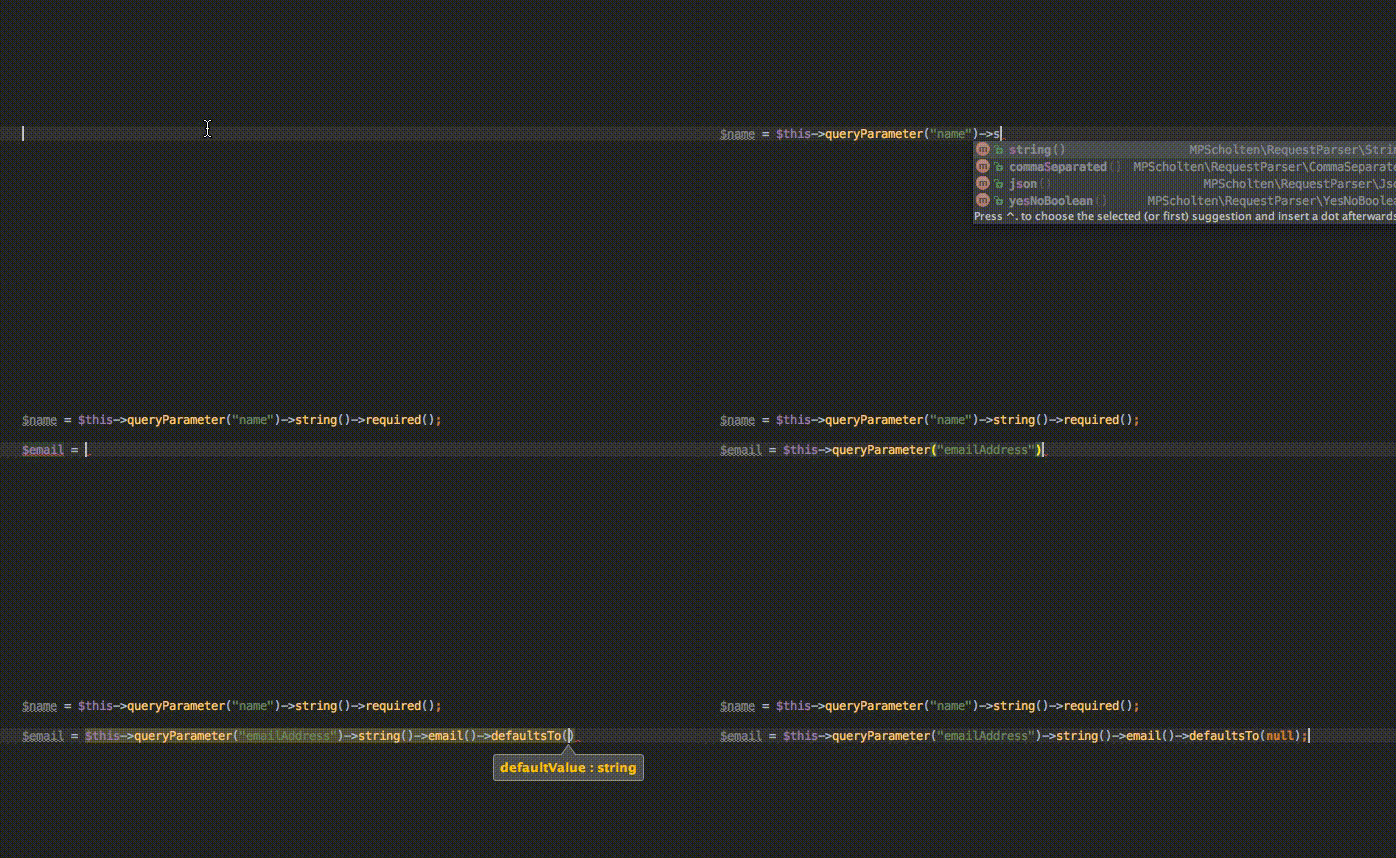
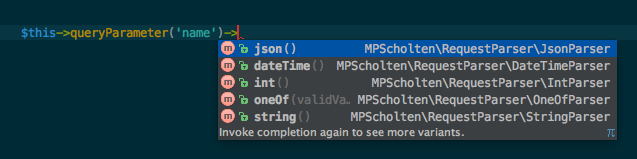

ห้องสมุดรองรับการวิเคราะห์แบบคงที่โดย IDE ของคุณ เช่นเมื่อมีพารามิเตอร์เช่น $createdAt = $this->queryParameter('createdAt')->dateTime()->required(); IDE ของคุณจะรู้ว่า $createdAt เป็นวัตถุ DateTime สิ่งนี้ช่วยให้คุณตรวจจับข้อผิดพลาดประเภทในขณะที่การแก้ไขและลดค่าใช้จ่ายในการบำรุงรักษาของการกระทำเนื่องจากประเภทปรับปรุงความชัดเจน
ไลบรารียังลดความเสี่ยงของค่า NULL ที่ไม่คาดคิดเนื่องจากพารามิเตอร์มักจะมีค่าเริ่มต้นที่ชัดเจนหรือจำเป็น
เมื่อจำเป็นต้องใช้พารามิเตอร์ แต่ไม่พบหรือเมื่อการตรวจสอบล้มเหลวไลบรารีจะโยนข้อยกเว้น ข้อยกเว้นเริ่มต้นคือ MPScholtenRequestParserNotFoundException และ MPScholtenRequestParserInvalidValueException วิธีที่แนะนำในการจัดการกับข้อผิดพลาดที่ถูกโยนทิ้งโดยห้องสมุดคือการจับพวกเขาภายในคอนโทรลเลอร์ด้านหน้าของคุณ:
 try {
    $ controller -> $ action ();
} catch ( NotFoundException $ e ) {
    echo $ e -> getMessage ();
} catch ( InvalidValueException $ e ) {
    echo $ e -> getMessage ();
} class MyController
{
use MPScholten RequestParser Symfony ControllerHelperTrait;
public function __construct ( Request $ request )
{
$ exceptionFactory = new ExceptionFactory (CustomNotFoundException::class, CustomInvalidValueException::class));
$ config = new MPScholten RequestParser Config ();
$ config -> setExceptionFactory ( $ exceptionFactory );
$ this -> initRequestParser ( $ request , $ config );
}
} หากคุณต้องการแทนที่ข้อความข้อยกเว้นที่ถูกส่งโดยไลบรารีเพียงครั้งเดียวหรือสองครั้งคุณสามารถทำได้โดยส่งข้อความยกเว้นเป็นอาร์กิวเมนต์ที่หนึ่งและสองไปยัง ->required() :
 class DashboardController
{
    public function show ()
    {
        $ dashboardId = $ this -> queryParameter ( ' id ' )-> int ()-> required ( " The dashboard id has to be a valid number " , " No dashboard id given " );
    }
}หากคุณไม่ต้องการระบุข้อความข้อยกเว้นที่กำหนดเองสำหรับการกระทำทั้งหมดของคุณ แต่ก็ยังไม่ต้องการใช้ข้อความยกเว้นในตัวคุณสามารถให้ตัวสร้างข้อความข้อยกเว้นของคุณเอง:
 class FriendlyExceptionMessageFactory extends  MPScholten  RequestParser ExceptionMessageFactory
{
    protected function createNotFoundMessage ( $ parameterName )
    {
        return " Looks like $ parameterName is missing :) " ;
    }

    protected function createInvalidValueMessage ( $ parameterName , $ parameterValue , $ expected )
    {
        return " Whoops :) $ parameterName seems to be invalid. We're looking for $ expected but you provided ' $ parameterValue ' " ;
    }
}

class MyController
{
    use  MPScholten  RequestParser  Symfony ControllerHelperTrait;

    public function __construct ( Request $ request )
    {
        $ config = new  MPScholten  RequestParser  Config ();
        $ config -> setExceptionMessageFactory ( new FriendlyExceptionMessageFactory ());

        $ this -> initRequestParser ( $ request , $ config );
    }
}
ตรวจสอบตัวอย่างนี้เกี่ยวกับข้อยกเว้นที่กำหนดเอง
อย่างแน่นอน. ห้องสมุดนี้ได้รับการพัฒนาในขั้นต้นที่ Quintly และมีการใช้อย่างกว้างขวางในการผลิตตั้งแต่เดือนเมษายน 2558 การใช้มันในระดับการผลิตหมายความว่ามีการมุ่งเน้นที่สำคัญในการเข้ากันได้ย้อนหลังและไม่ทำลายสิ่งของ
 composer tests
composer tests-coverage
อย่าลังเลที่จะส่งคำขอดึง!








