SKYNET Steam Emulator
1.0.0


โครงการนี้ถูกสร้างขึ้นโดยมีจุดประสงค์เพื่อแทนที่ steam_api.dll ดั้งเดิมจาก Steam ด้วยโครงการนี้และทำให้การเชื่อมต่อสามารถเล่นเกมในโหมด LAN ได้ นี่ไม่ใช่ wrapper Steamworks เช่น Steamworks.Net หรือ Facepunch โครงการอยู่ในระยะเริ่มต้นดังนั้นจึงยังไม่ทำงานสำหรับบางเกม
เมื่อไม่นานมานี้ฉันไม่สามารถอัปเดตที่เก็บเนื่องจากปัญหาส่วนตัวดังนั้นผู้ที่ต้องการร่วมมือกับการพัฒนาได้รับการต้อนรับ
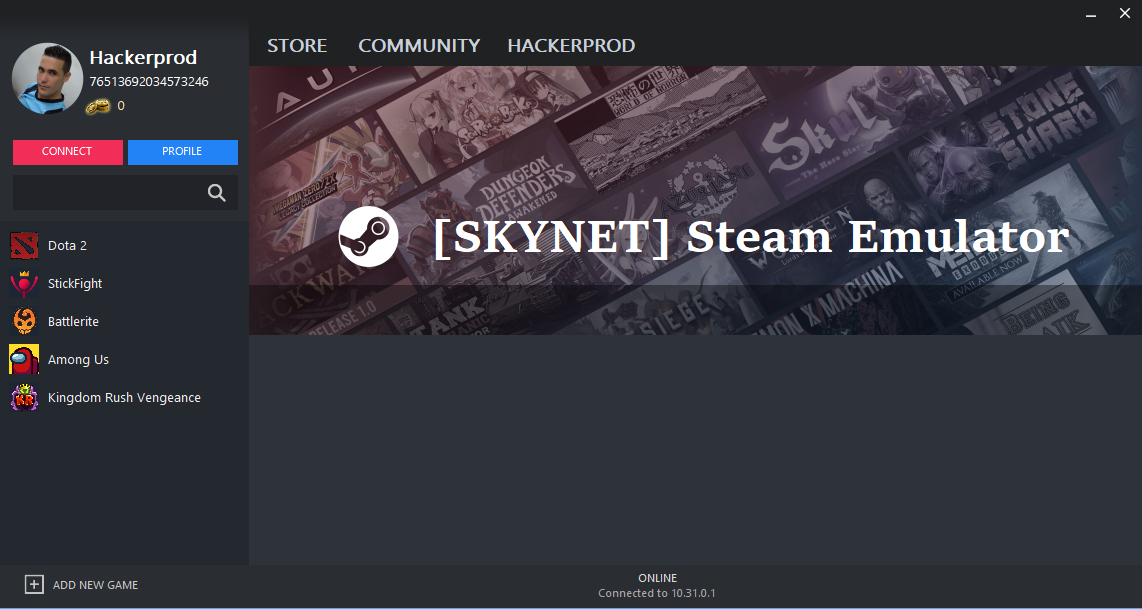
เมื่อรวบรวมโครงการจะมีการสร้างโฟลเดอร์สองโฟลเดอร์ (x64 และ x86) ที่มี DLL สำหรับแพลตฟอร์มเป้าหมายที่แตกต่างกันในกรณีของ X64 คุณต้องเปลี่ยนชื่อไฟล์เป็น Steam_api64.dll เพื่อเลียนแบบการเชื่อมต่อกับไอน้ำของเกมคุณต้องเปลี่ยน DLL ด้วยเกมที่มีเกม ในกรณีที่เอ็นจิ้นเกมเป็นเอกภาพคุณสามารถเปลี่ยนชื่อ DLL เป็น csteamworks.dll และแทนที่ได้
ในการใช้ไคลเอนต์คุณเพียงแค่ต้องเพิ่มเกมและกำหนดค่า AppID ลูกค้ากำลังอยู่ระหว่างการพัฒนา
 ? Root client folder
├──? x64                             // The x64 version of the SteamAPI dll that will be injected
├──? x86                             // The x64 version of the SteamAPI dll that will be injected
└──? Data
   ├──? Assemblies                   // Contains client libraries (Including cefsharp api or gecko)
   ├──? Images                       // Contains app cache and avatar images
   ├──? Injector                     // Contains the DLL injectors
   ├──? www                          // Contains the web files
   ├──? Storage                      // Contains stats and achievements files
   |  └──? Remote                    // Contains game files
   └──? Games.bin                    // Stored game list
 ? Root server folder
└──? Data
   ├──? Assemblies                   // Contains server libraries
   ├──? Images                       // Contains app cache and avatar images
   ├──? MongoDB                      // Contains local MongoDB server
   └──? Storage                      // Contains some server files
 User Stats manager         Save and Load user stats from local folder.
Achievements manager       Save and Load user achievements from local folder.
CSteamworks emulation      Rename the emu to CSteamworks.dll to emulate them.
Supported Game Engines     Works with multiple game engines like Source 2, Unity 3D etc.
Network communication      Network communication between clients through a configurable port.
Overlay                    External Overlay for steam and game messages.
DLC                        Unlock all downloaded DLCs.
Avatar support             Load avatar from file (Avatar.jpg) inside SKYNET folder and share it through the network.
Plugin system              Load external plugin to communicate with the emu.
In game voice              Fully functional voice system
การใช้ระบบการโทรกลับ
steaminternal_contextinit ในเกม x86
เมื่อตัวเลือกบันทึกไฟล์ SI เปิดใช้งานในการตั้งค่าไฟล์บันทึกจะถูกสร้างขึ้นภายในโฟลเดอร์ "Root Game Folder/Skynet" พร้อมชื่อต่อไปนี้ [SKYNET] steam_api.log
ระบบปลั๊กอินได้รับการพัฒนาเพื่อสร้างการสื่อสารระหว่างเกมและผู้ประสานงานเกมตัวอย่างต่อไปนี้แสดงปลั๊กอินพื้นฐาน
อินเตอร์เฟสสำหรับปลั๊กอินผู้ประสานงานเกม:
 namespace SKYNET . Plugin
{
    public interface IGameCoordinatorPlugin
    {
        uint Initialize ( ) ;
        void MessageFromGame ( byte [ ] bytes ) ;
        EventHandler < Dictionary < uint , byte [ ] > > IsMessageAvailable { get ; set ; }
    }
}
ปลั๊กอินผู้ประสานงานเกมตัวอย่าง:
 namespace SKYNET . Plugin
{
    public class Dota2GameCoordinator : IGameCoordinatorPlugin
    {
        private uint AppID = 570 ;
        public EventHandler < Dictionary < uint , byte [ ] > > IsMessageAvailable { get ; set ; }

        public uint Initialize ( )
        {
            // TODO: Initialize all Game coordinator class
            return AppID ;
        }

        public void MessageFromGame ( byte [ ] bytes )
        {
            // Process message from game
            uint MsgType = MsgUtil . GetGCMsg ( new MemoryStream ( bytes ) . ReadUInt32L ( ) ) ;
            IPacketGCMsg packetGCMsg = MsgUtil . GetPacketGcMsg ( MsgType , bytes ) ;
            // TODO: Process GC message
        }

        public void SendPacketToGame ( uint msgType , byte [ ] packet )
        {
            Dictionary < uint , byte [ ] > message = new Dictionary < uint , byte [ ] > ( ) ;
            message . Add ( msgType , packet ) ;
            IsMessageAvailable ? . Invoke ( this , message ) ;
        }

        public void SendPacketToGame ( Dictionary < uint , byte [ ] > messages )
        {
            IsMessageAvailable ? . Invoke ( this , messages ) ;
        }
    }
} 






