mobsfscan
0.4.5

MOBSFSCAN เป็นเครื่องมือวิเคราะห์แบบคงที่ที่สามารถค้นหารูปแบบรหัสที่ไม่ปลอดภัยในซอร์สโค้ด Android และ iOS ของคุณ รองรับ Java, Kotlin, Android XML, Swift และ Objective C Code MOBSFSCAN ใช้กฎการวิเคราะห์แบบคงที่ MOBSF และขับเคลื่อนโดย SEMGREP และ LIBSAST Pattern Matcher
ทำด้วย

หากคุณชอบ mobsfscan และพบว่ามีประโยชน์โปรดพิจารณาบริจาค
 การประเมินความปลอดภัยแอปพลิเคชันมือถืออัตโนมัติด้วย MOBSF -mas
 ผู้เชี่ยวชาญด้านเครื่องมือรักษาความปลอดภัย Android -ATX
pip install mobsfscan
ต้องใช้ Python 3.7+
$ mobsfscan
usage: mobsfscan [-h] [--json] [--sarif] [--sonarqube] [--html] [--type {android,ios,auto}]
                 [-o OUTPUT] [-c CONFIG] [-mp {default,billiard,thread}] [-w] [--no-fail] [-v]
                 [path ...]

positional arguments:
  path                  Path can be file(s) or directories with source code

options:
  -h, --help            show this help message and exit
  --json                set output format as JSON
  --sarif               set output format as SARIF 2.1.0
  --sonarqube           set output format compatible with SonarQube
  --html                set output format as HTML
  --type {android,ios,auto}
                        optional: force android or ios rules explicitly
  -o OUTPUT, --output OUTPUT
                        output filename to save the result
  -c CONFIG, --config CONFIG
                        location to .mobsf config file
  -mp {default,billiard,thread}, --multiprocessing {default,billiard,thread}
                        optional: specify multiprocessing strategy
  -w, --exit-warning    non zero exit code on warning
  --no-fail             force zero exit code, takes precedence over --exit-warning
-v, --version show mobsfscan version$ mobsfscan tests/assets/src/
- Pattern Match ████████████████████████████████████████████████████████████ 3
- Semantic Grep ██████ 37
mobsfscan: v0.3.0 | Ajin Abraham | opensecurity.in
╒══════════════╤════════════════════════════════════════════════════════════════════════════════════════════════════════════════════════════════════════════════════════╕
│ RULE ID │ android_webview_ignore_ssl │
├──────────────┼────────────────────────────────────────────────────────────────────────────────────────────────────────────────────────────────────────────────────────┤
│ DESCRIPTION │ Insecure WebView Implementation. WebView ignores SSL Certificate errors and accept any SSL Certificate. This application is vulnerable to MITM attacks │
├──────────────┼────────────────────────────────────────────────────────────────────────────────────────────────────────────────────────────────────────────────────────┤
│ TYPE │ RegexAnd │
├──────────────┼────────────────────────────────────────────────────────────────────────────────────────────────────────────────────────────────────────────────────────┤
│ PATTERN │ [ ' onReceivedSslError\(WebView ' , ' \.proceed\(\); ' ] │
├──────────────┼────────────────────────────────────────────────────────────────────────────────────────────────────────────────────────────────────────────────────────┤
│ SEVERITY │ ERROR │
├──────────────┼────────────────────────────────────────────────────────────────────────────────────────────────────────────────────────────────────────────────────────┤
│ INPUTCASE │ exact │
├──────────────┼────────────────────────────────────────────────────────────────────────────────────────────────────────────────────────────────────────────────────────┤
│ CVSS │ 7.4 │
├──────────────┼────────────────────────────────────────────────────────────────────────────────────────────────────────────────────────────────────────────────────────┤
│ CWE │ CWE-295 Improper Certificate Validation │
├──────────────┼────────────────────────────────────────────────────────────────────────────────────────────────────────────────────────────────────────────────────────┤
│ OWASP-MOBILE │ M3: Insecure Communication │
├──────────────┼────────────────────────────────────────────────────────────────────────────────────────────────────────────────────────────────────────────────────────┤
│ MASVS │ MSTG-NETWORK-3 │
├──────────────┼────────────────────────────────────────────────────────────────────────────────────────────────────────────────────────────────────────────────────────┤
│ REF │ https://github.com/MobSF/owasp-mstg/blob/master/Document/0x05g-Testing-Network-Communication.md#webview-server-certificate-verification │
├──────────────┼────────────────────────────────────────────────────────────────────────────────────────────────────────────────────────────────────────────────────────┤
│ FILES │ ╒════════════════╤═════════════════════════════════════════════════════════════════════════════════════════════╕ │
│ │ │ File │ ../test_files/android_src/app/src/main/java/opensecurity/webviewignoressl/MainActivity.java │ │
│ │ ├────────────────┼─────────────────────────────────────────────────────────────────────────────────────────────┤ │
│ │ │ Match Position │ 1480 - 1491 │ │
│ │ ├────────────────┼─────────────────────────────────────────────────────────────────────────────────────────────┤ │
│ │ │ Line Number(s) │ 50 │ │
│ │ ├────────────────┼─────────────────────────────────────────────────────────────────────────────────────────────┤ │
│ │ │ Match String │ .proceed (); │ │
│ │ ├────────────────┼─────────────────────────────────────────────────────────────────────────────────────────────┤ │
│ │ │ File │ ../test_files/android_src/app/src/main/java/opensecurity/webviewignoressl/MainActivity.java │ │
│ │ ├────────────────┼─────────────────────────────────────────────────────────────────────────────────────────────┤ │
│ │ │ Match Position │ 1331 - 1357 │ │
│ │ ├────────────────┼─────────────────────────────────────────────────────────────────────────────────────────────┤ │
│ │ │ Line Number(s) │ 46 │ │
│ │ ├────────────────┼─────────────────────────────────────────────────────────────────────────────────────────────┤ │
│ │ │ Match String │ onReceivedSslError(WebView │ │
│ │ ╘════════════════╧═════════════════════════════════════════════════════════════════════════════════════════════╛ │
╘══════════════╧════════════════════════════════════════════════════════════════════════════════════════════════════════════════════════════════════════════════════════╛ > >> from mobsfscan . mobsfscan import MobSFScan
> >> src = 'tests/assets/src/java/java_vuln.java'
> >> scanner = MobSFScan ([ src ], json = True )
> >> scanner . scan ()
{
'results' : {
'android_logging' : {
'files' : [{
'file_path' : 'tests/assets/src/java/java_vuln.java' ,
'match_position' : ( 13 , 73 ),
'match_lines' : ( 19 , 19 ),
'match_string' : ' Log.d("htbridge", "getAllRecords(): " + records.toString());'
}],
'metadata' : {
'cwe' : 'CWE-532 Insertion of Sensitive Information into Log File' ,
'owasp-mobile' : 'M1: Improper Platform Usage' ,
'masvs' : 'MSTG-STORAGE-3' ,
'reference' : 'https://github.com/MobSF/owasp-mstg/blob/master/Document/0x05d-Testing-Data-Storage.md#logs' ,
'description' : 'The App logs information. Please ensure that sensitive information is never logged.' ,
'severity' : 'INFO'
}
},
'android_certificate_pinning' : {
'metadata' : {
'cwe' : 'CWE-295 Improper Certificate Validation' ,
'owasp-mobile' : 'M3: Insecure Communication' ,
'masvs' : 'MSTG-NETWORK-4' ,
'reference' : 'https://github.com/MobSF/owasp-mstg/blob/master/Document/0x05g-Testing-Network-Communication.md#testing-custom-certificate-stores-and-certificate-pinning-mstg-network-4' ,
'description' : 'This App does not use TLS/SSL certificate or public key pinning to detect or prevent MITM attacks in secure communication channel.' ,
'severity' : 'INFO'
}
},
'android_root_detection' : {
'metadata' : {
'cwe' : 'CWE-919 - Weaknesses in Mobile Applications' ,
'owasp-mobile' : 'M8: Code Tampering' ,
'masvs' : 'MSTG-RESILIENCE-1' ,
'reference' : 'https://github.com/MobSF/owasp-mstg/blob/master/Document/0x05j-Testing-Resiliency-Against-Reverse-Engineering.md#testing-root-detection-mstg-resilience-1' ,
'description' : 'This App does not have root detection capabilities. Running a sensitive application on a rooted device questions the device integrity and affects users data.' ,
'severity' : 'INFO'
}
},
'android_prevent_screenshot' : {
'metadata' : {
'cwe' : 'CWE-200 Information Exposure' ,
'owasp-mobile' : 'M2: Insecure Data Storage' ,
'masvs' : 'MSTG-STORAGE-9' ,
'reference' : 'https://github.com/MobSF/owasp-mstg/blob/master/Document/0x05d-Testing-Data-Storage.md#finding-sensitive-information-in-auto-generated-screenshots-mstg-storage-9' ,
'description' : 'This App does not have capabilities to prevent against Screenshots from Recent Task History/ Now On Tap etc.' ,
'severity' : 'INFO'
}
},
'android_safetynet_api' : {
'metadata' : {
'cwe' : 'CWE-353 Missing Support for Integrity Check' ,
'owasp-mobile' : 'M8: Code Tampering' ,
'masvs' : 'MSTG-RESILIENCE-1' ,
'reference' : 'https://github.com/MobSF/owasp-mstg/blob/master/Document/0x05j-Testing-Resiliency-Against-Reverse-Engineering.md#testing-root-detection-mstg-resilience-1' ,
'description' : "This App does not uses SafetyNet Attestation API that provides cryptographically-signed attestation, assessing the device's integrity. This check helps to ensure that the servers are interacting with the genuine app running on a genuine Android device. " ,
'severity' : 'INFO'
}
},
'android_detect_tapjacking' : {
'metadata' : {
'cwe' : 'CWE-200 Information Exposure' ,
'owasp-mobile' : 'M1: Improper Platform Usage' ,
'masvs' : 'MSTG-PLATFORM-9' ,
'reference' : 'https://github.com/MobSF/owasp-mstg/blob/master/Document/0x05h-Testing-Platform-Interaction.md#testing-for-overlay-attacks-mstg-platform-9' ,
'description' : "This app does not has capabilities to prevent tapjacking attacks. An attacker can hijack the user's taps and tricks him into performing some critical operations that he did not intend to." ,
'severity' : 'INFO'
}
}
},
'errors' : []
} ไฟล์ .mobsf ในรูทของไดเรกทอรีซอร์สโค้ดช่วยให้คุณสามารถกำหนดค่า mobsfscan นอกจากนี้คุณยังสามารถใช้ไฟล์ .mobsf ที่กำหนดเองโดยใช้ --config อาร์กิวเมนต์
---
- ignore-filenames :
  - skip.java

  ignore-paths :
  - __MACOSX
  - skip_dir

  ignore-rules :
  - android_kotlin_logging
  - android_safetynet_api
  - android_prevent_screenshot
  - android_detect_tapjacking
  - android_certificate_pinning
  - android_root_detection
  - android_certificate_transparency

  severity-filter :
  - WARNING
- ERROR คุณสามารถระงับการค้นพบจากไฟล์ต้นฉบับโดยการเพิ่มความคิดเห็น // mobsf-ignore: rule_id1, rule_id2 ไปยังบรรทัดที่ทริกเกอร์การค้นพบ
ตัวอย่าง:
String password = "strong password" ; // mobsf-ignore: hardcoded_password คุณสามารถเปิดใช้งาน MOBSFSCAN ในท่อ CI/CD หรือ DEVSECOPS ของคุณ
เพิ่มสิ่งต่อไปนี้ในไฟล์ .github/workflows/mobsfscan.yml
 name : mobsfscan

on :
  push :
    branches : [ master, main ]
  pull_request :
    branches : [ master, main ]

jobs :
  build :
    runs-on : ubuntu-latest
    steps :
    - uses : actions/[email protected]
    - uses : actions/[email protected]
      with :
        python-version : ' 3.12 '
    - name : mobsfscan
      uses : MobSF/mobsfscan@main
      with :
        args : ' . --json '
ตัวอย่าง: pivaa กับ mobsfscan github การกระทำ
เพิ่มสิ่งต่อไปนี้ในไฟล์ .github/workflows/mobsfscan_sarif.yml
 name : mobsfscan sarif
on :
  push :
    branches : [ master, main ]
  pull_request :
    branches : [ master, main ]

jobs :
  mobsfscan :
    runs-on : ubuntu-latest
    name : mobsfscan code scanning
    steps :
    - name : Checkout the code
      uses : actions/[email protected]
    - uses : actions/[email protected]
      with :
        python-version : ' 3.12 '
    - name : mobsfscan
      uses : MobSF/mobsfscan@main
      with :
        args : ' . --sarif --output results.sarif || true '
    - name : Upload mobsfscan report
      uses : github/codeql-action/upload-sarif@v2
      with :
sarif_file : results.sarif 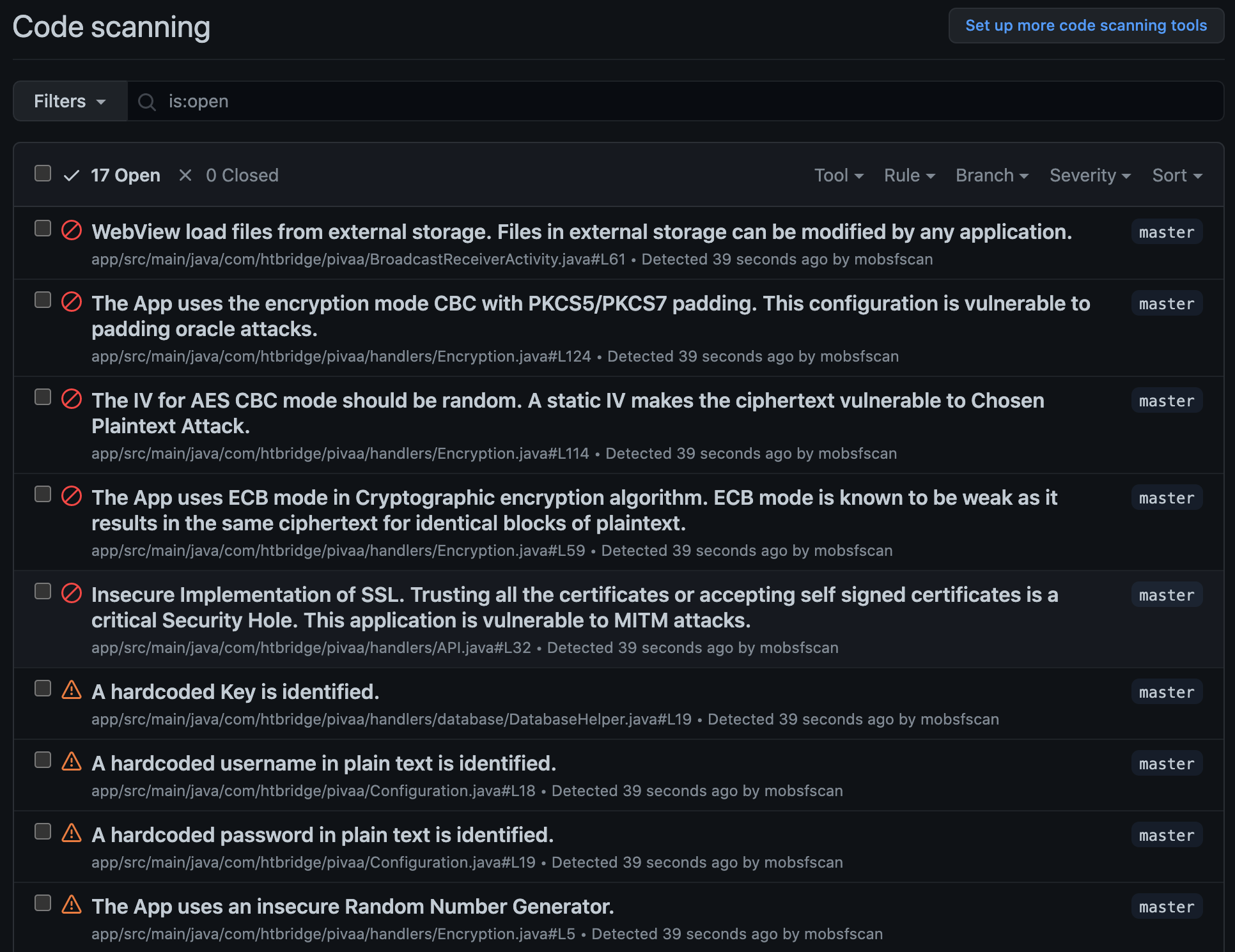
เพิ่มสิ่งต่อไปนี้ในไฟล์ .gitlab-ci.yml
 stages :
    - test
mobsfscan :
    image : python
    before_script :
        - pip3 install --upgrade mobsfscan
    script :
        - mobsfscan .
ตัวอย่าง:
เพิ่มสิ่งต่อไปนี้ในไฟล์ .travis.yml
 language : python
install :
    - pip3 install --upgrade mobsfscan
script :
- mobsfscan . เพิ่มสิ่งต่อไปนี้ในไฟล์ .circleci/config.yaml
 version : 2.1
jobs :
  mobsfscan :
    docker :
      - image : cimg/python:3.9.6
    steps :
      - checkout
      - run :
          name : Install mobsfscan
          command : pip install --upgrade mobsfscan
      - run :
           name : mobsfscan check
command : mobsfscan . docker pull opensecurity/mobsfscan
docker run -v /path-to-source-dir:/src opensecurity/mobsfscan /src docker build -t mobsfscan .
docker run -v /path-to-source-dir:/src mobsfscan /src







