vmd action
v0.0.7

เครื่องมือวิเคราะห์รหัสแบบคงที่สำหรับการตรวจจับรหัสและการละเมิดแนวปฏิบัติที่ดีที่สุดในโครงการ vue.js และ nuxt.js
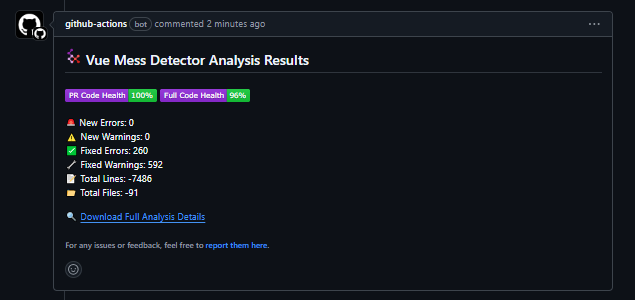
รวมเครื่องตรวจจับ Vue Mess เข้ากับไปป์ไลน์ CI ของคุณเพื่อรับการแจ้งเตือนการขอการดึงและแสดงป้ายได้อย่างง่ายดาย
เคล็ดลับ
การอ้างอิง: วิธีใช้เครื่องตรวจจับ Vue Mess
คุณสามารถเพิ่มการกระทำนี้เป็นขั้นตอนในเวิร์กโฟลว์การกระทำของ GitHub นี่คือตัวอย่างของวิธีการใช้:
 name : VMD Analysis

on :
  workflow_dispatch :
  pull_request :
    branches :
      - main
  push :
    branches :
      - main

permissions :
  contents : read
  pull-requests : write

jobs :
  detect-mess :
    runs-on : ubuntu-latest
    name : Detect Vue Mess
    steps :
      - name : Checkout
        uses : actions/checkout@v4

      - uses : pnpm/action-setup@v4
        name : Install pnpm
        with :
          run_install : false
          version : ' latest ' # delete this line if you have packageManager defined in package.json

      - name : Install Node.js
        uses : actions/setup-node@v4
        with :
          node-version : 20
          cache : ' pnpm '

      - name : Vue Mess Detector Analysis
uses : brenoepics/[email protected] name : VMD Analysis
on :
workflow_dispatch :
pull_request :
branches :
- main
push :
branches :
- main
permissions :
contents : read
pull-requests : write
jobs :
detect-mess :
runs-on : ubuntu-latest
name : Detect Vue Mess
steps :
- name : Checkout
uses : actions/checkout@v4
- name : Install Node.js
uses : actions/setup-node@v4
with :
node-version : 20
- name : Vue Mess Detector Analysis
uses : brenoepics/[email protected] name : VMD Analysis
on :
workflow_dispatch :
pull_request :
branches :
- main
push :
branches :
- main
permissions :
contents : read
pull-requests : write
jobs :
detect-mess :
runs-on : ubuntu-latest
name : Detect Vue Mess
steps :
- name : Checkout
uses : actions/checkout@v4
- name : Install Node.js
uses : actions/setup-node@v4
with :
node-version : 20
cache : ' yarn '
- name : Vue Mess Detector Analysis
uses : brenoepics/[email protected] name : VMD Analysis
on :
workflow_dispatch :
pull_request :
branches :
- main
push :
branches :
- main
permissions :
contents : read
pull-requests : write
jobs :
detect-mess :
runs-on : ubuntu-latest
name : Detect Vue Mess
steps :
- name : Checkout
uses : actions/checkout@v4
- name : Install Bun
uses : oven-sh/setup-bun@v2
with :
bun-version : ' latest '
- name : Vue Mess Detector Analysis
uses : brenoepics/[email protected] ดู Action.yml
- uses : brenoepics/[email protected]
  with :
    # Personal access token (PAT) used to fetch the repository. The PAT is
    # configured with the local git config, which enables your scripts to run
    # authenticated git commands. The post-job step removes the PAT.
    #
    # We recommend using a service account with the least permissions necessary.
    # Also when generating a new PAT, select the least scopes necessary.
    #
    # [Learn more about creating and using encrypted
    # secrets](https://help.github.com/en/actions/automating-your-workflow-with-github-actions/creating-and-using-encrypted-secrets)
    github-token : ' '

    # Version of Vue Mess Detector to use. This can be a specific version number
    # or 'latest' to use the most recent version available.
    version : ' '

    # If set to 'true', the action will skip the installation of Vue Mess Detector.
    # This can be useful if Vue Mess Detector is already installed in your environment.
    skipInstall : ' '

    # If set to 'true', the action will skip running analysis on pull requests
    # created by bots. This can help reduce unnecessary analysis runs.
    skipBots : ' '

    # If set to 'true', the action will post comments on pull requests with the
    # results of the analysis. If set to 'false', no comments will be posted.
    commentsEnabled : ' '

    # The package manager to use for installing dependencies. Supported values
    # are 'npm', 'yarn', 'pnpm', and 'bun'. If not specified, the action will
    # attempt to detect the package manager based on the lock file present in
    # the repository.
    packageManager : ' '

    # Additional arguments to pass to Vue Mess Detector when running the analysis.
    # This can be used to customize the behavior of the analysis.
    runArgs : ' '

    # The entry point for Vue Mess Detector. This is the directory where the
    # analysis will start. If not specified, the current directory will be used.
    entryPoint : ' '

    # The source directory to analyze. This should be the path to the directory
    # containing the source code you want to analyze. If not specified, 'src/'
    # will be used.
    srcDir : ' '

    # If set to 'true', the action will delete old comments on pull requests
    # before posting new ones. This can help keep the comment section clean.
    deleteOldComments : ' '

    # If set to 'true', the action will generate a report comparing the current
    # branch with the target branch. This can be useful for identifying changes
    # introduced in a pull request.
relativeMode : ' ' เคล็ดลับ
คุณสามารถค้นหารายการอินพุตและคำอธิบายของพวกเขาในไฟล์ action.yml
| ป้อนข้อมูล | คำอธิบาย | ที่จำเป็น | ค่าเริ่มต้น |
|---|---|---|---|
| GitHub-token | โทเค็น GitHub สำหรับการแสดงความคิดเห็นเกี่ยวกับคำขอดึง | false | github.token |
| รุ่น | เครื่องตรวจจับ Vue Mess รุ่น | true | latest |
| skipinstall | ข้ามการติดตั้งเครื่องตรวจจับ Vue Mess | true | false |
| skipbots | ข้ามการวิเคราะห์การวิ่งตามคำขอดึงจากบอท | true | true |
| commentsenabled | แสดงความคิดเห็นเกี่ยวกับคำขอดึง? | true | true |
| PackageManager | Package Manager ที่จะใช้ | false | (ตรวจจับ) |
| Runargs | อาร์กิวเมนต์ที่จะส่งผ่านไปยังเครื่องตรวจจับ Vue Mess | false | --group=file |
| จุดเข้า | จุดเข้าสำหรับเครื่องตรวจจับ Vue Mess | false | ./ |
| srcdir | ไดเรกทอรีแหล่งที่มาเพื่อวิเคราะห์ | true | src/ |
| DELETEOLDCOMMENTS | ลบความคิดเห็นรายงานเก่าเกี่ยวกับคำขอดึง? | false | false |
| ความสัมพันธ์ | เปรียบเทียบสาขาปัจจุบันกับเป้าหมาย (PR เท่านั้น) | true | true |
เรายินดีต้อนรับการมีส่วนร่วมในโครงการนี้! โปรดอ่านคู่มือการสนับสนุนของเราสำหรับข้อมูลเพิ่มเติมเกี่ยวกับวิธีการมีส่วนร่วม
หากคุณพบว่าโครงการนี้มีประโยชน์โปรดพิจารณาให้เป็น GitHub สิ่งนี้ช่วยในการแพร่กระจายการรับรู้ของโครงการและเป็นวิธีที่ยอดเยี่ยมในการแสดงการสนับสนุนของคุณ!
โครงการนี้ได้รับใบอนุญาตภายใต้ใบอนุญาต MIT







