milvus_cli
1.0.0

เลิกจ้าง!
โปรดดู repo ใหม่ milvus_cli สำหรับการอัปเดตที่ตามมา
อินเทอร์เฟซบรรทัดคำสั่ง Milvus ขึ้นอยู่กับ Milvus Python SDK
รายละเอียดเพิ่มเติมอ้างถึง milvus.io
| เวอร์ชัน Milvus | เวอร์ชัน pymilvus ที่แนะนำ | เวอร์ชัน CLI ที่แนะนำ |
|---|---|---|
| 2.0.0-rc7 | 2.0.0rc7 | 0.1.7 |
| 2.0.0-rc8 | 2.0.0rc8 | 0.1.8 |
* โปรดทราบว่า Milvus 2.0.0-RC7 ไม่สามารถใช้งานได้กับ Milvus 2.0.0 เวอร์ชันก่อนหน้าเนื่องจากการเปลี่ยนแปลงบางอย่างที่เกิดขึ้นกับรูปแบบการจัดเก็บ
Python> = 3.8.5
เรียกใช้ pip install milvus-cli==0.1.8
milvus_cli-<version>.tar.gzpip install milvus_cli-<version>.tar.gz git clone https://github.com/milvus-io/milvus_cli.gitcd milvus_clipip install --editable . ดาวน์โหลดรุ่นล่าสุดของ milvus_cli.exe และเรียกใช้
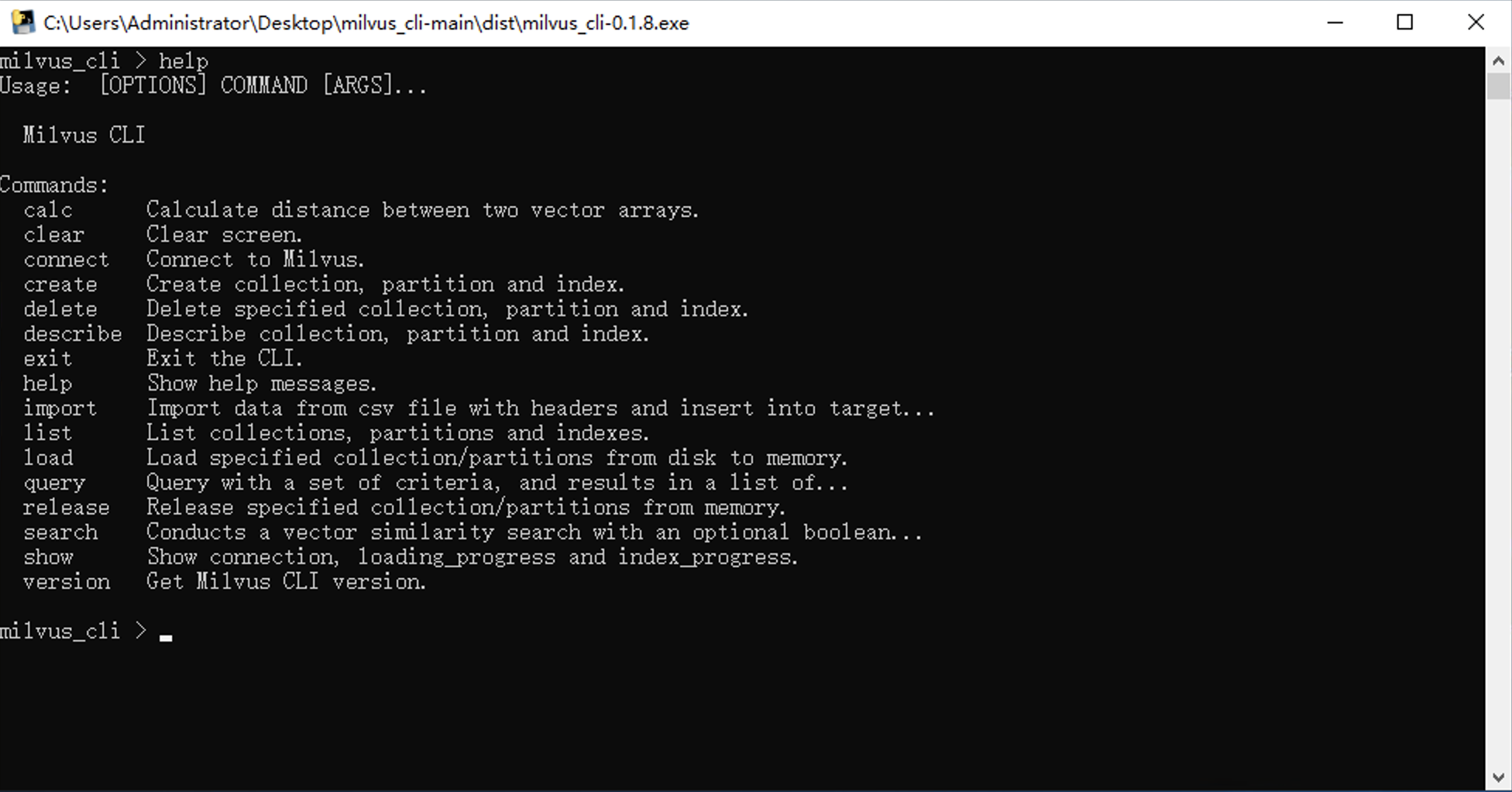
milvus_cli-<version>-Linuxsudo chmod +x milvus_cli-<version>-Linux เพื่ออนุญาตให้ดำเนินการ milvus_cli-<version>-Linux เป็นโปรแกรม./milvus_cli-<version>-Linux <Version> -Linux milvus_cli-<version>-macOSsudo chmod +x milvus_cli-<version>-macOS เพื่ออนุญาตให้ดำเนินการ milvus_cli-<version>-macOS เป็นโปรแกรม./milvus_cli-<version>-macOS เรียกใช้ milvus_cli (ในสภาพแวดล้อม Python) หรือดับเบิลคลิกที่ไฟล์ milvus_cli-<version>.exe (ในสภาพแวดล้อม Windows)
milvus_climilvus_cli-<version>.exe./milvus_cli-<version>-Linux -Linux./milvus_cli-<version>-macOScalcclearconnectcreatecreate aliascreate collectioncreate partitioncreate indexdeletedelete aliasdelete collectiondelete partitiondelete indexdelete entitiesdescribedescribe collectiondescribe partitiondescribe indexexithelpimportlistlist collectionslist indexeslist partitionsloadqueryreleasesearchshowshow connectionshow index_progressshow loading_progressshow query_segmentversioncalc milvus_cli > calc --help
Usage: milvus_cli.py calc [OPTIONS]
Calculate distance between two vector arrays.
Example:
milvus_cli > calc
Import left operator vectors from existing collection? [y/N]: n
The vector's type (float_vectors, bin_vectors): float_vectors
Left vectors:
[[0.083, 0.992, 0.931, 0.433, 0.93, 0.706, 0.668, 0.481, 0.255, 0.088,
0.121, 0.701, 0.935, 0.142, 0.012, 0.197, 0.066, 0.864, 0.263, 0.732,
0.445, 0.672, 0.184, 0.675, 0.361, 0.115, 0.396, 0.206, 0.084, 0.274,
0.523, 0.958, 0.071, 0.646, 0.864, 0.434, 0.212, 0.5, 0.319, 0.608,
0.356, 0.745, 0.672, 0.488, 0.221, 0.485, 0.193, 0.557, 0.546, 0.626,
0.593, 0.526, 0.404, 0.795, 0.076, 0.156, 0.231, 0.1, 0.18, 0.796,
0.716, 0.752, 0.816, 0.363], [0.284, 0.135, 0.172, 0.198, 0.752, 0.174,
0.314, 0.18, 0.672, 0.727, 0.062, 0.611, 0.921, 0.851, 0.238, 0.648,
0.794, 0.177, 0.639, 0.339, 0.402, 0.977, 0.887, 0.528, 0.768, 0.16,
0.698, 0.016, 0.906, 0.261, 0.902, 0.93, 0.547, 0.146, 0.65, 0.072,
0.876, 0.645, 0.303, 0.922, 0.807, 0.093, 0.063, 0.344, 0.667, 0.81,
0.662, 0.147, 0.242, 0.641, 0.903, 0.714, 0.637, 0.365, 0.512, 0.267,
0.577, 0.809, 0.698, 0.62, 0.768, 0.402, 0.922, 0.592]]
Import right operator vectors from existing collection? [y/N]: n
The vector's type (float_vectors, bin_vectors): float_vectors
Right vectors:
[[0.518, 0.034, 0.786, 0.251, 0.04, 0.247, 0.55, 0.595, 0.638, 0.957,
0.303, 0.023, 0.007, 0.712, 0.841, 0.648, 0.807, 0.429, 0.402, 0.904,
0.002, 0.882, 0.69, 0.268, 0.732, 0.511, 0.942, 0.202, 0.749, 0.234,
0.666, 0.517, 0.787, 0.399, 0.565, 0.457, 0.57, 0.937, 0.712, 0.981,
0.928, 0.678, 0.154, 0.775, 0.754, 0.532, 0.074, 0.493, 0.288, 0.229,
0.9, 0.657, 0.936, 0.184, 0.478, 0.587, 0.592, 0.84, 0.793, 0.985,
0.826, 0.595, 0.947, 0.175], [0.704, 0.02, 0.937, 0.249, 0.431, 0.99,
0.779, 0.855, 0.731, 0.665, 0.773, 0.647, 0.135, 0.44, 0.621, 0.329,
0.718, 0.003, 0.927, 0.511, 0.515, 0.359, 0.744, 0.828, 0.31, 0.161,
0.605, 0.539, 0.331, 0.077, 0.503, 0.668, 0.275, 0.72, 0.172, 0.035,
0.88, 0.762, 0.646, 0.727, 0.83, 0.001, 0.085, 0.188, 0.583, 0.709,
0.134, 0.683, 0.246, 0.214, 0.863, 0.109, 0.168, 0.539, 0.451, 0.303,
0.064, 0.575, 0.547, 0.85, 0.75, 0.789, 0.681, 0.735], [0.648, 0.769,
0.525, 0.716, 0.752, 0.199, 0.095, 0.222, 0.767, 0.029, 0.244, 0.527,
0.496, 0.691, 0.487, 0.83, 0.546, 0.102, 0.845, 0.096, 0.744, 0.758,
0.092, 0.289, 0.139, 0.005, 0.204, 0.245, 0.528, 0.607, 0.446, 0.029,
0.686, 0.558, 0.705, 0.451, 0.87, 0.404, 0.824, 0.727, 0.058, 0.283,
0.512, 0.682, 0.027, 0.026, 0.809, 0.669, 0.241, 0.103, 0.101, 0.225,
0.989, 0.662, 0.917, 0.972, 0.93, 0.447, 0.318, 0.434, 0.437, 0.036,
0.009, 0.96], [0.726, 0.418, 0.404, 0.244, 0.618, 0.356, 0.07, 0.842,
0.137, 0.967, 0.465, 0.811, 0.027, 0.704, 0.935, 0.546, 0.92, 0.125,
0.917, 0.089, 0.463, 0.929, 0.289, 0.721, 0.368, 0.837, 0.14, 0.431,
0.495, 0.75, 0.484, 0.083, 0.431, 0.392, 0.177, 0.303, 0.013, 0.317,
0.593, 0.047, 0.695, 0.185, 0.633, 0.825, 0.203, 0.619, 0.597, 0.152,
0.899, 0.061, 0.512, 0.67, 0.82, 0.52, 0.743, 0.07, 0.99, 0.119,
0.949, 0.284, 0.529, 0.65, 0.523, 0.059]]
Supported metric type. Default is "L2" (L2, IP, HAMMING, TANIMOTO) [L2]:
L2
sqrt [False]: True
Timeout(optional) []:
======
Return type:
Assume the vectors_left: L_1, L_2, L_3
Assume the vectors_right: R_a, R_b
Distance between L_n and R_m we called "D_n_m"
The returned distances are arranged like this:
[[D_1_a, D_1_b],
[D_2_a, D_2_b],
[D_3_a, D_3_b]]
Note: if some vectors doesn't exist in collection, the returned distance is "-1.0"
======
Result:
[[3.625464916229248, 3.234992742538452, 3.568333148956299, 3.694913148880005], [2.556027889251709, 2.8901233673095703, 3.385758399963379, 3.3239054679870605]]
Options:
--help Show this message and exit.
clear milvus_cli > clear --help
Usage: milvus_cli.py clear [OPTIONS]
Clear screen.
Options:
--help Show this message and exit.
connect milvus_cli > connect --help
Usage: milvus_cli.py connect [OPTIONS]
Connect to Milvus.
Example:
milvus_cli > connect -h 127.0.0.1 -p 19530 -a default
Options:
-a, --alias TEXT [Optional] - Milvus link alias name, default is
`default`.
-h, --host TEXT [Optional] - Host name, default is `127.0.0.1`.
-p, --port INTEGER [Optional] - Port, default is `19530`.
-D, --disconnect [Optional, Flag] - Disconnect from a Milvus server by
alias, default is `default`.
--help Show this message and exit.
create milvus_cli > create --help
Usage: milvus_cli.py create [OPTIONS] COMMAND [ARGS]...
Create collection, partition and index.
Options:
--help Show this message and exit.
Commands:
collection Create partition.
index Create index.
partition Create partition.
create alias milvus_cli > create alias --help
Usage: milvus_cli create alias [OPTIONS]
Specify alias for a collection. Alias cannot be duplicated, you can't assign
same alias to different collections. But you can specify multiple aliases
for a collection, for example:
create alias -c car -a carAlias1 -a carAlias2
You can also change alias of a collection to another collection. If the
alias doesn't exist, it will return error. Use "-A" option to change alias
owner collection, for example:
create alias -c car2 -A -a carAlias1 -a carAlias2
Options:
-c, --collection-name TEXT Collection name to specify alias.
-a, --alias-name TEXT [Multiple] - The alias of the collection.
-A, --alter [Optional, Flag] - Change an existing alias to
current collection.
-t, --timeout FLOAT [Optional] - An optional duration of time in
seconds to allow for the RPC. If timeout is not
set, the client keeps waiting until the server
responds or an error occurs.
--help Show this message and exit.
create collection milvus_cli > create collection --help
Usage: milvus_cli.py create collection [OPTIONS]
Create collection.
Example:
create collection -c car -f id:INT64:primary_field -f
vector:FLOAT_VECTOR:128 -f color:INT64:color -f brand:INT64:brand -p id -a
-d 'car_collection'
Options:
-c, --collection-name TEXT Collection name to be created.
-p, --schema-primary-field TEXT
Primary field name.
-a, --schema-auto-id [Optional, Flag] - Enable auto id.
-d, --schema-description TEXT [Optional] - Description details.
-f, --schema-field TEXT [Multiple] - FieldSchema. Usage is
"<Name>:<DataType>:<Dim(if vector) or
Description>"
--help Show this message and exit.
create partition milvus_cli > create partition --help
Usage: milvus_cli.py create partition [OPTIONS]
Create partition.
Example:
milvus_cli > create partition -c car -p new_partition -d
test_add_partition
Options:
-c, --collection TEXT Collection name.
-p, --partition TEXT The name of partition.
-d, --description TEXT [Optional] - Partition description.
--help Show this message and exit.
create index milvus_cli > create index --help
Usage: milvus_cli.py create index [OPTIONS]
Create index.
Example:
milvus_cli > create index
Collection name (car, car2): car2
The name of the field to create an index for (vector): vector
Index type (FLAT, IVF_FLAT, IVF_SQ8, IVF_PQ, RNSG, HNSW, ANNOY):
IVF_FLAT
Index metric type (L2, IP, HAMMING, TANIMOTO): L2
Index params nlist: 2
Timeout []:
Options:
--help Show this message and exit.
delete milvus_cli > delete --help
Usage: milvus_cli.py delete [OPTIONS] COMMAND [ARGS]...
Delete specified collection, partition and index.
Options:
--help Show this message and exit.
Commands:
collection Drops the collection together with its index files.
index Drop index and its corresponding index files.
partition Drop the partition and its corresponding index files.
delete alias milvus_cli > delete alias --help
Usage: milvus_cli.py delete alias [OPTIONS]
Delete an alias.
Options:
-c, --collection-name TEXT Collection name to be specified alias.
-a, --alias-name TEXT The alias of the collection.
-t, --timeout FLOAT [Optional] - An optional duration of time in
seconds to allow for the RPC. If timeout is not
set, the client keeps waiting until the server
responds or an error occurs.
--help Show this message and exit.
delete collection milvus_cli > delete collection --help
Usage: milvus_cli.py delete collection [OPTIONS]
Drops the collection together with its index files.
Example:
milvus_cli > delete collection -c car
Options:
-c, --collection TEXT The name of collection to be deleted.
-t, --timeout FLOAT [Optional] - An optional duration of time in seconds
to allow for the RPC. If timeout is not set, the
client keeps waiting until the server responds or an
error occurs.
--help Show this message and exit.
delete partition milvus_cli > delete partition --help
Usage: milvus_cli.py delete partition [OPTIONS]
Drop the partition and its corresponding index files.
Example:
milvus_cli > delete partition -c car -p new_partition
Options:
-c, --collection TEXT Collection name
-p, --partition TEXT The name of partition.
-t, --timeout FLOAT [Optional] - An optional duration of time in seconds
to allow for the RPC. If timeout is not set, the
client keeps waiting until the server responds or an
error occurs.
--help Show this message and exit.
delete index milvus_cli > delete index --help
Usage: milvus_cli.py delete index [OPTIONS]
Drop index and its corresponding index files.
Example:
milvus_cli > delete index -c car
Options:
-c, --collection TEXT Collection name
-t, --timeout FLOAT [Optional] - An optional duration of time in seconds
to allow for the RPC. If timeout is not set, the
client keeps waiting until the server responds or an
error occurs.
--help Show this message and exit.
delete entitiesยังไม่เปิดใช้งาน
 milvus_cli > delete entities --help
Usage: milvus_cli.py delete entities [OPTIONS]

  Delete entities with an expression condition. And return results to show
  which primary key is deleted successfully.

  Example:

      milvus_cli > delete entities -c car

      The expression to specify entities to be deleted, such as "film_id in [
      0, 1 ]": film_id in [ 0, 1 ]

      You are trying to delete the entities of collection. This action cannot
      be undone!

      Do you want to continue? [y/N]: y

Options:
  -c, --collection TEXT  Collection name.
  -p, --partition TEXT   [Optional] - Name of partitions that contain
                         entities.
  -t, --timeout FLOAT    [Optional] - An optional duration of time in seconds
                         to allow for the RPC. If timeout is not set, the
                         client keeps waiting until the server responds or an
                         error occurs.
  --help                 Show this message and exit.
describe milvus_cli > describe --help
Usage: milvus_cli.py describe [OPTIONS] COMMAND [ARGS]...
Describe collection or partition.
Options:
--help Show this message and exit.
Commands:
collection Describe collection.
partition Describe partition.
describe collection milvus_cli > describe collection --help
Usage: milvus_cli.py describe collection [OPTIONS]
Describe collection.
Example:
milvus_cli > describe collection -c test_collection_insert
Options:
-c, --collection TEXT The name of collection.
--help Show this message and exit.
describe partition milvus_cli > describe partition --help
Usage: milvus_cli.py describe partition [OPTIONS]
Describe partition.
Example:
milvus_cli > describe partition -c test_collection_insert -p _default
Options:
-c, --collection TEXT The name of collection.
-p, --partition TEXT [Optional] - The name of partition, default is
"_default".
--help Show this message and exit.
describe index milvus_cli > describe index --help
Usage: milvus_cli.py describe index [OPTIONS]
Describe index.
Example:
milvus_cli > describe index -c car
Options:
-c, --collection TEXT The name of collection.
--help Show this message and exit.
exit milvus_cli > exit --help
Usage: milvus_cli.py exit [OPTIONS]
Exit the CLI.
Options:
--help Show this message and exit.
help milvus_cli > help
Usage: [OPTIONS] COMMAND [ARGS]...
Milvus CLI
Commands:
calc Calculate distance between two vector arrays.
clear Clear screen.
connect Connect to Milvus.
create Create collection, partition and index.
delete Delete specified collection, partition and index.
describe Describe collection, partition and index.
exit Exit the CLI.
help Show help messages.
import Import data from csv file with headers and insert into target...
list List collections, partitions and indexes.
load Load specified collection and partitions.
query Query with a set of criteria, and results in a list of...
release Release specified collection and partitions.
search Conducts a vector similarity search with an optional boolean...
show Show connection, loading_progress and index_progress.
version Get Milvus CLI version.
import milvus_cli > import --help
Usage: milvus_cli.py import [OPTIONS] PATH
Import data from csv file(local or remote) with headers and insert into
target collection.
Example-1:
milvus_cli > import -c car 'examples/import_csv/vectors.csv'
Reading file from local path.
Reading csv file... [####################################] 100%
Column names are ['vector', 'color', 'brand']
Processed 50001 lines.
Inserting ...
Insert successfully.
-------------------------- ------------------
Total insert entities: 50000
Total collection entities: 150000
Milvus timestamp: 428849214449254403
-------------------------- ------------------
Example-2:
milvus_cli > import -c car 'https://raw.githubusercontent.com/milvus-
io/milvus_cli/main/examples/import_csv/vectors.csv'
Reading file from remote URL.
Reading csv file... [####################################] 100%
Column names are ['vector', 'color', 'brand']
Processed 50001 lines.
Inserting ...
Insert successfully.
-------------------------- ------------------
Total insert entities: 50000
Total collection entities: 150000
Milvus timestamp: 428849214449254403
-------------------------- ------------------
Options:
-c, --collection-name TEXT The name of collection to be imported.
-p, --partition TEXT [Optional] - The partition name which the data
will be inserted to, if partition name is not
passed, then the data will be inserted to
“_default” partition.
-t, --timeout FLOAT [Optional] - An optional duration of time in
seconds to allow for the RPC. If timeout is not
set, the client keeps waiting until the server
responds or an error occurs.
--help Show this message and exit.
list milvus_cli > list --help
Usage: milvus_cli.py list [OPTIONS] COMMAND [ARGS]...
List collections, partitions and indexes.
Options:
--help Show this message and exit.
Commands:
collections List all collections.
indexes List all indexes of the specified collection.
partitions List all partitions of the specified collection.
list collections milvus_cli > list collections --help
Usage: milvus_cli.py list collections [OPTIONS]
List all collections.
Options:
-t, --timeout FLOAT [Optional] - An optional duration of time in
seconds to allow for the RPC. When timeout is set
to None, client waits until server response or
error occur.
-l, --show-loaded BOOLEAN [Optional] - Only show loaded collections.
--help Show this message and exit.
list indexes milvus_cli > list indexes --help
Usage: milvus_cli.py list indexes [OPTIONS]
List all indexes of the specified collection.
Options:
-c, --collection TEXT The name of collection.
--help Show this message and exit.
list partitions milvus_cli > list partitions --help
Usage: milvus_cli.py list partitions [OPTIONS]
List all partitions of the specified collection.
Options:
-c, --collection TEXT The name of collection.
--help Show this message and exit.
load milvus_cli > load --help
Usage: milvus_cli.py load [OPTIONS]
Load specified collection/partitions from disk to memory.
Options:
-c, --collection TEXT The name of collection to load.
-p, --partition TEXT [Optional, Multiple] - The name of partition to load.
--help Show this message and exit.
query milvus_cli > query --help
Usage: milvus_cli.py query [OPTIONS]
Query with a set of criteria, and results in a list of records that match
the query exactly.
Example 1:
milvus_cli > query
Collection name: car
The query expression: id in [ 428960801420883491, 428960801420883492,
428960801420883493 ]
Name of partitions that contain entities(split by "," if multiple) []:
default
A list of fields to return(split by "," if multiple) []: color, brand
timeout []:
Example 2:
milvus_cli > query
Collection name: car
The query expression: id > 428960801420883491
Name of partitions that contain entities(split by "," if multiple) []:
default
A list of fields to return(split by "," if multiple) []: id, color,
brand
timeout []:
Options:
--help Show this message and exit.
release milvus_cli > release --help
Usage: milvus_cli.py release [OPTIONS]
Release specified collection/partitions from memory.
Options:
-c, --collection TEXT The name of collection to be released.
-p, --partition TEXT [Optional, Multiple] - The name of partition to
released.
--help Show this message and exit.
search milvus_cli > search --help
Usage: milvus_cli.py search [OPTIONS]
Conducts a vector similarity search with an optional boolean expression as
filter.
Example-1(import a CSV file):
Collection name (car, test_collection): car
The vectors of search data (the length of data is number of query (nq),
the dim of every vector in data must be equal to vector field’s of
collection. You can also import a CSV file without headers):
examples/import_csv/search_vectors.csv
The vector field used to search of collection (vector): vector
Metric type: L2
Search parameter nprobe's value: 10
The max number of returned record, also known as topk: 2
The boolean expression used to filter attribute []: id > 0
The names of partitions to search (split by "," if multiple) ['_default']
[]: _default
timeout []:
Guarantee Timestamp(It instructs Milvus to see all operations performed before a provided timestamp. If no such timestamp is provided, then Milvus will search all operations performed to date) [0]:
Travel Timestamp(Specify a timestamp in a search to get results based on a data view) [0]:
Example-2(collection has index):
Collection name (car, test_collection): car
The vectors of search data (the length of data is number of query (nq),
the dim of every vector in data must be equal to vector field’s of
collection. You can also import a CSV file without headers):
[[0.71, 0.76, 0.17, 0.13, 0.42, 0.07, 0.15, 0.67, 0.58, 0.02, 0.39,
0.47, 0.58, 0.88, 0.73, 0.31, 0.23, 0.57, 0.33, 0.2, 0.03, 0.43,
0.78, 0.49, 0.17, 0.56, 0.76, 0.54, 0.45, 0.46, 0.05, 0.1, 0.43,
0.63, 0.29, 0.44, 0.65, 0.01, 0.35, 0.46, 0.66, 0.7, 0.88, 0.07,
0.49, 0.92, 0.57, 0.5, 0.16, 0.77, 0.98, 0.1, 0.44, 0.88, 0.82,
0.16, 0.67, 0.63, 0.57, 0.55, 0.95, 0.13, 0.64, 0.43, 0.71, 0.81,
0.43, 0.65, 0.76, 0.7, 0.05, 0.24, 0.03, 0.9, 0.46, 0.28, 0.92,
0.25, 0.97, 0.79, 0.73, 0.97, 0.49, 0.28, 0.64, 0.19, 0.23, 0.51,
0.09, 0.1, 0.53, 0.03, 0.23, 0.94, 0.87, 0.14, 0.42, 0.82, 0.91,
0.11, 0.91, 0.37, 0.26, 0.6, 0.89, 0.6, 0.32, 0.11, 0.98, 0.67,
0.12, 0.66, 0.47, 0.02, 0.15, 0.6, 0.64, 0.57, 0.14, 0.81, 0.75,
0.11, 0.49, 0.78, 0.16, 0.63, 0.57, 0.18]]
The vector field used to search of collection (vector): vector
Metric type: L2
Search parameter nprobe's value: 10
The specified number of decimal places of returned distance [-1]: 5
The max number of returned record, also known as topk: 2
The boolean expression used to filter attribute []: id > 0
The names of partitions to search (split by "," if multiple) ['_default']
[]: _default
timeout []:
Guarantee Timestamp(It instructs Milvus to see all operations performed before a provided timestamp. If no such timestamp is provided, then Milvus will search all operations performed to date) [0]:
Travel Timestamp(Specify a timestamp in a search to get results based on a data view) [0]:
Example-3(collection has no index):
Collection name (car, car2): car
The vectors of search data(the length of data is number of query (nq),
the dim of every vector in data must be equal to vector field’s of
collection. You can also import a CSV file without headers):
examples/import_csv/search_vectors.csv
The vector field used to search of collection (vector): vector
The specified number of decimal places of returned distance [-1]: 5
The max number of returned record, also known as topk: 2
The boolean expression used to filter attribute []:
The names of partitions to search (split by "," if multiple) ['_default']
[]:
Timeout []:
Guarantee Timestamp(It instructs Milvus to see all operations performed before a provided timestamp. If no such timestamp is provided, then Milvus will search all operations performed to date) [0]:
Travel Timestamp(Specify a timestamp in a search to get results based on a data view) [0]:
Options:
--help Show this message and exit.
show milvus_cli > show --help
Usage: milvus_cli.py show [OPTIONS] COMMAND [ARGS]...
Show connection, loading_progress and index_progress.
Options:
--help Show this message and exit.
Commands:
connection Show current/all connection details
index_progress
loading_progress Show #loaded entities vs #total entities.
show connection milvus_cli > show connection --help
Usage: milvus_cli.py show connection [OPTIONS]
Show current/all connection details
Options:
-a, --all [Optional, Flag] - Show all connections.
--help Show this message and exit.
show index_progress milvus_cli > show index_progress --help
Usage: milvus_cli.py show index_progress [OPTIONS]
Show # indexed entities vs. # total entities.
Options:
-c, --collection TEXT The name of collection is loading
-i, --index TEXT [Optional] - Index name.
--help Show this message and exit.
show loading_progress milvus_cli > show loading_progress --help
Usage: milvus_cli.py show loading_progress [OPTIONS]
Show #loaded entities vs #total entities.
Options:
-c, --collection TEXT The name of collection is loading
-p, --partition TEXT [Optional, Multiple] - The names of partitions are
loading
--help Show this message and exit.
show query_segment milvus_cli > show query_segment --help
Usage: milvus_cli show query_segment [OPTIONS]
Notifies Proxy to return segments information from query nodes.
Options:
-c, --collection TEXT A string representing the collection to get segments
info.
-t, --timeout FLOAT [Optional] - An optional duration of time in seconds
to allow for the RPC. When timeout is not set, client
waits until server response or error occur.
--help Show this message and exit.
version milvus_cli > version --help
Usage: milvus_cli.py version [OPTIONS]
Get Milvus CLI version.
Options:
--help Show this message and exit.
หรือ
$ milvus_cli --version
Milvus Cli v0.1.7




