microagents
v0.1.0 (21.01.2024)

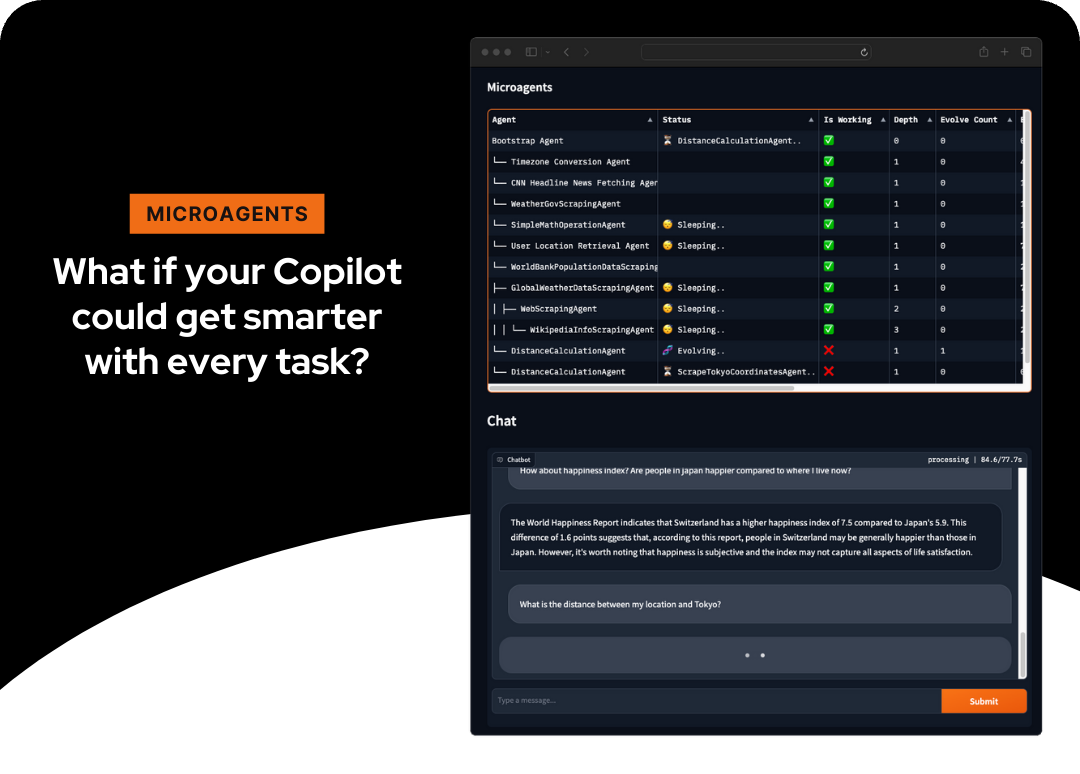
กรอบการทดลองสำหรับการสร้างตัวแทนการพัฒนาตนเองแบบไดนามิกเพื่อตอบสนองต่องาน
ดูการสาธิต·รายงานข้อบกพร่อง·คุณลักษณะการร้องขอ
Microagents แสดงถึงวิธีการใหม่ในการสร้างตัวแทนการพัฒนาตนเอง ตัวแทนขนาดเล็กขนาดเล็ก (ดังนั้น microagents ) จะถูกสร้างขึ้นแบบไดนามิกในการตอบสนองต่องานที่ผู้ใช้กำหนดให้ผู้ช่วยประเมินการทำงานของพวกเขาและเมื่อมีการตรวจสอบที่ประสบความสำเร็จ สิ่งนี้ช่วยให้การเรียนรู้ในช่วงการแชททำให้ระบบสามารถอนุมานวิธีการอย่างอิสระสำหรับการดำเนินงานได้อย่างอิสระ
โครงการนี้ใช้ประโยชน์จากเทคโนโลยีต่อไปนี้:
เพื่อรับสำเนาท้องถิ่นและเรียกใช้ทำตามขั้นตอนง่าย ๆ เหล่านี้
gpt-4-turbo และ text-embedding-ada-002git clone https://github.com/aymenfurter/microagents.gitpip install -r requirements.txt export OPENAI_KEY= ' your_api_key_here ' export AZURE_OPENAI_API_KEY= ' your_api_key_here '
export AZURE_OPENAI_ENDPOINT= ' https://my_endpoint_name_here.openai.azure.com/ '
# export OPENAI_EMBEDDING='' # optionally set the azure deployment name of your ada embedding (in case the name is not text-embedding-ada-002)
# export OPENAI_MODEL='' # optionally set the azure deployment name of your gpt 4 (in case the name is not gpt-4-1106-preview) export AZURE_OPENAI_ENDPOINT= ' https://my_endpoint_name_here.openai.azure.com/ '
export AZURE_OPENAI_USE_AAD= ' true ' # enables DefaultAzureCredential
# export AZURE_OPENAI_AD_TOKEN='' # optionally specify the AAD token here
# export AZURE_CLIENT_ID='' # optionally specify the client id of the managed identity
# export OPENAI_EMBEDDING='' # optionally set the azure deployment name of your ada embedding (in case the name is not text-embedding-ada-002)
# export OPENAI_MODEL='' # optionally set the azure deployment name of your gpt 4 (in case the name is not gpt-4-1106-preview) คำเตือน
Microagents เรียกใช้รหัส Python โดยตรงและปัจจุบันไม่ได้ทำงานภายในกล่องทราย ขอแนะนำอย่างยิ่งให้เรียกใช้ในสภาพแวดล้อมที่แยกได้เช่น GitHub Codespaces หรือ Docker (ReadMe-Docker.MD) เพื่อจำกัดความเสียหายที่อาจเกิดขึ้น ระวังค่าใช้จ่ายที่เกี่ยวข้องกับการใช้บริการของ OpenAI
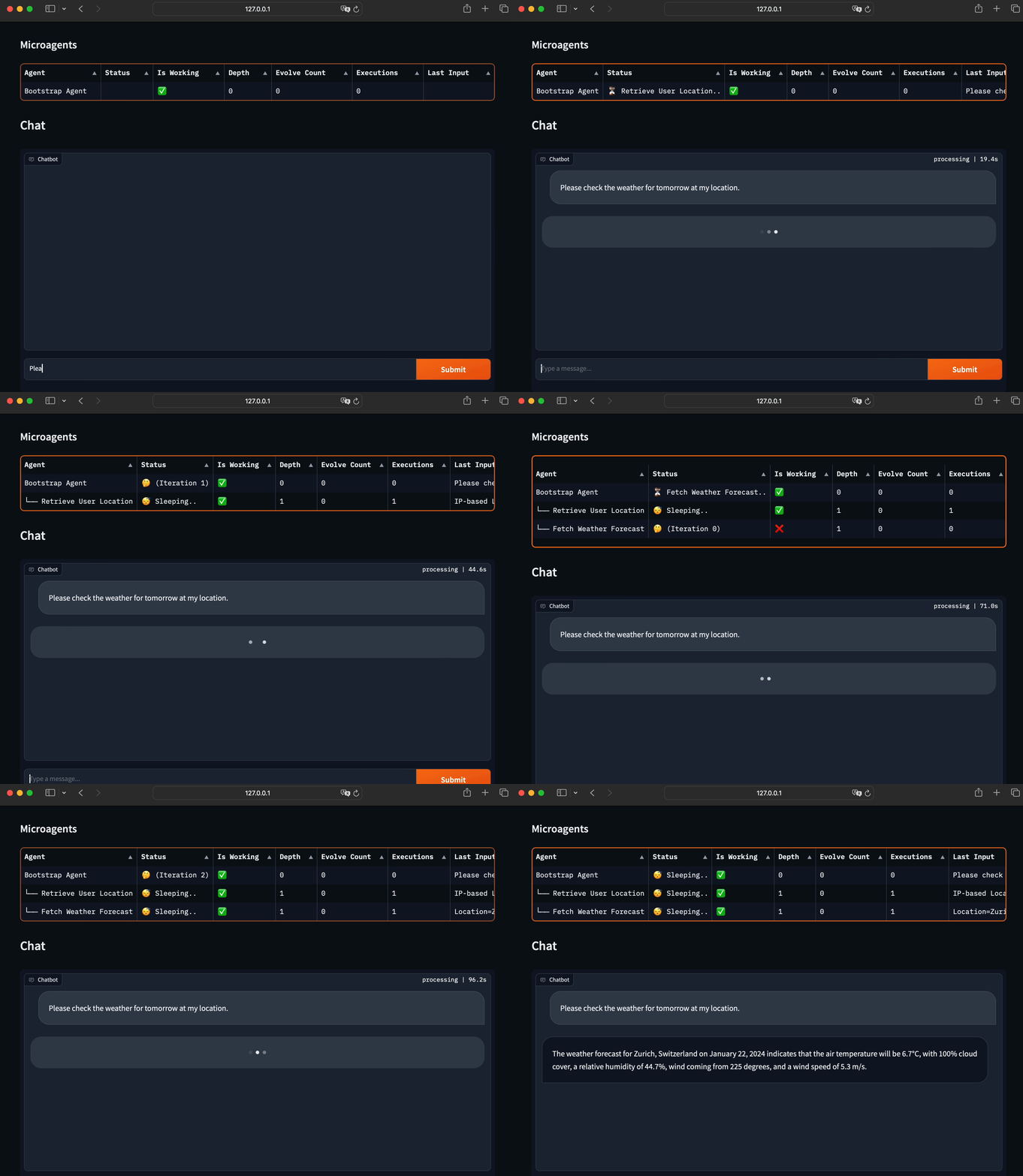
สำหรับการสาธิตให้ดำเนินการ:
python main.pyสำหรับประสบการณ์การแชทแบบโต้ตอบ:
python app.pyหากต้องการลบเอเจนต์ทั้งหมดเพียงลบไฟล์ "agent.db"
 You are an adept weather informant. Fetch the weather forecast by accessing public API data using this Python code snippet:

``python
import requests
import json

def fetch_weather_forecast(location, date):
    response = requests.get(f"https://api.met.no/weatherapi/locationforecast/2.0/compact?lat={location[0]}&lon={location[1]}")
    weather_data = response.json()
    for day_data in weather_data['properties']['timeseries']:
        if date in day_data['time']:
            print(day_data['data']['instant']['details'])
            break
``
# Example usage: fetch_weather_forecast((47.3769, 8.5417), '2024-01-22T12:00:00Z')
Note: Replace the (47.3769, 8.5417) with the actual latitude and longitude of the location and the date string accordingly.
 You are a skilled IP-based location retriever. Use Python's requests library to obtain geolocation data from a public IP address. Here is a sample code snippet you may adapt:

``python
import requests

def fetch_location_from_ip(ip_address):
    response = requests.get(f'http://ip-api.com/json/{ip_address}')
    data = response.json()
    return data.get('country'), data.get('city')
``

# Example usage:
# print(fetch_location_from_ip('8.8.8.8'))
Ensure that the code is capable of extracting location information such as country and city from the provided IP address.

นี่เป็นรุ่นแรกของ microagents และมีหลายอย่างเกิดขึ้นตั้งแต่การตีพิมพ์โครงการเริ่มต้น นี่คือการอัปเดตหลัก:
คำขอดึง : โครงการได้รับคำขอดึงทั้งหมด 6 รายการโดยเน้นความสนใจจากชุมชน
อินเทอร์เฟซผู้ใช้สองส่วน : ตอนนี้เราเสนออินเทอร์เฟซผู้ใช้สองส่วนสำหรับการโต้ตอบกับตัวแทน:
textual-app.py อินเทอร์เฟซนี้เป็นส่วนร่วมของชุมชนโดย Bearney74การขยายแบบขนาน : microagents ตอนนี้รองรับการขนานกัน! เมื่อมีการสร้างเอเจนต์ใหม่ตัวแทนสามคนจะถูกวางไข่ในแบบคู่ขนาน ตัวแทนคนแรกที่ทำงานให้สำเร็จนั้นยังคงอยู่ในขณะที่คนอื่น ๆ ถูกกำจัด
ตัวแทน pretrained : เราได้แนะนำ 28 ตัวแทน pretrained ที่รวมอยู่ในการทดสอบ ตัวแทนเหล่านี้เปิดใช้งานงานที่หลากหลายตั้งแต่การโต้ตอบกับ OpenStreetMap ไปจนถึงการให้ข้อมูลสภาพอากาศในปัจจุบัน ตัวแทนทั้งหมดเหล่านี้ได้รับการฝึกฝนโดยใช้ microagents
ขั้นตอนการตรวจสอบความถูกต้อง ("ผู้พิพากษา") : มีการเพิ่มขั้นตอน 'ผู้พิพากษา' ใหม่เพื่อให้แน่ใจว่าตัวแทนที่อ้างว่าทำงานได้จริงตามที่คาดไว้ ขั้นตอนการตรวจสอบเพิ่มเติมนี้ช่วยให้มั่นใจได้ว่ามีเพียงตัวแทนที่ใช้งานได้อย่างสมบูรณ์เท่านั้นที่รวมอยู่ในแคตตาล็อกของตัวแทนการทำงาน
การจัดเก็บตัวแทนแบบถาวร : ตัวแทนถูกเก็บไว้ในการวิ่งโดยใช้ sqlite ที่ใช้เพื่อจุดประสงค์นี้
หน่วยความจำตัวแทนที่ได้รับการปรับปรุง : ตัวแทนในขณะนี้มีความสามารถในการจดจำเฉพาะตัวแทนที่พวกเขาสร้างขึ้นก่อนหน้านี้ วิธีการนี้ช่วยเพิ่มความทนทานของการสร้างตัวแทนเนื่องจากหลีกเลี่ยงการเปลี่ยนแปลงเชิงลึกที่ไม่จำเป็นในระหว่างการดำเนินการ
การอัปเดตเหล่านี้แสดงถึงการเพิ่มประสิทธิภาพที่สำคัญสำหรับ microagents ฉันรอคอยที่จะได้รับการปรับปรุงเพิ่มเติมและการมีส่วนร่วมจากชุมชน
การมีส่วนร่วมคือสิ่งที่ทำให้ชุมชนโอเพ่นซอร์สเป็นสถานที่ที่น่าทึ่งในการเรียนรู้สร้างแรงบันดาลใจและสร้าง การมีส่วนร่วมใด ๆ ที่คุณทำ จะได้รับการชื่นชมอย่างมาก
แจกจ่ายภายใต้ใบอนุญาต MIT ดู LICENSE สำหรับข้อมูลเพิ่มเติม





