RouteOne
1.33

โดยจะอ่านเส้นทาง URL และแยกวิเคราะห์ค่าของเส้นทาง เพื่อให้สามารถตีความด้วยตนเองหรือโดยอัตโนมัติในวิธีที่เร็วที่สุดเท่าที่จะเป็นไปได้ (เช่น ในการใช้ระบบ MVC)
ไลบรารีนี้ไม่มีการขึ้นต่อกันซึ่งไม่เหมือนไลบรารีอื่น ๆ และรวมอยู่ในคลาสเดียว ดังนั้นจึงเข้ากันได้กับโปรเจ็กต์ PHP ใด ๆ เช่น WordPress, Laravel, Drupal, โปรเจ็กต์ PHP แบบกำหนดเอง ฯลฯ
ไลบรารีนี้เป็นไปตาม CoC Convention over Configuration มันลดขนาดสำเร็จรูปแต่มีฟังก์ชันการทำงานคงที่ ไลบรารีนี้ไม่อนุญาตให้ใช้ "เส้นทาง" ที่กำหนดเอง แต่ครอบคลุมเกือบทุกกรณี ดังนั้นจึงเพิ่มประสิทธิภาพและการใช้งานในขณะที่ลดความยืดหยุ่น
สมมติว่าเรามี URL ถัดไป http://somedomain.dom/Customer/Update/2 ไลบรารีนี้จะแปลง URL นี้เป็นตัวแปรที่อาจถูกประมวลผลหรือเรียกใช้เมธอดโดยตรง
เส้นทาง.php
 $ route = new RouteOne ( ' http://www.somedomain.dom ' );
$ route -> addPath ( ' api/{controller}/{action}/{id} ' );
$ route -> addPath ( ' {controller}/{action}/{id}/{idparent} ' );
$ route -> fetchPath ();
$ this -> callObjectEx ( ' cocacolacontroller{controller}Controller ' );
คลาสคอนโทรลเลอร์ CustomerController.php
 namespace cocacola  controller ;
class CustomerController {
   public function updateAction ( $ id = null , $ idparent = null , $ event = null ) {
      echo " We want to update the customer $ id " ;
   }
}
สมมติว่าเราทำการดำเนินการต่อไป:
ผู้ใช้เรียกเว็บไซต์ถัดไป http://somedomain.com/Customer/Insert เขาต้องการแสดงแบบฟอร์มเพื่อแทรกลูกค้า
 use  eftec  RouteOne  RouteOne ;
$ route = new RouteOne ( ' . ' , null , null ); // Create the RouteOne Class
$ route -> fetch (); // fetch all the input values (from the route, get, post and such).
$ route -> callObject ( ' somenamespace \ controller \ %sController ' ); // where it will call the  class CustomerController*
หรือ
 use eftec  RouteOne  RouteOne ;
$ route = new RouteOne ( ' . ' , null , null ); // Create the RouteOne Class
$ route -> fetch (); // fetch all the input values (from the route, get, post and such).
$ route -> callObjectEx ( ' somenamespace \ controller \ {controller}Controller ' ); // where it will call the  class CustomerController*
รหัสนี้เรียกใช้เมธอด InsertActionGet (GET), InsertActionPost (POST) หรือ InsertAction (GET/POST) ภายในคลาส Customer
วิธีการที่เรียกว่าเขียนดังนี้:
 class Customer {
    public function insertAction ( $ id = "" , $ idparent = "" , $ event = "" ) {
        // here we do our operation.
    }
}มาดูกันว่าเราต้องการ Update ลูกค้า หมายเลข 20 แล้วเราจะโทรไปหน้าถัดไป
http://somedomain.com/Customer/Update/20
โดยที่ 20 คือ "$id" ของลูกค้าที่จะแก้ไข (อาจเป็นตัวเลขของสตริง)
และหากเราต้องการ อัพเดท ลูกค้า หมายเลข 20 ของธุรกิจ APPL
http://somedomain.com/Customer/Update/20/APPL
โดยที่ APPL คือข้อมูล ระบุตัวตน
ตอนนี้ สมมติว่าเราคลิกที่ปุ่มใดปุ่มหนึ่งหรือดำเนินการบางอย่าง ฟิลด์ _event สามารถบันทึกข้อมูลได้ และอ่านโดยอาร์กิวเมนต์ $event ตัวแปรนี้สามารถส่งผ่าน GET หรือ POST
http://somedomain.com/Customer/Update/20/APPL?_event=click
หมายเหตุ: โมดูลจะได้รับโดยอัตโนมัติหากคุณใช้ addPath() และ fetchPath() ดังนั้นคุณไม่จำเป็นต้องระบุ ตอนนี้ สมมติว่าระบบของเราเป็นแบบโมดูลาร์ และเรามีลูกค้าหลายราย (ลูกค้าภายใน ภายนอก ฯลฯ)
$ route = new RouteOne ( ' . ' , null , true ); // true indicates it is modular.หรือ
$ route = new RouteOne ( ' . ' , null ,[ ' Internal ' ]); // or we determine the module automatically. In this case, every url that starts with Internalแล้ว
 $ route -> fetch ();
$ route -> callObject ( ' somenamespace \ %2s% \ controller \ %1sController ' );
http://somedomain.com/Internal/Customer/Update/20/APPL?_event=click
จากนั้นการแยกสาขาแรกคือชื่อของโมดูล ( Internal ) และมันเรียกคลาส somenamespaceInternalcontrollerCustomerController
ผู้แต่งต้องการ eftec/ RouteOne
ลินุกซ์:
vendor/bin/ RouteOne cli -init (if the binary does not work, then chage the permission to execution)หน้าต่าง:
. v endor b in r outeonecli.bat -initมันจะสร้างไฟล์ .htaccess และไฟล์ Route.php และ Route.php จะมีการกำหนดค่าเริ่มต้น
 const BASEURL = " http://localhost " ; // Base url edit this value.
const BASEWEBNS = " eftec \ controller " ; // Base namespace (web) edit this value
const BASEAPINS = " eftec \ api " ; // Base namespace (api) edit this value
หลังจากนั้น คุณสามารถเพิ่มหรือแก้ไขโค้ดในไฟล์นี้ได้
 <IfModule mod_rewrite.c>
    <IfModule mod_negotiation.c>
        Options -MultiViews -Indexes
    </IfModule>

    RewriteEngine On
    DirectoryIndex route.php

    # Handle Authorization Header
    RewriteCond %{HTTP:Authorization} .
    RewriteRule .* - [E=HTTP_AUTHORIZATION:%{HTTP:Authorization}]

    # Redirect Trailing Slashes If Not A Folder...
    RewriteCond %{REQUEST_FILENAME} !-d
    RewriteCond %{REQUEST_URI} (.+)/$
    RewriteRule ^ %1 [L,R=301]

    # Send Requests To Front Controller...
    RewriteCond %{REQUEST_FILENAME} !-d
    RewriteCond %{REQUEST_FILENAME} !-f
    RewriteRule ^ route.php?req=$1 [L,QSA]
</IfModule>
หากโฮสต์เว็บของคุณไม่อนุญาตให้ใช้ตัวเลือก FollowSymlinks ให้ลองแทนที่ด้วย Options +SymLinksIfOwnerMatch
บรรทัดสำคัญคือ:
RewriteRule ^(.*)$ route.php?req=$1 [L,QSA] # เราเตอร์ที่จะโทร
 server {
    listen 80;
    server_name localhost;
    root /example.com/public;

    add_header X-Frame-Options "SAMEORIGIN";
    add_header X-XSS-Protection "1; mode=block";
    add_header X-Content-Type-Options "nosniff";

    index index.html index.htm index.php;

    charset utf-8;

    location / {
        try_files $uri $uri/ /router.php?req=$document_uri&$query_string;
    }

    location = /favicon.ico { access_log off; log_not_found off; }
    location = /robots.txt  { access_log off; log_not_found off; }

    error_page 404 /index.php;

    location ~ .php$ {
        fastcgi_pass unix:/var/run/php/php7.2-fpm.sock;
        fastcgi_index index.php;
        fastcgi_param SCRIPT_FILENAME $realpath_root$fastcgi_script_name;
        include fastcgi_params;
    }

    location ~ /.(?!well-known).* {
        deny all;
    }
}
บรรทัดสำคัญคือ:
try_files $uri $uri/ /router.php?req=$document_uri&$query_string;
 server {
    listen 80;
    server_name localhost;
    root c:/www;

    add_header X-Frame-Options "SAMEORIGIN";
    add_header X-XSS-Protection "1; mode=block";
    add_header X-Content-Type-Options "nosniff";

    index index.html index.htm index.php;

    charset utf-8;

    location / {
        try_files $uri $uri/ /router.php?req=$document_uri&$query_string;
    }

    location = /favicon.ico { access_log off; log_not_found off; }
    location = /robots.txt  { access_log off; log_not_found off; }

    error_page 404 /index.php;

    location ~ .php$ {
        fastcgi_pass   127.0.0.1:9000;
        fastcgi_index  index.php;
        fastcgi_param  SCRIPT_FILENAME  $document_root$fastcgi_script_name;
        include fastcgi_params;
    }

    location ~ /.(?!well-known).* {
        deny all;
    }
}
บรรทัดสำคัญคือ:
try_files $uri $uri/ /router.php?req=$document_uri&$query_string;
โดยที่ router.php เป็นไฟล์ที่จะใช้เป็นเราเตอร์ ?req=$1 มีความสำคัญเนื่องจากระบบจะอ่านเส้นทางจาก "req"
 // router.php
$ route = new RouteOne (); // Create the RouteOne Class
$ route -> fetch (); // fetch all the input values (from the route, get, post and such).
$ route -> callObject ( ' somenamespace \ controller \ %sController ' ); // where it will call the  class somenamespacecontrollerCustomerController
บันทึก:
หากคุณต้องการใช้อาร์กิวเมนต์ที่แตกต่างจาก "req" คุณสามารถเปลี่ยนได้โดยใช้โค้ดถัดไป:
$route->argumentName='newargument';
ตั้งแต่เวอร์ชัน 1.21 คุณสามารถใช้เส้นทางที่กำหนดเองแทนเส้นทางที่กำหนดไว้ล่วงหน้าได้ เป็นวิธีที่แนะนำ วิธีอื่นยังคงมีอยู่
ไวยากรณ์:
เส้นทางที่ชัดเจน()
มันจะล้างเส้นทางทั้งหมดที่กำหนดไว้
ไวยากรณ์:
addPath($path, $name = null, เรียกได้ $middleWare=null)
เพิ่มเส้นทางที่สามารถประเมินได้โดยใช้ fetchPath()
ตัวอย่าง:
 $ this -> addPath ( ' api/{controller}/{action}/{id:0} ' , ' apipath ' );
$ this -> addPath ( ' /api/{controller}/{action}/{id:0}/ ' , ' apipath ' ); // "/" at the beginner and end are trimmed.
$ this -> addPath ( ' {controller}/{action}/{id:0} ' , ' webpath ' );
$ this -> addPath ( ' {controller:root}/{action}/{id:0} ' , ' webpath ' ); // root path using default
$ this -> addPath ( ' somepath ' , ' namepath ' ,
     function ( callable $ next , $ id = null , $ idparent = null , $ event = null ) {
         echo " middleware n" ;
         $ result = $ next ( $ id , $ idparent , $ event ); // calling the controller
         echo " endmiddleware n" ;
          return $ result ;
      });
บันทึก:
ส่วนแรกของเส้นทาง ก่อนใช้ "{" เพื่อกำหนดเส้นทางที่จะใช้
ตัวอย่าง "path/{controller}" และ "path/{controller}/{id}" ระบบจะพิจารณาว่าเป็นเส้นทางเดียวกัน
สตริง พารามิเตอร์ $path พาธ เช่น "aaa/{controller}/{action:default}/{id}"
โดยที่ default คือค่าเริ่มต้นที่เป็นทางเลือก
พารามิเตอร์ string|null $name (เป็นทางเลือก) ชื่อของเส้นทาง
พารามิเตอร์ callable|null $middleWare ฟังก์ชั่นที่สามารถเรียกได้ที่ใช้สำหรับมิดเดิลแวร์
อาร์กิวเมนต์แรกของฟังก์ชันจะต้องเป็นวิธีการที่สามารถเรียกได้
อาร์กิวเมนต์ถัดไปจะต้องเป็นอาร์กิวเมนต์ที่กำหนดโดย callObjectEx
(id, idparent, เหตุการณ์)
เส้นทางอาจเริ่มต้นด้วยตำแหน่งคงที่ แต่ส่วนที่เหลือของเส้นทางจะต้องถูกกำหนดโดยตัวแปร (ล้อมรอบด้วย {}) และคั่นด้วย "/"
คุณยังสามารถตั้งค่าเริ่มต้นสำหรับเส้นทางได้โดยการเขียน uma หลังชื่อของตัวแปร: {name:defaultvalue}
สามารถรับ ชื่อ ได้โดยใช้ $this->currentPath หากคุณเพิ่มชื่อด้วยชื่อเดียวกัน ชื่อนั้นจะถูกแทนที่
หากคุณไม่ได้ตั้งชื่อ ระบบจะใช้ตัวเลขอัตโนมัติ
ชื่อ จะถูกส่งคืนเมื่อคุณเรียก $this->fetchPath()
ตัวอย่าง:
 $ this -> addPath ( ' {controller}/{id}/{idparent} ' );
$ this -> addPath ( ' myapi/otherfolder/{controller}/{id}/{idparent} ' );
$ this -> addPath ( ' {controller:defcontroller}/{action:defaction}/{id:1}/{idparent:2} ' );

// url: /dummy/10/20 =>(controller: dummy, id=10, idparent=20)
// url: /myapi/otherfolder/dummy/10/20  =>(controller: dummy, id=10, idparent=20)
คุณสามารถกำหนดเส้นทางที่แตกต่างกันได้ แต่จะใช้เฉพาะส่วนแรกของเส้นทางที่ตรงกับบาง URL เท่านั้น 'path/somepath/{id}' จะทำงาน 'path/{id}/other' จะไม่ทำงาน
ไวยากรณ์:
ดึงข้อมูลเส้นทาง()
โดยดึงข้อมูลเส้นทางที่กำหนดไว้ก่อนหน้านี้โดย addPath และส่งคืนชื่อ (หรือหมายเลข) ของเส้นทาง หากไม่พบก็จะคืนค่าเท็จ
ตัวอย่าง:
 $ route = new RouteOne ( ' http://www.example.dom ' );
$ route -> addPath ( ' {controller}/{id}/{idparent} ' , ' optionalname ' );
// if the url is : http://www.example.dom/customer/1/200 then it will return
echo $ route -> fetchPath (); // optionalname
echo $ route -> controller ; // customer
echo $ route -> id ; // 1
echo $ route -> idparent ; // 200 มันได้รับค่าแบบสอบถาม (URL)
หมายเหตุ: แบบสอบถามนี้ไม่รวมค่า "req", "_event" และ "_extra"
ตัวอย่าง:
 // http://localhost/..../?id=hi
$ id = $ router -> getQuery ( " id " ); // hi
$ nf = $ router -> getQuery ( " something " , " not found " ); // not foundมันตั้งค่าแบบสอบถาม
ตัวอย่าง:
 $ route -> setQuery ( " id " , " hi " );
$ id = $ router -> getQuery ( " id " ); // hiซินแท็กซ์:
ดึงข้อมูลเส้นทาง()
ดึงค่าจากเส้นทาง และค่าต่างๆ จะถูกประมวลผล
ซินแท็กซ์
callObjectEx($classStructure, $throwOnError, $method, $methodGet, $methodPost,$arguments,$injectArguments)
โดยจะสร้างอินสแตนซ์ใหม่ของวัตถุ (เช่น วัตถุตัวควบคุม) และเรียกเมธอด
หมายเหตุ: เป็นเวอร์ชันขั้นสูงของ this::callObject()
วิธีการนี้ใช้ {} เพื่อแทนที่ค่าตามตัวแปรถัดไป:
| แท็ก | คำอธิบาย |
|---|---|
| {ตัวควบคุม} | ชื่อของตัวควบคุม |
| {การกระทำ} | การกระทำในปัจจุบัน |
| {เหตุการณ์} | เหตุการณ์ปัจจุบัน |
| {พิมพ์} | ประเภทของเส้นทางปัจจุบัน (ws, controller, front, api) |
| {โมดูล} | โมดูลปัจจุบัน (หากโมดูลทำงานอยู่) |
| {รหัส} | รหัสปัจจุบัน |
| {ระบุตัวตน} | ข้อมูลประจำตัวปัจจุบัน |
| {หมวดหมู่} | หมวดหมู่ปัจจุบัน |
| {หมวดหมู่ย่อย} | ประเภทย่อยปัจจุบัน |
| {หมวดหมู่ย่อย} | ประเภทย่อยปัจจุบัน |
ตัวอย่าง:
 // controller example http://somedomain/Customer/Insert/23
$ this -> callObjectEx ( ' cocacolacontroller{controller}Controller ' );
// it calls the method cocacolacontrollerCustomer::InsertAction(23,'','');

// front example: http://somedomain/product/coffee/nescafe/1
$ this -> callObjectEx ( ' cocacolacontroller{category}Controller ' // the class to call
        , false // if error then it throw an error
        , ' {subcategory} ' // the method to call (get, post or any other method)
        , null // the method to call (method get)
        , null // the method to call (method post)
        ,[ ' subsubcategory ' , ' id ' ] // the arguments to call the method
        ,[ ' arg1 ' , ' arg2 ' ]); // arguments that will be passed to the constructor of the instance
// it calls the method cocacolacontrollerproduct::coffee('nescafe','1');
เรียกวิธีการภายในวัตถุโดยใช้เส้นทางปัจจุบัน
ตัวอย่าง:
เราเตอร์:
 $ databaseService = new SomeDatabaseService ();
$ route = new RouteOne ();

$ route -> callObjectEx ( ' cocacolacontroller{controller}Controller ' // the class to call
        , false // if error then it throw an error
        , ' {action}Action ' // the method to call (get, post or any other method)
        , ' {action}Action{verb} ' // the method to call (method get)
        , ' {action}Action{verb} ' // the method to call (method post)
        ,[ ' id ' , ' idparent ' , ' event ' ] // the arguments to call the method
        ,[ $ databaseService , $ route ]); // (optional)arguments that will be passed to the constructor of the instance
ตัวควบคุม:
 namespace cocacola  controller ;
class CustomerController {
	protected $ databaseService ;
    protected $ route ;
    public function __construct ( $ databaseService , $ route ) {
        // optional: injecting services
		$ this -> databaseService = $ databaseService ;
		$ this -> route = $ route ;
    }
    // any action GET or POST
    public function GreenAction ( $ id = "" , $ idparent = "" , $ event = "" ) {
    }
    // GET only action (optional)
    public function BlueActionGET ( $ id = "" , $ idparent = "" , $ event = "" ) {
        // **my code goes here.**
    }
    // POST only action (optional)
    public function YellowActionPOST ( $ id = "" , $ idparent = "" , $ event = "" ) {
        // **my code goes here.**
    }
    // GET only action (optional)
    public function RedActionGET ( $ id = "" , $ idparent = "" , $ event = "" ) {
        // **my code goes here.**
    }
    // any action GET or POST
    public function RedAction ( $ id = "" , $ idparent = "" , $ event = "" ) {
        // **my code goes here.**
    }

}
ผลลัพธ์:
| URL | วิธีการที่เรียกว่า |
|---|---|
| http://localhost/ลูกค้า/สีเขียว (GET) | กรีนแอคชั่น |
| http://localhost/Customer/Green/20/30?_event=click (GET) | GreenAction($id=20, $idparent=30, $event='คลิก') |
| http://localhost/ลูกค้า/สีเขียว (POST) | กรีนแอคชั่น |
| http://localhost/ลูกค้า/สีน้ำเงิน (GET) | BlueActionGET |
| http://localhost/ลูกค้า/สีน้ำเงิน (POST) | ข้อผิดพลาด |
| http://localhost/ลูกค้า/เหลือง (GET) | ข้อผิดพลาด |
| http://localhost/ลูกค้า/เหลือง (POST) | สีเหลืองActionPOST |
| http://localhost/ลูกค้า/แดง (GET) | RedActionGET (มีลำดับความสำคัญมากกว่า RedAction) |
| http://localhost/ลูกค้า/แดง (POST) | เรดแอคชั่น |
| http://localhost/ลูกค้า/Orange | ข้อผิดพลาด |
มันเรียก (รวม) ไฟล์ php โดยใช้ชื่อปัจจุบันของคอนโทรลเลอร์
ไวยากรณ์:
getHeader($key, $valueIfNotFound = null)
ได้รับส่วนหัวปัจจุบัน (ถ้ามี) หากไม่พบค่า ก็จะส่งกลับ $valueIfNotFound โปรดทราบว่า $key จะถูกแปลงเป็นตัวพิมพ์ใหญ่เสมอ
ตัวอย่าง:
$ token = $ this -> getHeader ( ' token ' , ' TOKEN NOT FOUND ' );ไวยากรณ์:
getBody($jsonDeserialize = false, $asAssociative = true)
มันได้รับเนื้อหาของคำขอ
ตัวอย่าง:
 $ body = $ this -> getBody (); // '{"id"=>1,"name"=>john}' (as string)
$ body = $ this -> getBody ( true ); // stdClass {id=>1,name=>john}
$ body = $ this -> getBody ( true , true ); // ["id"=>1,"name"=>john]ส่งกลับ URL ฐานปัจจุบันโดยไม่มีช่องว่างการติดตาม พารามิเตอร์ หรือแบบสอบถาม
หมายเหตุ : ฟังก์ชันนี้อาศัย $_SERVER['SERVER_NAME'] และผู้ใช้ปลายทางสามารถแก้ไขได้
จะส่งคืนเซิร์ฟเวอร์ปัจจุบันโดยไม่มีเครื่องหมายทับต่อท้าย
$ route -> getCurrentServer (); // http://somedomain มันตั้งชื่อเซิร์ฟเวอร์ปัจจุบัน ถูกใช้โดย getCurrentUrl() และ getCurrentServer()
หมายเหตุ: หากไม่ได้ตั้งค่า $this->setCurrentServer() ระบบจะใช้ $_SERVER['SERVER_NAME'] และผู้ใช้สามารถแก้ไขได้
 $ route -> setCurrentServer ( ' localhost ' );
$ route -> setCurrentServer ( ' 127.0.0.1 ' );
$ route -> setCurrentServer ( ' domain.dom ' ); ได้รับ URL (เต็ม) ตามข้อมูลในชั้นเรียน
 $ route -> getUrl (); // http://somedomain/controller/action/id
$ route -> getUrl ( ' id=20 ' ); // http://somedomain/controller/action/id?id=20
$ route -> getUrl ( ' id=20 ' , true ); // http://somedomain/controller/action/id?id=20&field=20&field2=40มันสร้าง URL ตามค่าที่กำหนดเอง
$ route -> url ( null , " Customer " , " Update " , 20 ); // Customer/Update/20สร้าง URL (ด้านหน้า) ตามค่าที่กำหนดเอง
$ route -> url ( null , " Daily " , " Milk " , 20 ); // Daily/Milk/20 หากโดเมนย่อยว่างเปล่าหรือแตกต่างจาก www โดเมนย่อยจะเปลี่ยนเส้นทางไปที่ www.domain.com
หมายเหตุ: ไม่สามารถใช้ได้กับ localhost, โดเมนที่ไม่มี TLD (netbios) หรือโดเมน ip มันเป็นไปตามวัตถุประสงค์
หมายเหตุ: หากโค้ดนี้จำเป็นต้องเปลี่ยนเส้นทาง โค้ดจะหยุดการทำงานของโค้ด โดยปกติจะต้องถูกเรียกที่ด้านบนของโค้ด
 $ route -> alwaysWWW ();  // if the domain is somedomain.dom/url, then it redirects to www.somedomain.dom/url
$ route -> alwaysWWW ( true ); // if the domain is http: somedomain.dom/url, then it redirects to https: www.somedomain.dom/url หากโหลดเพจเป็น http เพจจะเปลี่ยนเส้นทางไปที่ https
หมายเหตุ: ไม่สามารถใช้ได้กับ localhost, โดเมนที่ไม่มี TLD (netbios) หรือโดเมน ip มันเป็นไปตามวัตถุประสงค์
หมายเหตุ: หากโค้ดนี้จำเป็นต้องเปลี่ยนเส้นทาง โค้ดจะหยุดการทำงานของโค้ด โดยปกติจะต้องถูกเรียกที่ด้านบนของโค้ด
 $ route -> alwaysHTTPS (); // http://somedomain.com ---> https://somedomain.com
$ route -> alwaysHTTPS (); // http://localhost ---> // http://localhost
$ route -> alwaysHTTPS (); // http://127.0.0.1 ---> // http://127.0.0.1
$ route -> alwaysHTTPS (); // http://mypc ---> // http://mypc หากโดเมนย่อยคือ www (ตัวอย่าง www.domain.dom) โดเมนนั้นจะเปลี่ยนเส้นทางไปยังโดเมนเปล่า domain.dom
หมายเหตุ: ไม่สามารถใช้ได้กับ localhost, โดเมนที่ไม่มี TLD (netbios) หรือโดเมน ip มันเป็นไปตามวัตถุประสงค์
หมายเหตุ: หากโค้ดนี้จำเป็นต้องเปลี่ยนเส้นทาง โค้ดจะหยุดการทำงานของโค้ด โดยปกติจะต้องถูกเรียกที่ด้านบนของโค้ด
 $ route -> alwaysNakedDomain ();  // if the domain is www.somedomain.dom/url, then it redirects to somedomain.dom/url
$ route -> alwaysNakedDomain ( true ); // if the domain is http: www.somedomain.dom/url, then it redirects to https: somedomain.dom/url | สนาม | เส้นทาง | คำอธิบาย | ตัวอย่าง |
|---|---|---|---|
| $argumentName | ชื่อของอาร์กิวเมนต์ที่ใช้โดย Apache .Htaccess และ nginx | $this-argumentName='req'; | |
| $ฐาน | มันคือ URL ฐาน | $นี่->ฐาน=0; | |
| $ประเภท | เป็นประเภทของ url (api,ws,controller หรือ front) | เสียงสะท้อน $this->ประเภท; // api | |
| $โมดูล | {โมดูล} | มันเป็นโมดูลปัจจุบัน | สะท้อน $this->โมดูล; |
| $คอนโทรลเลอร์ | {ตัวควบคุม} | มันคือตัวควบคุม | เสียงสะท้อน $this->ตัวควบคุม; |
| $การกระทำ | {การกระทำ} | มันคือการกระทำ | สะท้อน $this->การกระทำ; |
| $รหัส | {รหัส} | มันเป็นตัวระบุ | เสียงสะท้อน $this->id; |
| $เหตุการณ์ | {เหตุการณ์} | มันคือเหตุการณ์ (เช่น "คลิกที่ปุ่ม) | echo$this->เหตุการณ์; |
| $idparent | {ระบุตัวตน} | เป็นรหัสผู้ปกครองปัจจุบัน (ถ้ามี) | สะท้อน $this->idparent; |
| $พิเศษ | {พิเศษ} | มันคือเหตุการณ์ (เช่น "คลิกที่ปุ่ม) | สะท้อน $this->พิเศษ; |
| $หมวดหมู่ | {หมวดหมู่} | หมวดหมู่ปัจจุบัน มีประโยชน์สำหรับประเภท 'ด้านหน้า' | เสียงสะท้อน $this->หมวดหมู่; |
| $หมวดหมู่ย่อย | {หมวดหมู่ย่อย} | หมวดย่อยปัจจุบัน มันมีประโยชน์สำหรับประเภท 'ด้านหน้า' | echo $this->หมวดหมู่ย่อย; |
| $หมวดหมู่ย่อย | {หมวดหมู่ย่อย} | หมวดหมู่ย่อยปัจจุบัน มันมีประโยชน์สำหรับประเภท 'ด้านหน้า' | echo $this->หมวดหมู่ย่อย; |
| $ระบุ | เป็นอาเรย์แบบเชื่อมโยงที่ช่วยในการระบุเส้นทาง api และ ws | $this->identify=['api'=>'apiurl','ws'=>'webservices','controller'=>'']; | |
| $isPostBack | มันจะเป็นจริงหากเพจนั้นเป็น POST หรือมิฉะนั้นจะเป็นเท็จ | ถ้า ($นี่->isPostBack) { ... }; | |
| $คำกริยา | {กริยา} | กริยาปัจจุบันอาจเป็น GET, POST, PUT และ DELETE | ถ้า ($นี่ -> กริยา) { ... }; |
ตัวอย่าง:
 $ this -> addPath ( ' portal/web/{controller}/{action:list} ' );
$ this -> fetchPath ();
var_dump ( $ this -action); // it shows the current action or the default value "list" if none. | สนาม | คำอธิบาย | ตัวอย่าง |
|---|---|---|
| $allowedกริยา | รายการที่มีกริยาที่อนุญาต | $this->allowedVerbs=['GET', 'POST', 'PUT', 'DELETE']; |
| $allowedFields | รายการที่มีฟิลด์ที่อนุญาตซึ่งใช้โดย callObjectEx() | $this->allowedFields=['ตัวควบคุม', 'การกระทำ', 'คำกริยา', 'เหตุการณ์', 'ประเภท', 'โมดูล', 'id' , 'idparent', 'หมวดหมู่', 'หมวดหมู่ย่อย', 'หมวดหมู่ย่อย']; |
| ตั้งค่าไวท์ลิสต์() | โดยจะตั้งค่าอาเรย์ที่เชื่อมโยงด้วยไวท์ลิสต์ให้กับ controller , action , category , subcategory , subsubcategory และ module หากไม่ได้ตั้งค่า (ค่าเริ่มต้นเป็น null) จะอนุญาตให้ป้อนข้อมูลใดก็ได้ ขณะนี้ใช้งานได้กับ คอนโทรลเลอร์ และ หมวดหมู่ เท่านั้น | $this->setWhitelist('ตัวควบคุม','การจัดซื้อ','ใบแจ้งหนี้','ลูกค้า'); $this->setWhitelist('controller',null) // อนุญาตให้ใช้คอนโทรลเลอร์ใดก็ได้; |
การไวท์ลิสต์วิธีการอนุญาตให้มีการดำเนินการสองอย่าง:
ตัวอย่างเช่น:
 // Example, value not in the whitelist: someweb.dom/customer/list
$ this -> setWhiteList ( ' controller ' ,[ ' Product ' , ' Client ' ]);
$ this -> fetch ();
var_dump ( $ this -> controller ); // null or the default value
var_dump ( $ this -> notAllowed ); // true (whitelist error)


// Example, value in the whitelist but with the wrong case: someweb.dom/customer/list
$ this -> setWhiteList ( ' controller ' ,[ ' Customer ' ]);
$ this -> fetch ();
var_dump ( $ this -> controller ); // it shows "Customer" instead of "customer"
var_dump ( $ this -> notAllowed ); // false (not error with the validation of the whitelist)

// reset whitelist for controllers
$ this -> setWhiteList ( ' controller ' , null ); RouteOne มี CLI พื้นฐานสำหรับสร้างและเริ่มต้นการกำหนดค่า cli RouteOne ไบนารีอยู่ในโฟลเดอร์ vendor/bin
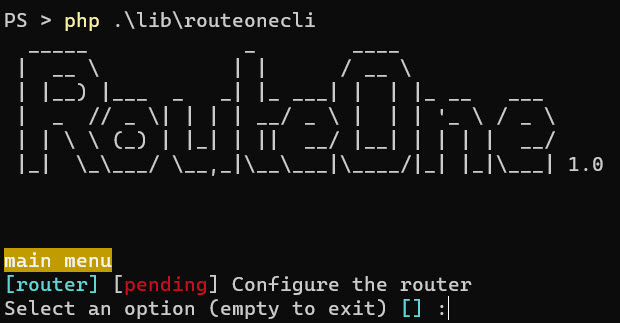
./vendor/bin/ RouteOne cliเข้าสู่ เราเตอร์ แล้วกด Enter
ในเมนูของเราเตอร์ จะแสดงหน้าจอถัดไป:

รอดำเนินการหมายความว่าการดำเนินการอยู่ระหว่างรอดำเนินการ หรือต้องมีบางอย่างในการกำหนดค่า
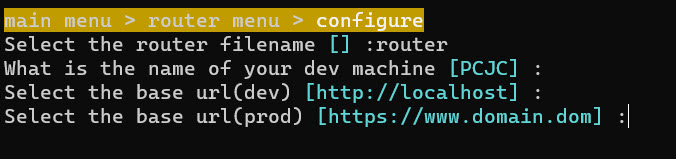
เมื่อเสร็จแล้ว การกำหนดค่าจะถูกทำเครื่องหมายเป็น "ตกลง"
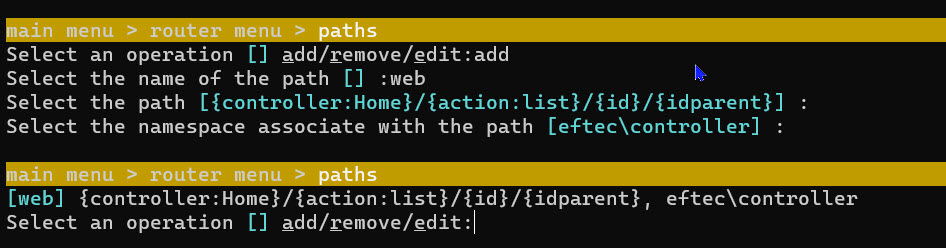
ตอนนี้เรามากำหนดค่าเส้นทางกัน