com.rest.elevenlabs
venlabs 3.4.2

Um cliente repouso de síntese de voz do Elevenlabs não oficial para o mecanismo de jogo da unidade.
Baseado no Elevenlabs-Dotnet
Não sou afiliado ao Elevenlabs e é necessária uma conta com acesso à API.
Todos os direitos autorais, marcas comerciais, logotipos e ativos são propriedade de seus respectivos proprietários.
Requer unidade 2021.3 LTS ou superior.
O método de instalação recomendado é embora o Unity Package Manager e o OpenUPM.
Package Manager 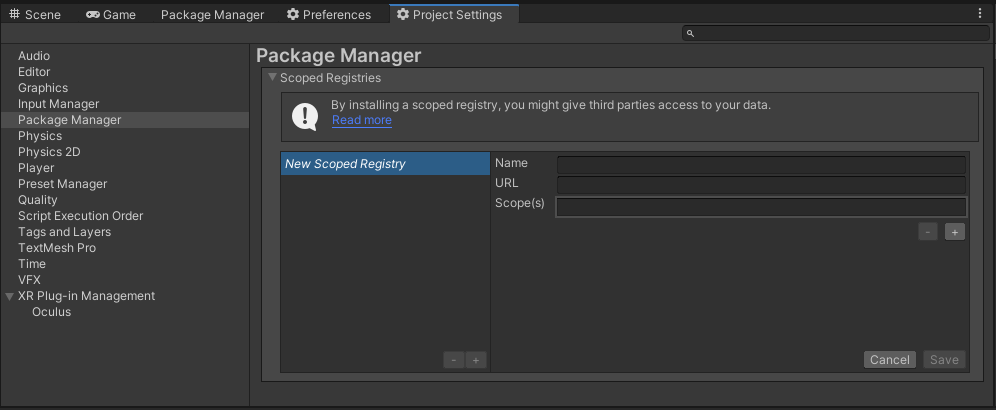
OpenUPMhttps://package.openupm.comcom.rest.elevenlabscom.utilitiesMy RegistriesElevenLabshttps://github.com/RageAgainstThePixel/com.rest.elevenlabs.git#upmNota: Este repositório tem dependências de outros repositórios! Você é responsável por adicioná -los por conta própria.
Existem 4 maneiras de fornecer suas chaves da API, em ordem de precedência:
var api = new ElevenLabsClient ( "yourApiKey" ) ; Ou crie um objeto de ElevenLabsAuthentication
var api = new ElevenLabsClient ( new ElevenLabsAuthentication ( "yourApiKey" ) ) ; Você pode salvar a chave diretamente em um objeto scriptable localizado na pasta de Assets/Resources .
Você pode criar um novo usando o menu de contexto do painel do projeto e criando um novo objeto Scriptable ElevenLabsConfiguration .
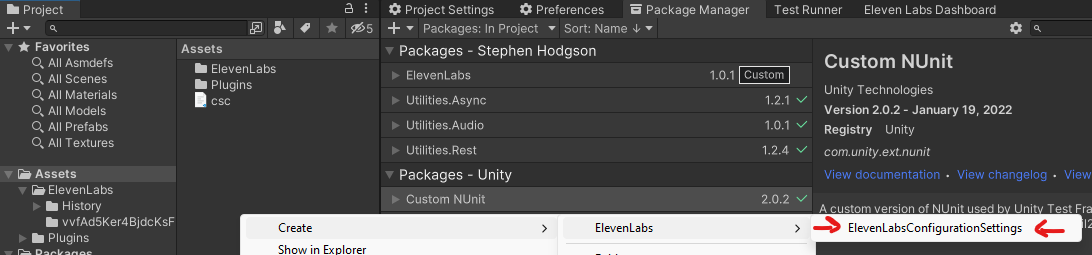
Tentativas de carregar as teclas da API de um arquivo de configuração, por padrão .elevenlabs no diretório atual, opcionalmente, atravessando a árvore do diretório ou no diretório inicial do usuário.
Para criar um arquivo de configuração, crie um novo arquivo de texto chamado .elevenlabs e contendo a linha:
{
  "apiKey" : " yourApiKey " ,
}
Você também pode carregar o arquivo diretamente com o caminho conhecido chamando um método estático em autenticação:
var api = new ElevenLabsClient ( new ElevenLabsAuthentication ( ) . LoadFromDirectory ( "your/path/to/.elevenlabs" ) ) ; ; Use as variáveis de ambiente do seu sistema especificam uma chave da API a ser usada.
ELEVEN_LABS_API_KEY para sua chave de API. var api = new ElevenLabsClient ( new ElevenLabsAuthentication ( ) . LoadFromEnvironment ( ) ) ;Usando os pacotes Elevenlabs-Dotnet ou com.rest.elevenlabs diretamente no seu aplicativo front-end, pode expor suas chaves da API e outras informações confidenciais. Para mitigar esse risco, é recomendável configurar uma API intermediária que faça solicitações para o Elevenlabs em nome do seu aplicativo front-end. Esta biblioteca pode ser utilizada para configurações de host front-end e intermediário, garantindo comunicação segura com a API do Elevenlabs.
No exemplo do front end, você precisará autenticar com segurança seus usuários usando seu provedor preferido do OAuth. Quando o usuário for autenticado, trocam seu token de autenticação personalizado com sua chave de API no back -end.
Siga estas etapas:
ElevenLabsAuthentication e passe no token personalizado.ElevenLabsSettings e especifique o domínio em que sua API intermediária está localizada.auth e settings para o construtor ElevenLabsClient ao criar a instância do cliente.Aqui está um exemplo de como configurar o front -end:
 var authToken = await LoginAsync ( ) ;
var auth = new ElevenLabsAuthentication ( authToken ) ;
var settings = new ElevenLabsSettings ( domain : "api.your-custom-domain.com" ) ;
var api = new ElevenLabsClient ( auth , settings ) ;
Essa configuração permite que seu aplicativo front-end se comunique com segurança com o seu back-end que usará o elevenlabs-dotnet-proxy, que encaminhará solicitações para a API do Elevenlabs. Isso garante que suas chaves da API do Elevenlabs e outras informações confidenciais permaneçam seguras ao longo do processo.
Neste exemplo, demonstramos como configurar e usar ElevenLabsProxyStartup em um novo aplicativo Web ASP.NET Core. O servidor proxy lidará com as solicitações de autenticação e encaminhamento para a API do Elevenlabs, garantindo que suas chaves da API e outras informações confidenciais permaneçam seguras.
Install-Package ElevenLabs-DotNet-Proxydotnet add package ElevenLabs-DotNet-Proxy<PackageReference Include="ElevenLabs-DotNet-Proxy" />AbstractAuthenticationFilter e substitua o método ValidateAuthenticationAsync . Isso implementará o IAuthenticationFilter que você usará para verificar o token da sessão do usuário em relação ao seu servidor interno.Program.cs , crie um novo aplicativo da Web proxy ligando para o método ElevenLabsProxyStartup.CreateDefaultHost , passando seu AuthenticationFilter personalizada como um argumento de tipo.ElevenLabsAuthentication e ElevenLabsClientSettings , como você normalmente faria com suas teclas da API, Org ID ou Azure Settings. public partial class Program
{
private class AuthenticationFilter : AbstractAuthenticationFilter
{
public override async Task ValidateAuthenticationAsync ( IHeaderDictionary request )
{
await Task . CompletedTask ; // remote resource call
// You will need to implement your own class to properly test
// custom issued tokens you've setup for your end users.
if ( ! request [ "xi-api-key" ] . ToString ( ) . Contains ( TestUserToken ) )
{
throw new AuthenticationException ( "User is not authorized" ) ;
}
}
}
public static void Main ( string [ ] args )
{
var client = new ElevenLabsClient ( ) ;
var proxy = ElevenLabsProxyStartup . CreateDefaultHost < AuthenticationFilter > ( args , client ) ;
proxy . Run ( ) ;
}
}Depois de configurar seu servidor proxy, seus usuários finais agora podem fazer solicitações autenticadas à sua API proxy, em vez de diretamente à API do Elevenlabs. O servidor proxy lidará com as solicitações de autenticação e encaminhamento para a API do Elevenlabs, garantindo que suas chaves da API e outras informações confidenciais permaneçam seguras.
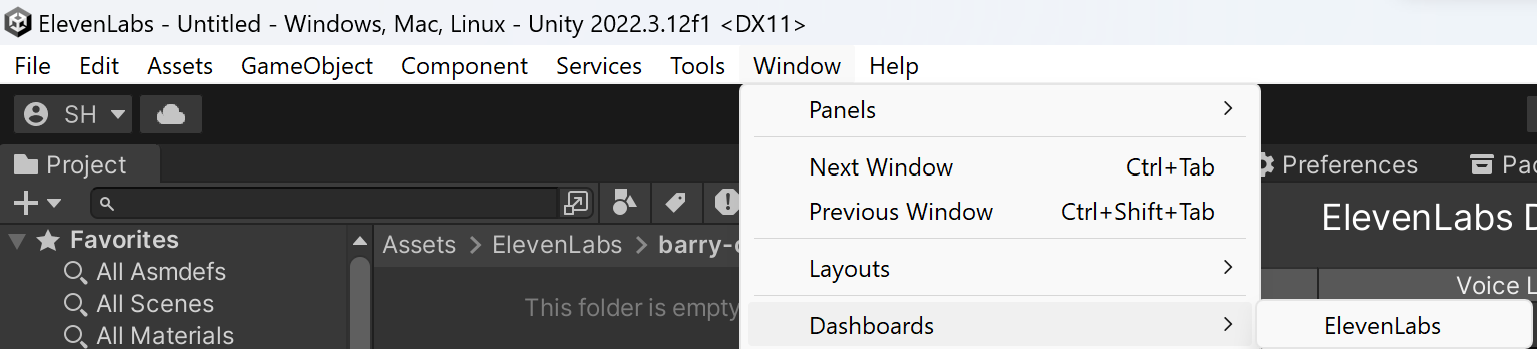
Você pode executar todas as mesmas ações no site da Elevenlabs, no editor usando o painel do Elevenlabs!
Window/Dashboards/ElevenLabs
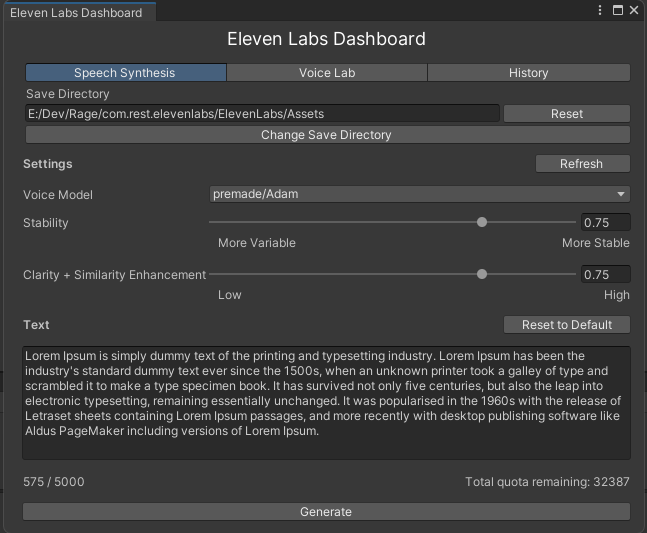
Assim como no site da Elevenlabs, você pode sintetizar novos clipes de áudio usando vozes disponíveis. Essa ferramenta o torna ainda mais útil, pois os clipes são baixados e importados automaticamente para o seu projeto, prontos para você usar!
Assim como no site da Elevenlabs, você pode gerenciar todas as suas vozes diretamente no editor.
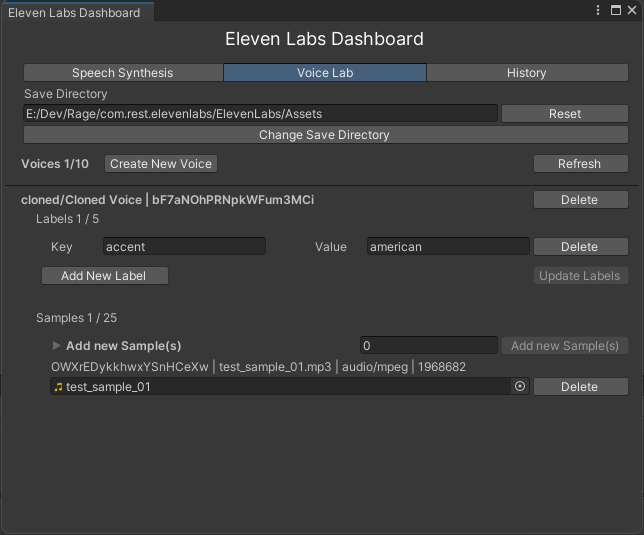
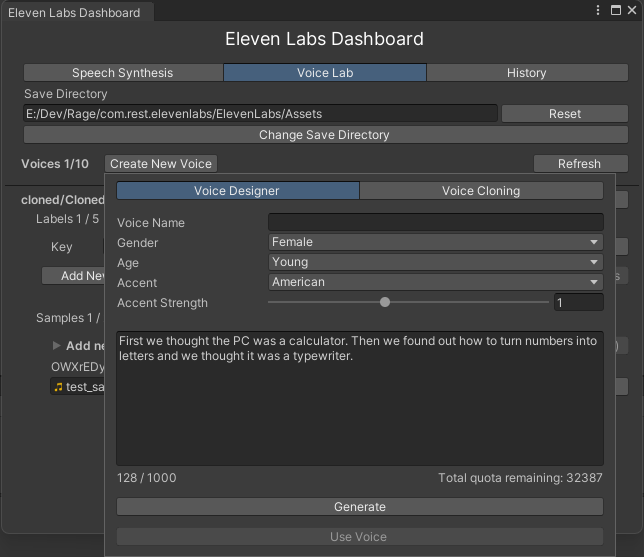
Selecionar Create New Voice exibirá um pop -up onde você pode projetar vozes totalmente novas usando modelos generativos do Elevenlabs.
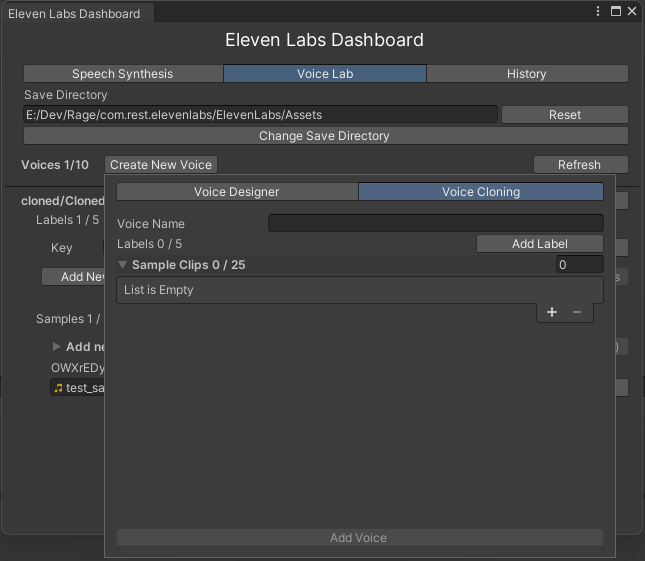
Além disso, você também pode clonar uma voz de gravações de amostra.
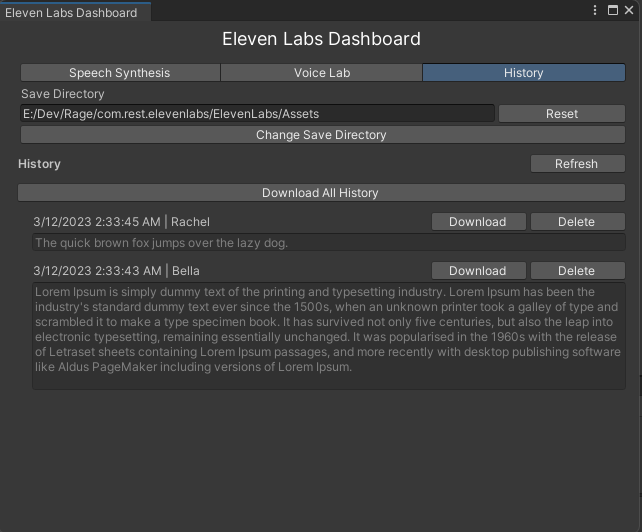
Você também tem acesso à lista completa de todas as suas amostras geradas, prontas para download.
Converter texto em fala.
 var api = new ElevenLabsClient ( ) ;
var text = "The quick brown fox jumps over the lazy dog." ;
var voice = ( await api . VoicesEndpoint . GetAllVoicesAsync ( ) ) . FirstOrDefault ( ) ;
var request = new TextToSpeechRequest ( voice , text ) ;
var voiceClip = await api . TextToSpeechEndpoint . TextToSpeechAsync ( request ) ;
audioSource . PlayOneShot ( voiceClip . AudioClip ) ;
Nota: Se você deseja salvar o clipe de voz em seu projeto, precisará copiá -lo do caminho em cache para o local especificado em seu projeto:
voiceClip . CopyIntoProject ( editorDownloadDirectory ) ; Texto do fluxo para fala.
 var api = new ElevenLabsClient ( ) ;
var text = "The quick brown fox jumps over the lazy dog." ;
var voice = ( await api . VoicesEndpoint . GetAllVoicesAsync ( ) ) . FirstOrDefault ( ) ;
var partialClips = new Queue < VoiceClip > ( ) ;
var request = new TextToSpeechRequest ( voice , message , model : Model . EnglishTurboV2 , outputFormat : OutputFormat . PCM_44100 ) ;
var voiceClip = await api . TextToSpeechEndpoint . StreamTextToSpeechAsync ( request , partialClip =>
{
    // Note: check demo scene for best practices
    // on how to handle playback with OnAudioFilterRead
    partialClips . Enqueue ( partialClip ) ;
} ) ;Acesso a vozes criadas pelo usuário ou Elevenlabs.
Obtém uma lista de vozes compartilhadas na biblioteca de voz pública.
 var api = new ElevenLabsClient ( ) ;
var results = await ElevenLabsClient . SharedVoicesEndpoint . GetSharedVoicesAsync ( ) ;
foreach ( var voice in results . Voices )
{
    Debug . Log ( $ " { voice . OwnerId } | { voice . VoiceId } | { voice . Date } | { voice . Name } " ) ;
} Obtém uma lista de todas as vozes disponíveis.
 var api = new ElevenLabsClient ( ) ;
var allVoices = await api . VoicesEndpoint . GetAllVoicesAsync ( ) ;

foreach ( var voice in allVoices )
{
    Debug . Log ( $ " { voice . Id } | { voice . Name } | similarity boost: { voice . Settings ? . SimilarityBoost } | stability: { voice . Settings ? . Stability } " ) ;
} Obtém as configurações de voz padrão global.
 var api = new ElevenLabsClient ( ) ;
var result = await api . VoicesEndpoint . GetDefaultVoiceSettingsAsync ( ) ;
Debug . Log ( $ "stability: { result . Stability } | similarity boost: { result . SimilarityBoost } " ) ; var api = new ElevenLabsClient ( ) ;
var voice = await api . VoicesEndpoint . GetVoiceAsync ( "voiceId" ) ;
Debug . Log ( $ " { voice . Id } | { voice . Name } | { voice . PreviewUrl } " ) ; Edite as configurações para uma voz específica.
 var api = new ElevenLabsClient ( ) ;
var success = await api . VoicesEndpoint . EditVoiceSettingsAsync ( voice , new VoiceSettings ( 0.7f , 0.7f ) ) ;
Debug . Log ( $ "Was successful? { success } " ) ; var api = new ElevenLabsClient ( ) ;
var labels = new Dictionary < string , string >
{
{ "accent" , "american" }
} ;
var audioSamplePaths = new List < string > ( ) ;
var voice = await api . VoicesEndpoint . AddVoiceAsync ( "Voice Name" , audioSamplePaths , labels ) ; var api = new ElevenLabsClient ( ) ;
var labels = new Dictionary < string , string >
{
{ "age" , "young" }
} ;
var audioSamplePaths = new List < string > ( ) ;
var success = await api . VoicesEndpoint . EditVoiceAsync ( voice , audioSamplePaths , labels ) ;
Debug . Log ( $ "Was successful? { success } " ) ; var api = new ElevenLabsClient ( ) ;
var success = await api . VoicesEndpoint . DeleteVoiceAsync ( voiceId ) ;
Debug . Log ( $ "Was successful? { success } " ) ; Acesso às suas amostras, criadas por você ao clonar vozes.
 var api = new ElevenLabsClient ( ) ;
var voiceClip = await api . VoicesEndpoint . DownloadVoiceSampleAsync ( voice , sample ) ; var api = new ElevenLabsClient ( ) ;
var success = await api . VoicesEndpoint . DeleteVoiceSampleAsync ( voiceId , sampleId ) ;
Debug . Log ( $ "Was successful? { success } " ) ;Os dubs forneceram arquivo de áudio ou vídeo para o determinado idioma.
 var api = new ElevenLabsClient ( ) ;
// from URI
var request = new DubbingRequest ( new Uri ( "https://youtu.be/Zo5-rhYOlNk" ) , "ja" , "en" , 1 , true ) ;
// from file
var request = new DubbingRequest ( filePath , "es" , "en" , 1 ) ;
var metadata = await api . DubbingEndpoint . DubAsync ( request , progress : new Progress < DubbingProjectMetadata > ( metadata =>
{
    switch ( metadata . Status )
    {
        case "dubbing" :
            Debug . Log ( $ "Dubbing for { metadata . DubbingId } in progress... Expected Duration: { metadata . ExpectedDurationSeconds : 0.00 } seconds" ) ;
            break ;
        case "dubbed" :
            Debug . Log ( $ "Dubbing for { metadata . DubbingId } complete in { metadata . TimeCompleted . TotalSeconds : 0.00 } seconds!" ) ;
            break ;
        default :
            Debug . Log ( $ "Status: { metadata . Status } " ) ;
            break ;
    }
} ) ) ; Retorna metadados sobre um projeto de dublagem, incluindo se ainda está em andamento ou não.
 var api = new ElevenLabsClient ( ) ;
var metadata = api . await GetDubbingProjectMetadataAsync ( "dubbing - id");Retorna o caminho de arquivo dublado baixado.
Importante
Os vídeos serão devolvidos no formato MP4 e apenas os dubs de áudio serão devolvidos no MP3.
 var dubbedClipPath = await ElevenLabsClient . DubbingEndpoint . GetDubbedFileAsync ( metadata . DubbingId , request . TargetLanguage ) ;
var dubbedClip = await Rest . DownloadAudioClipAsync ( $ "file:// { dubbedClipPath } " , AudioType . MPEG ) ;
audioSource . PlayOneShot ( dubbedClip ) ; Retorna a transcrição do dub no formato desejado.
 var srcFile = new FileInfo ( audioPath ) ;
var transcriptPath = new FileInfo ( $ " { srcFile . FullName } .dubbed. { request . TargetLanguage } .srt" ) ;
var transcriptFile = await ElevenLabsClient . DubbingEndpoint . GetTranscriptForDubAsync ( metadata . DubbingId , request . TargetLanguage ) ;
await File . WriteAllTextAsync ( transcriptPath . FullName , transcriptFile ) ; Exclui um projeto de dublagem.
 var api = new ElevenLabsClient ( ) ;
await api . DubbingEndpoint . DeleteDubbingProjectAsync ( "dubbing-id" ) ;API que converte texto em sons e usa o modelo de áudio de AI mais avançado de todos os tempos.
 var api = new ElevenLabsClient ( ) ;
var request = new SoundGenerationRequest ( "Star Wars Light Saber parry" ) ;
var clip = await api . SoundGenerationEndpoint . GenerateSoundAsync ( request ) ;Acesso aos seus clipes de áudio sintetizados anteriormente, incluindo seus metadados.
Obtenha metadados sobre todo o seu áudio gerado.
 var api = new ElevenLabsClient ( ) ;
var historyItems = await api . HistoryEndpoint . GetHistoryAsync ( ) ;

foreach ( var item in historyItems . OrderBy ( historyItem => historyItem . Date ) )
{
    Debug . Log ( $ " { item . State } { item . Date } | { item . Id } | { item . Text . Length } | { item . Text } " ) ;
}
Obtenha informações sobre um item específico.
 var api = new ElevenLabsClient ( ) ;
var historyItem = await api . HistoryEndpoint . GetHistoryItemAsync ( voiceClip . Id ) ; var api = new ElevenLabsClient ( ) ;
var voiceClip = await api . HistoryEndpoint . DownloadHistoryAudioAsync ( historyItem ) ; Downloads os últimos 100 itens históricos ou a coleção de itens especificados.
 var api = new ElevenLabsClient ( ) ;
var voiceClips = await api . HistoryEndpoint . DownloadHistoryItemsAsync ( ) ;
Nota: Para copiar os clipes diretamente para o seu projeto, você pode ligar adicionalmente:
VoiceClipUtilities . CopyIntoProject ( editorDownloadDirectory , downloadItems . ToArray ( ) ) ; var api = new ElevenLabsClient ( ) ;
var success = await api . HistoryEndpoint . DeleteHistoryItemAsync ( historyItem ) ;
Debug . Log ( $ "Was successful? { success } " ) ;Acesso às informações do seu usuário e status de assinatura.
Obtém informações sobre sua conta de usuário com o Elevenlabs.
 var api = new ElevenLabsClient ( ) ;
var userInfo = await api . UserEndpoint . GetUserInfoAsync ( ) ; Obtém informações sobre sua assinatura no Elevenlabs.
 var api = new ElevenLabsClient ( ) ;
var subscriptionInfo = await api . UserEndpoint . GetSubscriptionInfoAsync ( ) ;






