Plugin.Glypher
v5.11.2

https://docs.microsoft.com/en-us/xamarin/xamarin-forms/user-interface/text/fonts#use-a-custom-font https://docs.microsoft.com/en-us/xamarin/xamarin-forms/user-interface/text/fonts#display-font-icons
Se você estiver usando xamarin.forms 4.5.0.530 abaixo da versão, ainda faz sentido usar esse plugue.

Este plug -in estende o suporte para glifos de fonte (ícones de fonte) em aplicativos Xamarin.forms.
xmlns:fontAwesome5Free="clr-namespace:Plugin.Glypher.FontAwesome5Free;assembly=Plugin.Glypher.FontAwesome5Free"
xmlns:glypher="clr-namespace:Plugin.Glypher;assembly=Plugin.Glypher"

< Label glypher:FontGlyph.Glyph= " {x:Static fontAwesome5Free:GlyphListBrand.Fab_Bluetooth} "
       FontSize = " Large "
       TextColor = " CornflowerBlue " />

< Button glypher:FontGlyph.Glyph= " {x:Static fontAwesome5Free:GlyphListBrand.Fab_Bitcoin} "
        FontSize = " Large "
        TextColor = " IndianRed " />

< Image >
    < Image .Source>
        < FontImageSource Size = " 32 "
                         Color = " Orange "
                         glypher:FontGlyph.Glyph= " {x:Static fontAwesome5Free:GlyphListRegular.Far_Bell_Slash} " />
    </ Image .Source>
</ Image >Plugin.Glypher disponível no NUGET: https://www.nuget.org/packages/plugin.glypher Plugin.Glypher não precisa ser referência se estiver usando outro pacote.
| Pacote | Wiki | NUGET | Android | iOS |
|---|---|---|---|---|
Plugin.Glypher.FontAwesome5Free | Fonte incrível 5 grátis | Sim | Sim | |
Plugin.Glypher.FontAwesome5Pro | Fonte Awesome 5 Pro | Sim | Sim | |
Plugin.Glypher.WeatherIcons | Ícones do tempo | Sim | Sim |
| Android | iOS |
|---|---|
 | 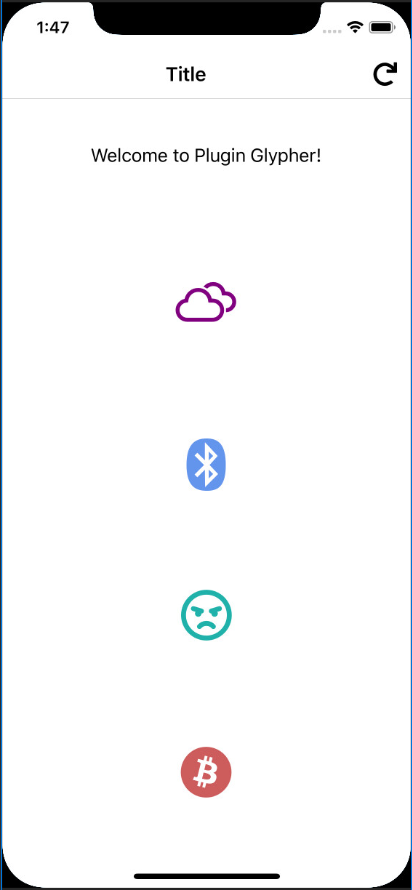 |
No Visual Studio, confirme que o Sourcelink está ativado. Além disso, desligue "apenas meu código", pois, bem, este não é o seu código.
https://docs.microsoft.com/en-us/dotnet/standard/library-guidance/sourcelink
Contribuições são bem -vindas. Sinta -se à vontade para arquivar problemas e puxar solicitações no repositório e eles serão revisados conforme o tempo permite.
Obrigado pelos ícones de Yannick Lung, Stephen Hutchings








