com.openai.unity
com.openai.unity 8.4.4

Baseado no OpenAi-Dotnet
Um pacote Openai para a unidade usar através de sua API RESTful. Desenvolvido independentemente, esta não é uma biblioteca oficial e não sou afiliado ao OpenAI. Uma conta da API OpenAI é necessária.
Todos os direitos autorais, marcas comerciais, logotipos e ativos são propriedade de seus respectivos proprietários.
Requer unidade 2021.3 LTS ou superior.
O método de instalação recomendado é embora o Unity Package Manager e o OpenUPM.
OpenUPMhttps://package.openupm.comcom.openaicom.utilities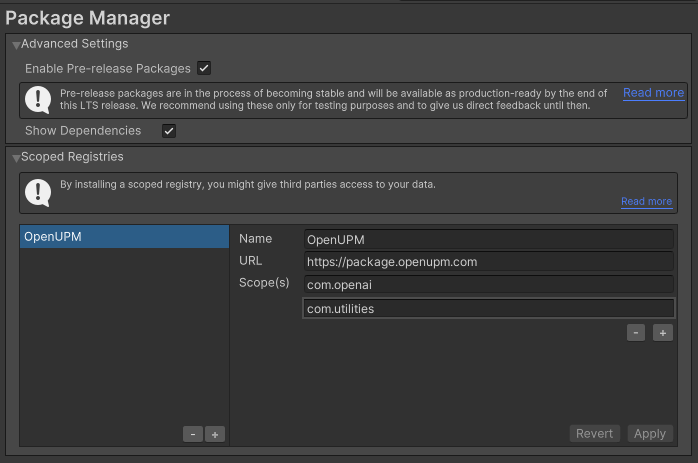
My RegistriesOpenAIhttps://github.com/RageAgainstThePixel/com.openai.unity.git#upmNota: Este repositório tem dependências de outros repositórios! Você é responsável por adicioná -los por conta própria.
Confira nossos novos documentos de API!
https://rageagainstthepixel.github.io/openai-dotnet
Existem 4 maneiras de fornecer suas chaves da API, em ordem de precedência:
Aviso
Recomendamos o uso das variáveis de ambiente para carregar a chave da API em vez de tê -la codificada com força em sua fonte. Não é recomendável usar esse método na produção, mas apenas para aceitar credenciais do usuário, testes locais e cenários de início rápido.
Você usa a OpenAIAuthentication ao inicializar a API como mostrado:
Aviso
Recomendamos o uso das variáveis de ambiente para carregar a chave da API em vez de tê -la codificada com força em sua fonte. Não é recomendável usar esse método na produção, mas apenas para aceitar credenciais do usuário, testes locais e cenários de início rápido.
var api = new OpenAIClient ( " sk-apiKey " ) ; Ou crie um objeto OpenAIAuthentication manualmente
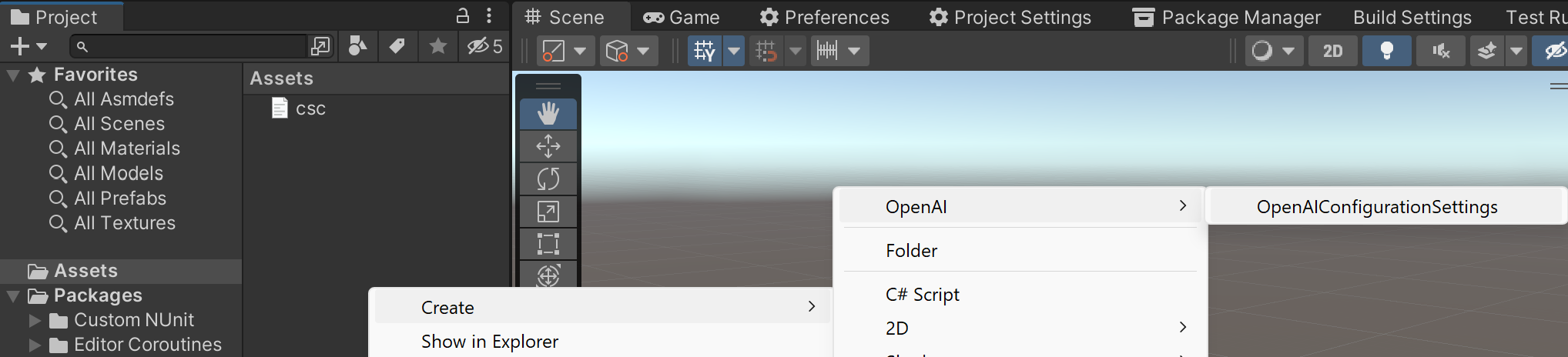
var api = new OpenAIClient ( new OpenAIAuthentication ( " sk-apiKey " , " org-yourOrganizationId " , " proj_yourProjectId " ) ) ; Você pode salvar a chave diretamente em um objeto scriptable localizado na pasta de Assets/Resources .
Você pode criar um novo usando o menu de contexto do painel do projeto e criando um novo objeto Scriptable OpenAIConfiguration .
Aviso
Cuidado com a verificação desse arquivo no controle de origem, pois outras pessoas poderão ver sua chave da API. Recomenda-se usar o OpenAI-DotNet-Proxy e autenticar usuários com seu provedor preferido de OAuth.
Tentativas de carregar as teclas da API de um arquivo de configuração, por padrão .openai no diretório atual, opcionalmente, atravessando a árvore do diretório ou no diretório inicial do usuário.
Para criar um arquivo de configuração, crie um novo arquivo de texto chamado .openai e contendo a linha:
Observação
As entradas de organização e identificação do projeto são opcionais.
{
  "apiKey" : " sk-aaaabbbbbccccddddd " ,
  "organizationId" : " org-yourOrganizationId " ,
  "projectId" : " proj_yourProjectId "
}OPENAI_API_KEY=sk-aaaabbbbbccccddddd
OPENAI_ORGANIZATION_ID=org-yourOrganizationId
OPENAI_PROJECT_ID=proj_yourProjectId Você também pode carregar o arquivo de configuração diretamente com o caminho conhecido chamando métodos estáticos na OpenAIAuthentication :
.openai no diretório especificado: var api = new OpenAIClient ( new OpenAIAuthentication ( ) . LoadFromDirectory ( " path/to/your/directory " ) ) ;.openai desde que esteja em conformidade com o formato JSON: var api = new OpenAIClient ( new OpenAIAuthentication ( ) . LoadFromPath ( " path/to/your/file.json " ) ) ; Use as variáveis de ambiente do seu sistema especificam uma chave e organização da API para usar.
OPENAI_API_KEY para sua tecla API.OPENAI_ORGANIZATION_ID para especificar uma organização.OPENAI_PROJECT_ID para especificar um projeto. var api = new OpenAIClient ( new OpenAIAuthentication ( ) . LoadFromEnvironment ( ) ) ;Você também pode optar por usar as implantações do Microsoft Azure Openai.
Você pode encontrar as informações necessárias no playground do Azure clicando no botão View Code e visualizar um URL como este:
https://{your-resource-name}.openai.azure.com/openai/deployments/{deployment-id}/chat/completions?api-version={api-version}your-resource-name é o nome do seu recurso do Azure OpenAi.deployment-id O nome da implantação que você escolheu quando implantou o modelo.api-version A versão da API a ser usada para esta operação. Isso segue o formato AAAA-MM-DD. Para configurar o cliente para usar sua implantação, você precisará passar no OpenAISettings no construtor do cliente.
 var auth = new OpenAIAuthentication ( " sk-apiKey " ) ;
var settings = new OpenAISettings ( resourceName : " your-resource-name " , deploymentId : " deployment-id " , apiVersion : " api-version " ) ;
var api = new OpenAIClient ( auth , settings ) ; Autentique -se com o MSAL como de costume e obtenha o token de acesso e use o token de acesso ao criar sua OpenAIAuthentication . Em seguida, certifique -se de definir a UseAzureActiveRectory como TRUE ao criar seus OpenAISettings .
Tutorial: App de desktop que chama APIs da Web: adquirir um token
 // get your access token using any of the MSAL methods
var accessToken = result . AccessToken ;
var auth = new OpenAIAuthentication ( accessToken ) ;
var settings = new OpenAISettings ( resourceName : " your-resource " , deploymentId : " deployment-id " , apiVersion : " api-version " , useActiveDirectoryAuthentication : true ) ;
var api = new OpenAIClient ( auth , settings ) ;Usando os pacotes OpenAI-DotNet ou com.openai.unity diretamente em seu aplicativo front-end pode expor suas chaves da API e outras informações confidenciais. Para mitigar esse risco, é recomendável configurar uma API intermediária que faça solicitações para abrir em nome do seu aplicativo front-end. Esta biblioteca pode ser utilizada para configurações de host front-end e intermediário, garantindo comunicação segura com a API do OpenAI.
No exemplo do front end, você precisará autenticar com segurança seus usuários usando seu provedor preferido do OAuth. Quando o usuário for autenticado, trocam seu token de autenticação personalizado com sua chave de API no back -end.
Siga estas etapas:
OpenAIAuthentication e passe no token personalizado com o prefixo sess- .OpenAISettings e especifique o domínio em que sua API intermediária está localizada.auth e settings para o construtor OpenAIClient ao criar a instância do cliente.Aqui está um exemplo de como configurar o front -end:
 var authToken = await LoginAsync ( ) ;
var auth = new OpenAIAuthentication ( $" sess- { authToken } " ) ;
var settings = new OpenAISettings ( domain : " api.your-custom-domain.com " ) ;
var api = new OpenAIClient ( auth , settings ) ;
Essa configuração permite que seu aplicativo front-end se comunique com segurança com o seu back-end que usará o OpenAI-Dotnet-Proxy, que encaminhará solicitações para a API do OpenAI. Isso garante que suas teclas de API do OpenAI e outras informações confidenciais permaneçam seguras durante todo o processo.
Neste exemplo, demonstramos como configurar e usar OpenAIProxy em um novo aplicativo Web ASP.NET Core. O servidor proxy lidará com as solicitações de autenticação e encaminhamento para a API OpenAI, garantindo que suas chaves da API e outras informações confidenciais permaneçam seguras.
Install-Package OpenAI-DotNet-Proxydotnet add package OpenAI-DotNet-Proxy<PackageReference Include="OpenAI-DotNet-Proxy" />AbstractAuthenticationFilter e substitua o método ValidateAuthentication . Isso implementará o IAuthenticationFilter que você usará para verificar o token da sessão do usuário em relação ao seu servidor interno.Program.cs , crie um novo aplicativo da Web proxy chamando OpenAIProxy.CreateWebApplication Method, passando seu AuthenticationFilter personalizado como um argumento de tipo.OpenAIAuthentication e OpenAIClientSettings como faria normalmente com suas chaves da API, Org ID ou Azure. public partial class Program
{
private class AuthenticationFilter : AbstractAuthenticationFilter
{
public override async Task ValidateAuthenticationAsync ( IHeaderDictionary request )
{
await Task . CompletedTask ; // remote resource call to verify token
// You will need to implement your own class to properly test
// custom issued tokens you've setup for your end users.
if ( ! request . Authorization . ToString ( ) . Contains ( TestUserToken ) )
{
throw new AuthenticationException ( " User is not authorized " ) ;
}
}
}
public static void Main ( string [ ] args )
{
var auth = OpenAIAuthentication . LoadFromEnv ( ) ;
var settings = new OpenAIClientSettings ( /* your custom settings if using Azure OpenAI */ ) ;
using var openAIClient = new OpenAIClient ( auth , settings ) ;
OpenAIProxy . CreateWebApplication < AuthenticationFilter > ( args , openAIClient ) . Run ( ) ;
}
}Depois de configurar seu servidor proxy, seus usuários finais agora podem fazer solicitações autenticadas à sua API proxy, em vez de diretamente à API do OpenAI. O servidor proxy lidará com as solicitações de autenticação e encaminhamento para a API OpenAI, garantindo que suas chaves da API e outras informações confidenciais permaneçam seguras.
Liste e descreva os vários modelos disponíveis na API. Você pode consultar a documentação dos modelos para entender quais modelos estão disponíveis e as diferenças entre eles.
Também compatibilidade com o modelo de check -out para entender quais modelos funcionam com quais pontos de extremidade.
Para especificar um modelo personalizado não predefinido nesta biblioteca:
var model = new Model ( " model-id " ) ; A API de modelos é acessada via OpenAIClient.ModelsEndpoint
Liste os modelos atualmente disponíveis e fornece informações básicas sobre cada um, como o proprietário e a disponibilidade.
 var api = new OpenAIClient ( ) ;
var models = await api . ModelsEndpoint . GetModelsAsync ( ) ;

foreach ( var model in models )
{
    Debug . Log ( model . ToString ( ) ) ;
} Recupera uma instância do modelo, fornecendo informações básicas sobre o modelo como o proprietário e as permissões.
 var api = new OpenAIClient ( ) ;
var model = await api . ModelsEndpoint . GetModelDetailsAsync ( " gpt-4o " ) ;
Debug . Log ( model . ToString ( ) ) ; Exclua um modelo de ajuste fino. Você deve ter o papel do proprietário em sua organização.
 var api = new OpenAIClient ( ) ;
var isDeleted = await api . ModelsEndpoint . DeleteFineTuneModelAsync ( " your-fine-tuned-model " ) ;
Assert . IsTrue ( isDeleted ) ;Aviso
Recurso beta. API sujeita a mudanças de quebra.
A API em tempo real permite criar experiências conversacionais multimodais de baixa latência. Atualmente, ele suporta texto e áudio como entrada e saída, além de chamadas de função.
A API de assistentes é acessada via OpenAIClient.RealtimeEndpoint
Aqui está um exemplo simples de como criar uma sessão em tempo real e enviar e receber mensagens do modelo.
 var api = new OpenAIClient ( ) ;
var cancellationTokenSource = new CancellationTokenSource ( ) ;
var tools = new List < Tool >
{
    Tool . FromFunc ( " goodbye " , ( ) =>
    {
        cancellationTokenSource . Cancel ( ) ;
        return " Goodbye! " ;
    } )
} ;
var options = new Options ( Model . GPT4oRealtime , tools : tools ) ;
using var session = await api . RealtimeEndpoint . CreateSessionAsync ( options ) ;
var responseTask = session . ReceiveUpdatesAsync < IServerEvent > ( ServerEvents , cancellationTokenSource . Token ) ;
await session . SendAsync ( new ConversationItemCreateRequest ( " Hello! " ) ) ;
await session . SendAsync ( new CreateResponseRequest ( ) ) ;
await session . SendAsync ( new InputAudioBufferAppendRequest ( new ReadOnlyMemory < byte > ( new byte [ 1024 * 4 ] ) ) , cancellationTokenSource . Token ) ;
await session . SendAsync ( new ConversationItemCreateRequest ( " GoodBye! " ) ) ;
await session . SendAsync ( new CreateResponseRequest ( ) ) ;
await responseTask ;

void ServerEvents ( IServerEvent @event )
{
    switch ( @event )
    {
        case ResponseAudioTranscriptResponse transcriptResponse :
            Debug . Log ( transcriptResponse . ToString ( ) ) ;
            break ;
        case ResponseFunctionCallArgumentsResponse functionCallResponse :
            if ( functionCallResponse . IsDone )
            {
                ToolCall toolCall = functionCallResponse ;
                toolCall . InvokeFunction ( ) ;
            }

            break ;
    }
} A biblioteca implementa a interface IClientEvent para eventos enviados pelo cliente de saída.
UpdateSessionRequest : Atualize a sessão com novas opções de sessão.InputAudioBufferAppendRequest : Anexe áudio ao buffer de áudio de entrada. (Ao contrário de outros eventos do cliente, o servidor não enviará uma resposta de confirmação a este evento).InputAudioBufferCommitRequest : Compreenda o buffer de áudio de entrada. (Quando no modo VAD do servidor, o cliente não precisa enviar este evento).InputAudioBufferClearRequest : Limpe o buffer de áudio de entrada.ConversationItemCreateRequest : Crie um novo item de conversa. Esta é a principal maneira de enviar o conteúdo do usuário para o modelo.ConversationItemTruncateRequest : envie este evento para truncar o áudio de uma mensagem de assistente anterior.ConversationItemDeleteRequest : exclua um item de conversa. Isso é útil quando você deseja remover uma mensagem do histórico de conversas.CreateResponseRequest : Crie uma resposta do modelo. Envie este evento depois de criar novos itens de conversa ou chamar chamadas de ferramentas. Isso acionará o modelo para gerar uma resposta.ResponseCancelRequest -nd este evento para cancelar uma resposta em andamento. Você pode enviar eventos do cliente a qualquer momento para o servidor chamando o método RealtimeSession.SendAsync no objeto da sessão. A chamada de envio retornará um identificador IServerEvent que melhor representa a resposta apropriada do servidor para esse evento. Isso é útil se você deseja lidar com as respostas do servidor de uma maneira mais granular.
Idealmente, porém, você pode lidar com todas as respostas do servidor com RealtimeSession.ReceiveUpdatesAsync .
Observação
O servidor não enviará uma resposta de confirmação ao evento InputAudioBufferAppendRequest .
Importante
Você também precisará enviar CreateResponseRequest para acionar o modelo para gerar uma resposta.
 var serverEvent = await session . SendAsync ( new ConversationItemCreateRequest ( " Hello! " ) ) ;
Debug . Log ( serverEvent . ToJsonString ( ) ) ;
serverEvent = await session . SendAsync ( new CreateResponseRequest ( ) ) ;
Debug . Log ( serverEvent . ToJsonString ( ) ) ; A biblioteca implementa a interface IServerEvent para eventos enviados pelo servidor recebido.
RealtimeEventError : retornado quando ocorre um erro, o que pode ser um problema de cliente ou um problema de servidor.SessionResponse : Retornado para um evento session.created e session.updated .RealtimeConversationResponse : retornado quando um novo item de conversa é criado.ConversationItemCreatedResponse : retornou quando um novo item de conversa é criado.ConversationItemInputAudioTranscriptionResponse : Retornado quando a transcrição de áudio de entrada é concluída ou falhada.ConversationItemTruncatedResponse : retornado quando um item de conversa é truncado.ConversationItemDeletedResponse : retornou quando um item de conversa é excluído.InputAudioBufferCommittedResponse : Retorno quando um buffer de áudio de entrada está comprometido, pelo cliente ou automaticamente no modo VAD do servidor.InputAudioBufferClearedResponse : retornado quando um buffer de áudio de entrada é limpo.InputAudioBufferStartedResponse : enviado pelo servidor quando no modo Server_vad para indicar que o discurso foi detectado no buffer de áudio. Isso pode acontecer sempre que o áudio é adicionado ao buffer (a menos que a fala já seja detectada). O cliente pode querer usar este evento para interromper a reprodução de áudio ou fornecer feedback visual ao usuário.InputAudioBufferStoppedResponse : Retornado no modo Server_vad quando o servidor detecta o final da fala no buffer de áudio.RealtimeResponse : retornado quando uma resposta é criada ou feita.ResponseOutputItemResponse : Retorno quando um item de saída de resposta é adicionado ou feito.ResponseContentPartResponse : Retorno quando uma parte do conteúdo de resposta é adicionada ou feita.ResponseTextResponse : Retornado quando um texto de resposta é atualizado ou feito.ResponseAudioTranscriptResponse : Retornado quando uma transcrição de áudio de resposta é atualizada ou feita.ResponseAudioResponse : Retornado quando um áudio de resposta é atualizado ou feito.ResponseFunctionCallArgumentsResponse : Retorno quando uma resposta de resposta Argumentos de chamada são atualizados ou feitos.RateLimitsResponse : retornado quando os limites da taxa são atualizados. Para receber eventos do servidor, você precisará ligar para o método RealtimeSession.ReceiveUpdatesAsync no objeto da sessão. Este método retornará uma Task que será concluída quando a sessão for fechada ou quando o token de cancelamento for acionado. Idealmente, esse método deve ser chamado uma vez e é executado durante a duração da sessão.
Observação
Você também pode receber retornos de chamada IClientEvent enviados usando a interface IRealtimeEvent em vez do IServerEvent .
 await session . ReceiveUpdatesAsync < IServerEvent > ( ServerEvents , cancellationTokenSource . Token ) ;

void ServerEvents ( IServerEvent @event )
{
    switch ( @event )
    {
        case RealtimeEventError error :
            // raised anytime an error occurs
            break ;
        case SessionResponse sessionResponse :
            // raised when a session is created or updated
            break ;
        case RealtimeConversationResponse conversationResponse :
            // raised when a new conversation is created
            break ;
        case ConversationItemCreatedResponse conversationItemCreated :
            // raised when a new conversation item is created
            break ;
        case ConversationItemInputAudioTranscriptionResponse conversationItemTranscription :
            // raised when the input audio transcription is completed or failed
            break ;
        case ConversationItemTruncatedResponse conversationItemTruncated :
            // raised when a conversation item is truncated
            break ;
        case ConversationItemDeletedResponse conversationItemDeleted :
            // raised when a conversation item is deleted
            break ;
        case InputAudioBufferCommittedResponse committedResponse :
            // raised when an input audio buffer is committed
            break ;
        case InputAudioBufferClearedResponse clearedResponse :
            // raised when an input audio buffer is cleared
            break ;
        case InputAudioBufferStartedResponse startedResponse :
            // raised when speech is detected in the audio buffer
            break ;
        case InputAudioBufferStoppedResponse stoppedResponse :
            // raised when speech stops in the audio buffer
            break ;
        case RealtimeResponse realtimeResponse :
            // raised when a response is created or done
            break ;
        case ResponseOutputItemResponse outputItemResponse :
            // raised when a response output item is added or done
            break ;
        case ResponseContentPartResponse contentPartResponse :
            // raised when a response content part is added or done
            break ;
        case ResponseTextResponse textResponse :
            // raised when a response text is updated or done
            break ;
        case ResponseAudioTranscriptResponse transcriptResponse :
            // raised when a response audio transcript is updated or done
            break ;
        case ResponseFunctionCallArgumentsResponse functionCallResponse :
            // raised when a response function call arguments are updated or done
            break ;
        case RateLimitsResponse rateLimitsResponse :
            // raised when rate limits are updated
            break ;
    }
}Aviso
Recurso beta. API sujeita a mudanças de quebra.
Crie assistentes que possam chamar modelos e usar ferramentas para executar tarefas.
A API de assistentes é acessada via OpenAIClient.AssistantsEndpoint
Retorna uma lista de assistentes.
 var api = new OpenAIClient ( ) ;
var assistantsList = await api . AssistantsEndpoint . ListAssistantsAsync ( ) ;

foreach ( var assistant in assistantsList . Items )
{
    Debug . Log ( $" { assistant } -> { assistant . CreatedAt } " ) ;
} Crie um assistente com um modelo e instruções.
 var api = new OpenAIClient ( ) ;
var request = new CreateAssistantRequest ( Model . GPT4o ) ;
var assistant = await api . AssistantsEndpoint . CreateAssistantAsync ( request ) ; Recupera um assistente.
 var api = new OpenAIClient ( ) ;
var assistant = await api . AssistantsEndpoint . RetrieveAssistantAsync ( " assistant-id " ) ;
Debug . Log ( $" { assistant } -> { assistant . CreatedAt } " ) ; Modifica um assistente.
 var api = new OpenAIClient ( ) ;
var createRequest = new CreateAssistantRequest ( Model . GPT4_Turbo ) ;
var assistant = await api . AssistantsEndpoint . CreateAssistantAsync ( createRequest ) ;
var modifyRequest = new CreateAssistantRequest ( Model . GPT4o ) ;
var modifiedAssistant = await api . AssistantsEndpoint . ModifyAssistantAsync ( assistant . Id , modifyRequest ) ;
// OR AssistantExtension for easier use!
var modifiedAssistantEx = await assistant . ModifyAsync ( modifyRequest ) ; Exclua um assistente.
 var api = new OpenAIClient ( ) ;
var isDeleted = await api . AssistantsEndpoint . DeleteAssistantAsync ( " assistant-id " ) ;
// OR AssistantExtension for easier use!
var isDeleted = await assistant . DeleteAsync ( ) ;
Assert . IsTrue ( isDeleted ) ; Observação
Os eventos de stream de assistente podem ser facilmente adicionados às chamadas de encadeamento existentes, passando pelo Func<IServerSentEvent, Task> streamEventHandler para qualquer método existente que suporta streaming.
Crie threads com os quais os assistentes possam interagir.
A API Threads é acessada via OpenAIClient.ThreadsEndpoint
Crie um thread.
 var api = new OpenAIClient ( ) ;
var thread = await api . ThreadsEndpoint . CreateThreadAsync ( ) ;
Debug . Log ( $" Create thread { thread . Id } -> { thread . CreatedAt } " ) ;
Crie um thread e execute -o em uma solicitação.
Veja também: Execução de threads
 var api = new OpenAIClient ( ) ;
var assistant = await api . AssistantsEndpoint . CreateAssistantAsync (
    new CreateAssistantRequest (
        name : " Math Tutor " ,
        instructions : " You are a personal math tutor. Answer questions briefly, in a sentence or less. " ,
        model : Model . GPT4o ) ) ;
var messages = new List < Message > { " I need to solve the equation `3x + 11 = 14`. Can you help me? " } ;
var threadRequest = new CreateThreadRequest ( messages ) ;
var run = await assistant . CreateThreadAndRunAsync ( threadRequest ) ;
Debug . Log ( $" Created thread and run: { run . ThreadId } -> { run . Id } -> { run . CreatedAt } " ) ;
Crie um thread e execute -o em uma solicitação durante os eventos de streaming.
 var api = new OpenAIClient ( ) ;
var tools = new List < Tool >
{
    Tool . GetOrCreateTool ( typeof ( WeatherService ) , nameof ( WeatherService . GetCurrentWeatherAsync ) )
} ;
var assistantRequest = new CreateAssistantRequest ( tools : tools , instructions : " You are a helpful weather assistant. Use the appropriate unit based on geographical location. " ) ;
var assistant = await api . AssistantsEndpoint . CreateAssistantAsync ( assistantRequest ) ;
ThreadResponse thread = null ;
async Task StreamEventHandler ( IServerSentEvent streamEvent )
{
    switch ( streamEvent )
    {
        case ThreadResponse threadResponse :
            thread = threadResponse ;
            break ;
        case RunResponse runResponse :
            if ( runResponse . Status == RunStatus . RequiresAction )
            {
                var toolOutputs = await assistant . GetToolOutputsAsync ( runResponse ) ;

                foreach ( var toolOutput in toolOutputs )
                {
                    Debug . Log ( $" Tool Output: { toolOutput } " ) ;
                }

                await runResponse . SubmitToolOutputsAsync ( toolOutputs , StreamEventHandler ) ;
            }
            break ;
        default :
            Debug . Log ( streamEvent . ToJsonString ( ) ) ;
            break ;
    }
}

var run = await assistant . CreateThreadAndRunAsync ( " I'm in Kuala-Lumpur, please tell me what's the temperature now? " , StreamEventHandler ) ;
run = await run . WaitForStatusChangeAsync ( ) ;
var messages = await thread . ListMessagesAsync ( ) ;
foreach ( var response in messages . Items . Reverse ( ) )
{
    Debug . Log ( $" { response . Role } : { response . PrintContent ( ) } " ) ;
} Recupera um tópico.
 var api = new OpenAIClient ( ) ;
var thread = await api . ThreadsEndpoint . RetrieveThreadAsync ( " thread-id " ) ;
// OR if you simply wish to get the latest state of a thread
thread = await thread . UpdateAsync ( ) ;
Debug . Log ( $" Retrieve thread { thread . Id } -> { thread . CreatedAt } " ) ; Modifica um thread.
Nota: Somente os metadados podem ser modificados.
 var api = new OpenAIClient ( ) ;
var thread = await api . ThreadsEndpoint . CreateThreadAsync ( ) ;
var metadata = new Dictionary < string , string >
{
    { " key " , " custom thread metadata " }
}
thread = await api . ThreadsEndpoint . ModifyThreadAsync ( thread . Id , metadata ) ;
// OR use extension method for convenience!
thread = await thread . ModifyAsync ( metadata ) ;
Debug . Log ( $" Modify thread { thread . Id } -> { thread . Metadata [ " key " ] } " ) ; Exclua um tópico.
 var api = new OpenAIClient ( ) ;
var isDeleted = await api . ThreadsEndpoint . DeleteThreadAsync ( " thread-id " ) ;
// OR use extension method for convenience!
var isDeleted = await thread . DeleteAsync ( ) ;
Assert . IsTrue ( isDeleted ) ; Crie mensagens dentro de threads.
Retorna uma lista de mensagens para um determinado thread.
 var api = new OpenAIClient ( ) ;
var messageList = await api . ThreadsEndpoint . ListMessagesAsync ( " thread-id " ) ;
// OR use extension method for convenience!
var messageList = await thread . ListMessagesAsync ( ) ;

foreach ( var message in messageList . Items )
{
    Debug . Log ( $" { message . Id } : { message . Role } : { message . PrintContent ( ) } " ) ;
}
Crie uma mensagem.
 var api = new OpenAIClient ( ) ;
var thread = await api . ThreadsEndpoint . CreateThreadAsync ( ) ;
var request = new CreateMessageRequest ( " Hello world! " ) ;
var message = await api . ThreadsEndpoint . CreateMessageAsync ( thread . Id , request ) ;
// OR use extension method for convenience!
var message = await thread . CreateMessageAsync ( " Hello World! " ) ;
Debug . Log ( $" { message . Id } : { message . Role } : { message . PrintContent ( ) } " ) ;
Recuperar uma mensagem.
 var api = new OpenAIClient ( ) ;
var message = await api . ThreadsEndpoint . RetrieveMessageAsync ( " thread-id " , " message-id " ) ;
// OR use extension methods for convenience!
var message = await thread . RetrieveMessageAsync ( " message-id " ) ;
var message = await message . UpdateAsync ( ) ;
Debug . Log ( $" { message . Id } : { message . Role } : { message . PrintContent ( ) } " ) ;
Modificar uma mensagem.
Nota: Somente os metadados da mensagem podem ser modificados.
 var api = new OpenAIClient ( ) ;
var metadata = new Dictionary < string , string >
{
    { " key " , " custom message metadata " }
} ;
var message = await api . ThreadsEndpoint . ModifyMessageAsync ( " thread-id " , " message-id " , metadata ) ;
// OR use extension method for convenience!
var message = await message . ModifyAsync ( metadata ) ;
Debug . Log ( $" Modify message metadata: { message . Id } -> { message . Metadata [ " key " ] } " ) ; Representa uma execução executada em um thread.
Retorna uma lista de execuções pertencentes a um tópico.
 var api = new OpenAIClient ( ) ;
var runList = await api . ThreadsEndpoint . ListRunsAsync ( " thread-id " ) ;
// OR use extension method for convenience!
var runList = await thread . ListRunsAsync ( ) ;

foreach ( var run in runList . Items )
{
    Debug . Log ( $" [ { run . Id } ] { run . Status } | { run . CreatedAt } " ) ;
}
Crie uma corrida.
 var api = new OpenAIClient ( ) ;
var assistant = await api . AssistantsEndpoint . CreateAssistantAsync (
    new CreateAssistantRequest (
        name : " Math Tutor " ,
        instructions : " You are a personal math tutor. Answer questions briefly, in a sentence or less. " ,
        model : Model . GPT4o ) ) ;
var thread = await api . ThreadsEndpoint . CreateThreadAsync ( ) ;
var message = await thread . CreateMessageAsync ( " I need to solve the equation `3x + 11 = 14`. Can you help me? " ) ;
var run = await thread . CreateRunAsync ( assistant ) ;
Debug . Log ( $" [ { run . Id } ] { run . Status } | { run . CreatedAt } " ) ;
Crie uma corrida e transmita os eventos.
 var api = new OpenAIClient ( ) ;
var assistant = await api . AssistantsEndpoint . CreateAssistantAsync (
    new CreateAssistantRequest (
        name : " Math Tutor " ,
        instructions : " You are a personal math tutor. Answer questions briefly, in a sentence or less. Your responses should be formatted in JSON. " ,
        model : Model . GPT4o ,
        responseFormat : ChatResponseFormat . Json ) ) ;
var thread = await api . ThreadsEndpoint . CreateThreadAsync ( ) ;
var message = await thread . CreateMessageAsync ( " I need to solve the equation `3x + 11 = 14`. Can you help me? " ) ;
var run = await thread . CreateRunAsync ( assistant , async streamEvent =>
{
    Debug . Log ( streamEvent . ToJsonString ( ) ) ;
    await Task . CompletedTask ;
} ) ;
var messages = await thread . ListMessagesAsync ( ) ;

foreach ( var response in messages . Items . Reverse ( ) )
{
    Debug . Log ( $" { response . Role } : { response . PrintContent ( ) } " ) ;
} Recupera uma corrida.
 var api = new OpenAIClient ( ) ;
var run = await api . ThreadsEndpoint . RetrieveRunAsync ( " thread-id " , " run-id " ) ;
// OR use extension method for convenience!
var run = await thread . RetrieveRunAsync ( " run-id " ) ;
var run = await run . UpdateAsync ( ) ;
Debug . Log ( $" [ { run . Id } ] { run . Status } | { run . CreatedAt } " ) ; Modifica uma corrida.
Nota: Somente os metadados podem ser modificados.
 var api = new OpenAIClient ( ) ;
var metadata = new Dictionary < string , string >
{
    { " key " , " custom run metadata " }
} ;
var run = await api . ThreadsEndpoint . ModifyRunAsync ( " thread-id " , " run-id " , metadata ) ;
// OR use extension method for convenience!
var run = await run . ModifyAsync ( metadata ) ;
Debug . Log ( $" Modify run { run . Id } -> { run . Metadata [ " key " ] } " ) ; Quando uma execução possui o status: requires_action e required_action.type é submit_tool_outputs , esse terminal pode ser usado para enviar as saídas das chamadas da ferramenta depois de todas elas são concluídas. Todas as saídas devem ser enviadas em uma única solicitação.
Observação
Consulte Criar exemplo de thread e executar o exemplo de como transmitir eventos de saída de ferramentas.
 var api = new OpenAIClient ( ) ;
var tools = new List < Tool >
{
    // Use a predefined tool
    Tool . Retrieval , Tool . CodeInterpreter ,
    // Or create a tool from a type and the name of the method you want to use for function calling
    Tool . GetOrCreateTool ( typeof ( WeatherService ) , nameof ( WeatherService . GetCurrentWeatherAsync ) ) ,
    // Pass in an instance of an object to call a method on it
    Tool . GetOrCreateTool ( api . ImagesEndPoint , nameof ( ImagesEndpoint . GenerateImageAsync ) ) ,
    // Define func<,> callbacks
    Tool . FromFunc ( " name_of_func " , ( ) => { /* callback function */ } ) ,
    Tool . FromFunc < T1 , T2 , TResult > ( " func_with_multiple_params " , ( t1 , t2 ) => { /* logic that calculates return value */ return tResult ; } )
} ;
var assistantRequest = new CreateAssistantRequest ( tools : tools , instructions : " You are a helpful weather assistant. Use the appropriate unit based on geographical location. " ) ;
var testAssistant = await api . AssistantsEndpoint . CreateAssistantAsync ( assistantRequest ) ;
var run = await testAssistant . CreateThreadAndRunAsync ( " I'm in Kuala-Lumpur, please tell me what's the temperature now? " ) ;
// waiting while run is Queued and InProgress
run = await run . WaitForStatusChangeAsync ( ) ;

// Invoke all of the tool call functions and return the tool outputs.
var toolOutputs = await testAssistant . GetToolOutputsAsync ( run . RequiredAction . SubmitToolOutputs . ToolCalls ) ;

foreach ( var toolOutput in toolOutputs )
{
    Debug . Log ( $" tool call output: { toolOutput . Output } " ) ;
}
// submit the tool outputs
run = await run . SubmitToolOutputsAsync ( toolOutputs ) ;
// waiting while run in Queued and InProgress
run = await run . WaitForStatusChangeAsync ( ) ;
var messages = await run . ListMessagesAsync ( ) ;

foreach ( var message in messages . Items . OrderBy ( response => response . CreatedAt ) )
{
    Debug . Log ( $" { message . Role } : { message . PrintContent ( ) } " ) ;
} Saídas estruturadas é a evolução do modo JSON. Enquanto ambos garantem que o JSON válido seja produzido, apenas saídas estruturadas garantem adesão ao esquema.
Importante
finish_reason estiver com o comprimento, o que indica que a geração excedeu o max_tokens ou a conversa excedeu o limite do token. Para se proteger contra isso, verifique finish_reason antes de analisar a resposta.Primeiro defina a estrutura de suas respostas. Estes serão usados como seu esquema. Esses são os objetos aos quais você desestimizará; portanto, use modelos de objetos JSON padrão.
 public class MathResponse
{
    [ JsonProperty ( " steps " ) ]
    public IReadOnlyList < MathStep > Steps { get ; private set ; }

    [ JsonProperty ( " final_answer " ) ]
    public string FinalAnswer { get ; private set ; }
}

public class MathStep
{
    [ JsonProperty ( " explanation " ) ]
    public string Explanation { get ; private set ; }

    [ JsonProperty ( " output " ) ]
    public string Output { get ; private set ; }
}
Para usar, basta especificar o tipo MathResponse como uma restrição genérica em um CreateAssistantAsync , CreateRunAsync ou CreateThreadAndRunAsync .
 var api = new OpenAIClient ( ) ;
var assistant = await api . AssistantsEndpoint . CreateAssistantAsync < MathResponse > (
    new CreateAssistantRequest (
        name : " Math Tutor " ,
        instructions : " You are a helpful math tutor. Guide the user through the solution step by step. " ,
        model : " gpt-4o-2024-08-06 " ) ) ;
ThreadResponse thread = null ;

try
{
    async Task StreamEventHandler ( IServerSentEvent @event )
    {
        try
        {
            switch ( @event )
            {
                case MessageResponse message :
                    if ( message . Status != MessageStatus . Completed )
                    {
                        Debug . Log ( @event . ToJsonString ( ) ) ;
                        break ;
                    }

                    var mathResponse = message . FromSchema < MathResponse > ( ) ;

                    for ( var i = 0 ; i < mathResponse . Steps . Count ; i ++ )
                    {
                        var step = mathResponse . Steps [ i ] ;
                        Debug . Log ( $" Step { i } : { step . Explanation } " ) ;
                        Debug . Log ( $" Result: { step . Output } " ) ;
                    }

                    Debug . Log ( $" Final Answer: { mathResponse . FinalAnswer } " ) ;
                    break ;
                default :
                    Debug . Log ( @event . ToJsonString ( ) ) ;
                    break ;
            }
        }
        catch ( Exception e )
        {
            Debug . Log ( e ) ;
            throw ;
        }

        await Task . CompletedTask ;
    }

    var run = await assistant . CreateThreadAndRunAsync ( " how can I solve 8x + 7 = -23 " , StreamEventHandler ) ;
    thread = await run . GetThreadAsync ( ) ;
    run = await run . WaitForStatusChangeAsync ( ) ;
    Debug . Log ( $" Created thread and run: { run . ThreadId } -> { run . Id } -> { run . CreatedAt } " ) ;
    var messages = await thread . ListMessagesAsync ( ) ;

    foreach ( var response in messages . Items . OrderBy ( response => response . CreatedAt ) )
    {
        Debug . Log ( $" { response . Role } : { response . PrintContent ( ) } " ) ;
    }
}
finally
{
    await assistant . DeleteAsync ( deleteToolResources : thread == null ) ;

    if ( thread != null )
    {
        var isDeleted = await thread . DeleteAsync ( deleteToolResources : true ) ;
    }
}
Você também pode criar manualmente a String JSON Schema JSON, mas será responsável por deseralizar seus dados de resposta:
 var api = new OpenAIClient ( ) ;
var mathSchema = new JsonSchema ( " math_response " , @"
{
  ""type"": ""object"",
  ""properties"": {
    ""steps"": {
      ""type"": ""array"",
      ""items"": {
        ""type"": ""object"",
        ""properties"": {
          ""explanation"": {
            ""type"": ""string""
          },
          ""output"": {
            ""type"": ""string""
          }
        },
        ""required"": [
          ""explanation"",
          ""output""
        ],
        ""additionalProperties"": false
      }
    },
    ""final_answer"": {
      ""type"": ""string""
    }
  },
  ""required"": [
    ""steps"",
    ""final_answer""
  ],
  ""additionalProperties"": false
}" ) ;
var assistant = await api . AssistantsEndpoint . CreateAssistantAsync (
    new CreateAssistantRequest (
        name : " Math Tutor " ,
        instructions : " You are a helpful math tutor. Guide the user through the solution step by step. " ,
        model : " gpt-4o-2024-08-06 " ,
        jsonSchema : mathSchema ) ) ;
ThreadResponse thread = null ;

try
{
    var run = await assistant . CreateThreadAndRunAsync ( " how can I solve 8x + 7 = -23 " ,
        async @event =>
        {
            Debug . Log ( @event . ToJsonString ( ) ) ;
            await Task . CompletedTask ;
        } ) ;
    thread = await run . GetThreadAsync ( ) ;
    run = await run . WaitForStatusChangeAsync ( ) ;
    Debug . Log ( $" Created thread and run: { run . ThreadId } -> { run . Id } -> { run . CreatedAt } " ) ;
    var messages = await thread . ListMessagesAsync ( ) ;

    foreach ( var response in messages . Items )
    {
        Debug . Log ( $" { response . Role } : { response . PrintContent ( ) } " ) ;
    }
}
finally
{
    await assistant . DeleteAsync ( deleteToolResources : thread == null ) ;

    if ( thread != null )
    {
        var isDeleted = await thread . DeleteAsync ( deleteToolResources : true ) ;
        Assert . IsTrue ( isDeleted ) ;
    }
} Retorna uma lista de etapas de execução pertencentes a uma corrida.
 var api = new OpenAIClient ( ) ;
var runStepList = await api . ThreadsEndpoint . ListRunStepsAsync ( " thread-id " , " run-id " ) ;
// OR use extension method for convenience!
var runStepList = await run . ListRunStepsAsync ( ) ;

foreach ( var runStep in runStepList . Items )
{
    Debug . Log ( $" [ { runStep . Id } ] { runStep . Status } { runStep . CreatedAt } -> { runStep . ExpiresAt } " ) ;
} Recupera uma etapa de execução.
 var api = new OpenAIClient ( ) ;
var runStep = await api . ThreadsEndpoint . RetrieveRunStepAsync ( " thread-id " , " run-id " , " step-id " ) ;
// OR use extension method for convenience!
var runStep = await run . RetrieveRunStepAsync ( " step-id " ) ;
var runStep = await runStep . UpdateAsync ( ) ;
Debug . Log ( $" [ { runStep . Id } ] { runStep . Status } { runStep . CreatedAt } -> { runStep . ExpiresAt } " ) ; Cancela uma corrida que está in_progress .
 var api = new OpenAIClient ( ) ;
var isCancelled = await api . ThreadsEndpoint . CancelRunAsync ( " thread-id " , " run-id " ) ;
// OR use extension method for convenience!
var isCancelled = await run . CancelAsync ( ) ;
Assert . IsTrue ( isCancelled ) ; As lojas vetoriais são usadas para armazenar arquivos para uso pela ferramenta file_search .
A API do Vector Stores é acessada via OpenAIClient.VectorStoresEndpoint
Retorna uma lista de lojas vetoriais.
 var api = new OpenAIClient ( ) ;
var vectorStores = await api . VectorStoresEndpoint . ListVectorStoresAsync ( ) ;

foreach ( var vectorStore in vectorStores . Items )
{
    Debug . Log ( vectorStore ) ;
}
Crie uma loja de vetores.
 var api = new OpenAIClient ( ) ;
var createVectorStoreRequest = new CreateVectorStoreRequest ( " test-vector-store " ) ;
var vectorStore = await api . VectorStoresEndpoint . CreateVectorStoreAsync ( createVectorStoreRequest ) ;
Debug . Log ( vectorStore ) ; Recupera uma loja de vetores.
 var api = new OpenAIClient ( ) ;
var vectorStore = await api . VectorStoresEndpoint . GetVectorStoreAsync ( " vector-store-id " ) ;
Debug . Log ( vectorStore ) ; Modifica uma loja de vetores.
 var api = new OpenAIClient ( ) ;
var metadata = new Dictionary < string , object > { { " Test " , DateTime . UtcNow } } ;
var vectorStore = await api . VectorStoresEndpoint . ModifyVectorStoreAsync ( " vector-store-id " , metadata : metadata ) ;
Debug . Log ( vectorStore ) ;
Exclua uma loja de vetores.
 var api = new OpenAIClient ( ) ;
var isDeleted = await api . VectorStoresEndpoint . DeleteVectorStoreAsync ( " vector-store-id " ) ;
Assert . IsTrue ( isDeleted ) ; Os arquivos do Vector Store representam arquivos dentro de uma loja de vetores.
Retorna uma lista de arquivos do Vector Store.
 var api = new OpenAIClient ( ) ;
var files = await api . VectorStoresEndpoint . ListVectorStoreFilesAsync ( " vector-store-id " ) ;

foreach ( var file in vectorStoreFiles . Items )
{
    Debug . Log ( file ) ;
}
Crie um arquivo do Vector Store anexando um arquivo a um loja de vetores.
 var api = new OpenAIClient ( ) ;
var file = await api . VectorStoresEndpoint . CreateVectorStoreFileAsync ( " vector-store-id " , " file-id " , new ChunkingStrategy ( ChunkingStrategyType . Static ) ) ;
Debug . Log ( file ) ; Recupera um arquivo de loja de vetores.
 var api = new OpenAIClient ( ) ;
var file = await api . VectorStoresEndpoint . GetVectorStoreFileAsync ( " vector-store-id " , " vector-store-file-id " ) ;
Debug . Log ( file ) ; Exclua um arquivo de loja de vetores. Isso removerá o arquivo do loja de vetores, mas o próprio arquivo não será excluído. Para excluir o arquivo, use o terminal de exclusão do arquivo.
 var api = new OpenAIClient ( ) ;
var isDeleted = await api . VectorStoresEndpoint . DeleteVectorStoreFileAsync ( " vector-store-id " , vectorStoreFile ) ;
Assert . IsTrue ( isDeleted ) ; Os arquivos do Vector Store representam arquivos dentro de uma loja de vetores.
Crie um lote de arquivo de loja de vetores.
 var api = new OpenAIClient ( ) ;
var files = new List < string > { " file_id_1 " , " file_id_2 " } ;
var vectorStoreFileBatch = await api . VectorStoresEndpoint . CreateVectorStoreFileBatchAsync ( " vector-store-id " , files ) ;
Debug . Log ( vectorStoreFileBatch ) ; Recupera um lote de arquivo de loja de vetores.
 var api = new OpenAIClient ( ) ;
var vectorStoreFileBatch = await api . VectorStoresEndpoint . GetVectorStoreFileBatchAsync ( " vector-store-id " , " vector-store-file-batch-id " ) ;
// you can also use convenience methods!
vectorStoreFileBatch = await vectorStoreFileBatch . UpdateAsync ( ) ;
vectorStoreFileBatch = await vectorStoreFileBatch . WaitForStatusChangeAsync ( ) ; Retorna uma lista de arquivos do Vector Store em um lote.
 var api = new OpenAIClient ( ) ;
var files = await api . VectorStoresEndpoint . ListVectorStoreBatchFilesAsync ( " vector-store-id " , " vector-store-file-batch-id " ) ;

foreach ( var file in files . Items )
{
    Debug . Log ( file ) ;
}
Cancelar um lote de arquivo de loja de vetores. Isso tenta cancelar o processamento de arquivos neste lote o mais rápido possível.
 var api = new OpenAIClient ( ) ;
var isCancelled = await api . VectorStoresEndpoint . CancelVectorStoreFileBatchAsync ( " vector-store-id " , " vector-store-file-batch-id " ) ;Dada uma conversa de bate -papo, o modelo retornará uma resposta de conclusão de bate -papo.
A API de bate -papo é acessada via OpenAIClient.ChatEndpoint
Cria uma conclusão para a mensagem de bate -papo
 var api = new OpenAIClient ( ) ;
var messages = new List < Message >
{
    new Message ( Role . System , " You are a helpful assistant. " ) ,
    new Message ( Role . User , " Who won the world series in 2020? " ) ,
    new Message ( Role . Assistant , " The Los Angeles Dodgers won the World Series in 2020. " ) ,
    new Message ( Role . User , " Where was it played? " ) ,
} ;
var chatRequest = new ChatRequest ( messages , Model . GPT4o ) ;
var response = await api . ChatEndpoint . GetCompletionAsync ( chatRequest ) ;
var choice = response . FirstChoice ;
Debug . Log ( $" [ { choice . Index } ] { choice . Message . Role } : { choice . Message } | Finish Reason: { choice . FinishReason } " ) ; var api = new OpenAIClient ( ) ;
var messages = new List < Message >
{
new Message ( Role . System , " You are a helpful assistant. " ) ,
new Message ( Role . User , " Who won the world series in 2020? " ) ,
new Message ( Role . Assistant , " The Los Angeles Dodgers won the World Series in 2020. " ) ,
new Message ( Role . User , " Where was it played? " ) ,
} ;
var chatRequest = new ChatRequest ( messages ) ;
var response = await api . ChatEndpoint . StreamCompletionAsync ( chatRequest , async partialResponse =>
{
Debug . Log ( partialResponse . FirstChoice . Delta . ToString ( ) ) ;
await Task . CompletedTask ;
} ) ;
var choice = response . FirstChoice ;
Debug . Log ( $" [ { choice . Index } ] { choice . Message . Role } : { choice . Message } | Finish Reason: { choice . FinishReason } " ) ; var api = new OpenAIClient ( ) ;
var messages = new List < Message >
{
new ( Role . System , " You are a helpful weather assistant. Always prompt the user for their location. " ) ,
new Message ( Role . User , " What's the weather like today? " ) ,
} ;
foreach ( var message in messages )
{
Debug . Log ( $" { message . Role } : { message } " ) ;
}
// Define the tools that the assistant is able to use:
// 1. Get a list of all the static methods decorated with FunctionAttribute
var tools = Tool . GetAllAvailableTools ( includeDefaults : false , forceUpdate : true , clearCache : true ) ;
// 2. Define a custom list of tools:
var tools = new List < Tool >
{
Tool . GetOrCreateTool ( objectInstance , " TheNameOfTheMethodToCall " ) ,
Tool . FromFunc ( " a_custom_name_for_your_function " , ( ) => { /* Some logic to run */ } )
} ;
var chatRequest = new ChatRequest ( messages , tools : tools , toolChoice : " auto " ) ;
var response = await api . ChatEndpoint . GetCompletionAsync ( chatRequest ) ;
messages . Add ( response . FirstChoice . Message ) ;
Debug . Log ( $" { response . FirstChoice . Message . Role } : { response . FirstChoice } | Finish Reason: { response . FirstChoice . FinishReason } " ) ;
var locationMessage = new Message ( Role . User , " I'm in Glasgow, Scotland " ) ;
messages . Add ( locationMessage ) ;
Debug . Log ( $" { locationMessage . Role } : { locationMessage . Content } " ) ;
chatRequest = new ChatRequest ( messages , tools : tools , toolChoice : " auto " ) ;
response = await api . ChatEndpoint . GetCompletionAsync ( chatRequest ) ;
messages . Add ( response . FirstChoice . Message ) ;
if ( response . FirstChoice . FinishReason == " stop " )
{
Debug . Log ( $" { response . FirstChoice . Message . Role } : { response . FirstChoice } | Finish Reason: { response . FirstChoice . FinishReason } " ) ;
var unitMessage = new Message ( Role . User , " Fahrenheit " ) ;
messages . Add ( unitMessage ) ;
Debug . Log ( $" { unitMessage . Role } : { unitMessage . Content } " ) ;
chatRequest = new ChatRequest ( messages , tools : tools , toolChoice : " auto " ) ;
response = await api . ChatEndpoint . GetCompletionAsync ( chatRequest ) ;
}
// iterate over all tool calls and invoke them
foreach ( var toolCall in response . FirstChoice . Message . ToolCalls )
{
Debug . Log ( $" { response . FirstChoice . Message . Role } : { toolCall . Function . Name } | Finish Reason: { response . FirstChoice . FinishReason } " ) ;
Debug . Log ( $" { toolCall . Function . Arguments } " ) ;
// Invokes function to get a generic json result to return for tool call.
var functionResult = await toolCall . InvokeFunctionAsync ( ) ;
// If you know the return type and do additional processing you can use generic overload
var functionResult = await toolCall . InvokeFunctionAsync < string > ( ) ;
messages . Add ( new Message ( toolCall , functionResult ) ) ;
Debug . Log ( $" { Role . Tool } : { functionResult } " ) ;
}
// System: You are a helpful weather assistant.
// User: What's the weather like today?
// Assistant: Sure, may I know your current location? | Finish Reason: stop
// User: I'm in Glasgow, Scotland
// Assistant: GetCurrentWeather | Finish Reason: tool_calls
// {
// "location": "Glasgow, Scotland",
// "unit": "celsius"
// }
// Tool: The current weather in Glasgow, Scotland is 39°C. Aviso
Recurso beta. API sujeita a mudanças de quebra.
 var api = new OpenAIClient ( ) ;
var messages = new List < Message >
{
    new Message ( Role . System , " You are a helpful assistant. " ) ,
    new Message ( Role . User , new List < Content >
    {
        " What's in this image? " ,
        new ImageUrl ( " https://upload.wikimedia.org/wikipedia/commons/thumb/d/dd/Gfp-wisconsin-madison-the-nature-boardwalk.jpg/2560px-Gfp-wisconsin-madison-the-nature-boardwalk.jpg " , ImageDetail . Low )
    } )
} ;
var chatRequest = new ChatRequest ( messages , model : Model . GPT4o ) ;
var response = await api . ChatEndpoint . GetCompletionAsync ( chatRequest ) ;
Debug . Log ( $" { response . FirstChoice . Message . Role } : { response . FirstChoice . Message . Content } | Finish Reason: { response . FirstChoice . FinishDetails } " ) ;
Você pode até passar em uma Texture2D !
 var api = new OpenAIClient ( ) ;
var messages = new List < Message >
{
    new Message ( Role . System , " You are a helpful assistant. " ) ,
    new Message ( Role . User , new List < Content >
    {
        " What's in this image? " ,
        texture
    } )
} ;
var chatRequest = new ChatRequest ( messages , model : Model . GPT4o ) ;
var result = await api . ChatEndpoint . GetCompletionAsync ( chatRequest ) ;
Debug . Log ( $" { result . FirstChoice . Message . Role } : { result . FirstChoice } | Finish Reason: { result . FirstChoice . FinishDetails } " ) ; var api = new OpenAIClient ( ) ;
var messages = new List < Message >
{
new Message ( Role . System , " You are a helpful assistant. " ) ,
new Message ( Role . User , " Is a golden retriever a good family dog? " )
} ;
var chatRequest = new ChatRequest ( messages , Model . GPT4oAudio , audioConfig : Voice . Alloy ) ;
var response = await api . ChatEndpoint . GetCompletionAsync ( chatRequest ) ;
Debug . Log ( $" { response . FirstChoice . Message . Role } : { response . FirstChoice } | Finish Reason: { response . FirstChoice . FinishDetails } " ) ;
audioSource . PlayOneShot ( response . FirstChoice . Message . AudioOutput . AudioClip ) ; A evolução do modo JSON. Enquanto ambos garantem que o JSON válido seja produzido, apenas saídas estruturadas garantem adesão ao esquema.
Importante
finish_reason estiver com o comprimento, o que indica que a geração excedeu o max_tokens ou a conversa excedeu o limite do token. Para se proteger contra isso, verifique finish_reason antes de analisar a resposta.Primeiro defina a estrutura de suas respostas. Estes serão usados como seu esquema. Esses são os objetos aos quais você desestimizará; portanto, use modelos de objetos JSON padrão.
 public class MathResponse
{
    [ JsonProperty ( " steps " ) ]
    public IReadOnlyList < MathStep > Steps { get ; private set ; }

    [ JsonProperty ( " final_answer " ) ]
    public string FinalAnswer { get ; private set ; }
}

public class MathStep
{
    [ JsonProperty ( " explanation " ) ]
    public string Explanation { get ; private set ; }

    [ JsonProperty ( " output " ) ]
    public string Output { get ; private set ; }
}
Para usar, basta especificar o tipo MathResponse como uma restrição genérica ao solicitar uma conclusão.
 var api = new OpenAIClient ( ) ;
var messages = new List < Message >
{
    new ( Role . System , " You are a helpful math tutor. Guide the user through the solution step by step. " ) ,
    new ( Role . User , " how can I solve 8x + 7 = -23 " )
} ;

var chatRequest = new ChatRequest ( messages , model : " gpt-4o-2024-08-06 " ) ;
var ( mathResponse , chatResponse ) = await api . ChatEndpoint . GetCompletionAsync < MathResponse > ( chatRequest ) ;

for ( var i = 0 ; i < mathResponse . Steps . Count ; i ++ )
{
    var step = mathResponse . Steps [ i ] ;
    Debug . Log ( $" Step { i } : { step . Explanation } " ) ;
    Debug . Log ( $" Result: { step . Output } " ) ;
}

Debug . Log ( $" Final Answer: { mathResponse . FinalAnswer } " ) ;
chatResponse . GetUsage ( ) ; Importante
finish_reason estiver com o comprimento, o que indica que a geração excedeu o max_tokens ou a conversa excedeu o limite do token. Para se proteger contra isso, verifique finish_reason antes de analisar a resposta. var messages = new List < Message >
{
new Message ( Role . System , " You are a helpful assistant designed to output JSON. " ) ,
new Message ( Role . User , " Who won the world series in 2020? " ) ,
} ;
var chatRequest = new ChatRequest ( messages , Model . GPT4o , responseFormat : ChatResponseFormat . Json ) ;
var response = await api . ChatEndpoint . GetCompletionAsync ( chatRequest ) ;
foreach ( var choice in response . Choices )
{
Debug . Log ( $" [ { choice . Index } ] { choice . Message . Role } : { choice } | Finish Reason: { choice . FinishReason } " ) ;
}
response . GetUsage ( ) ;Converte áudio em texto.
A API de áudio é acessada via OpenAIClient.AudioEndpoint
Gera áudio a partir do texto de entrada.
 var api = new OpenAIClient ( ) ;
var request = new SpeechRequest ( " Hello world! " ) ;
var speechClip = await api . AudioEndpoint . GetSpeechAsync ( request ) ;
audioSource . PlayOneShot ( speechClip ) ;
Debug . Log ( speechClip ) ; Gerar áudio transmitido a partir do texto de entrada.
 var api = new OpenAIClient ( ) ;
var request = new SpeechRequest ( " Hello world! " , responseFormat : SpeechResponseFormat . PCM ) ;
var speechClip = await api . AudioEndpoint . GetSpeechAsync ( request , partialClip =>
{
    audioSource . PlayOneShot ( partialClip ) ;
} ) ;
Debug . Log ( speechClip ) ;
Observação
Confira qualquer uma das cenas de demonstração para obter as melhores práticas sobre como lidar com a reprodução com OnAudioFilterRead .
Transcreve áudio para o idioma de entrada.
 var api = new OpenAIClient ( ) ;
var request = new AudioTranscriptionRequest ( audioClip , language : " en " ) ;
var result = await api . AudioEndpoint . CreateTranscriptionAsync ( request ) ;
Debug . Log ( result ) ;
Você também pode obter informações detalhadas usando verbose_json para obter granularidades de data e hora:
 var api = new OpenAIClient ( ) ;
using var request = new AudioTranscriptionRequest ( transcriptionAudio , responseFormat : AudioResponseFormat . Verbose_Json , timestampGranularity : TimestampGranularity . Word , temperature : 0.1f , language : " en " ) ;
var response = await api . AudioEndpoint . CreateTranscriptionTextAsync ( request ) ;

foreach ( var word in response . Words )
{
    Debug . Log ( $" [ { word . Start } - { word . End } ] " { word . Word } " " ) ;
} Traduz áudio para o inglês.
 var api = new OpenAIClient ( ) ;
var request = new AudioTranslationRequest ( audioClip ) ;
var result = await api . AudioEndpoint . CreateTranslationAsync ( request ) ;
Debug . Log ( result ) ;Dada uma imagem de entrada rápida e/ou de entrada, o modelo gerará uma nova imagem.
A API de imagens é acessada via OpenAIClient.ImagesEndpoint
Cria uma imagem com um prompt.
 var api = new OpenAIClient ( ) ;
var request = new ImageGenerationRequest ( " A house riding a velociraptor " , Models . Model . DallE_3 ) ;
var imageResults = await api . ImagesEndPoint . GenerateImageAsync ( request ) ;

foreach ( var result in imageResults )
{
    Debug . Log ( result . ToString ( ) ) ;
    Assert . IsNotNull ( result . Texture ) ;
} Cria uma imagem editada ou estendida, dada uma imagem original e um prompt.
 var api = new OpenAIClient ( ) ;
var request = new ImageEditRequest ( Path . GetFullPath ( imageAssetPath ) , Path . GetFullPath ( maskAssetPath ) , " A sunlit indoor lounge area with a pool containing a flamingo " , size : ImageSize . Small ) ;
var imageResults = await api . ImagesEndPoint . CreateImageEditAsync ( request ) ;

foreach ( var result in imageResults )
{
    Debug . Log ( result . ToString ( ) ) ;
    Assert . IsNotNull ( result . Texture ) ;
} Cria uma variação de uma determinada imagem.
 var api = new OpenAIClient ( ) ;
var request = new ImageVariationRequest ( imageTexture , size : ImageSize . Small ) ;
var imageResults = await api . ImagesEndPoint . CreateImageVariationAsync ( request ) ;

foreach ( var result in imageResults )
{
    Debug . Log ( result . ToString ( ) ) ;
    Assert . IsNotNull ( result . Texture ) ;
}
Como alternativa, o endpoint pode pegar diretamente uma textura2D com leitura/gravação ativada e compactação definida como nenhuma.
 var api = new OpenAIClient ( ) ;
var request = new ImageVariationRequest ( imageTexture , size : ImageSize . Small ) ;
var imageResults = await api . ImagesEndPoint . CreateImageVariationAsync ( request ) ;

foreach ( var result in imageResults )
{
    Debug . Log ( result . ToString ( ) ) ;
    Assert . IsNotNull ( result . Texture ) ;
}Os arquivos são usados para fazer upload de documentos que podem ser usados com recursos como ajuste fino.
A API de arquivos é acessada via OpenAIClient.FilesEndpoint
Retorna uma lista de arquivos que pertencem à organização do usuário.
 var api = new OpenAIClient ( ) ;
var fileList = await api . FilesEndpoint . ListFilesAsync ( ) ;

foreach ( var file in fileList )
{
    Debug . Log ( $" { file . Id } -> { file . Object } : { file . FileName } | { file . Size } bytes " ) ;
} Carregue um arquivo que pode ser usado em vários pontos de extremidade. O tamanho de todos os arquivos enviados por uma organização pode ser de até 100 GB.
O tamanho dos arquivos individuais pode ser no máximo 512 MB. Consulte o Guia de Ferramentas de Assistentes para saber mais sobre os tipos de arquivos suportados. A API de ajuste fina suporta apenas arquivos .jsonl.
 var api = new OpenAIClient ( ) ;
var file = await api . FilesEndpoint . UploadFileAsync ( " path/to/your/file.jsonl " , FilePurpose . FineTune ) ;
Debug . Log ( file . Id ) ; Exclua um arquivo.
 var api = new OpenAIClient ( ) ;
var isDeleted = await api . FilesEndpoint . DeleteFileAsync ( fileId ) ;
Assert . IsTrue ( isDeleted ) ; Retorna informações sobre um arquivo específico.
 var api = new OpenAIClient ( ) ;
var file = await api . FilesEndpoint . GetFileInfoAsync ( fileId ) ;
Debug . Log ( $" { file . Id } -> { file . Object } : { file . FileName } | { file . Size } bytes " ) ; Faça o download do conteúdo do arquivo no diretório especificado.
 var api = new OpenAIClient ( ) ;
var downloadedFilePath = await api . FilesEndpoint . DownloadFileAsync ( fileId ) ;
Debug . Log ( downloadedFilePath ) ;
Assert . IsTrue ( File . Exists ( downloadedFilePath ) ) ;Gerencie trabalhos de ajuste fino para adaptar um modelo aos seus dados de treinamento específicos.
Guia relacionado: modelos de ajuste fino
A API de arquivos é acessada via OpenAIClient.FineTuningEndpoint
Cria um trabalho que tunha um modelo especificado de um determinado conjunto de dados.
A resposta inclui detalhes do trabalho envolvido, incluindo o status do trabalho e o nome dos modelos ajustados, uma vez concluídos.
 var api = new OpenAIClient ( ) ;
var fileId = " file-abc123 " ;
var request = new CreateFineTuneRequest ( fileId ) ;
var job = await api . FineTuningEndpoint . CreateJobAsync ( Model . GPT3_5_Turbo , request ) ;
Debug . Log ( $" Started { job . Id } | Status: { job . Status } " ) ; Liste os trabalhos de ajuste fino da sua organização.
 var api = new OpenAIClient ( ) ;
var jobList = await api . FineTuningEndpoint . ListJobsAsync ( ) ;

foreach ( var job in jobList . Items . OrderByDescending ( job => job . CreatedAt ) ) )
{
    Debug . Log ( $" { job . Id } -> { job . CreatedAt } | { job . Status } " ) ;
} Obtém informações sobre o trabalho de ajuste.
 var api = new OpenAIClient ( ) ;
var job = await api . FineTuningEndpoint . GetJobInfoAsync ( fineTuneJob ) ;
Debug . Log ( $" { job . Id } -> { job . CreatedAt } | { job . Status } " ) ;
Cancelar imediatamente um trabalho de ajuste.
 var api = new OpenAIClient ( ) ;
var isCancelled = await api . FineTuningEndpoint . CancelFineTuneJobAsync ( fineTuneJob ) ;
Assert . IsTrue ( isCancelled ) ; Obtenha atualizações de status para um trabalho de ajuste fino.
 var api = new OpenAIClient ( ) ;
var eventList = await api . FineTuningEndpoint . ListJobEventsAsync ( fineTuneJob ) ;
Debug . Log ( $" { fineTuneJob . Id } -> status: { fineTuneJob . Status } | event count: { eventList . Events . Count } " ) ;

foreach ( var @event in eventList . Items . OrderByDescending ( @event => @event . CreatedAt ) )
{
    Debug . Log ( $"  { @event . CreatedAt } [ { @event . Level } ] { @event . Message } " ) ;
}Crie grandes lotes de solicitações de API para processamento assíncrono. A API em lote retorna as conclusões dentro de 24 horas para um desconto de 50%.
A API de lotes é acessada via OpenAIClient.BatchesEndpoint
Liste os lotes da sua organização.
 var api = new OpenAIClient ( ) ;
var batches = await api . BatchEndpoint . ListBatchesAsync ( ) ;

foreach ( var batch in listResponse . Items )
{
    Debug . Log ( batch ) ;
} Cria e executa um lote a partir de um arquivo de solicitações enviadas
 var api = new OpenAIClient ( ) ;
var batchRequest = new CreateBatchRequest ( " file-id " , Endpoint . ChatCompletions ) ;
var batch = await api . BatchEndpoint . CreateBatchAsync ( batchRequest ) ; Recupera um lote.
 var api = new OpenAIClient ( ) ;
var batch = await api . BatchEndpoint . RetrieveBatchAsync ( " batch-id " ) ;
// you can also use convenience methods!
batch = await batch . UpdateAsync ( ) ;
batch = await batch . WaitForStatusChangeAsync ( ) ; Cancela um lote em andamento. O lote estará no cancelamento do status por até 10 minutos, antes de mudar para cancelado, onde terá resultados parciais (se houver) disponíveis no arquivo de saída.
 var api = new OpenAIClient ( ) ;
var isCancelled = await api . BatchEndpoint . CancelBatchAsync ( batch ) ;
Assert . IsTrue ( isCancelled ) ;Obtenha uma representação vetorial de uma determinada entrada que pode ser facilmente consumida por modelos e algoritmos de aprendizado de máquina.
Guia relacionado: incorporação
A API de edições é acessada via OpenAIClient.EmbeddingsEndpoint
Cria um vetor de incorporação que representa o texto de entrada.
 var api = new OpenAIClient ( ) ;
var response = await api . EmbeddingsEndpoint . CreateEmbeddingAsync ( " The food was delicious and the waiter... " , Models . Embedding_Ada_002 ) ;
Debug . Log ( response ) ;Dado um texto de entrada, saídas se o modelo o classificar como violando a política de conteúdo do OpenAI.
Guia relacionado: Moderações
A API de moderações pode ser acessada via OpenAIClient.ModerationsEndpoint
Classifica se o texto viola a política de conteúdo da OpenAI.
 var api = new OpenAIClient ( ) ;
var isViolation = await api . ModerationsEndpoint . GetModerationAsync ( " I want to kill them. " ) ;
Assert . IsTrue ( isViolation ) ;
Além disso, você também pode obter as pontuações de uma determinada entrada.
 var api = new OpenAIClient ( ) ;
var response = await api . ModerationsEndpoint . CreateModerationAsync ( new ModerationsRequest ( " I love you " ) ) ;
Assert . IsNotNull ( response ) ;
Debug . Log ( response . Results ? [ 0 ] ? . Scores ? . ToString ( ) ) ;




