vscode read aloud text
1.0.0

Visual Studio 코드를위한 간단한 텍스트 음성 연장.
Vscode Marketplace를 방문하십시오.
큰 소리로 텍스트를 읽고 현재 텍스트를 강조 표시하십시오.
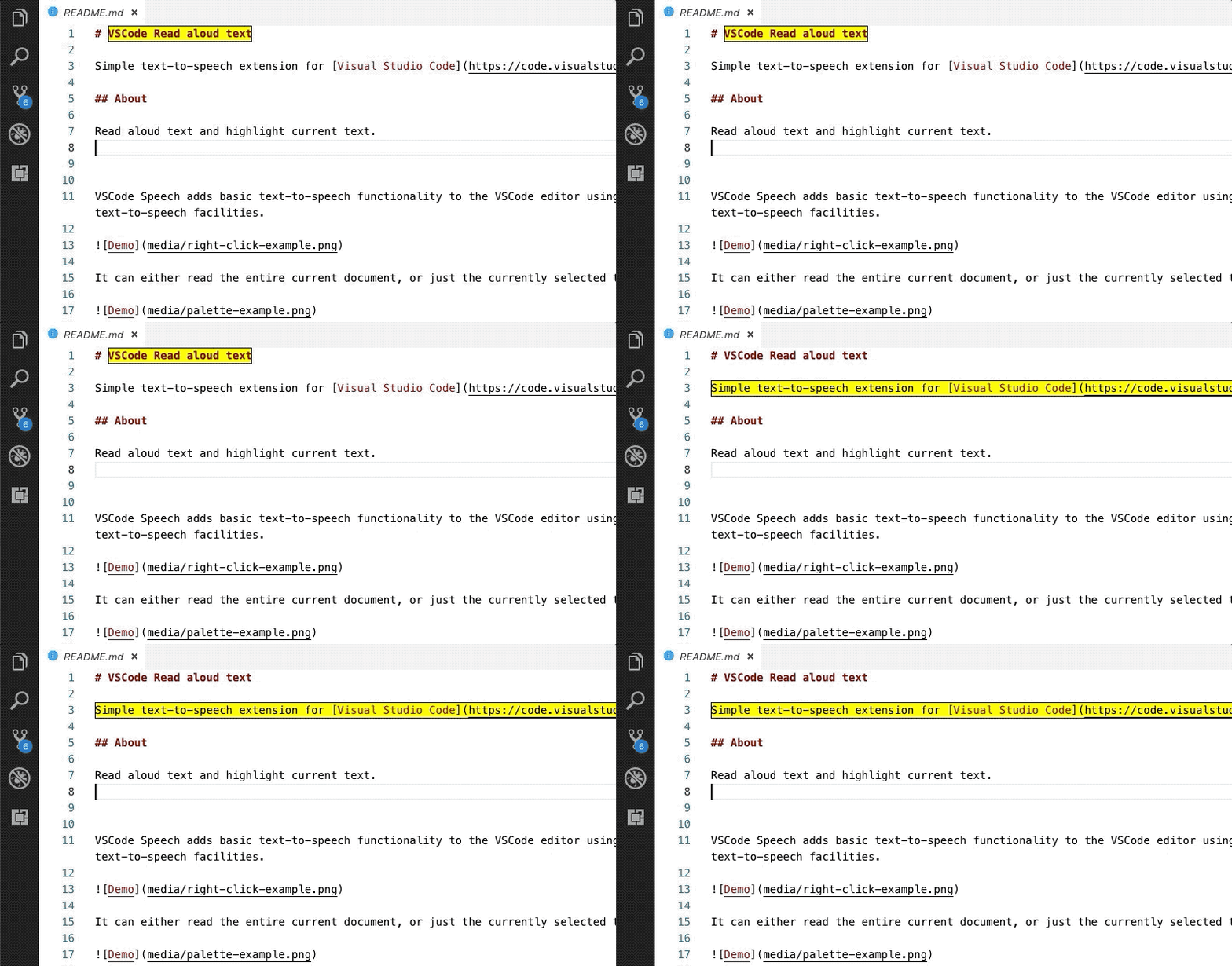
VSCODE Speech는 운영 체제의 내장 텍스트 음성 연설 시설을 사용하여 VSCODE 편집기에 기본 텍스트 음성 연설 기능을 추가합니다.
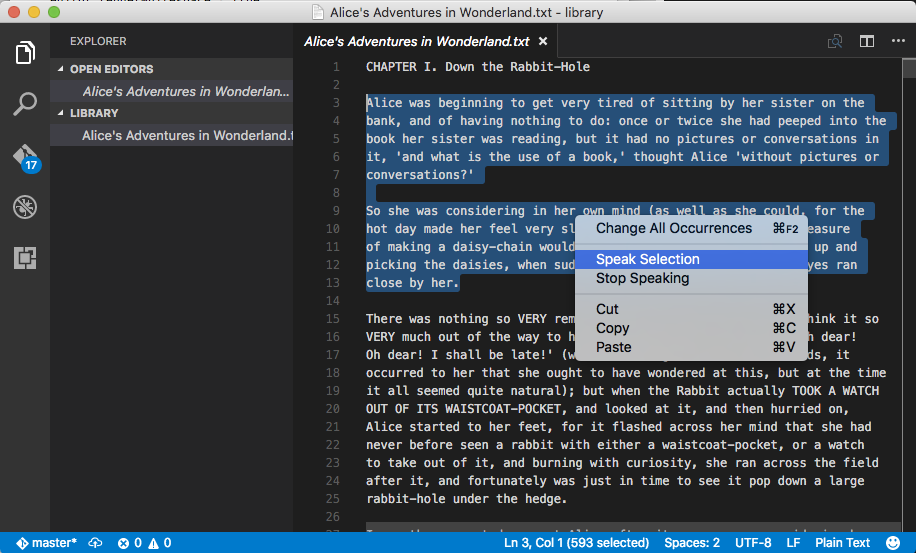
전체 현재 문서 또는 현재 선택된 텍스트 만 읽을 수 있습니다.
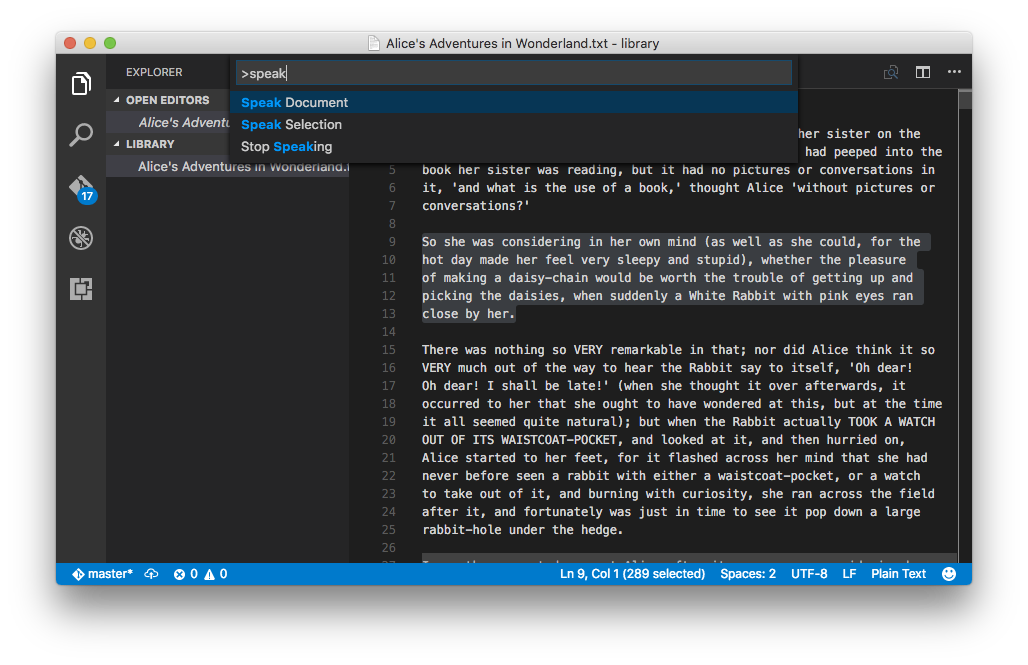
CodeBlock 처럼 Unrasonbale 노드를 건너 뛰십시오.txt , Markdown 및 Re : Parser를 사용하여보기 만 지원합니다.read-aloud-text.speakDocument : 문서를 설명하십시오read-aloud-text.speakHere : 여기에서 말하십시오read-aloud-text.speakSelection : speak 선택read-aloud-text.stopSpeaking : 말하기 중지 기본적으로 VSCODE Specive는 운영 체제에 대해 구성한 음성 설정을 사용합니다. 일부 VSCODE 설정을 사용하여 텍스트를 읽는 데 사용되는 음성을 변경할 수 있습니다.
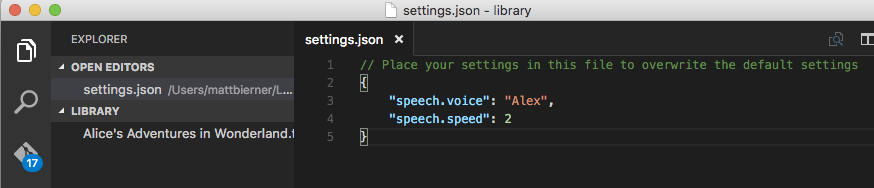
speech.voice텍스트를 읽는 데 사용되는 목소리의 이름. NULL이라면이 기본값은 현재 시스템 음성으로 나타납니다.
Mac에서 사용 가능한 목소리 목록의 경우 :
System PreferencesDictation & SpeechText to Speech 엽니 다또는 명령 줄에서 실행 :
$ say -v ?Mac OS 10.11의 예제 출력은 다음과 같습니다.
 Agnes               en_US    # Isn't it nice to have a computer that will talk to you?
Albert              en_US    #  I have a frog in my throat. No, I mean a real frog!
Alex                en_US    # Most people recognize me by my voice.
Alice               it_IT    # Salve, mi chiamo Alice e sono una voce italiana.
Alva                sv_SE    # Hej, jag heter Alva. Jag är en svensk röst.
Amelie              fr_CA    # Bonjour, je m’appelle Amelie. Je suis une voix canadienne.
Anna                de_DE    # Hallo, ich heiße Anna und ich bin eine deutsche Stimme.
Bad News            en_US    # The light you see at the end of the tunnel is the headlamp of a fast approaching train.
Bahh                en_US    # Do not pull the wool over my eyes.
Bells               en_US    # Time flies when you are having fun.
Boing               en_US    # Spring has sprung, fall has fell, winter's here and it's colder than usual.
Bruce               en_US    # I sure like being inside this fancy computer
Bubbles             en_US    # Pull the plug! I'm drowning!
Carmit              he_IL    # שלום. קוראים לי כרמית, ואני קול בשפה העברית.
Cellos              en_US    # Doo da doo da dum dee dee doodly doo dum dum dum doo da doo da doo da doo da doo da doo da doo
Damayanti           id_ID    # Halo, nama saya Damayanti. Saya berbahasa Indonesia.
Daniel              en_GB    # Hello, my name is Daniel. I am a British-English voice.
Deranged            en_US    # I need to go on a really long vacation.
Diego               es_AR    # Hola, me llamo Diego y soy una voz española.
Ellen               nl_BE    # Hallo, mijn naam is Ellen. Ik ben een Belgische stem.
Fiona               en-scotland # Hello, my name is Fiona. I am a Scottish-English voice.
Fred                en_US    # I sure like being inside this fancy computer
Good News           en_US    # Congratulations you just won the sweepstakes and you don't have to pay income tax again.
Hysterical          en_US    # Please stop tickling me!
Ioana               ro_RO    # Bună, mă cheamă Ioana . Sunt o voce românească.
Joana               pt_PT    # Olá, chamo-me Joana e dou voz ao português falado em Portugal.
Junior              en_US    # My favorite food is pizza.
Kanya               th_TH    # สวัสดีค่ะ ดิฉันชื่อKanya
Karen               en_AU    # Hello, my name is Karen. I am an Australian-English voice.
Kathy               en_US    # Isn't it nice to have a computer that will talk to you?
Kyoko               ja_JP    # こんにちは、私の名前はKyokoです。日本語の音声をお届けします。
Laura               sk_SK    # Ahoj. Volám sa Laura . Som hlas v slovenskom jazyku.
Lekha               hi_IN    # नमस्कार, मेरा नाम लेखा है.Lekha मै हिंदी मे बोलने वाली आवाज़ हूँ.
Luciana             pt_BR    # Olá, o meu nome é Luciana e a minha voz corresponde ao português que é falado no Brasil
Maged               ar_SA    # مرحبًا اسمي Maged. أنا عربي من السعودية.
Mariska             hu_HU    # Üdvözlöm! Mariska vagyok. Én vagyok a magyar hang.
Mei-Jia             zh_TW    # 您好,我叫美佳。我說國語。
Melina              el_GR    # Γεια σας, ονομάζομαι Melina. Είμαι μια ελληνική φωνή.
Milena              ru_RU    # Здравствуйте, меня зовут Milena. Я – русский голос системы.
Moira               en_IE    # Hello, my name is Moira. I am an Irish-English voice.
Monica              es_ES    # Hola, me llamo Monica y soy una voz española.
Nora                nb_NO    # Hei, jeg heter Nora. Jeg er en norsk stemme.
Paulina             es_MX    # Hola, me llamo Paulina y soy una voz mexicana.
Pipe Organ          en_US    # We must rejoice in this morbid voice.
Princess            en_US    # When I grow up I'm going to be a scientist.
Ralph               en_US    # The sum of the squares of the legs of a right triangle is equal to the square of the hypotenuse.
Samantha            en_US    # Hello, my name is Samantha. I am an American-English voice.
Sara                da_DK    # Hej, jeg hedder Sara. Jeg er en dansk stemme.
Satu                fi_FI    # Hei, minun nimeni on Satu. Olen suomalainen ääni.
Sin-ji              zh_HK    # 您好,我叫 Sin-ji。我講廣東話。
Tessa               en_ZA    # Hello, my name is Tessa. I am a South African-English voice.
Thomas              fr_FR    # Bonjour, je m’appelle Thomas. Je suis une voix française.
Ting-Ting           zh_CN    # 您好,我叫Ting-Ting。我讲中文普通话。
Trinoids            en_US    # We cannot communicate with these carbon units.
Veena               en_IN    # Hello, my name is Veena. I am an Indian-English voice.
Vicki               en_US    # Isn't it nice to have a computer that will talk to you?
Victoria            en_US    # Isn't it nice to have a computer that will talk to you?
Whisper             en_US    # Pssssst, hey you, Yeah you, Who do ya think I'm talking to, the mouse?
Xander              nl_NL    # Hallo, mijn naam is Xander. Ik ben een Nederlandse stem.
Yelda               tr_TR    # Merhaba, benim adım Yelda. Ben Türkçe bir sesim.
Yuna                ko_KR    # 안녕하세요. 제 이름은 Yuna입니다. 저는 한국어 음성입니다.
Zarvox              en_US    # That looks like a peaceful planet.
Zosia               pl_PL    # Witaj. Mam na imię Zosia, jestem głosem kobiecym dla języka polskiego.
Zuzana              cs_CZ    # Dobrý den, jmenuji se Zuzana. Jsem český hlas.
Windows에서 명령 프롬프트 실행에서 :
 powershell " Add-Type -AssemblyName System.speech; " ^
    " $speak = New-Object System.Speech.Synthesis.SpeechSynthesizer; " ^
    " $speak.GetInstalledVoices() " ^
    " | foreach  { $_.VoiceInfo.Name } "
예제 출력 :
 Microsoft David Desktop
Microsoft Zira Desktop
speech.speed음성을위한 속도 승수. 기본값은 운영 체제의 기본 비율로 나타납니다.
1 표준 속도로 읽히고, 2 정상보다 두 배 빠르게 읽히고, 0.5 정상보다 절반을 다시 읽습니다.
NPM으로 설치하십시오
npm install
디버그
 npm run compile
vscode .
# Lunch Extension on Debug Tag => Open new VSCode
게시







