codemetrix
1.0.0

코드베이스를 진정으로 이해하려면 얼마나 느슨하거나 결합 된 지, 그리고 변화에 대한 적절한 방법을 알아야합니다.
Codemetrix는 "커플 링 메트릭"을 계산하는 것이 지피입니다.
Wikipedia에 대해 자세히 알아보십시오.
메트릭 측면에서 Archfit의 모습은 다음과 같습니다.
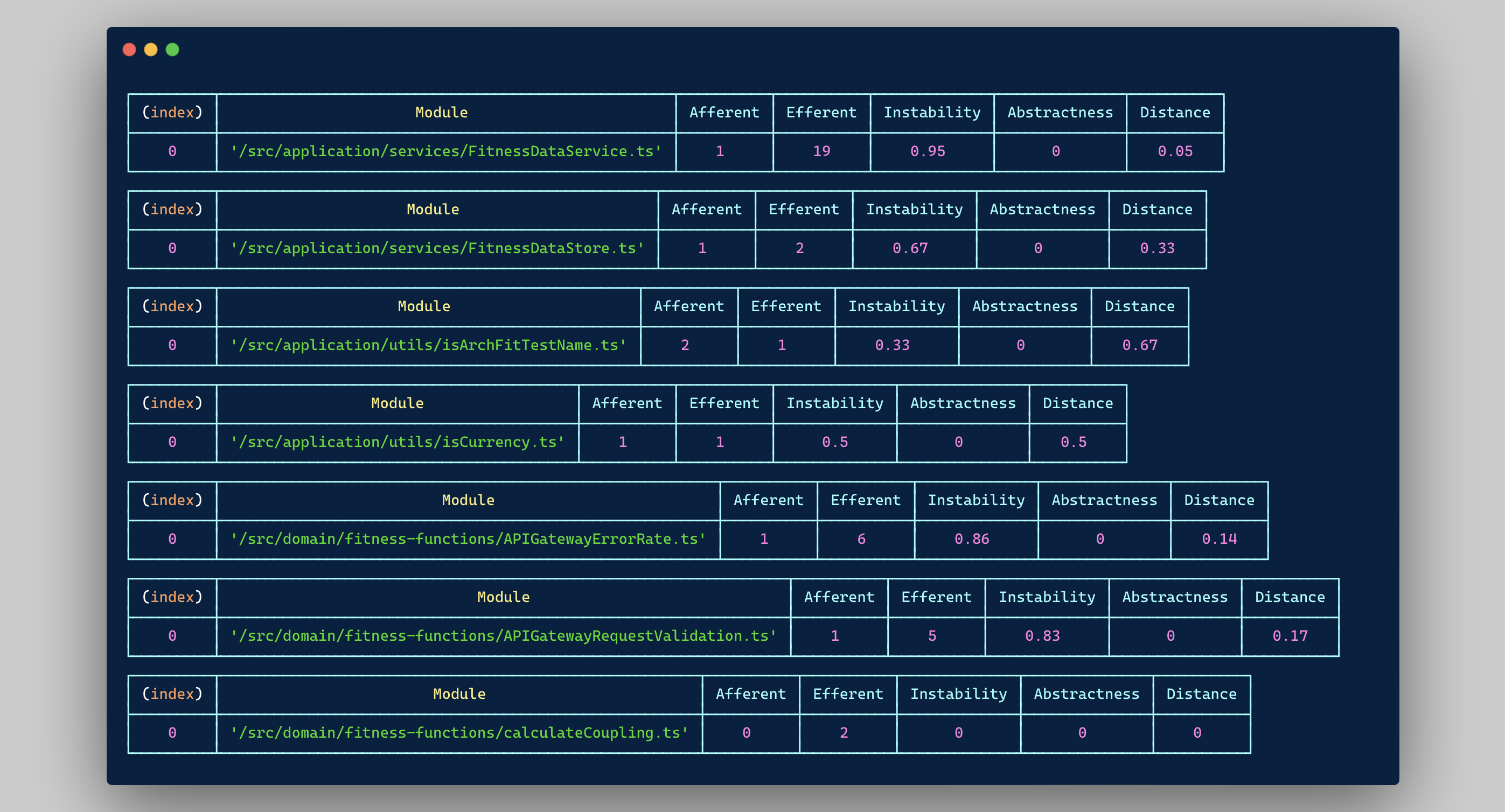
또한 프로젝트에서 전체 코드 라인의 지시 당당 간과를 얻는 데 도움이됩니다. 디렉토리가 모든 프로젝트 코드 기반의 디렉토리, 집계 된 메트릭 (구 심성/efferent 커플 링 등)의 비율 및 이러한 세부 사항을 포함하는 디렉토리를 선택합니다.
{
  "results" : [
    {
      "directoryPath" : " /src/application/services " ,
      "afferent" : 2 ,
      "efferent" : 21 ,
      "abstractions" : 0 ,
      "concretions" : 1 ,
      "loc" : 260 ,
      "percent" : 8.51
    },
    {
      "directoryPath" : " /src/application/utils " ,
      "afferent" : 3 ,
      "efferent" : 2 ,
      "abstractions" : 0 ,
      "concretions" : 2 ,
      "loc" : 52 ,
      "percent" : 1.7
    },
    {
      "directoryPath" : " /src/domain/fitness-functions " ,
      "afferent" : 14 ,
      "efferent" : 79 ,
      "abstractions" : 7 ,
      "concretions" : 23 ,
      "loc" : 1181 ,
      "percent" : 38.63
    },
    {
      "directoryPath" : " /src/domain/services " ,
      "afferent" : 2 ,
      "efferent" : 28 ,
      "abstractions" : 0 ,
      "concretions" : 2 ,
      "loc" : 275 ,
      "percent" : 9
    },
    {
      "directoryPath" : " /src/errors " ,
      "afferent" : 9 ,
      "efferent" : 0 ,
      "abstractions" : 0 ,
      "concretions" : 0 ,
      "loc" : 109 ,
      "percent" : 3.57
    },
    {
      "directoryPath" : " /src " ,
      "afferent" : 0 ,
      "efferent" : 5 ,
      "abstractions" : 0 ,
      "concretions" : 2 ,
      "loc" : 86 ,
      "percent" : 2.81
    },
    {
      "directoryPath" : " /src/infrastructure/aws " ,
      "afferent" : 20 ,
      "efferent" : 28 ,
      "abstractions" : 0 ,
      "concretions" : 15 ,
      "loc" : 684 ,
      "percent" : 22.37
    },
    {
      "directoryPath" : " /src/infrastructure/utils/io " ,
      "afferent" : 3 ,
      "efferent" : 7 ,
      "abstractions" : 0 ,
      "concretions" : 3 ,
      "loc" : 40 ,
      "percent" : 1.31
    },
    {
      "directoryPath" : " /src/infrastructure/utils/math " ,
      "afferent" : 12 ,
      "efferent" : 0 ,
      "abstractions" : 0 ,
      "concretions" : 3 ,
      "loc" : 27 ,
      "percent" : 0.88
    },
    {
      "directoryPath" : " /src/infrastructure/utils/string " ,
      "afferent" : 22 ,
      "efferent" : 0 ,
      "abstractions" : 0 ,
      "concretions" : 2 ,
      "loc" : 25 ,
      "percent" : 0.82
    },
    {
      "directoryPath" : " /src/infrastructure/utils/time " ,
      "afferent" : 10 ,
      "efferent" : 2 ,
      "abstractions" : 0 ,
      "concretions" : 9 ,
      "loc" : 83 ,
      "percent" : 2.72
    },
    {
      "directoryPath" : " /src/interfaces " ,
      "afferent" : 56 ,
      "efferent" : 16 ,
      "abstractions" : 12 ,
      "concretions" : 0 ,
      "loc" : 235 ,
      "percent" : 7.69
    }
  ],
  "totalLinesOfCode" : 3057 ,
  "loc" : " /src/domain/fitness-functions " ,
  "afferent" : " /src/interfaces " ,
  "efferent" : " /src/domain/fitness-functions " ,
  "abstractions" : " /src/interfaces " ,
  "concretions" : " /src/domain/fitness-functions "
}CodemetRix는 완전히 의존성이 없으며 매우 가벼워집니다. 원격 통화 나 아무 일도 진행되지 않으며 평범한 오래된 정적 파일 분석 만 있습니다.
또한 현재 구현은 전적으로 TypeScript에 중점을 두지 만 다른 언어를 지원하도록 확장하는 것은 불가능하지 않아야합니다. 더 넓은 언어 지원을 원한다면 내 손님이되어 풀 요청을 받으십시오!
Codemetrix는 Node가 새로운 버전으로 설치되었다고 가정합니다.
코드를 빌드하고 테스트하려면 노드 19 이상이 필요합니다.
컴파일 된 파일, dist/index.mjs 및 codemetrix.sh 다운로드하고 아래 지침을 따라갈 수 있습니다. 당신이 git에 크지 않다면 이것은 좋습니다.
그러나 더 좋은 옵션은이 저장소를 복제하고 install.sh 스크립트를 사용하는 것입니다.
그것은 :
.codemetrix 라는 루트 레벨 디렉토리를 만듭니다codemetrix.sh 및 dist/index.mjs 새 디렉토리로 복사하십시오codemetrix )으로 .zshrc 에 줄을 추가하십시오.설치 스크립트를 자유롭게 수정하거나 설정하는 방식과 일치하지 않으면 설정하십시오.
변경 사항을 활성화하려면 IDE를 공급하거나 다시로드해야합니다.
git 저장소에서 codemetrix 실행하십시오. 소스 코드가 src 디렉토리에 있다고 가정합니다.
다른 디렉토리를 제공하려면 codemetrix YOUR_DIRECTORY 실행하십시오.
전용 기고 .md가 있지만 일반적으로 새로운 기능에 대한 제안과 제안을 기쁘게 생각합니다!







