springboot hello world jsp
1.0.0

5 일 -Spring Boot -Hello World 예제 JSP
이 튜토리얼에서는 Spring Boot에서 JSP를 사용하여 Hello World 예제를 가장 간단하게 만드는 방법을 알게 될 것입니다.
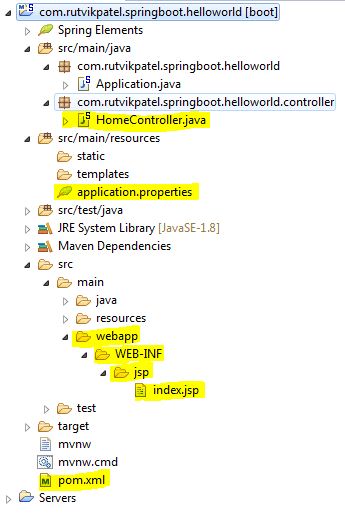
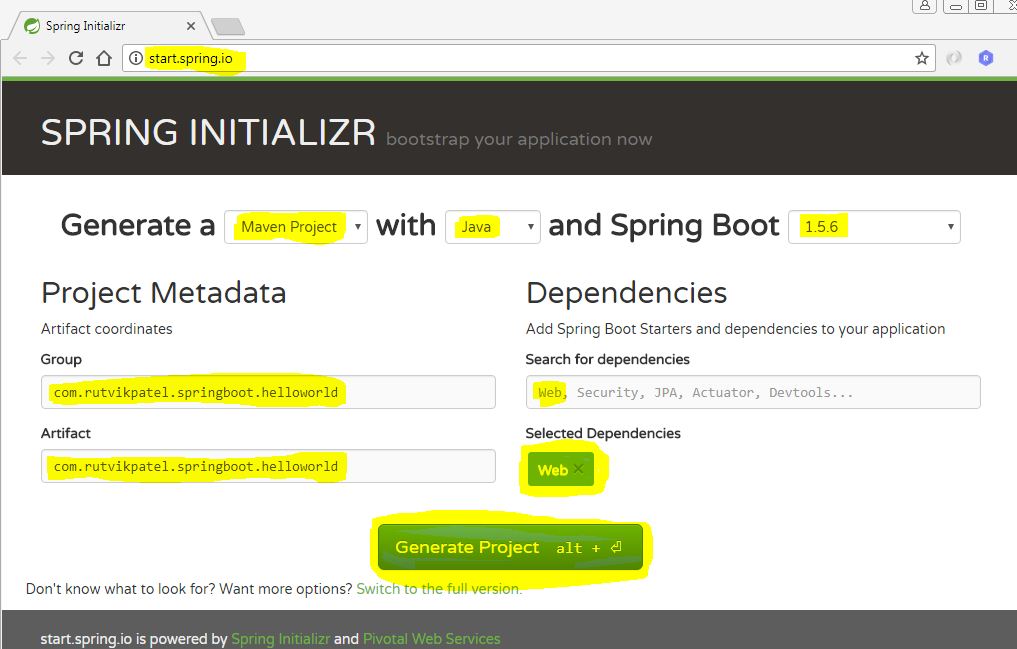
파일> 가져 오기> 기존 Maven 프로젝트>
Next클릭> 프로젝트 루트 디렉토리 선택>Finish클릭하십시오.
pom.xml 파일에 추가 종속성을 추가하십시오 < dependencies >
< dependency >
< groupId >org.springframework.boot</ groupId >
< artifactId >spring-boot-starter-web</ artifactId >
</ dependency >
< dependency >
< groupId >org.springframework.boot</ groupId >
< artifactId >spring-boot-starter-test</ artifactId >
< scope >test</ scope >
</ dependency >
<!-- JSTL for JSP -->
< dependency >
< groupId >javax.servlet</ groupId >
< artifactId >jstl</ artifactId >
</ dependency >
<!-- Need this to compile JSP -->
< dependency >
< groupId >org.apache.tomcat.embed</ groupId >
< artifactId >tomcat-embed-jasper</ artifactId >
< scope >provided</ scope >
</ dependency >
</ dependencies >src/main/resources/application.properties 파일에 프로젝트 구성 속성을 추가합니다 # jsp view binding configuration
spring.mvc.view.prefix=/WEB-INF/jsp/
spring.mvc.view.suffix=.jsp
# project context and port configuration
server.port=8080
server.context-path=/springboot-helloworld
src/main/java/package/HomeController.java 파일에서 컨트롤러 클래스를 추가합니다 import org . springframework . stereotype . Controller ;
import org . springframework . ui . Model ;
import org . springframework . web . bind . annotation . RequestMapping ;
import org . springframework . web . bind . annotation . RequestMethod ;
@ Controller
public class HomeController {
@ RequestMapping ( value = "/" , method = RequestMethod . GET )
public String hello ( Model model ){
model . addAttribute ( "title" , "Spring Boot - Hello World Example Jsp" );
return "index" ;
}
}webapp/WEB-INF/jsp/index.jsp 파일에서 JSP보기를 추가하십시오 <%@ page language = " java " contentType = " text/html; charset=ISO-8859-1 " pageEncoding = " ISO-8859-1 " %>
<%@ taglib prefix = " spring " uri = " http://www.springframework.org/tags " %>
<%@ taglib prefix = " c " uri = " http://java.sun.com/jsp/jstl/core " %>
<!DOCTYPE html>
< html >
< head >
< title > ${ title } </ title >
</ head >
< body >
< h1 > ${ title } </ h1 >
</ body >
</ html >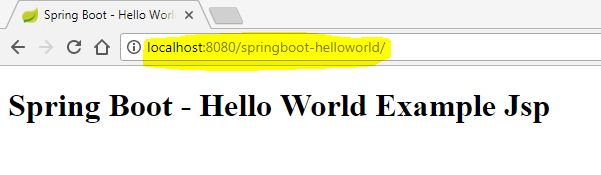
프로젝트를 마우스 오른쪽 버튼으로 클릭하여> Spring Boot 앱으로 실행하십시오.
http : // localhost : 8080/springboot-helloworld로 이동하십시오.
Rutvik Patel [email protected]
GPL v3.0 라이센스에 따라 배포됩니다. 자세한 내용은 LICENSE 참조하십시오.







