pivotnacci
1.0.0

HTTP 에이전트를 배포하여 내부 네트워크에 피봇하십시오. Pivotnacci를 사용하면 HTTP agents 와 통신하는 양말 서버를 만들 수 있습니다. 아키텍처는 다음과 같습니다.
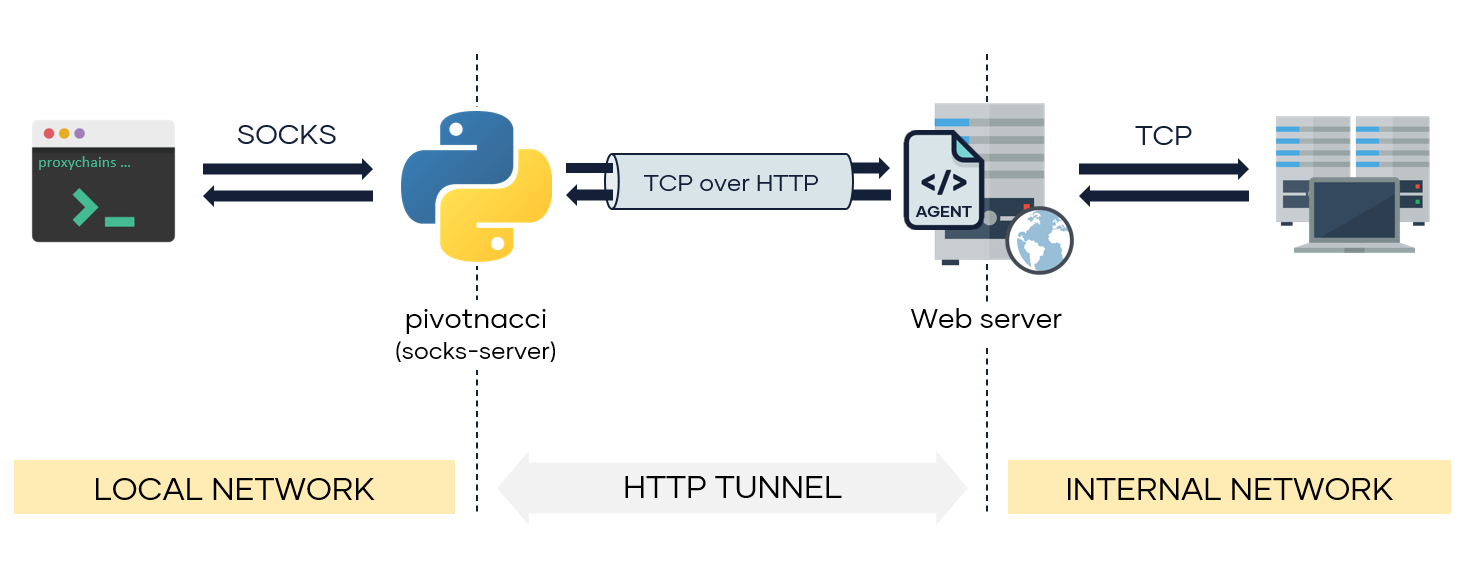
이 도구는 Great Regeorg에서 영감을 받았습니다. 그러나 몇 가지 개선 사항이 포함됩니다.
파이썬 패키지에서 :
pip3 install pivotnacci저장소에서 :
git clone https://github.com/blackarrowsec/pivotnacci.git
cd pivotnacci/
pip3 install -r requirements.txt # to avoid installing on the OS
python3 setup.py install # to install on the OS $ pivotnacci -h
usage: pivotnacci [-h] [-s addr] [-p port] [--verbose] [--ack-message message]
[--password password] [--user-agent user_agent]
[--header header] [--proxy [protocol://]host[:port]]
[--type type] [--polling-interval milliseconds]
[--request-tries number] [--retry-interval milliseconds]
url
Socks server for HTTP agents
positional arguments:
url The url of the agent
optional arguments:
-h , --help show this help message and exit
-s addr, --source addr
The default listening address (default: 127.0.0.1)
-p port, --port port The default listening port (default: 1080)
--verbose, -v
--ack-message message, -a message
Message returned by the agent web page (default:
Server Error 500 (Internal Error))
--password password Password to communicate with the agent (default: )
--user-agent user_agent, -A user_agent
The User-Agent header sent to the agent (default:
pivotnacci/0.0.1)
--header header, -H header
Send custom header. Specify in the form ' Name: Value '
(default: None)
--proxy [protocol://]host[:port], -x [protocol://]host[:port]
Set the HTTP proxy to use.(Environment variables
HTTP_PROXY and HTTPS_PROXY are also supported)
(default: None)
--type type, -t type To specify agent type in case is not automatically
detected. Options are [ ' php ' , ' jsp ' , ' aspx ' ] (default:
None)
--polling-interval milliseconds
Interval to poll the agents (for recv operations)
(default: 100)
--request-tries number
The number of retries for each request to an agent. To
use in case of balanced servers (default: 50)
--retry-interval milliseconds
Interval to retry a failure request (due a balanced
server) (default: 100) 비밀번호 s3cr3t 가있는 에이전트 사용 ( AGENT_PASSWORD 변수는 에이전트 측면에서도 수정해야합니다) :
pivotnacci https://domain.com/agent.php --password " s3cr3t " 사용자 정의 HTTP Host 헤더 및 사용자 정의 CustomAgent 사용자 에이전트 사용 :
pivotnacci https://domain.com/agent.jsp -H ' Host: vhost.domain.com ' -A ' CustomAgent ' 다른 에이전트 메시지 설정 418 I'm a teapot ( ACK_MESSAGE 변수도 에이전트 측면에서도 수정해야합니다) :
pivotnacci https://domain.com/agent.aspx --ack-message " 418 I'm a teapot " 투표 간격을 2 초로 설정하여 탐지 속도 (예 : WAF)를 줄입니다.
pivotnacci https://domain.com/agent.php --polling-interval 2000Eloy Pérez (@zer1t0) [www.blackarrow.net -www.tarlogic.com]
이 프로젝트에 포함 된 모든 코드는 GNU AGPLV3 라이센스의 조건에 따라 라이센스가 부여됩니다.







