com.rest.meshy
com.rest.meshy 1.1.0

Unity 게임 엔진을위한 비공식적으로 Meshy Generative AI RESTFUL 클라이언트.
모든 저작권, 상표, 로고 및 자산은 해당 소유자의 자산입니다.
이 저장소는 수락하기로 선택한 경우 Meshy 조직으로 전송할 수 있습니다.
Unity 2021.3 lts 이상이 필요합니다.
권장 설치 방법은 Unity Package Manager 및 OpenUPM입니다.
Package Manager 선택하십시오 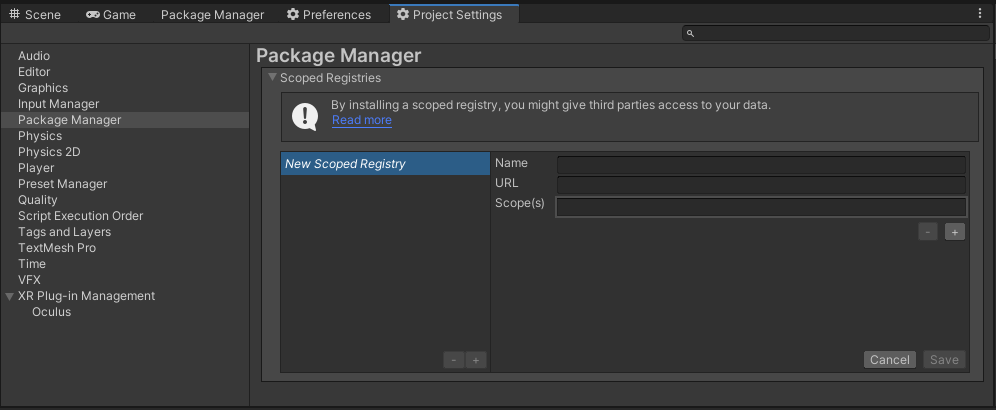
OpenUPMhttps://package.openupm.comcom.rest.meshyMy Registries 로 변경하십시오Meshy 패키지를 추가하십시오https://github.com/RageAgainstThePixel/com.rest.meshy.git#upm 에서 패키지를 추가하십시오참고 :이 repo는 다른 저장소에 의존적입니다! 귀하는 직접 추가 할 책임이 있습니다.
우선 순위로 API 키를 제공하는 4 가지 방법이 있습니다.
그림과 같이 API를 초기화 할 때 MeshyAuthentication 을 사용합니다.
var api = new MeshyClient ( " msy_apikey123 " ) ; 또는 수동으로 MeshyAuthentication 객체를 만듭니다
var api = new MeshyClient ( new MeshyAuthentication ( " msy_apikey123 " ) ) ; 키를 Assets/Resources 폴더에있는 스크립트 가능한 객체에 직접 저장할 수 있습니다.
프로젝트 창의 컨텍스트 메뉴를 사용하여 새 MeshyConfiguration 스크립트 가능한 객체를 만들어 새 것을 만들 수 있습니다.
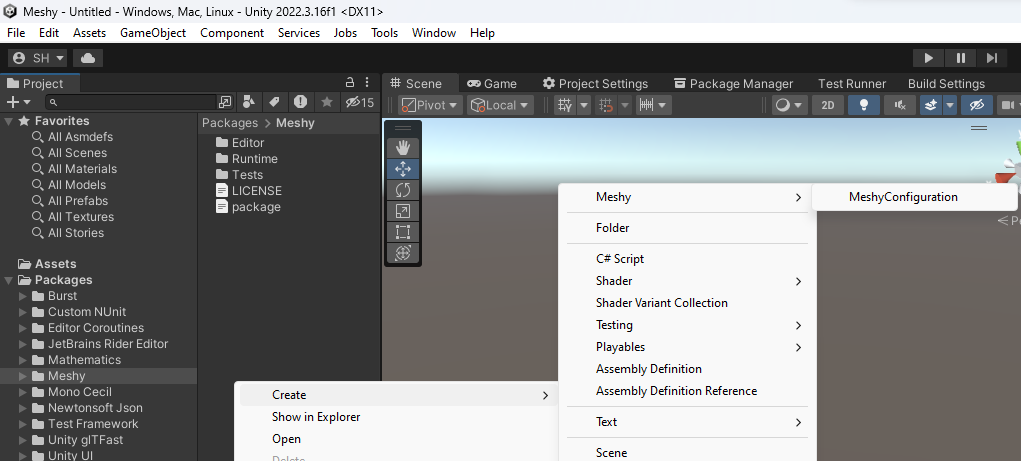
구성 파일에서 기본적으로 .meshy 현재 디렉토리에서 API 키를로드하려고 시도합니다.
구성 파일을 만들려면 .meshy 라는 새 텍스트 파일을 작성하고 라인을 포함하십시오.
조직 입력은 선택 사항입니다.
{
  "apiKey" : " msy_apikey123 "
}
MeshyAuthentication 에서 정적 메소드를 호출하여 알려진 경로로 구성 파일을 직접로드 할 수도 있습니다.
.meshy config를로드합니다. var api = new MeshyClient ( new MeshyAuthentication ( ) . LoadFromDirectory ( " path/to/your/directory " ) ) ;.meshy 라는 이름을 지정할 필요가 없습니다. var api = new MeshyClient ( new MeshyAuthentication ( ) . LoadFromPath ( " path/to/your/file.json " ) ) ; 시스템의 환경 변수를 사용하여 사용할 API 키 및 조직을 지정하십시오.
MESHY_API_KEY 사용하십시오. var api = new MeshyClient ( new MeshyAuthentication ( ) . LoadFromEnvironment ( ) ) ;WebApp에서와 마찬가지로 대시 보드에서 동일한 작업을 수행 할 수 있습니다.
Pro-Tip : 컨텍스트 창을 사용하여 프리 랩 및 장면 객체에 대한 편집기 옵션에서 빠르게 액세스 할 수 있습니다!
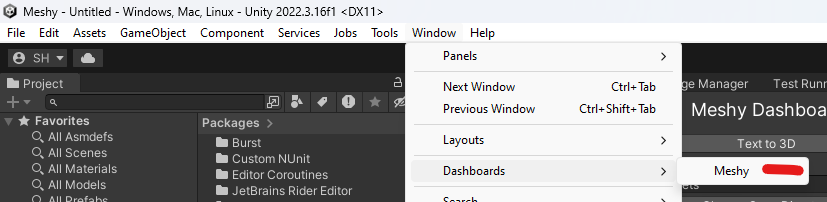
Window/Dashboards/Meshy 를 통해 대시 보드에 액세스하십시오
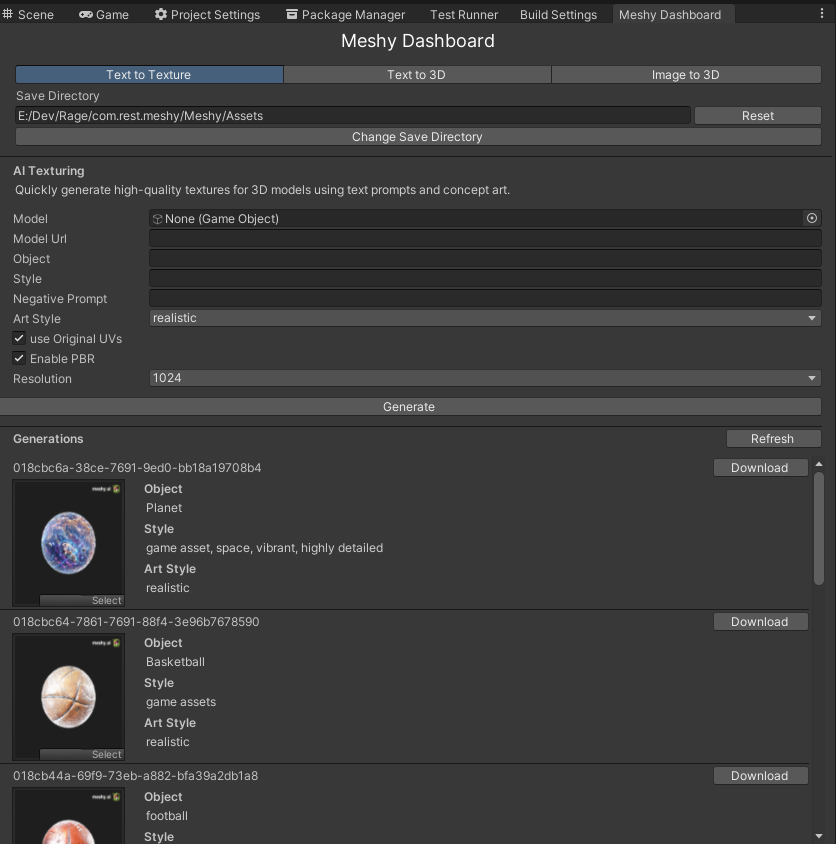
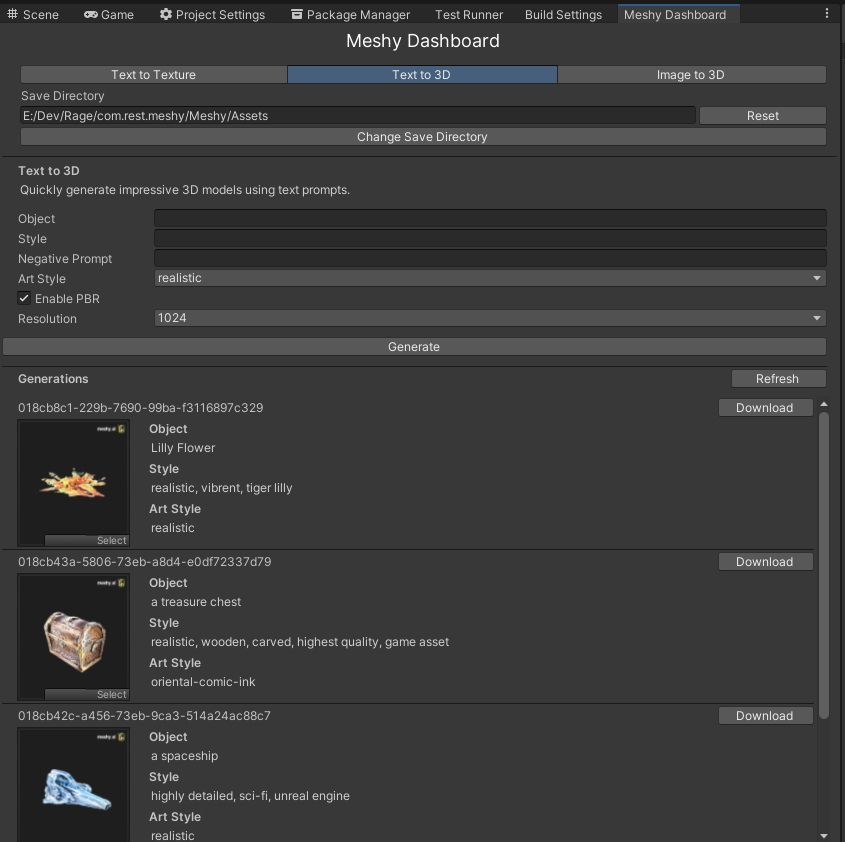
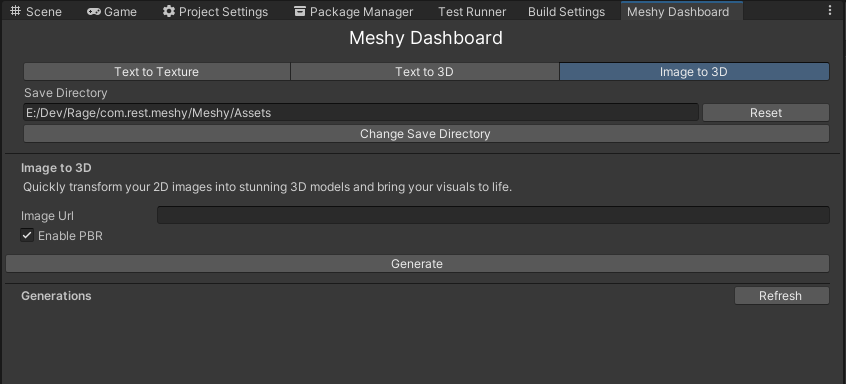
텍스트 프롬프트 및 컨셉 아트를 사용하여 기존 3D 모델에 대한 고품질 텍스처를 신속하게 생성하십시오.
 var api = new MeshyClient ( ) ;
var textToTextureTasks = await api . TextToTextureEndpoint . ListTasksAsync ( 1 , 12 , SortOrder . Descending ) ;

foreach ( var meshyTask in textToTextureTasks )
{
    Debug . Log ( $" { meshyTask . Id } | created_at: { meshyTask . CreatedAt } " ) ;
}
텍스처 작업에 새로운 텍스트를 작성하고 작업이 완료 될 때까지 진행 상황을보고합니다.
재 텍사스 할 수있는 프리브 랩 또는 장면 gameObject를 전달하십시오.
 var api = new MeshyClient ( ) ;
var sphere = GameObject . CreatePrimitive ( PrimitiveType . Sphere ) ;
var request = new TextToTextureRequest ( sphere , " Basketball " , " game assets " , enableOriginalUV : false , resolution : Resolutions . X1024 , artStyle : ArtStyles . Realistic ) ;
var taskResult = await MeshyClient . TextToTextureEndpoint . CreateTextToTextureTaskAsync ( request , new Progress < TaskProgress > ( progress => Debug . Log ( $" [ { progress . Id } ] { progress . Status } : { progress . PrecedingTasks ?? progress . Progress } " ) ) ) ;
Assert . IsNotNull ( taskResult ) ;
Debug . Log ( $" { taskResult . Id } | created_at: { taskResult . FinishedAt } | expires_at: { taskResult . ExpiresAt } " ) ;
GLB 내보내기 프로세스를 더 많이 제어 해야하는 경우 자신의 GLTFast.Export.GameObjectExport 객체를 전달할 수도 있습니다.
 var api = new MeshyClient ( ) ;
var sphere = GameObject . CreatePrimitive ( PrimitiveType . Sphere ) ;
var exportSettings = new ExportSettings
{
    Format = GltfFormat . Binary ,
    FileConflictResolution = FileConflictResolution . Overwrite ,
    ComponentMask = ~ ( ComponentType . Camera | ComponentType . Animation | ComponentType . Light ) ,
} ;
var gameObjectExportSettings = new GameObjectExportSettings
{
    OnlyActiveInHierarchy = false ,
    DisabledComponents = true ,
} ;
var glbExport = new GameObjectExport ( exportSettings , gameObjectExportSettings ) ;
glbExport . AddScene ( new [ ] { sphere } ) ;
var request = new TextToTextureRequest ( glbExport , " Planet " , " game asset, space, vibrant, highly detailed " , enableOriginalUV : false , resolution : Resolutions . X1024 , artStyle : ArtStyles . Realistic ) ;
var taskResult = await MeshyClient . TextToTextureEndpoint . CreateTextToTextureTaskAsync ( request , new Progress < TaskProgress > ( progress => Debug . Log ( $" [ { progress . Id } ] { progress . Status } : { progress . PrecedingTasks ?? progress . Progress } " ) ) ) ;
Assert . IsNotNull ( taskResult ) ;
Debug . Log ( $" { taskResult . Id } | created_at: { taskResult . FinishedAt } | expires_at: { taskResult . ExpiresAt } " ) ;
공개 URL을 사용할 수도 있습니다.
 var api = new MeshyClient ( ) ;
var modelUrl = " https://github.com/KhronosGroup/UnityGLTF/raw/master/UnityGLTF/Assets/StreamingAssets/Lantern/glTF-Binary/Lantern.glb "
var request = new TextToTextureRequest ( modelUrl , " Lantern " , " game assets " , resolution : Resolutions . X1024 , artStyle : ArtStyles . Realistic ) ;
var taskResult = await api . TextToTextureEndpoint . CreateTextToTextureTaskAsync ( request , new Progress < TaskProgress > ( progress => Debug . Log ( $" [ { progress . Id } ] { progress . Status } : { progress . PrecedingTasks ?? progress . Progress } " ) ) ) ;
Debug . Log ( $" { taskResult . Id } | created_at: { taskResult . FinishedAt } | expires_at: { taskResult . ExpiresAt } " ) ;텍스트 프롬프트를 사용하여 인상적인 3D 모델을 빠르게 생성합니다.
 var api = new MeshyClient ( ) ;
var textTo3DTasks = await MeshyClient . TextTo3DEndpoint . ListTasksAsync ( 1 , 12 , SortOrder . Descending ) ;

foreach ( var meshyTask in textTo3DTasks )
{
    Debug . Log ( $" { meshyTask . Id } | created_at: { meshyTask . CreatedAt } " ) ;
} var request = new TextTo3DRequest ( " a treasure chest " , " realistic, wooden, carved, highest quality " , resolution : Resolutions . X1024 , artStyle : ArtStyles . Realistic ) ;
var taskResult = await MeshyClient . TextTo3DEndpoint . CreateTextTo3DTaskAsync ( request , new Progress < TaskProgress > ( progress => Debug . Log ( $" [ { progress . Id } ] { progress . Status } : { progress . PrecedingTasks ?? progress . Progress } " ) ) ) ;
Debug . Log ( $" { taskResult . Id } | created_at: { taskResult . FinishedAt } | expires_at: { taskResult . ExpiresAt } " ) ;2D 이미지를 멋진 3D 모델로 빠르게 변환하고 시각을 활기차게하십시오.
켈 현재 현재 API 버전에서는 작동하지 않습니다.
 var api = new MeshyClient ( ) ;
var imageTo3dTasks = await api . ImageTo3DEndpoint . ListTasksAsync ( 1 , 12 , SortOrder . Descending ) ;

foreach ( var meshyTask in imageTo3dTasks )
{
    Debug . Log ( $" { meshyTask . Id } | created_at: { meshyTask . CreatedAt } " ) ;
} var api = new MeshyClient ( ) ;
var imageUrl = " https://raw.githubusercontent.com/KhronosGroup/glTF-Sample-Assets/main/Models/Fox/screenshot/screenshot-x150.jpg " ;
var request = new ImageTo3DRequest ( imageUrl ) ;
var taskResult = await api . ImageTo3DEndpoint . CreateImageTo3DTaskAsync ( request , new Progress < TaskProgress > ( progress => Debug . Log ( $" [ { progress . Id } ] { progress . Status } : { progress . PrecedingTasks ?? progress . Progress } " ) ) ) ;
Assert . IsNotNull ( taskResult ) ;
Debug . Log ( $" { taskResult . Id } | created_at: { taskResult . FinishedAt } | expires_at: { taskResult . ExpiresAt } " ) ;




