
Huantian city server IP address:
plaintext n4.suteidc.com
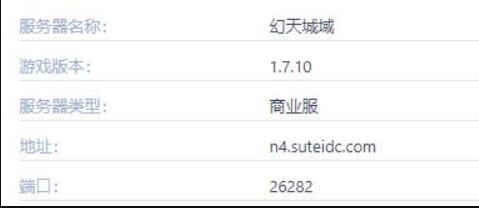
• Type: Survival/RPG comprehensive experience
• Featured modules:

-Candy World : a creative map full of fun
-Magic Gaia : A paradise of deep exploration and challenges
-Marriage system : adding social elements
-Team copy : a proving ground for cooperative competition
-Territory world : personalized space and resource acquisition
1. Start the game : Log in to your "Minecraft" game client.
2. Multiplayer mode selection : On the main game interface, find and click the "Multiplayer Game" option.
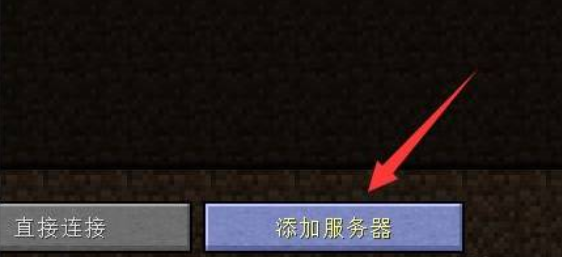
3. Add a server : In the right menu, click the "Add Server" icon.
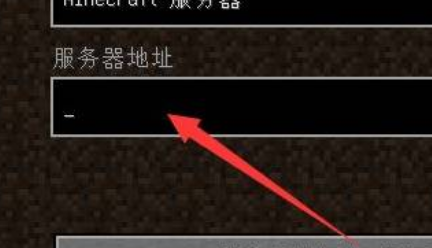
4. Enter the server address : In the pop-up window, fill in the n4.suteidc.com address provided above.
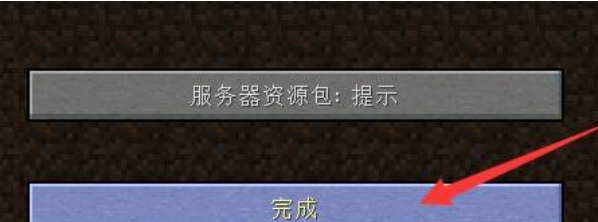
5. Connect to the server : After confirming that everything is correct, click the "Finish" button to start your fantasy adventure.
FAQ:
1. Q: Does the server require a specific version to connect?
A: Normally, as long as your version of "Minecraft" is compatible with the server, you can connect smoothly. Please make sure your game version is compatible with the server.
2. Q: Is there any age limit on the server?
A: The Huantian City server may have a minimum age requirement for playing. Please confirm the relevant regulations before entering.
3. Q: Can I create my own character on the server?
A: Yes, the server supports custom roles, you can set them according to your preferences.