LM Infinite
1.0.0

これは、Pytorchの大規模な言語モデル(NAACL 2024 Outstanding Paper Award)の紙LM-Infinite:ゼロショットの極端な長さの一般化のコードです。この作業は、チーハン、Qifan Wang、Hao Peng、Wenhan Xiong、Yu Chen、Heng Ji、Sinong Wangによって行われます。
この論文では、著者は、LM-Infiniteと呼ばれる簡単な方法を提案し、追加のトレーニングやパラメーターの更新なしに、大規模な言語モデルの極端な長さ200mトークンまでの長さの一般化を改善します。
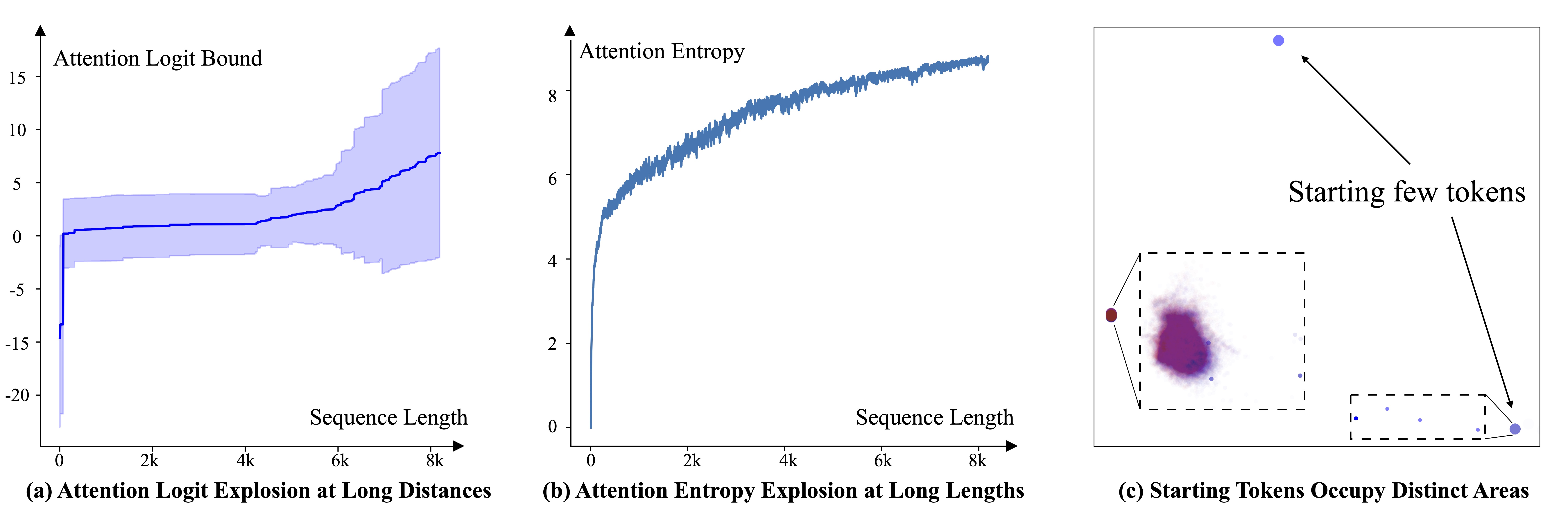
私たちは、LLMSの長さの一般化障害の根底にある3つの要因を最初に特定することで動機付けられています。 (a)要因1:トークン間の目に見えない距離は、注意ロジットを爆発させます。 (b)因子2:目に見えない数のトークンは、長さが増加するにつれて、トレーニング範囲を超えてエントロピーが増加する可能性があります。 (c)因子3:数個のトークンを開始することは、明確な特徴領域を占めるため、破棄すべきではありません。
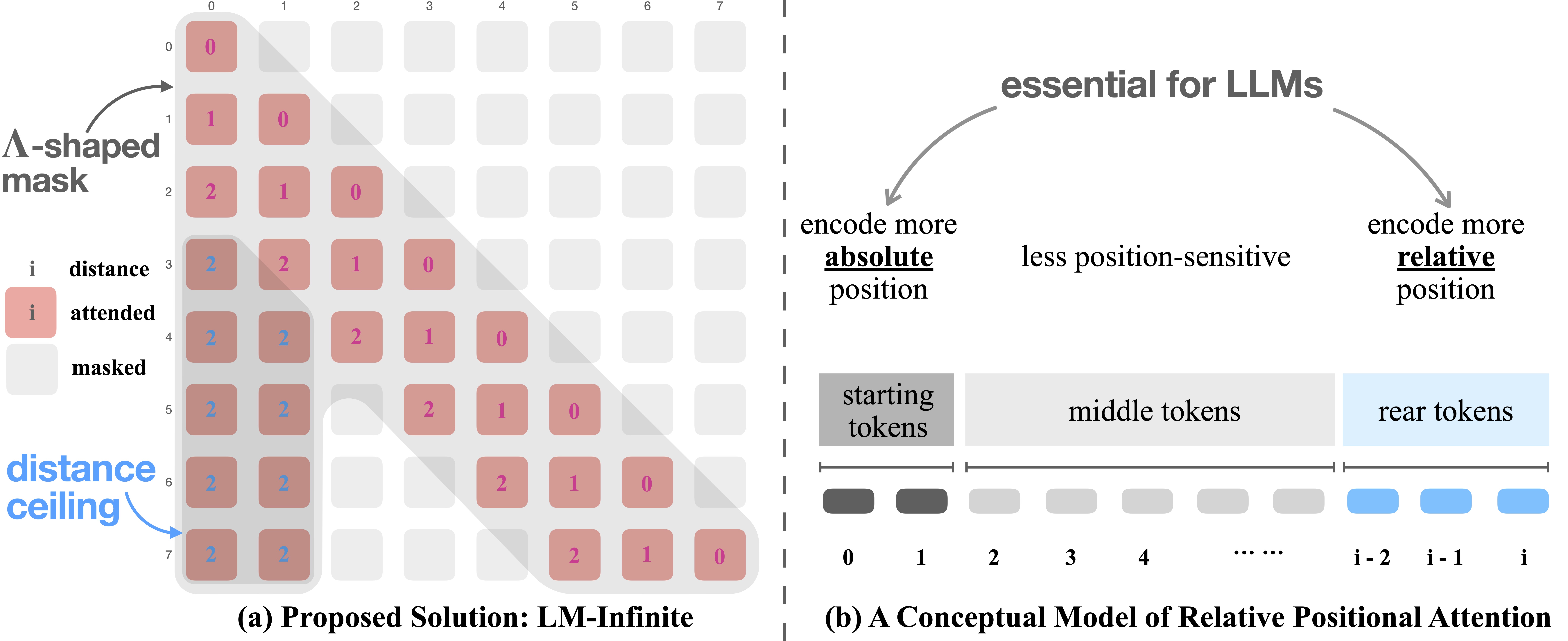
重要なアイデアは、(1)aを使用することです
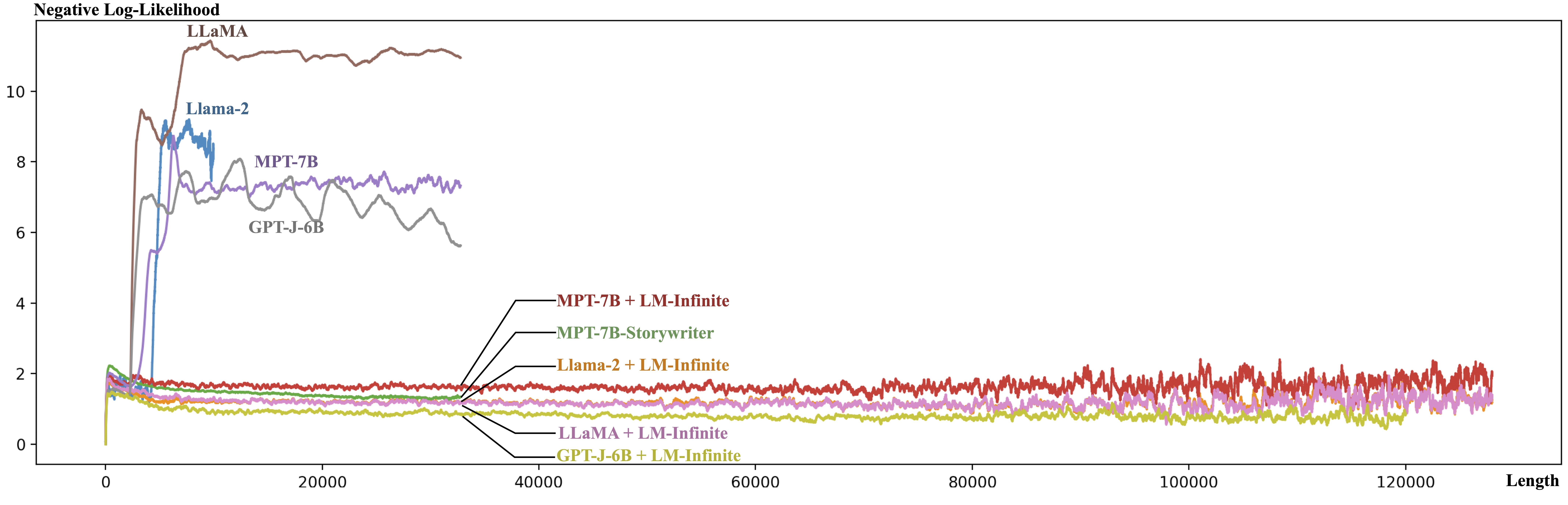
huggingfaceトランスのドロップイン置換として、LM-Infiniteメソッドを実装しました。トランスモデルをロードした後、それがラマモデル、MPTモデル、またはGPT-Jモデルの場合、LM-Infiniteを有効にするために次のコードを実行できます。
ラマモデルの場合:
 from models.llama import convert_llama_model
model = convert_llama_model(model, 4096, 10)
MPTモデルの場合:
 from models.mpt_7b import convert_mpt_model
model = convert_mpt_model(model, 4096, 10)
GPT-Jモデルの場合:
 from models.gpt_j import convert_gpt_j_model
model = convert_gpt_j_model(model, 4096, 10)
その後、モデルをいつものように使用できます!
Anacondaの観点からのPythonパッケージの詳細なリストは、 requirements.txtにあります。一部のパッケージは、 condaによって、一部はpipによってインストールされました。 Anaconda&PIP環境に要件をインストールするという私のコマンドは次のとおりです。
 conda install pytorch torchvision torchaudio pytorch-cuda=11.8 -c pytorch -c nvidia
conda install -c conda-forge sentencepiece einops cudatoolkit-dev tqdm ipython datasets evaluate rouge-score protobuf accelerate langchain openai
pip install transformers deepspeed
 ├── LICENSE
├── README.md
├── requirements.txt
├── configs
│   └── zero3_efficient_config.json         # config for deepspeed acceleration
├── data
│   ├── generation_metrics.py
│   ├── get_data.py                         # dataset loading and preprocessing
│   ├── passkey_retrieval
│   │   ├── create_passkey_data.py
│   │   ├── create_passkey_data.sh
│   │   └── passkey_retrieval_accuracy.py
│   └── split_pile_file.py                  # split the Pile dataset into task-specific files
├── models
│   ├── constant.py                         # a constant function model
│   ├── get_llama2
│   │   ├── convert_llama_weights_to_hf.py  # convert llama-2 weights to huggingface format
│   │   └── download_llama2.sh
│   ├── get_model.py
│   ├── gpt_j.py
│   ├── lambda_attention.py                 # efficient implementation of lambda attention
│   ├── llama.py
│   ├── model_base.py
│   └── mpt_7b.py
├── scripts
│   ├── combine_evaluate_generation.py
│   ├── combine_results.py
│   ├── eval_downstream_tasks.py            # evaluate on passkey retrieval task
│   ├── eval_generation.py                  # evaluate generation metrics
│   └── eval_ppl_deepspeed.py               # evaluate perplexity
├── utils
│   ├── arguments.py
│   └── utils.py
└── visualization
    ├── plot_nll.py
    ├── position_pca.py
    └── relative_attention_explosion.py
データセットの場合、コーパスデータセットを準備する必要があります。元のPileソース(https://pile.eleuther.ai)を${PILE_PATH}/test.jsonl.zstおよび${PILE_PATH}/val.jsonl.zstにダウンロードすると、次のコマンドを実行して圧縮データセットを抽出します。
 cd ${PILE_PATH}
zstd -d ./ test.jsonl.zst
zstd -d ./ val.jsonl.zst
次に、次のコマンドを実行して、データセットをタスク固有のファイルに分割します。
 cd ${REPOSITORY_ROOT}
mkdir -p ${PILE_PATH}/val
mkdir -p ${PILE_PATH}/test
python data/split_pile_file.py ${PILE_PATH}/val.jsonl ${PILE_PATH}/val
python data/split_pile_file.py ${PILE_PATH}/test.jsonl ${PILE_PATH}/test
ただし、公式の山はもうダウンロードできないように見えるので、おそらく別のソースを把握する必要があります(https://huggingface.co/datasets/arxiv_datasetまたはhttps://openwbtext2.readthedocs.io/en/latest/)。または、独自のコーパスを使用することもできます。どちらのオプションでも、データ/get_data.pyを編集する必要があります。
バックボーンモデルの場合、このペーパーではLlama-2、Llama、GPT-J、およびMPT-7Bを使用しています。最後の3つのモデルは、Huggingface Model Hubから直接利用可能であるため、事前にアクションは必要ありません。 llama-2のダウンロードキーは、メタAIリクエストフォームからリクエストする必要があります。次に、次のコマンドを実行します
bash models/get_llama2/download_llama2.sh
プロンプトに従って、チェックポイントを${PATH_TO_LLAMA2_CHECKPOINTS}にダウンロードします。その後、実行します
 python models/get_llama2/convert_llama_weights_to_hf.py
    --input_dir ${PATH_TO_LLAMA2_CHECKPOINTS}
    --model_size 7B
    --output_dir ${PATH_TO_LLAMA2_CHECKPOINTS}/llama-2-7b-hf
llama-2-7bチェックポイントをハギングフェイス形式に変換します。
コードでは、ログと結果を保存するために${LOG_DIR}が必要です。十分なスペースを持つディレクトリを選択してください。
ARXIVテストセットでのllama-2モデルの困惑を評価します。
 TRIAL=llama2-infinite-ArXiv
mkdir -p $LOG_DIR/$TRIAL
CUDA_VISIBLE_DEVICES=0
MASTER_PORT=$(shuf -i 29500-65535 -n 1)
DS_SKIP_CUDA_CHECK=1 PYTHONPATH=. deepspeed --include localhost:$CUDA_VISIBLE_DEVICES --master_port $MASTER_PORT scripts/eval_ppl_deepspeed.py
    --deepspeed_config configs/zero3_efficient_config.json
    --model ${PATH_TO_LLAMA2_CHECKPOINTS}/llama-2-7b-hf --tokenizer_path ${PATH_TO_LLAMA2_CHECKPOINTS}
    --use_lambda_attention --local_branch 4096 --global_branch 100 --limit_distance 4096
    --dataset the_pile --dataset_group ArXiv --split test --dataset_dir ${PILE_PATH}
    --max_length 32770
    --log_dir $LOG_DIR/$TRIAL
議論の簡単な説明:
--model :モデルのパスまたは名前。 decapoda-research/llama-7b-hfを渡して、llama、 mosaicml/mpt-7bを使用してmpt-7b、およびEleutherAI/gpt-j-6b使用してGPT-J-6bを使用します。--tokenizer_path :トークネイザーへのパス。 Llama-2を使用しない場合は、この引数を削除します。--use_lambda_attention :Lambdaの注意を使用します。 (lm-infiniteに必要)--local_branch :ローカルブランチサイズ。 Llama、MPT-7B、GPT-Jの2048(LM-Infiniteに必要)--global_branch :グローバルブランチサイズ。範囲10〜100は、一般的に同様の効果を与えます。 (lm-infiniteに必要)--limit_distance :距離制限。 Llama、MPT-7B、GPT-Jの2048(LM-Infiniteに必要)--dataset :データセット名。データ/get_data.pyを参照して、カスタムデータセットの使用方法を把握してください。 lm-infiniteなしでバニラモデルで評価したい場合は、 --use_lambda_attention --local_branch 4096 --global_branch 100 --limit_distance 4096引数セット。
テストセットのサブセットでのみ評価したい場合は、 --start_data_from引数--max_data_num使用して、テストセットの開始インデックスを指定します。
TRIAL=llama2-infinite-ArXiv-extreme
CUDA_VISIBLE_DEVICES=0
MASTER_PORT=$(shuf -i 29500-65535 -n 1)
echo port: $MASTER_PORT
mkdir -p $LOG_DIR/$TRIAL
DS_SKIP_CUDA_CHECK=1 PYTHONPATH=. deepspeed --include localhost:$CUDA_VISIBLE_DEVICES --master_port $MASTER_PORT scripts/eval_infinite_ppl.py
    --deepspeed_config configs/zero3_efficient_config.json
    --model ${PATH_TO_LLAMA2_CHECKPOINTS}/llama-2-7b-hf --tokenizer_path ${PATH_TO_LLAMA2_CHECKPOINTS}
    --use_lambda_attention --local_branch 4096 --global_branch 10 --limit_distance 4096
    --dataset the_pile --dataset_group ArXiv --split test --dataset_dir ${PILE_PATH}
    --streaming_length 200000000 --max_length 128000 --start_data_from 2300
    --log_dir $LOG_DIR/$TRIAL
ARXIVテストセットのLLAMA-2モデルから評価を生成します。
TRIAL=llama2-infinite-generate-ArXiv
mkdir -p $LOG_DIR/$TRIAL
CUDA_VISIBLE_DEVICES=0
MASTER_PORT=$(shuf -i 29500-65535 -n 1)
DS_SKIP_CUDA_CHECK=1 PYTHONPATH=. deepspeed --include localhost:$CUDA_VISIBLE_DEVICES --master_port $MASTER_PORT scripts/eval_generation.py
    --deepspeed_config configs/zero3_efficient_config.json
    --model ${PATH_TO_LLAMA2_CHECKPOINTS}/llama-2-7b-hf --tokenizer_path ${PATH_TO_LLAMA2_CHECKPOINTS}
    --use_lambda_attention --local_branch 4096 --global_branch 100 --limit_distance 4096
    --dataset the_pile --dataset_group ArXiv --split test --dataset_dir ${PILE_PATH}
    --max_length 33000
    --max_generation_length 100 --evaluate_metrics --evaluate_positions 4096 8192 12288 16384
    --log_dir $LOG_DIR/$TRIAL
まず、PassKey検索データセットを準備する必要があります。
 for MAX_LENGTH in 2048 3072 4096 5120 6144 7168 8192 10240 12288 14335 16384; do
    echo $MAX_LENGTH
    python data/passkey_retrieval/create_passkey_data.py
        --token-length $MAX_LENGTH
        --dump-file-path ${PASSKEY_DATA}/${MAX_LENGTH}
        --tokenizer-path ${PATH_TO_LLAMA2_CHECKPOINTS}
        --num-samples 1000
done
次に、PassKey検索タスクを評価しましょう。
CUDA_VISIBLE_DEVICES=0
for MAX_LENGTH in 6144 8192 10240 12288 16384; do
    TRIAL=llama2-infinite-passkey-$MAX_LENGTH
    mkdir -p $LOG_DIR/$TRIAL
    MASTER_PORT=$(shuf -i 29500-65535 -n 1)
    DS_SKIP_CUDA_CHECK=1 PYTHONPATH=. deepspeed --master_port $MASTER_PORT --include localhost:$CUDA_VISIBLE_DEVICES scripts/eval_downstream_tasks.py
        --deepspeed_config configs/zero3_efficient_config.json
        --model ${PATH_TO_LLAMA2_CHECKPOINTS}/llama-2-7b-hf --tokenizer_path ${PATH_TO_LLAMA2_CHECKPOINTS}
        --use_lambda_attention --local_branch 4096 --global_branch 10 --limit_distance 4096 --triangle_offset 0
        --top_k_attention 5 --top_k_from_layer 4
        --dataset passkey_retrieval --dataset_dir ${PASSKEY_DATA} --dataset_group ${MAX_LENGTH}
        --max_generation_length 7 --evaluate_metrics
        --log_dir $LOG_DIR/$TRIAL
done
Qasperタスクの実行:
CUDA_VISIBLE_DEVICES=0
DATASET=qasper
TRIAL=llama2-infinite-$DATASET
mkdir -p $LOG_DIR/$TRIAL
MASTER_PORT=$(shuf -i 29500-65535 -n 1)
echo port: $MASTER_PORT
DS_SKIP_CUDA_CHECK=1 PYTHONPATH=. deepspeed --include localhost:$CUDA_VISIBLE_DEVICES --master_port $MASTER_PORT scripts/eval_downstream_tasks.py
    --deepspeed_config configs/zero3_efficient_config_large.json
    --model ${PATH_TO_LLAMA2_CHECKPOINTS}/llama-2-7b-hf --tokenizer_path ${PATH_TO_LLAMA2_CHECKPOINTS}
    --use_lambda_attention --local_branch 4096 --global_branch 10 --limit_distance 4096 --triangle_offset 0
    --top_k_attention 5 --top_k_from_layer 4
    --dataset $DATASET --split test --evaluate_metrics
    --max_length 6144 --truncation_side center
    --log_dir $LOG_DIR/$TRIAL
 @inproceedings{han2024lm,
  title={LM-Infinite: Zero-Shot Extreme Length Generalization for Large Language Models},
  author={Han, Chi and Wang, Qifan and Peng, Hao and Xiong, Wenhan and Chen, Yu and Ji, Heng and Wang, Sinong},
  booktitle={Proceedings of the 2024 Conference of the North American Chapter of the Association for Computational Linguistics: Human Language Technologies (Volume 1: Long Papers)},
  pages={3991--4008},
  year={2024}
}







