PHPOpenAI
v2.3

PHPOpenAI 、PHPでOpenAI APIを使用できるコミュニティに維持されているライブラリです。
このプロジェクトはPHPで記述されており、 OpenAI API既存のPHPプロジェクトに簡単に統合するために使用できます。
このプロジェクトは、列挙などの機能を使用するためのPHPバージョン8.1に基づいています。このプロジェクトでは、外部依存関係は必要ありません。ただし、適切に動作するようにカール拡張機能をインストールする必要があります。
このプロジェクトは、作曲家を使用して依存関係を管理します。 Composerをまだインストールしていない場合は、公式Composer Webサイトの指示に従ってそうすることができます。
プロジェクトをインストールするには、次のコマンドを使用してpackagist.orgからパッケージをインストールできます。
composer require easygithdev/php-openaiOpenAI APIを使用するには、WebサイトにサインアップしてAPIキーを取得する必要があります。 APIキーができたら、PHPコードで使用してOpenAI APIにリクエストを送信できます。
キーを取得する方法を見つけるには、次のアドレスに移動します。
https://help.openai.com/en/articles/4936850-where-do-i-find-my-secret-pey。
PHPでOpenai APIを使用する方法を示すコードの例は次のとおりです。
 <?php
require_once __DIR__ . ' /vendor/autoload.php ' ;

use EasyGithDev  PHPOpenAI  Helpers  ModelEnum ;
use EasyGithDev  PHPOpenAI  OpenAIClient ;

$ apiKey = getenv ( ' OPENAI_API_KEY ' );

$ response = ( new OpenAIClient ( $ apiKey ))-> Completion ()-> create (
    ModelEnum:: TEXT_DAVINCI_003 ,
    " Say this is a test " ,
)-> toObject ();

// Response as stClass object
echo ' <pre> ' , print_r ( $ response , true ), ' </pre> ' ;このコードは、APIキーを備えた新しいOpenAIApiオブジェクトをインスタンス化し、OpenAIが提供するGPT-3 AI言語モデルでテキスト完了を実行する新しいCompletionオブジェクトを作成します。
create()メソッドは、 Completionオブジェクトで呼び出され、新しいテキスト完了を生成します。 2つのパラメーターが必要です。
完了の結果は$response変数で返されます。結果は、完成したテキストを表示したり、追加の処理のためにプログラムの別の部分に送ったりするなど、さらなる処理に使用できます。
環境変数を使用してキーを保存できます。次の例のように、この変数を使用できます。
export OPENAI_API_KEY= " sk-xxxxxxxxxxx "変数をApache構成ファイルに配置できます。
 <VirtualHost hostname:80>
   ...
   SetEnv OPENAI_API_KEY sk-xxxxxxxxxxx
   ...
</VirtualHost>
そして、サービスを再起動します。
これで、PHPのgetenv()関数を呼び出すことにより、環境変数を使用できます。
 <?php
$ response = ( new OpenAIApi ( getenv ( ' OPENAI_API_KEY ' )))-> Completion ()-> create (
    ModelEnum:: TEXT_DAVINCI_003 ,
    " Say this is a test " ,
);組織に関する情報を提供したい場合は、次のように進める必要があります。
 <?php
$ apiKey = getenv ( ' OPENAI_API_KEY ' );
$ org = getenv ( ' OPENAI_API_ORG ' );

// Passing the organization to the client
$ response = ( new OpenAIClient ( $ apiKey , $ org ))APIのURLを変更する必要がある場合は、次のように続行できます。
 <?php
$ apiKey = getenv ( ' OPENAI_API_KEY ' );

// Create a new router, with origine url and version
$ route = new OpenAIRoute (
    ' https://api.openai.com ' ,
    ' v1 '
);

// Get a specific Url
echo $ route -> completionCreate () , ' <br> ' ;

// Passing the router to the client
$ response = ( new OpenAIClient ( $ apiKey ))
    -> setRoute ( $ route );
ルートを再定義するには、 OpenAIRouteクラスを拡張するか、 Routeインターフェイスを実装する必要があります。
APIはJSON形式で応答を返します。さまざまな情報へのアクセスを容易にするために、ハンドラーオブジェクトのtoObject()またはtoArray()メソッドを呼び出してデータにアクセスできます。
 <?php

$ response = ( new OpenAIClient ( $ apiKey ))-> Completion ()-> create (
    ModelEnum:: TEXT_DAVINCI_003 ,
    " Say this is a test " ,
)-> toObject ();

// Response as a stClass object
echo ' <pre> ' , print_r ( $ response , true ), ' </pre> ' ;

$ response = ( new OpenAIClient ( $ apiKey ))-> Completion ()-> create (
    ModelEnum:: TEXT_DAVINCI_003 ,
    " Say this is a test " ,
)-> toArray ();

// Response as an associative array
echo ' <pre> ' , print_r ( $ response , true ), ' </pre> ' ;APIがエラーを返す場合があります。したがって、問題の原因を特定できる必要があります。この困難を処理するために、多くの選択肢があります。
toObject()またはtoArray()メソッドを備えたハンドラーオブジェクトを使用している場合は、 try-catch構造を使用してください。
 try {
    $ response = ( new OpenAIClient ( ' BAD KEY ' ))
        -> Completion ()
        -> create (
            ModelEnum:: TEXT_DAVINCI_003 ,
            " Say this is a test " ,
        )
        -> toObject ();
} catch ( Throwable $ t ) {
    echo nl2br ( $ t -> getMessage ());
    die;
} CurlResponseオブジェクトを使用している場合、VALIDATORSを使用してエラーが発生していることを確認できます。
 $ handler = ( new OpenAIClient ( ' BAD KEY ' ))-> Completion ()-> create (
    ModelEnum:: TEXT_DAVINCI_003 ,
    " Say this is a test " ,
);

$ response = $ handler -> getResponse ();
$ contentTypeValidator = $ handler -> getContentTypeValidator ();

if (!( new StatusValidator ( $ response ))-> validate () or
    !( new $ contentTypeValidator ( $ response ))-> validate ()) {
    echo $ response -> getBody ();
}
エラーの詳細をご覧ください。
これは、ユーザーによって定義された絵画スタイルの画像を作成できるアプリケーションを示すビデオです。このアプリケーションは、phpopenaiプロジェクトを使用して作成されます。
ここでコードを見つけることができます:
https://github.com/easygithdev/phpopenai-playground.git。
OpenAIをアプリケーションに統合することは、数行のコードと同じくらい簡単です。
ここですべてのコードを見つけることができます:
https://github.com/easygithdev/phpopenai-examples。
 $ response = ( new OpenAIClient ( $ apiKey ))-> Chat ()-> create (
    ModelEnum:: GPT_3_5_TURBO ,
    [
        new ChatMessage (ChatMessage:: ROLE_SYSTEM , " You are a helpful assistant. " ),
        new ChatMessage (ChatMessage:: ROLE_USER , " Who won the world series in 2020? " ),
        new ChatMessage (ChatMessage:: ROLE_ASSISTANT , " The Los Angeles Dodgers won the World Series in 2020. " ),
        new ChatMessage (ChatMessage:: ROLE_USER , " Where was it played? " ),
    ]
)-> toObject ();
チャットの完了の詳細をご覧ください。
 $ response = ( new OpenAIClient ( $ apiKey ))-> Completion ()-> create (
    ModelEnum:: TEXT_DAVINCI_003 ,
    " Say this is a test " ,
)-> toObject ();
テキストの完了の詳細をご覧ください。
OpenAI APIのストリーム属性は、APIによって返されるデータフローを制御するために使用できるオプションのパラメーターです。このオプションをtrueに設定すると、APIは単一の応答ではなくストリーミングデータとして応答を返します。
これは、APIが処理する前に完全な応答を待つのではなく、APIが利用可能になったときに結果を取得できることを意味します。このオプションは、大量のデータをリアルタイムで処理する必要があるアプリケーションに役立ちます。
 <?php
header ( ' Content-Type: text/event-stream ' );
header ( ' Cache-Control: no-cache ' );

. . .

( new OpenAIClient ( $ apiKey ))-> Completion ()-> create (
    model: " text-davinci-003 " ,
    prompt: " Translate this into 1. French, 2. Spanish and 3. Japanese: nn What rooms do you have available? nn 1. " ,
    temperature: 0.3 ,
    max_tokens: 100 ,
    top_p: 1.0 ,
    frequency_penalty: 0.0 ,
    presence_penalty: 0.0 ,
    stream: true
)-> getResponse ();
< html >
< body >
< div id =" result " > </ div >
< script >
function nl2br ( str , replaceMode , isXhtml ) {
var breakTag = ( isXhtml ) ? '<br />' : '<br>' ;
var replaceStr = ( replaceMode ) ? '$1' + breakTag : '$1' + breakTag + '$2' ;
return ( str + '' ) . replace ( / ([^>rn]?)(rn|nr|r|n) / g , replaceStr ) ;
}
if ( typeof ( EventSource ) !== 'undefined' ) {
console . info ( 'Starting connection...' ) ;
var source = new EventSource ( 'stream.php' ) ;
source . addEventListener ( 'open' , function ( e ) {
console . info ( 'Connection was opened.' ) ;
} , false ) ;
source . addEventListener ( 'error' , function ( e ) {
var txt ;
switch ( event . target . readyState ) {
// if reconnecting
case EventSource . CONNECTING :
txt = 'Reconnecting...' ;
break ;
// if error was fatal
case EventSource . CLOSED :
txt = 'Connection failed. Will not retry.' ;
break ;
}
console . error ( 'Connection error: ' + txt ) ;
} , false ) ;
source . addEventListener ( 'message' , function ( e ) {
if ( e . data == "[DONE]" ) {
source . close ( ) ;
return ;
}
document . getElementById ( 'result' ) . innerHTML += nl2br ( JSON . parse ( e . data ) . choices [ 0 ] . text ) ;
} , false ) ;
} else {
alert ( 'Your browser does not support Server-sent events! Please upgrade it!' ) ;
console . error ( 'Connection aborted' ) ;
}
</ script >
</ body >
</ html > $ response = ( new OpenAIClient ( $ apiKey ))-> Edit ()-> create (
" What day of the wek is it? " ,
ModelEnum:: TEXT_DAVINCI_EDIT_001 ,
" Fix the spelling mistakes " ,
)-> toObject ();テキスト編集の詳細をご覧ください。
 function displayUrl ( $ url )
{
    return ' <img src=" ' . $ url . ' " /> ' ;
}

$ response = ( new OpenAIClient ( $ apiKey ))-> Image ()-> create (
    " a rabbit inside a beautiful garden, 32 bit isometric " ,
    n: 2 ,
    size: ImageSizeEnum::is256,
)-> toObject ();
< ?php foreach ($response- > data as $image) : ? >
< div > < ?= displayUrl($image- > url) ? > </ div >
< ?php endforeach; ? > 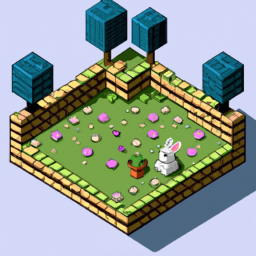
画像生成の詳細をご覧ください。
 $ response = ( new OpenAIClient ( $ apiKey ))-> Image ()-> createVariation (
        __DIR__ . ' /../../assets/image_variation_original.png ' ,
        n: 2 ,
        size: ImageSizeEnum::is256
    )-> toObject ();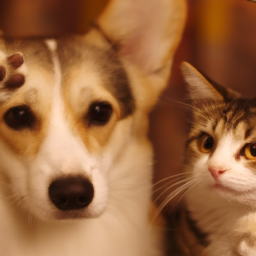
画像のバリエーションの詳細をご覧ください。
 $ response = ( new OpenAIClient ( $ apiKey ))-> Image ()-> createEdit (
        image: __DIR__ . ' /../../assets/image_edit_original.png ' ,
        mask: __DIR__ . ' /../../assets/image_edit_mask2.png ' ,
        prompt: ' a sunlit indoor lounge area with a pool containing a flamingo ' ,
        size: ImageSizeEnum::is512,
    )-> toObject ();
画像編集の詳細をご覧ください。
 $ response = ( new OpenAIClient ( $ apiKey ))-> Embedding ()-> create (
    ModelEnum:: TEXT_EMBEDDING_ADA_002 ,
    " The food was delicious and the waiter... " ,
)-> toObject ();
埋め込みの詳細をご覧ください。
 $ response = ( new OpenAIClient ( $ apiKey ))-> Audio ()
    -> addCurlParam ( ' timeout ' , 30 )
    -> transcription (
        __DIR__ . ' /../../assets/openai.mp3 ' ,
        ModelEnum:: WHISPER_1 ,
        response_format: AudioResponseEnum:: SRT
    )-> toObject ();
オーディオ転写の詳細をご覧ください。
 $ response = ( new OpenAIClient ( $ apiKey ))-> Audio ()
    -> addCurlParam ( ' timeout ' , 30 )
    -> translation (
        __DIR__ . ' /../../assets/openai_fr.mp3 ' ,
        ' whisper-1 ' ,
        response_format: AudioResponseEnum:: TEXT
    )-> toObject ();
オーディオ翻訳の詳細をご覧ください。
 $ response = ( new OpenAIClient ( $ apiKey ))
    -> Model ()
    -> list ()
    -> toObject ();
モデルの詳細をご覧ください。
 $ response = ( new OpenAIClient ( $ apiKey ))
    -> Model ()
    -> retrieve ( ' text-davinci-001 ' )
    -> toObject ();
モデルの詳細をご覧ください。
 $ response = ( new OpenAIClient ( $ apiKey ))
    -> Model ()
    -> delete (
        $ _POST [ ' model ' ]
    )-> toObject ();
モデルの詳細をご覧ください。
 $ response = ( new OpenAIApi ( $ apiKey ))
    -> File ()
    -> list ()
    -> toObject ();
ファイルの詳細をご覧ください。
 $ response = ( new OpenAIApi ( $ apiKey ))
    -> File ()
    -> create (
        __DIR__ . ' /../../assets/mydata.jsonl ' ,
        ' fine-tune ' ,
    )
    -> toObject ();
ファイルの詳細をご覧ください。
 $ response = ( new OpenAIApi ( $ apiKey ))
    -> File ()
    -> delete ( ' file-xxxx ' )
    -> toObject ();
ファイルの詳細をご覧ください。
 $ response = ( new OpenAIApi ( $ apiKey ))
    -> File ()
    -> retrieve ( ' file-xxxx ' )
    -> toObject ();
モデルの詳細をご覧ください。
 $ response = ( new OpenAIApi ( $ apiKey ))
    -> File ()
    -> download ( ' file-xxxx ' )
    -> toObject ();
モデルの詳細をご覧ください。
 $ response = ( new OpenAIApi ( $ apiKey ))
    -> FineTune ()
    -> list ()
    -> toObject ();
微調整の詳細をご覧ください。
 $ response = ( new OpenAIApi ( $ apiKey ))
        -> FineTune ()
        -> create (
            ' file-xxxx '
        )
        -> toObject ();
微調整の詳細をご覧ください。
 $ response = ( new OpenAIApi ( $ apiKey ))
    -> FineTune ()
    -> retrieve ( ' ft-xxx ' )
    -> toObject ();
微調整の詳細をご覧ください。
 $ response = ( new OpenAIApi ( $ apiKey ))
    -> FineTune ()
    -> listEvents ( ' ft-xxx ' )
    -> toObject ();
微調整の詳細をご覧ください。
 $ response = ( new OpenAIApi ( $ apiKey ))
    -> FineTune ()
    -> Cancel ( ' ft-xxx ' )
    -> toObject ();
微調整の詳細をご覧ください。
 $ response = ( new OpenAIClient ( $ apiKey ))
    -> Moderation ()
    -> create ( ' I want to kill them. ' )
    -> toObject ();
節度の詳細をご覧ください。
すべてのテストを実行するには:
composer test tests1つのテストのみを実行するには:
composer test tests/[NAME]Test.phpPhpopenaiは、Openai APIをプロジェクトに簡単に統合したいPHP開発者にとって有用なプロジェクトです。単純なインストールと作曲家の使用、テキスト分類、画像生成、および名前付きエンティティ認識がPHPアプリケーションになります。







