housaku
Update project metadata

Housakuは、SQLiteのFTS5の上に構築された個人検索エンジンで、ドキュメント、書籍、PDF、お気に入りのフィードなどを1か所で照会できます。
Housakuは早期に開発されているため、更新する際には、いくつかの互換性のない変更やその他のマイナーな問題が期待できます。 Once version
v1.0.0is reached, my goal is to focus on stability and avoiding breaking changes as much as possible.
.txt , .md , .csv , .pdf , .epub , .docx , .xlsx and .pptx .Support for file formats like
.odtis coming as well as the possibility of indexing posts from Bluesky feeds and Mastodon.
Housakuの作業を開始することを決めた最初の理由は、フルテキスト検索の基本と、検索エンジンがボンネットの下でどのように動作するかについて詳しく学ぶことでした。実際、コミット履歴を見ると、最初に、パフォーマンスのためにSQLiteのFTS5ソリューションを使用することを選択する前に、すべての解析、トークン化、TF/IDF計算が「手動で」処理されたことがわかります。
2番目の最後の理由は、私が管理していた大量のドキュメントでした。 I have ~5,000 notes in Obsidian, formatted in Markdown, a couple of hundred books in my Calibre library, mainly in .epub , a significant number of PDFs, and PowerPoint presentations from my computer science degree at UNED.さらに、長い間購読してきたRSSフィードの膨大なコレクションもあります。そのため、各ドキュメントがどこにあるか、どのような形式であるかを心配することなく、このすべてのドキュメントを検索する効率的かつ簡単な方法が必要/必要でした。
Housakuをインストールする推奨方法は、UVを使用することです。
uv tool install --python 3.13 housaku今、あなたはただ実行するだけです:
housaku --helpアップグレードするには、使用してください。
uv tool upgrade housaku

# Or

uv tool upgrade housaku --reinstallpipx To install Housaku using pipx , simply run:
pipx install housakuJust remember that the minimal version of Python required is
>=3.13.
pipPIPを使用してHousakuをインストールすることもできますが、正確なコマンドは環境のセットアップ方法によって異なります。この場合、コマンドは次のように見えるはずです。
python3 -m pip install housakuBefore you start using Housaku, the first step is to edit the config.toml file located at your $XDG_CONFIG_HOME/housaku/config.toml . This file is generated automatically the first time you run housaku and will look something like this:
 # Welcome! This is the configuration file for Housaku.

# Available themes include:
# - "dracula"
# - "textual-dark"
# - "textual-light"
# - "nord"
# - "gruvbox"
# - "catppuccin-mocha"
# - "textual-ansi"
# - "tokyo-night"
# - "monokai"
# - "flexoki"
# - "catppuccin-latte"
# - "solarized-light"

theme = " dracula "

[ files ]
# Directories to include for indexing.
# Example: include = ["/home/<user>/documents/notes"]
include = []

# Patterns to exclude from the indexing
# Example: exclude = ["*.tmp", "backup", "*.png"]
exclude = []

[ feeds ]
# List of RSS/Atom feeds to index
# Example: urls = ["https://example.com/feed", "https://anotherexample.com/rss"]
urls = []
The folder that holds the configuration file as well as the SQLite database is determined by the
get_app_dirutility.詳細については、こちらをご覧ください。
An easy way to open your config.toml file is to run the following command:
housaku configThe best way to see which commands are available is to run housaku with the --help flag.
housaku --helpまた、特定のコマンドが実行することについて詳しく知ることもできます。
housaku [command] --help

# For example:

housaku index --help The config command is a very simple command that just open the config.toml file using the default editor.
housaku configインデックスを作成するドキュメントを含むディレクトリのリストを構成した後、投稿を取得するフィードのリストと、次を実行できます。
housaku indexファイルのみをインデックスするには、次のコマンドを使用します。
housaku index --include filesフィードのみをインデックスするには:
housaku index --include feedsYou can specify both options to index files and feeds together, but this is equivalent to simply running the
indexcommand without any options.
ファイルやドキュメントのインデックスを作成するときに使用されるスレッドの数を変更することもできます。
housaku index -t 8私の推奨事項は、デフォルトのスレッド数に固執することです。
現時点では、インデックスファイルはマルチスレッドを使用して並行して行われているため、プロセスが高速になりますが、合併症も導入されます。 For example, cancelling the indexing half-way using ctrl+c will cause some threads to exit while others will continue running in the background and then fail.
search command The simplest way to start searching your documents and posts is by using the search command:
houskau searh --query " Django AND Postgres " You can also limit the number of results by using the --limit option which, by default, is set to 10:
housaku search --query " Django AND Postgres " --limit 20 If you don't specify a query using the --query/-q options you will be prompted to enter one.
クエリ構文の詳細については、こちらをご覧ください。
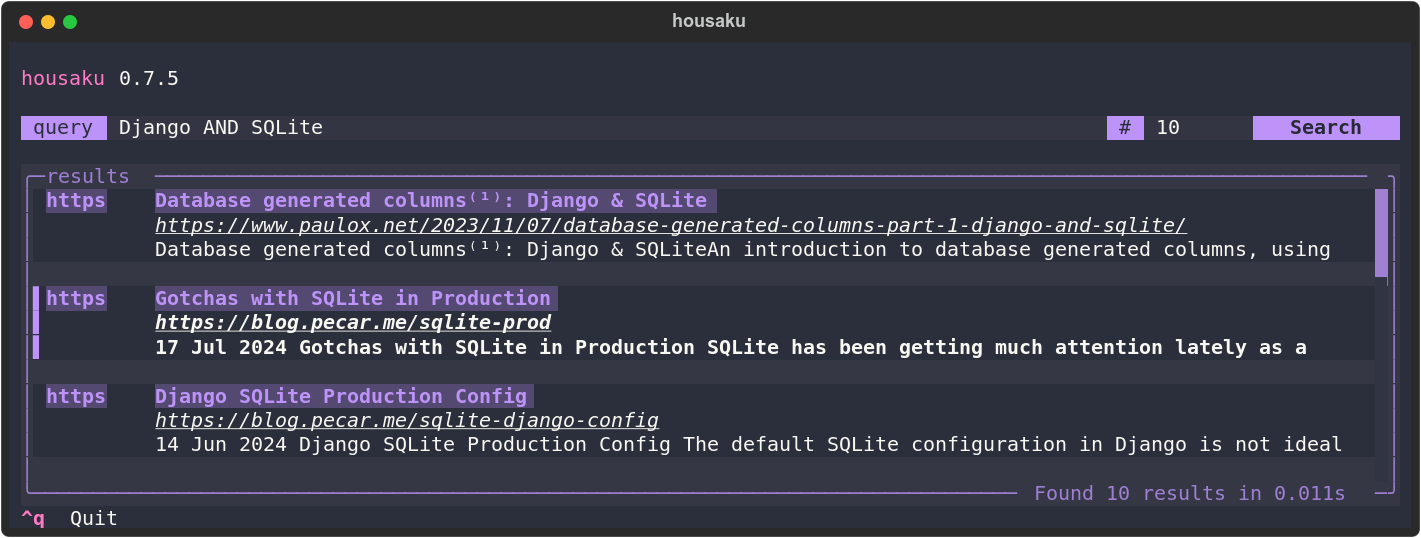
私のお気に入りの推奨される検索方法は、TUIを使用することです。それを開始するには、実行するだけです:
housaku tuiTo exit the TUI just press
ctrl + q, and to open a search result, pressEnterwhile the result is highlighted.
Housakuには、実行してアクセスできる非常にシンプルなWeb UIもあります。
housaku web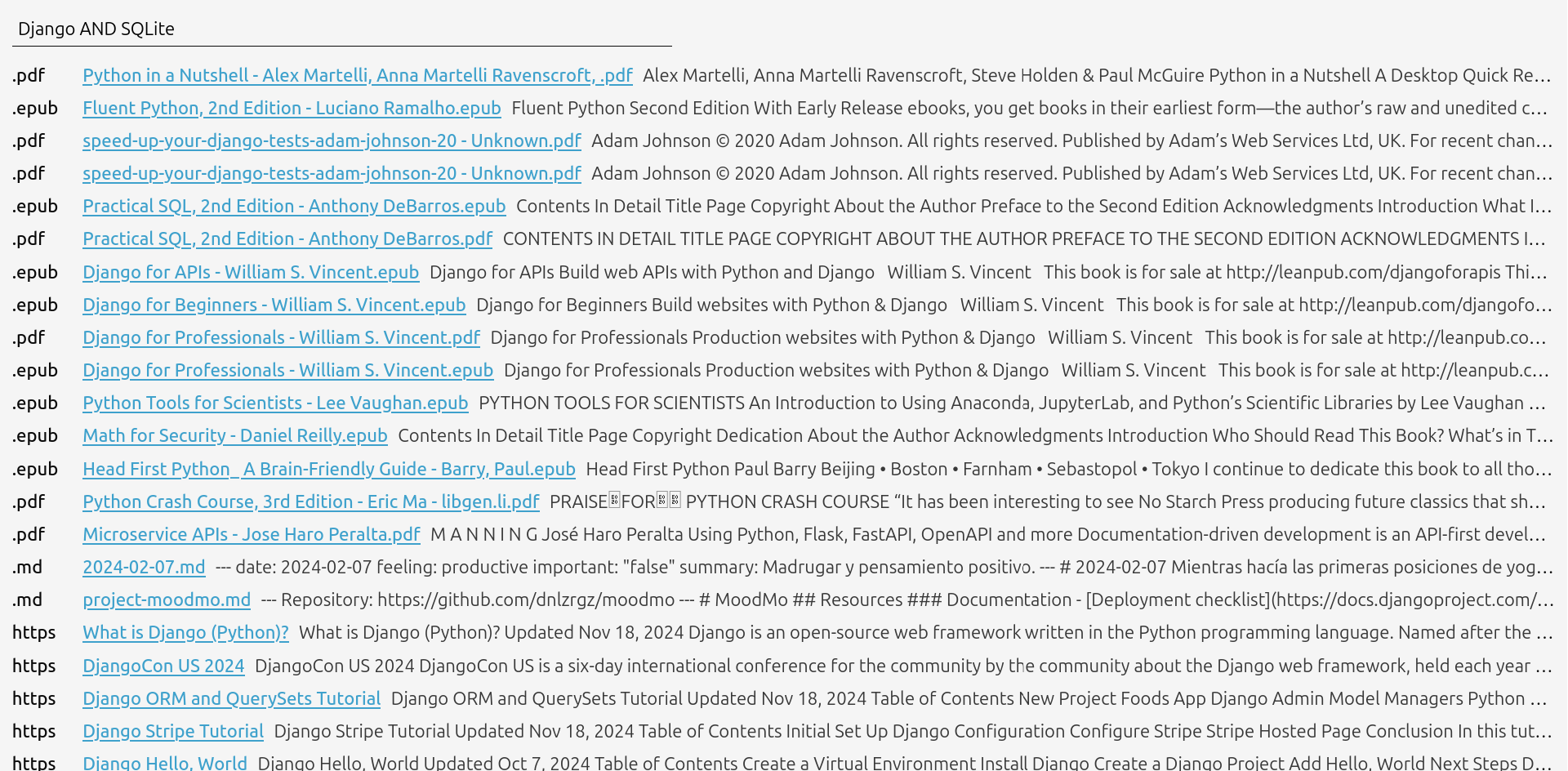
The default port is
4242.
この検索方法にはいくつかの制限があります。たとえば、ローカルドキュメントにリンクする結果を開くことはできません。
vacuum and purge The vacuum command is used to optimize the SQLite database by reclaiming unused space and improving performance.真空コマンドを実行するには、単に実行するだけです。
housaku vacuum The purge command is used to completely clear all data from the database.このコマンドは、データベースを初期状態にリセットする場合に役立ちます。
housaku purgeこれらのコマンドは、データベースに保持しているデータに直接影響を与えるため、これらの両方を使用する前に注意してください。
貢献を歓迎します!提案がある場合は、お気軽に問題を開いてください。





