Paste
1.0.0

 <!--
@template: master
@partial: project
@title: The Page Title
@visible: TRUE // visible in menu
@label: Menu Label (optional)
-->
Cara tercepat adalah dengan mengkloning situs demo dan memodifikasinya sesuai selera! Pastikan untuk menjalankan composer update untuk menginstal dependensi.
Situs Demo: https://github.com/paste/paste-demo
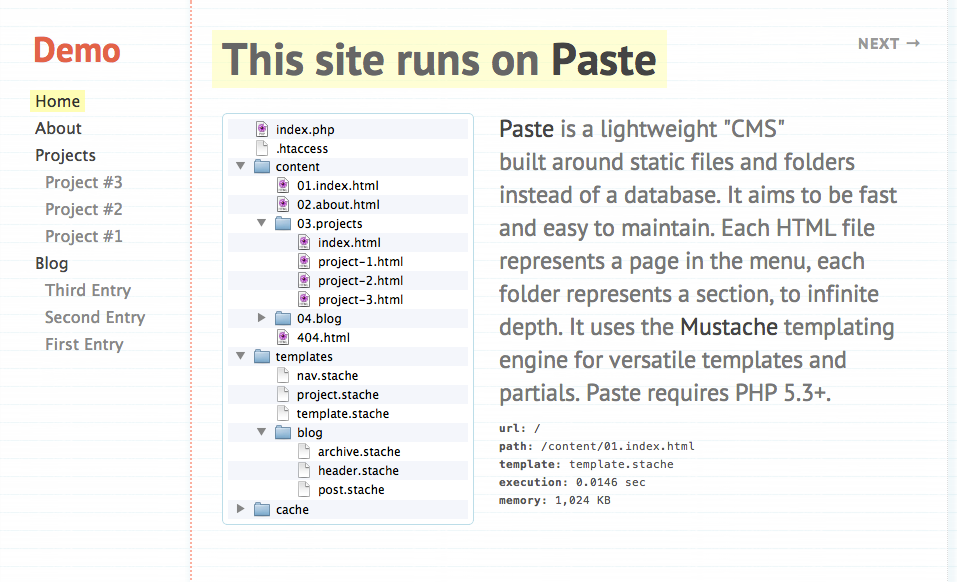
Gunakan Komposer. Tambahkan paste/paste ke composer.json proyek Anda:
{
    "require" : {
        "paste/paste" : " dev-master "
    }
}
Buat file index.php untuk router depan: (atau salin dari situs demo)
 <?php

// composer autoload
require ' vendor/autoload.php ' ;
use Paste  Paste ;

// configuration
$ config = array (
	// optionally specify a 'base_url' if serving Paste from a subdirectory, i.e. RewriteBase
	// 'base_url' => '/paste-demo',
	// relative path to content directory
	// 'content_dir' => 'content',
	// relative path to template directory
	// 'template_dir' => 'templates',
	// relative path to cache directory
	// 'cache_dir' => 'cache',
);

// load config and parse content directory
$ paste = new Paste ( $ config );

// (optional) user defined routing
// 'route regex' => any valid callback
// matched tokens from the regex will be passed as parameters, with $paste instance first
$ paste -> add_route ( ' blog/([0-9]{4})/([0-9]{2})/([0-9]{2})/([A-Za-z0-9-_]+) ' , function ( $ paste , $ year , $ month , $ day , $ name ) {
	// ignore date and run normal content request
	return $ paste -> render_url ( " blog/ $ name " );
});

// init routing and run
$ paste -> run ();
Buat content , templates , direktori cache di root web Anda. Folder cache harus dapat ditulisi oleh Apache. Root web Anda akan terlihat seperti ini:
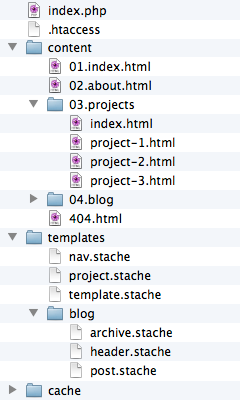
 /cache/
/content/
	index.html
/templates/
	template.stache
/vendor/
index.php
composer.json
.htaccess
Tambahkan file indeks konten root, content/index.html :
 <!-- @title: Hello World -->
<!-- @template: template -->
< h3 > Hello, world! </ h3 >
Tambahkan template pertama, misal templates/template.stache :
 <!doctype html >
< html >
< head >
	< meta charset =" utf-8 " >
	< title > {{title}} </ title >
</ head >
< body >
	{{{content}}}
</ body >
</ html >
Buat file .htaccess untuk mengaktifkan penulisan ulang URL: (atau salin dari situs demo)
 # don't list directories
Options -Indexes

# Turn on URL rewriting
RewriteEngine On

# Installation directory -- same as your 'base_url'
RewriteBase /

# Protect dot files from being viewed
< Files .*>
	Order Deny , Allow
	Deny From All
</ Files >

# Protect application and system files from being viewed
RewriteRule ^(?:vendor|content|templates|cache)b.* index.php/$0 [L]

# Allow any files or directories that exist to be displayed directly
RewriteCond %{REQUEST_FILENAME} !-f
RewriteCond %{REQUEST_FILENAME} !-d

# Rewrite all other URLs to index.php/URL
RewriteRule .* index.php/$0 [PT]

# use utf-8 encoding for anything served text/plain or text/html
AddDefaultCharset utf-8

# force utf-8 for a number of file formats
AddCharset utf-8 .html .css .js .xml .json .rss
Sekarang kunjungi situs Tempel Anda di browser web dan nikmati keajaibannya !





