ICCBot
v1.0

ICCBOT: Un outil de résolution ICC sensible au fragment et au contexte pour les applications Android.
Le papier PDF peut être trouvé sur https://hanada31.github.io/pdf/icse22_iccbot.pdf
@inproceedings{icse22_iccbot,
  author    = {Jiwei Yan and
               Shixin Zhang and
	       Yepang Liu and
               Jun Yan and
               Jian Zhang},
  title     = {ICCBot: Fragment-Aware and Context-Sensitive ICC Resolution for {Android} Applications},
  booktitle = {The 44th International Conference on Software Engineering, {ICSE} 2022 (Demo Track)},
  year      = {2022},
}Python 3+
Java 1.8+
Installez Graphviz (http://www.graphviz.org/download/)
 # Initialize soot-dev submodule
git submodule update --init soot-dev

# Use -DskipTests to skip tests of soot (make build faster)
mvn -f pom.xml clean package -DskipTests

# Copy jar to root directory
cp target/ICCBot-jar-with-dependencies.jar ICCBot.jar
ou utilisez le script de construction fourni par nous:
python scripts/mvn.pyjava -jar ICCBot.jar -path apk/ -name ICCBotBench.apk -androidJar lib/platforms -time 30 -maxPathNumber 100 -client CTGClient -outputDir results/outputou analyser les APK sous un dossier donné avec un script python:
python scripts/runICCBot.py [apkPath] [resultPath] java -jar ICCBot.jar -h
usage: java -jar ICCBot.jar [options] [-path] [-name] [-androidJar] [-outputDir][-client]
-h -h: Show the help information.
-name <arg> -name: Set the name of the apk under analysis.
-path <arg> -path: Set the path to the apk under analysis.
-outputDir <arg> -outputDir: Set the output folder of the apk.
-client <arg> -client
"CallGraphClient: Output call graph files."
"ManifestClient: Output manifest.xml file."
"IROutputClient: Output soot IR files."
"FragmentClient: Output the fragment loading results."
"CTGClient/MainClient: Resolve ICC and generate CTG."
"ICCSpecClient: Report ICC specification for each component."
-androidJar <arg> -androidJar: Set the path of android.jar.
-version <arg> -version [default:23]: Version of Android SDK.
-maxPathNumber <arg> -maxPathNumber [default:10000]: Set the max number of paths.
-time <arg> -time [default:90]: Set the max running time (min).
-noAdapter -noAdapter: exclude super simple adapter model
-noAsyncMethod -noAsyncMethod: exclude async method call edge
-noCallBackEntry -noCallBackEntry: exclude the call back methods
-noDynamicBC -noDynamicBC: exclude dynamic broadcast receiver matching
-noFragment -noFragment: exclude fragment operation model
-noFunctionExpand -noFunctionExpand: do not inline function with useful contexts
-noImplicit -noImplicit: exclude implict matching
-noLibCode -noLibCode: exclude the activities not declared in app's package
-noPolym -noPolym: exclude polymorphism methods
-noStaticField -noStaticField: exclude string operation model
-noStringOp -noStringOp: exclude string operation model
-noWrapperAPI -noWrapperAPI: exclude RAICC model
-onlyDummyMain -onlyDummyMain: limit the entry scope
-debug -debug: use debug mode.
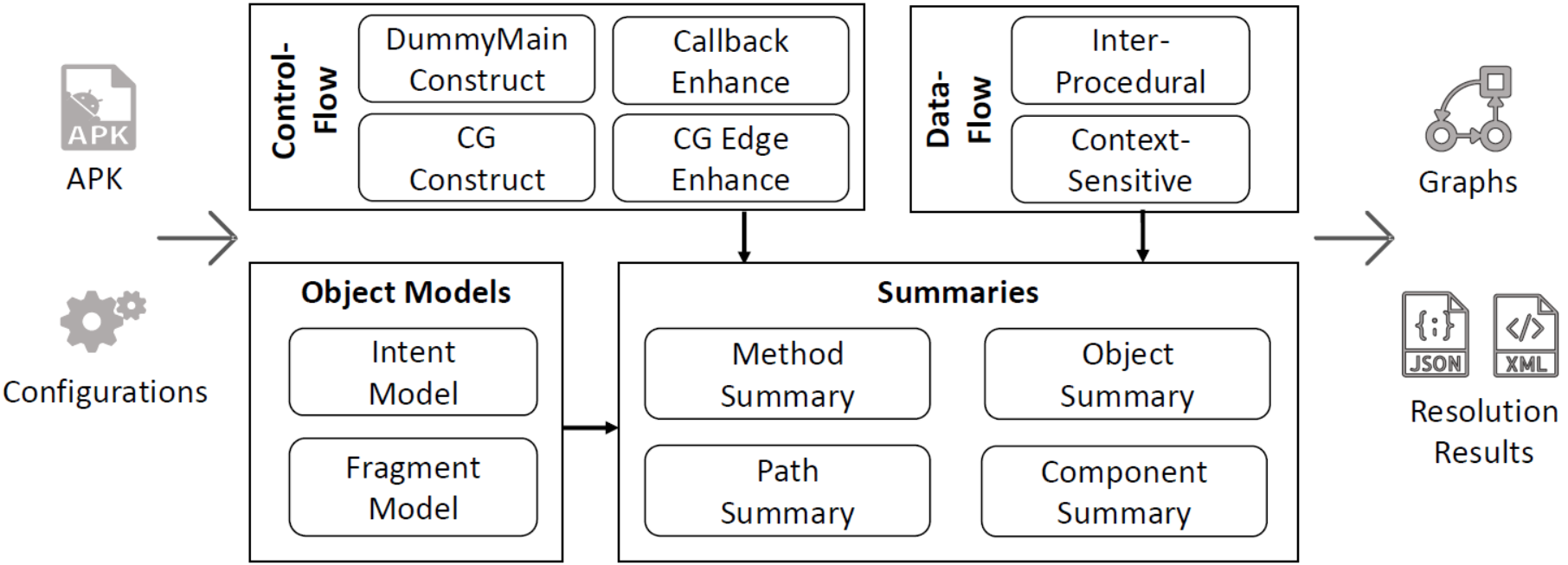
Entrée: fichier APK
Sortie: Résultats de la résolution ICC, graphique CTG, etc.
Fichier JSON de spécification ICC générée
Q: ICCBOT fournit une erreur " Failed to load analyze config json: File not exist "
R: Assurez-vous que vous disposez de la config du dossier sous le répertoire actuel, avec le fichier config/config.json spécifiant excludePackages et AndroidCallbacks .







