delphi jose jwt
Release 3.3.1


Implementación de Delphi de JWT (JSON Web Token) y el conjunto de especificaciones de Jose (JSON Object Firming and Encryption). Esta biblioteca admite las serializaciones compactas JWS (JWE) con varios algoritmos Jose.
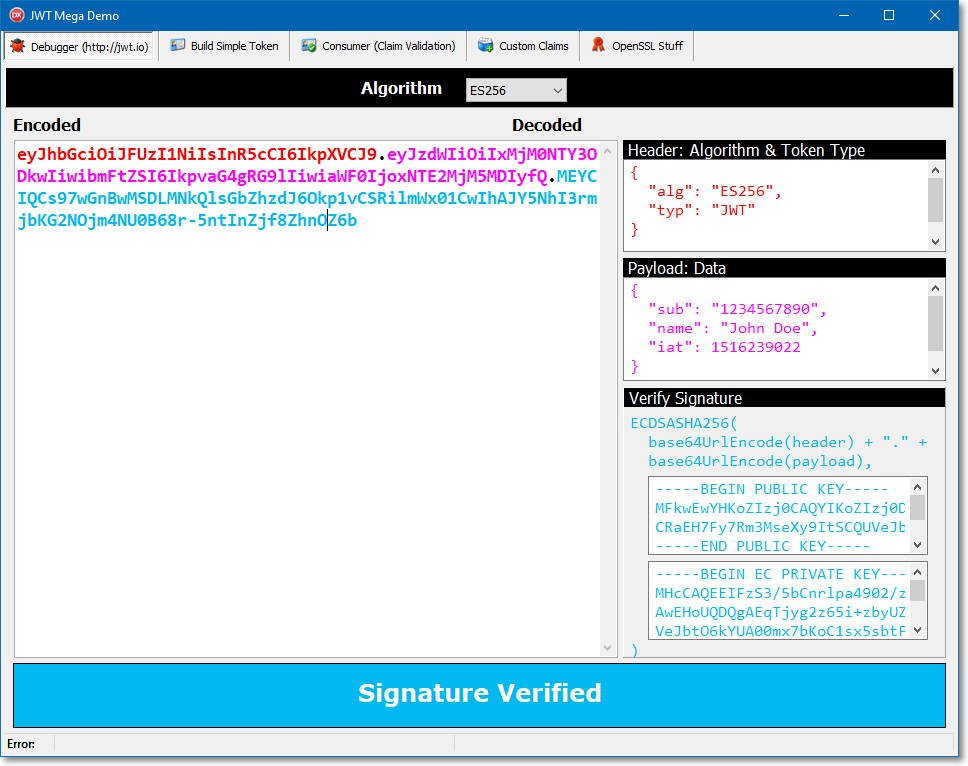
Antes de Delphi 10 Seattle, el algoritmo HMAC-SHA utiliza OpenSSL a través de la Biblioteca Indy, por lo que para generar el token debe tener las DLL OpenSSL en el sistema de su servidor.
En las versiones de Delphi 10 Seattle o Delphi más nuevas, el algoritmo HMAC también está en la unidad del sistema.
El algoritmo HMAC-RSA (ECDSA) utiliza necesariamente OpenSSL, por lo que si planea usar estos algoritmos para firmar su token, tiene que descargar e implementar OpenSSL (en el servidor).
Tenga en cuenta que el cliente no tiene que generar o verificar el token (usando SHA o RSA) para que en el lado del cliente no sea necesario para las DLLS OpenSSL.
Si necesita la biblioteca OpenSSL en el servidor, puede descargar el paquete directamente a la página del proyecto GitHub de Indy (tenga en cuenta que siempre actualiza la última versión y para que coincida con la bitness de su aplicación)
José es un estándar que proporciona un enfoque general para la firma y el cifrado de cualquier contenido. José consta de varios RFC:
| Algoritmos | Compatible |
|---|---|
exp | ✔️ |
iat | ✔️ |
nbf | ✔️ |
aud | ✔️ |
iss | ✔️ |
jti | ✔️ |
typ | ✔️ |
TJOSEProducer y TJOSEProducerBuilder (alias TJOSEProcess ) para construir un nuevo token compacto con muchas opciones TJOSEConsumer y TJOSEConsumerBuilder fáciles de usar para validar el token con una gran granularidad| Algoritmos | Compatible |
|---|---|
None | ✔️ ¡No lo uses! ? |
HS256 | ✔️ |
HS384 | ✔️ |
HS512 | ✔️ |
RS256 | ✔️ ¡Actualizado! |
RS384 | ✔️ ¡Actualizado! |
RS512 | ✔️ ¡Actualizado! |
ES256 | ✔️ NUEVO! ? |
ES384 | ✔️ NUEVO! ? |
ES512 | ✔️ NUEVO! ? |
ES256K | ✔️ NUEVO! ? |
NoneEsta biblioteca ha sido probada con Delphi 12 Atenas , Delphi 11 Alexandria , Delphi 10.4 Sydney , Delphi 10.3 Río , Delphi 10.2 Tokio , pero con algún trabajo debería compilar con DXE6 y superior, pero no he probado o probado esto, si logras esta tarea, ¡estaré feliz de crear una rama de tu trabajo!
Esta biblioteca no tiene dependencias en bibliotecas/unidades externas.
Unidades de Delphi utilizadas:
Simplemente agregue la ruta de origen "Fuente/Common" y Source/Jose "a su ruta del proyecto Delphi y ... ¡está listo para comenzar!
Usando el comando boss install :
$ boss install github.com/paolo-rossi/delphi-jose-jwt Para crear un token, simplemente cree una instancia de la clase TJWT y establezca las propiedades (reclamos).
La forma más fácil de construir un token JWT (representación compacta) es utilizar la interfaz IJOSEProducer :
 uses
  JOSE.Producer;

var
  LResult: string;
begin
  LResult := TJOSEProcess.New
    .SetIssuer( ' Delphi JOSE Library ' )
    .SetIssuedAt(Now)
    .SetExpiration(Now + 1 )
    .SetAlgorithm(LAlg)
    .SetKey(TJOSEAlgorithmId.HS256)
    .Build
    .GetCompactToken
  ;

  memoCompact.Lines.Add(LResult);
end ; Otra forma de serializar, deserializar, verificar un token es usar la clase de utilidad TJOSE :
 uses
  JOSE.Core.JWT,
  JOSE.Core.Builder;

var
  LToken: TJWT;
  LCompactToken: string;
begin
  LToken := TJWT.Create;
  try
    // Token claims
    LToken.Claims.Issuer := ' WiRL REST Library ' ;
    LToken.Claims.Subject := ' Paolo Rossi ' ;
    LToken.Claims.Expiration := Now + 1 ;

    // Signing and Compact format creation
    LCompactToken := TJOSE.SHA256CompactToken( ' my_very_long_and_safe_secret_key ' , LToken);
    mmoCompact.Lines.Add(LCompactToken);
  finally
    LToken.Free;
end ; Usando las clases TJWT , TJWS y TJWK , tiene más control sobre la creación del token compacto final.
 var
  LToken: TJWT;
  LSigner: TJWS;
  LKey: TJWK;
  LAlg: TJOSEAlgorithmId;
begin
  LToken := TJWT.Create;
  try
    // Set your claims
    LToken.Claims.Subject := ' Paolo Rossi ' ;
    LToken.Claims.Issuer := ' Delphi JOSE Library ' ;
    LToken.Claims.IssuedAt := Now;
    LToken.Claims.Expiration := Now + 1 ;

    // Choose the signing algorithm
    case cbbAlgorithm.ItemIndex of
      0 : LAlg := TJOSEAlgorithmId.HS256;
      1 : LAlg := TJOSEAlgorithmId.HS384;
      2 : LAlg := TJOSEAlgorithmId.HS512;
    else LAlg := TJOSEAlgorithmId.HS256;
    end ;

    // Create your key from any text or TBytes
    LKey := TJWK.Create(edtSecret.Text);

    try
      // Create the signer
      LSigner := TJWS.Create(LToken);
      try
        // With this option you can have keys < algorithm length
        LSigner.SkipKeyValidation := True;

        // Sign the token!
        LSigner.Sign(LKey, LAlg);

        memoCompact.Lines.Add( ' Header: ' + LSigner.Header);
        memoCompact.Lines.Add( ' Payload: ' + LSigner.Payload);
        memoCompact.Lines.Add( ' Signature: ' + LSigner.Signature);
        memoCompact.Lines.Add( ' Compact Token: ' + LSigner.CompactToken);
      finally
        LSigner.Free;
      end ;
    finally
      LKey.Free;
    end ;
  finally
    LToken.Free;
  end ;
Desempacar y verificar tokens es simple.
Debe pasar la clave y el formato compacto de token a la función de clase TJOSE.Verify
 var
  LKey: TJWK;
  LToken: TJWT;
begin
  // Create the key from a text or TBytes
  LKey := TJWK.Create( ' my_very_long_and_safe_secret_key ' );

  // Unpack and verify the token!
  LToken := TJOSE.Verify(LKey, FCompactToken);

  if Assigned(LToken) then
  begin
    try
      if LToken.Verified then
        mmoJSON.Lines.Add( ' Token signature is verified ' )
      else
        mmoJSON.Lines.Add( ' Token signature is not verified ' )
    finally
      LToken.Free;
    end ;
  end ;

end ; Usando el nuevo TJOSEConsumer de clase, es muy fácil validar las afirmaciones del token. El objeto TJOSEConsumer está construido con la clase de utilidad TJOSEConsumerBuilder utilizando la interfaz Fluent.
 var
  LConsumer: IJOSEConsumer;
begin
  LConsumer := TJOSEConsumerBuilder.NewConsumer
    .SetClaimsClass(TJWTClaims)

    // JWS-related validation
    .SetVerificationKey(edtConsumerSecret.Text)
    .SetSkipVerificationKeyValidation
    .SetDisableRequireSignature

    // string-based claims validation
    .SetExpectedSubject( ' paolo-rossi ' )
    .SetExpectedAudience(True, [ ' Paolo ' ])

    // Time-related claims validation
    .SetRequireIssuedAt
    .SetRequireExpirationTime
    .SetEvaluationTime(IncSecond(FNow, 26 ))
    .SetAllowedClockSkew( 20 , TJOSETimeUnit.Seconds)
    .SetMaxFutureValidity( 20 , TJOSETimeUnit.Minutes)

    // Build the consumer object
    .Build();

  try
    // Process the token with your rules!
    LConsumer.Process(Compact);
  except
    // (optionally) log the errors
    on E: Exception do
      memoLog.Lines.Add(E.Message);
  end ;






