building genai applications with golang
1.0.0

| título | autor | fecha |
|---|---|---|
Desarrollo de aplicaciones Genai con Golang | Haimtrann | 25/03/2024 |
Lo que a menudo vemos en la producción es una variedad en los idiomas escritos en GO, Java, .NET, sin embargo, la mayoría de los materiales de aprendizaje sobre la construcción de aplicaciones Genai (inteligencia artificial generativa) actualmente se encuentra en Python y JavaScript. Este taller muestra cómo comenzar con Amazon Bedrock en la implementación de algunos ejemplos básicos sin usar marcos como Langchain, Streamlit o React.
Los ejemplos incluyen:
Implementará estas características utilizando solo conceptos básicos de programación sin tener que aprender un nuevo marco para ayudarlo a comprender realmente y dominar conceptos fundamentales.
Arquitectura
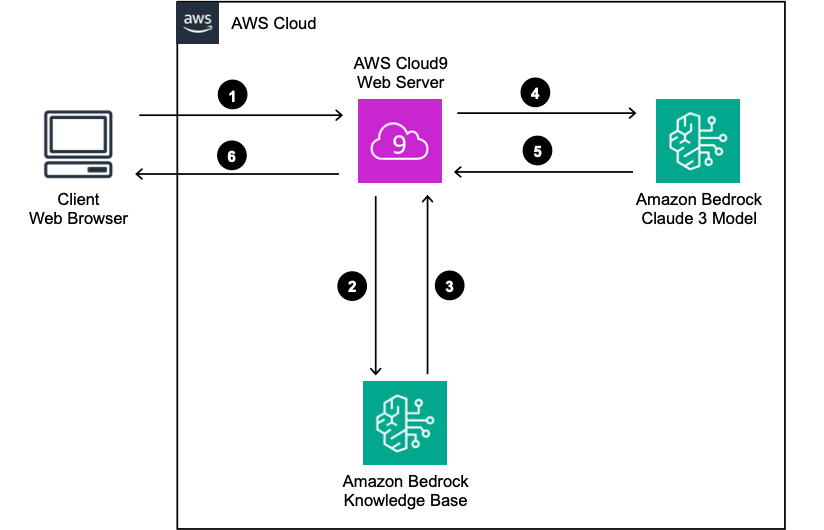
Esta aplicación de muestra supone que ya configuró
Reemplace las variables en /bedrock/constants.fo con la suya, por ejemplo
 const BEDROCK_REGION = ""
const AOSS_REGION = ""
const KNOWLEDGE_BASE_REGION = ""
const KNOWLEDGE_BASE_ID = ""
const KNOWLEDGE_BASE_MODEL_ID = ""
const KNOWLEDGE_BASE_NUMBER_OF_RESULT = 6
const AOSS_ENDPOINT = ""
const AOSS_NOTE_APP_INDEX_NAME = "" Estructura de proyectos
 | - - static
  | - - aoss - index. html
  | -- aoss - query. html
  | -- claude - haiku. html
  | -- image. html
  | -- retrieve. html
  | -- retrieve - generate. html
| -- bedrock
  | -- aoss. go
  | -- bedrock. go
  | -- constants. go
  | -- knowledge - based. go
| -- main. go
| -- go . mod
| -- go . sum
Main.go implementa un servidor HTTP y una solicitud de ruta a los manejadores. Bedrock.go y Aoss.go son funciones para invocar a Amazon Bedrock y Amazon OpenSearch Servidor (AOSS), respectivamente. La carpeta estática contiene frontend simple con JavaScript.
Importante
Para usar AOSS, necesita crear una colección de OpenSearch y proporcionar su punto final de URL en Constants.go. Además, debe configurar el acceso a los datos en el AOSS para el entorno de tiempo de ejecución (perfil de EC2, rol de TAKS ECS, rol de lambda, .etc)
Siga este documento oficial para instalar Golang, luego ejecute la aplicación como el siguiente
Importante
Instale Go Versión 1.21.5
 cd developing - genai - applications - with - golang
go run main . go Primero, es bueno crear algunas estructuras de datos según el formato de la API de Amazon Bedrock Claude3
 type Content struct {
	Type string `json:"type"`
	Text string `json:"text"`
}

type Message struct {
	Role    string    `json:"role"`
	Content [] Content `json:"content"`
}

type Body struct {
	MaxTokensToSample int       `json:"max_tokens"`
	Temperature       float64   `json:"temperature,omitempty"`
	AnthropicVersion  string    `json:"anthropic_version"`
	Messages          [] Message `json:"messages"`
}

// list of messages
messages := [] Message {{
	Role :    "user" ,
	Content : [] Content {{ Type : "text" , Text : promt }},
}}

// form request body
payload := Body {
	MaxTokensToSample : 2048 ,
	Temperature :       0.9 ,
	AnthropicVersion :  "bedrock-2023-05-31" ,
	Messages :          messages ,
}
Luego convierta la carga útil en bytes e invoca al cliente de roca madre
 payload := Body {
	MaxTokensToSample : 2048 ,
	Temperature :       0.9 ,
	AnthropicVersion :  "bedrock-2023-05-31" ,
	Messages :          messages ,
}

// marshal payload to bytes
payloadBytes , err := json . Marshal ( payload )

if err != nil {
	fmt . Println ( err )
	return
}

// create request to bedrock
output , error := BedrockClient . InvokeModelWithResponseStream (
	context . Background (),
	& bedrockruntime. InvokeModelWithResponseStreamInput {
		Body :        payloadBytes ,
		ModelId :     aws . String ( "anthropic.claude-3-haiku-20240307-v1:0" ),
		ContentType : aws . String ( "application/json" ),
		Accept :      aws . String ( "application/json" ),
	},
)

if error != nil {
	fmt . Println ( error )
	return
}
Finalmente, analice la respuesta de transmisión y decodifique al texto. Cuando se implementan en un servidor HTTP, necesitamos modificar el código un poco para transmitir cada parte de la respuesta al cliente. Por ejemplo aquí
 output , error := BedrockClient . InvokeModelWithResponseStream (
	context . Background (),
	& bedrockruntime. InvokeModelWithResponseStreamInput {
		Body :        payloadBytes ,
		ModelId :     aws . String ( "anthropic.claude-3-haiku-20240307-v1:0" ),
		ContentType : aws . String ( "application/json" ),
		Accept :      aws . String ( "application/json" ),
	},
)

if error != nil {
	fmt . Println ( error )
	return
}

// parse response stream
for event := range output . GetStream (). Events () {
	switch v := event .( type ) {
	case * types. ResponseStreamMemberChunk :

		//fmt.Println("payload", string(v.Value.Bytes))

		var resp ResponseClaude3
		err := json . NewDecoder ( bytes . NewReader ( v . Value . Bytes )). Decode ( & resp )
		if err != nil {
			fmt . Println ( err )
		}

		fmt . Println ( resp . Delta . Text )

	case * types. UnknownUnionMember :
		fmt . Println ( "unknown tag:" , v . Tag )

	default :
		fmt . Println ( "union is nil or unknown type" )
	}
}Este taller no proporciona detallado paso a paso para implementar la aplicación. En cambio, proporciona arquitectura general y una opción de implementación. Es directo implementar la aplicación en Amazon ECS.
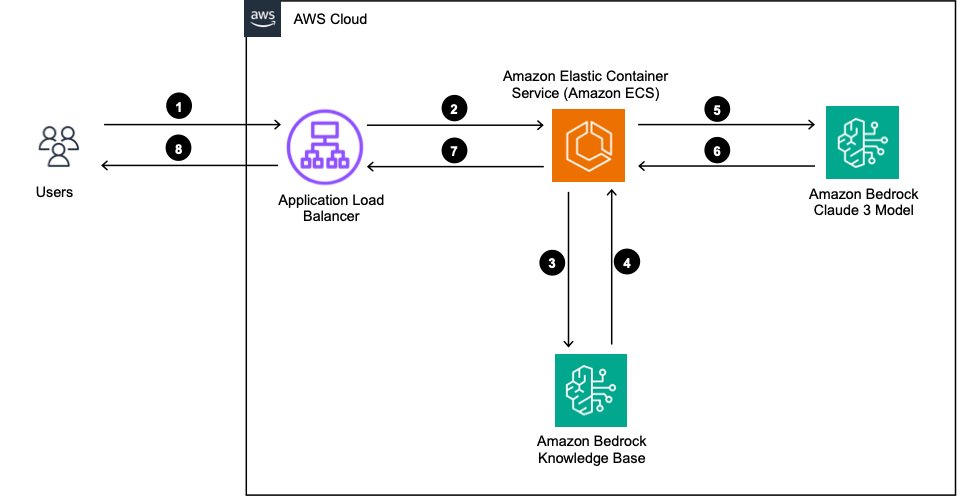
Dockfile
# syntax = docker / dockerfile : 1

# Build the application from source
FROM golang : 1.21 . 5 AS build - stage

WORKDIR / app

COPY go . mod go . sum . /
RUN go mod download

COPY * . go . /
COPY  bedrock . / bedrock

RUN CGO_ENABLED = 0 GOOS = linux go build - o / genaiapp

# Run the tests in the container
FROM build - stage AS run - test - stage

# Deploy the application binary into a lean image
FROM gcr . io / distroless / base - debian11 AS build - release - stage

WORKDIR /

COPY -- from = build - stage / genai - go - app / genaiapp
COPY static . / static

EXPOSE 3000

USER nonroot : nonroot

ENTRYPOINT [ "/genaiapp" ]
Rol de tarea de ECS
El papel de la tarea necesita permisos para
Aquí hay una muestra de la política de IAM adjunta al rol de tarea
{
  "Version" : " 2012-10-17 " ,
  "Statement" : [
    {
      "Action" : [
        " bedrock:InvokeModel " ,
        " bedrock:InvokeModelWithResponseStream " ,
        " bedrock:InvokeAgent "
      ],
      "Resource" : [
        " arn:aws:bedrock:<REGION>::foundation-model/anthropic.claude-3-haiku-20240307-v1:0 " ,
        " arn:aws:bedrock:<REGION>::foundation-model/amazon.titan-embed-text-v1 "
      ],
      "Effect" : " Allow "
    },
    {
      "Action" : [ " s3:GetObject " , " s3:PutObject " ],
      "Resource" : [
        " arn:aws:s3:::<BUCKET_NAME> " ,
        " arn:aws:s3:::<BUCKET_NAME>/* "
      ],
      "Effect" : " Allow "
    },
    {
      "Action" : " aoss:APIAccessAll " ,
      "Resource" : [
        " arn:aws:aoss:<REGION>:<ACCOUNT_ID>:collection/<COLLECTION_ID> "
      ],
      "Effect" : " Allow "
    }
  ]
}
Política de acceso a datos de AOSS
Para permitir que el rol de la tarea acceda a la colección AOSS, necesitamos actualizar la política de acceso de la colección.





