phalapi
PhalApi 2.23.2

Pronunciation: Pai Framework, official website: https://www.phalapi.net/
The elegant and detailed development documents specially prepared for PHPer can basically find the answers you want in the documentation. Please see: PhalApi 2.x development documents.
Use composer to create a project command to achieve one-click installation.
$ composer create-project phalapi/phalapiWarm reminder: For the use of composer, please refer to Composer Chinese website/Packagist China full-scale mirroring.
Alternatively, manual installation can be performed. After downloading and decompressing this Git project code, perform an optional composer update, that is:
$ composer updateIf you are using Nginx, you can refer to the following configuration.
 server {
    listen 80 ;
    server_name dev.phalapi.net;
    # 将根目录设置到public目录
    root /path/to/phalapi/public;
    charset utf-8;

    location / {
        index index.php;
    }

    location ~ .php$ {
        fastcgi_split_path_info ^(.+.php)(/.+)$ ;
        # 根据当前环境,选择合适的通讯方式
        # fastcgi_pass unix:/var/run/php-fpm/php-fpm.sock;
        fastcgi_pass 127.0.0.1:9000;
        fastcgi_index index.php;
        include fastcgi_params;
        fastcgi_param SCRIPT_FILENAME $document_root$fastcgi_script_name ;
    }
}
When configuring, you need to set the root directory of the website to the public directory, and restart nginx after saving the configuration.
Warm reminder: It is recommended to point the access root path to /path/to/phalapi/public.
How to use MySQL database, refer to modify the ./config/dbs.php database configuration.
 return array (
    /**
     * DB数据库服务器集群 / database cluster
     */
    ' servers ' => array (
        ' db_master ' => array (                       // 服务器标记 / database identify
            ' type '      => ' mysql ' ,                 // 数据库类型,暂时只支持:mysql, sqlserver / database type
            ' host '      => ' 127.0.0.1 ' ,             // 数据库域名 / database host
            ' name '      => ' phalapi ' ,               // 数据库名字 / database name
            ' user '      => ' root ' ,                  // 数据库用户名 / database user
            ' password '  => '' ,	                    // 数据库密码 / database password
            ' port '      => 3306 ,                    // 数据库端口 / database port
            ' charset '   => ' UTF8 ' ,                  // 数据库字符集 / database charset
            ' pdo_attr_string '   => false ,           // 数据库查询结果统一使用字符串,true是,false否
            ' driver_options ' => array (              // PDO初始化时的连接选项配置
                // 若需要更多配置,请参考官方文档:https://www.php.net/manual/zh/pdo.constants.php
            ),
        ),
    ),

    // 更多代码省略……
);
Finally, you need to add write permissions to the runtime directory. For more installation instructions, please refer to the documentation to download and install.
In PhalApi, you can specify the interface service to be called through the service parameter (the short name is the s parameter). For example, access the default interface service.
http://dev.phalapi.net/?s=App.Site.Index
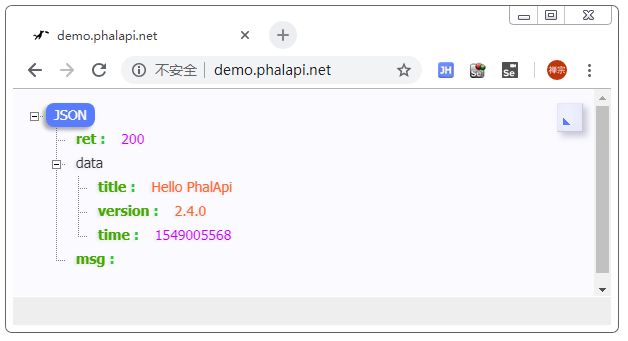
The result output after the interface request is similar to the following:
 {
    "ret": 200,
    "data": {
        "title": "Hello PhalApi",
        "version": "2.4.2",
        "time": 1501079142
    },
    "msg": ""
}
The corresponding PHP code is in the ./src/app/Api/Site.php file, and the source code fragment is as follows:
 <?php
namespace App  Api ;
use PhalApi  Api ;

/**
 * 默认接口服务类
 * @author: dogstar <[email protected]> 2014-10-04
 */
class Site extends Api {
    public function getRules () {
        return array (
            ' index ' => array (
                ' username '  => array ( ' name ' => ' username ' , ' default ' => ' PhalApi ' , ' desc ' => '用户名' ),
            ),
        );
    }

    /**
     * 默认接口服务
     * @desc 默认接口服务,当未指定接口服务时执行此接口服务
     * @return string title 标题
     * @return string content 内容
     * @return string version 版本,格式:X.X.X
     * @return int time 当前时间戳
     * @exception 400 非法请求,参数传递错误
     */
    public function index () {
        return array (
            ' title ' => ' Hello ' . $ this -> username ,
            ' version ' => PHALAPI_VERSION ,
            ' time ' => $ _SERVER [ ' REQUEST_TIME ' ],
        );
    }
}
The operation effect is as follows:
PhalApi will automatically generate online interface documents in real time based on the parameter configuration and code comments of the interface you wrote. The online interface document link is:
The browsing effect is similar to the following:
The effect of the interface document details page is similar to the following:
Supports online interface testing, requesting sample descriptions, generating offline HTML interface documents, and real-time updates.
./phalapi
├── README.md # 简介
├── bin # 脚本目录
├── config # 配置目录
│   ├── app.php # 应用配置
│   ├── dbs.php # 数据库配置
│   ├── di.php # 依赖服务配置
│   └── sys.php #系统配置
├── data # 数据库
│   └── phalapi.sql # 数据库安装时的文件
├── language # 翻译包
├── public # 对外访问的目录
│   ├── docs # 离线生成的HTML接口文档
│   ├── docs.php # 在线版接口文档访问入口
│   ├── index.php
│   ├── init.php # 全局初始化文件
│   ├── static # 静态资源
│   ├── uploads # 上传目录(需要有写入权限)
│   └── phalapi_logo.png # logo图片
├── runtime # 运行目录
│   ├── cache # 文件缓存
│   └── log # 文件日志
├── sdk # SDK包
├── src # 项目源代码,非常重要
│   ├── app # 接口源代码(遵循ADM模式)
│   │   ├── Api # 放置接口源代码,相当于控制器层
│   │   ├── Common # 公共代码目录,放置工具等
│   │   ├── Domain # 领域业务层,负责业务逻辑和处理
│   │   ├── functions.php # 公共函数库
│   │   └── Model # 数据源层,负责数据持久化存储及操作
│   └── view # 页面模板目录(如接口文档)
├── tests # 单元测试
└── vendor # composer包,不需要手动修改,通过composer install/update可进行安装和更新 Modify the ./public/init.php file to set the current language.
 // 翻译语言包设定-简体中文
 PhalApi  SL ( ' zh_cn ' );

// Setting language to English
 PhalApi  SL ( ' en ' );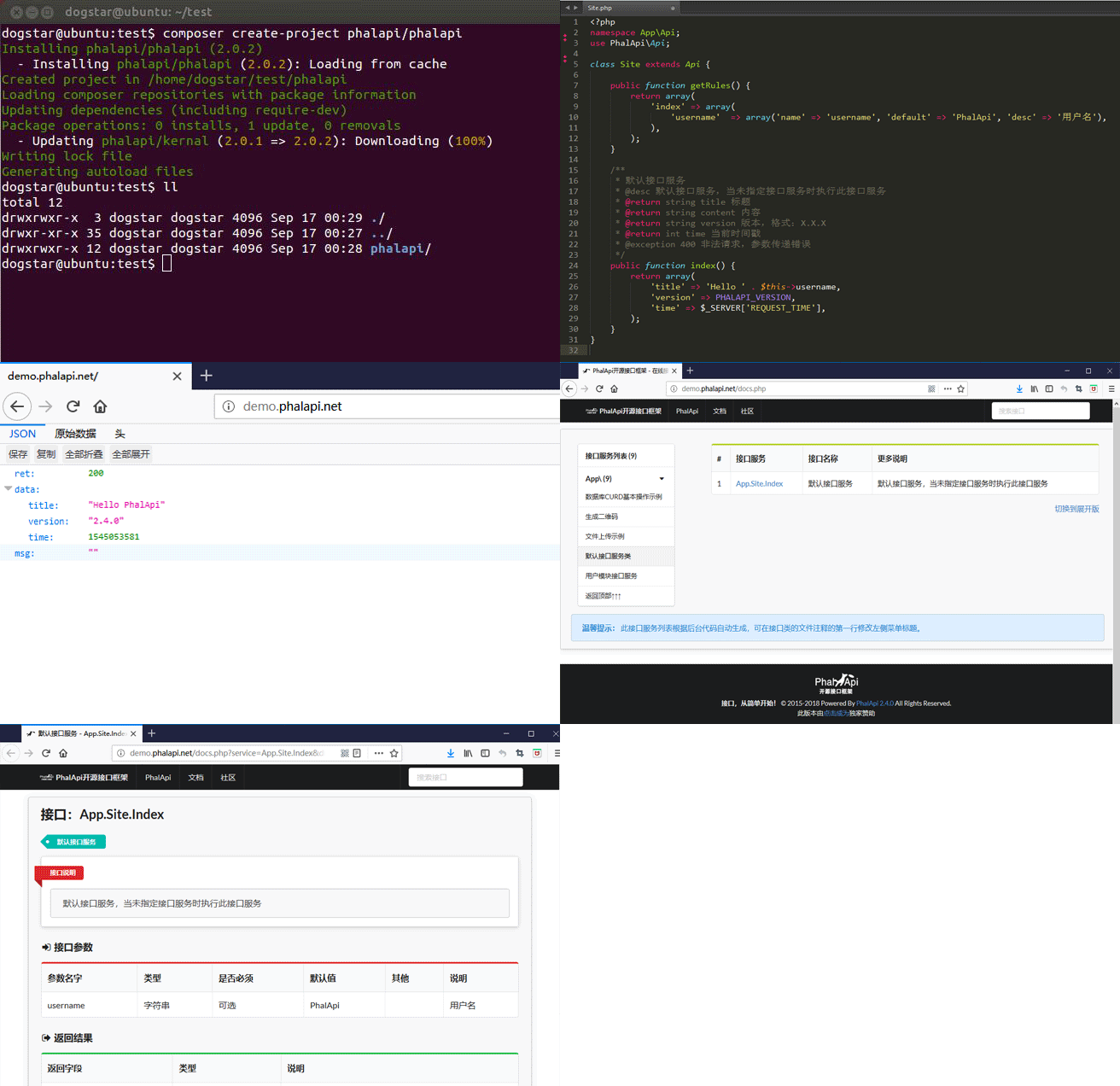
Warm reminder: The above extension needs to be installed through composer before use. For more information about the use and development of extended class libraries, please refer to the document: PhalApi framework extension class library.
Warm reminder: The difference between application plug-ins and composer extensions is that application plug-ins are more granular and have more specific functions. They may not only have databases, interfaces, interfaces, but also cooperate with other terminals, and are not subject to composer specifications. They are the development method of PhalApi's independent invention and design. For more information, please refer to: Third-party application plug-in development tutorial.
Warm reminder: All the above products use the PhalApi open source framework and are independently developed by the official. Individuals/teams/enterprises are welcome to use it.
If you find any problems, or any problems, please submit an Issue here.
If you like, please help me give me a Star on Github or Mayun, and you can also donate to PhalApi^_^.
Apache 2.0, Apache Licence is a protocol adopted by Apache, a famous non-profit open source organization. This protocol is similar to BSD, and also encourages code sharing and respects the copyright of the original author, and allows code modification and re-publishing (as open source or commercial software).
It has been maintained and upgraded by Guangzhou Guochuang Network Technology Co., Ltd. for a long time.








