tamzen font
Tamzen-1.11.6

This is my personal fork of the wonderful Tamsyn font by Scott Fial.
It's programmatically forked from Tamsyn version 1.11 by the Rakefile script
(see Building below) which backports glyphs from older versions
while deleting deliberately empty glyphs (which serve as unimplemented markers)
to allow secondary fallback fonts to provide real glyphs at those code points.
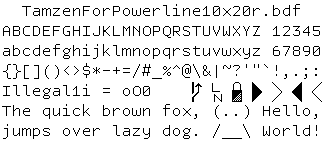
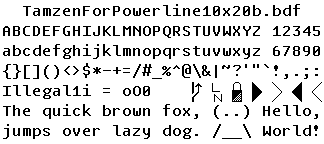
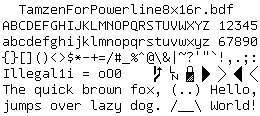
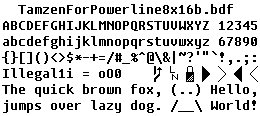
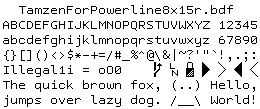
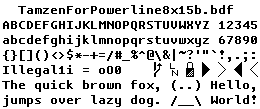
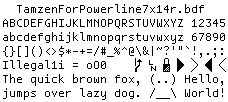
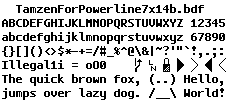
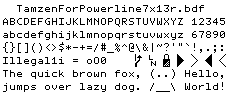
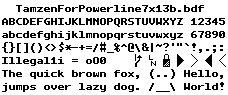
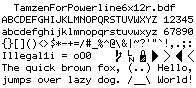
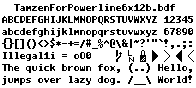
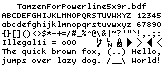
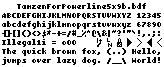
The "TamzenForPowerline" fonts contain additional Powerline symbols that I initially generated using ZyX_I's bitmap-font-patcher and then later hand-tuned to perfection using the gbdfed(1) graphical bitmap font editor:
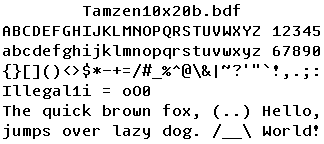
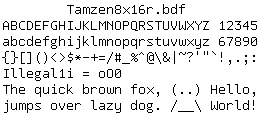
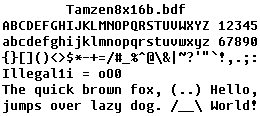
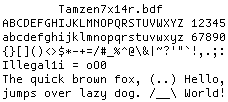
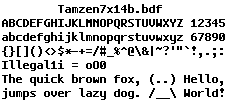
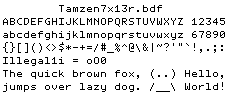
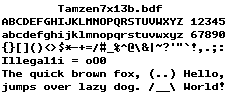
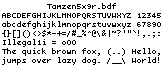
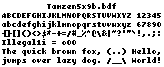
$ cat screenshot.txt
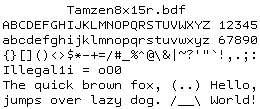
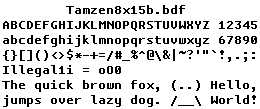
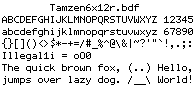
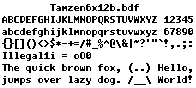
ABCDEFGHIJKLMNOPQRSTUVWXYZ 12345
abcdefghijklmnopqrstuvwxyz 67890
{}[]()<>$*-+=/#_%^@&|~?'"`!,.;:
Illegal1i = oO0
The quick brown fox, (..) Hello,
jumps over lazy dog. /__ World!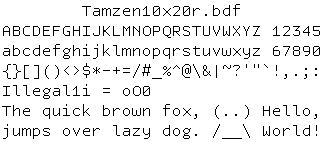
Using a package manager:
Manually, in Linux:
Download a release
or clone this Git repository into ~/.fonts/tamzen-font and then run:
xset +fp ~/.fonts/tamzen-font/bdf
xset fp rehash
You should now be able to see the "Tamzen" font family in xfontsel.
Manually, in Windows:
ttf/ folder into your Windows Fonts folder.Manually, in macOS:
ttf/ folder into your Font Book app.Switch to a Linux VT (virtual terminal) by pressing Control-Alt-F1.
Run showconsolefont to see how the character map currently looks.
Run setfont ~/.fonts/tamzen-font/psf/TamzenForPowerline10x20.psf.
See how the character map now displays glyphs from the Tamzen font.
Try running setfont with other Tamzen fonts in the psf/ folder.
See https://wiki.archlinux.org/index.php/Fonts#Console_fonts for details.
The following Xresources allow you to dynamically switch between the various Tamzen fonts by holding down Control and right-clicking in the XTerm terminal.
XTerm*font  : -*-tamzen-medium-*-*-*-16-*-*-*-*-*-*-*
XTerm*font1 : -*-tamzen-medium-*-*-*-9-*-*-*-*-*-*-*
XTerm*font2 : -*-tamzen-medium-*-*-*-12-*-*-*-*-*-*-*
XTerm*font3 : -*-tamzen-medium-*-*-*-13-*-*-*-*-*-*-*
XTerm*font4 : -*-tamzen-medium-*-*-*-15-*-*-*-*-*-*-*
XTerm*font5 : -*-tamzen-medium-*-*-*-16-*-*-*-*-*-*-*
XTerm*font6 : -*-tamzen-medium-*-*-*-20-*-*-*-*-*-*-*

! Tamzen fonts for use with Powerline
XTerm*font  : -*-tamzenforpowerline-medium-*-*-*-16-*-*-*-*-*-*-*
XTerm*font1 : -*-tamzenforpowerline-medium-*-*-*-9-*-*-*-*-*-*-*
XTerm*font2 : -*-tamzenforpowerline-medium-*-*-*-12-*-*-*-*-*-*-*
XTerm*font3 : -*-tamzenforpowerline-medium-*-*-*-13-*-*-*-*-*-*-*
XTerm*font4 : -*-tamzenforpowerline-medium-*-*-*-15-*-*-*-*-*-*-*
XTerm*font5 : -*-tamzenforpowerline-medium-*-*-*-16-*-*-*-*-*-*-*
XTerm*font6 : -*-tamzenforpowerline-medium-*-*-*-20-*-*-*-*-*-*-*
Feed the above snippet into the xrdb(1) program and then start a new XTerm to see its effect. Afterwards, you can add this snippet to your ~/.Xdefaults or ~/.Xresources files to have these settings be automatically applied by XTerm.
The following command aliases let you dynamically switch between the various Tamzen fonts when run inside a shell that is attached to the URxvt terminal.
alias font="printf 'e]710;%s07'"

alias Tamzen-9=Tamzen5x9r
alias Tamzen5x9r='font -misc-tamzen-medium-r-normal--9-65-100-100-c-50-iso8859-1'
alias Tamzen5x9b='font -misc-tamzen-bold-r-normal--9-65-100-100-c-50-iso8859-1'

alias Tamzen-12=Tamzen6x12r
alias Tamzen6x12r='font -misc-tamzen-medium-r-normal--12-87-100-100-c-60-iso8859-1'
alias Tamzen6x12b='font -misc-tamzen-bold-r-normal--12-87-100-100-c-60-iso8859-1'

alias Tamzen-13=Tamzen7x13r
alias Tamzen7x13r='font -misc-tamzen-medium-r-normal--13-101-100-100-c-70-iso8859-1'
alias Tamzen7x13b='font -misc-tamzen-bold-r-normal--13-101-100-100-c-70-iso8859-1'

alias Tamzen-14=Tamzen7x14r
alias Tamzen7x14r='font -misc-tamzen-medium-r-normal--14-101-100-100-c-70-iso8859-1'
alias Tamzen7x14b='font -misc-tamzen-bold-r-normal--14-101-100-100-c-70-iso8859-1'

alias Tamzen-15=Tamzen8x15r
alias Tamzen8x15r='font -misc-tamzen-medium-r-normal--15-108-100-100-c-80-iso8859-1'
alias Tamzen8x15b='font -misc-tamzen-bold-r-normal--15-108-100-100-c-80-iso8859-1'

alias Tamzen-16=Tamzen8x16r
alias Tamzen8x16r='font -misc-tamzen-medium-r-normal--16-108-100-100-c-80-iso8859-1'
alias Tamzen8x16b='font -misc-tamzen-bold-r-normal--16-108-100-100-c-80-iso8859-1'

alias Tamzen-20=Tamzen10x20r
alias Tamzen10x20r='font -misc-tamzen-medium-r-normal--20-145-100-100-c-100-iso8859-1'
alias Tamzen10x20b='font -misc-tamzen-bold-r-normal--20-145-100-100-c-100-iso8859-1'

# Tamzen fonts for use with Powerline
alias TamzenForPowerline-9=TamzenForPowerline5x9r
alias TamzenForPowerline5x9r='font -misc-tamzenforpowerline-medium-r-normal--9-65-100-100-c-50-iso10646-1'
alias TamzenForPowerline5x9b='font -misc-tamzenforpowerline-bold-r-normal--9-65-100-100-c-50-iso10646-1'

alias TamzenForPowerline-12=TamzenForPowerline6x12r
alias TamzenForPowerline6x12r='font -misc-tamzenforpowerline-medium-r-normal--12-87-100-100-c-60-iso10646-1'
alias TamzenForPowerline6x12b='font -misc-tamzenforpowerline-bold-r-normal--12-87-100-100-c-60-iso10646-1'

alias TamzenForPowerline-13=TamzenForPowerline7x13r
alias TamzenForPowerline7x13r='font -misc-tamzenforpowerline-medium-r-normal--13-101-100-100-c-70-iso10646-1'
alias TamzenForPowerline7x13b='font -misc-tamzenforpowerline-bold-r-normal--13-101-100-100-c-70-iso10646-1'

alias TamzenForPowerline-14=TamzenForPowerline7x14r
alias TamzenForPowerline7x14r='font -misc-tamzenforpowerline-medium-r-normal--14-101-100-100-c-70-iso10646-1'
alias TamzenForPowerline7x14b='font -misc-tamzenforpowerline-bold-r-normal--14-101-100-100-c-70-iso10646-1'

alias TamzenForPowerline-15=TamzenForPowerline8x15r
alias TamzenForPowerline8x15r='font -misc-tamzenforpowerline-medium-r-normal--15-108-100-100-c-80-iso10646-1'
alias TamzenForPowerline8x15b='font -misc-tamzenforpowerline-bold-r-normal--15-108-100-100-c-80-iso10646-1'

alias TamzenForPowerline-16=TamzenForPowerline8x16r
alias TamzenForPowerline8x16r='font -misc-tamzenforpowerline-medium-r-normal--16-108-100-100-c-80-iso10646-1'
alias TamzenForPowerline8x16b='font -misc-tamzenforpowerline-bold-r-normal--16-108-100-100-c-80-iso10646-1'

alias TamzenForPowerline-20=TamzenForPowerline10x20r
alias TamzenForPowerline10x20r='font -misc-tamzenforpowerline-medium-r-normal--20-145-100-100-c-100-iso10646-1'
alias TamzenForPowerline10x20b='font -misc-tamzenforpowerline-bold-r-normal--20-145-100-100-c-100-iso10646-1'
Specify your desired font size along with the name of your desired font variant (either Tamzen or TamzenForPowerline) in your ~/.wezterm.lua configuration file:
return {
  font_size = 10,
  font = wezterm.font_with_fallback { 'TamzenForPowerline' },
}
You can also disable ligatures just for Tamzen fonts since they lack ligatures:
return {
  font_size = 10,
  font = wezterm.font_with_fallback {
    {
      family = 'TamzenForPowerline', weight = 'Medium',
      -- disable ligatures for Tamzen since it lacks them
      harfbuzz_features = { 'calt=0', 'clig=0', 'liga=0' },
    },
  },
}
If you have Docker available, use the convenient rake docker command:
rake docker
You can build the Tamzen fonts for yourself by running these commands:
bundle exec rake                 # build things only when necessary
bundle exec rake clobber         # destroy everything that we built
bundle exec rake clobber default # rebuild everything from scratch
But first, you'll need to install these dependencies (assuming Debian):
# NOTE: the "xfonts-utils" package provides both bdftopcf(1) and fonttosfnt(1)
sudo apt-get install ruby git imagemagick xfonts-utils bdf2psf default-jre gbdfed openjdk-11-jdk-headless
gem install bundler -v 2.3.26
bundle install
Similarly, if you've opted to use bitmap-font-patcher integration:
sudo apt-get install python python-fontforge python-pip python-dev libfreetype6-dev
pip install --user bdflib
pip install --user Pillow
Like my work? ? Please spare a life today as thanks! ???????✌
Why? For ? ethics, the ? environment, and ? health; see link above. ?
Copyright 2011 Suraj N. Kurapati https://github.com/sunaku
Copyright 2010 Scott Fial http://www.fial.com/~scott/
Distributed under the same terms as the Tamsyn font. See LICENSE file.








