reactjs18 virtualspeakz
v1.0.0

VirtualSpeakz-AI Messenger is a phenomenal Chat Application integrating clever GPT bots for assistant, chat, and coding built with ChatEngine & OpenAI.
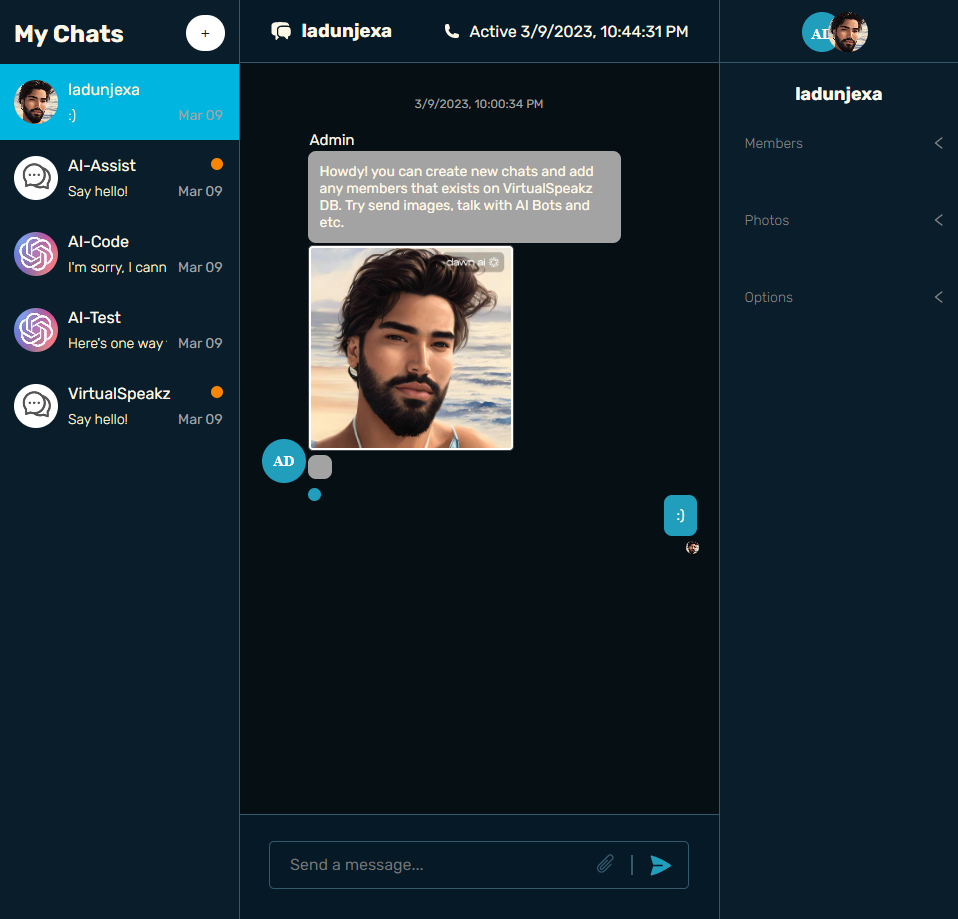
This repository houses a phenomenal AI Chat Application integrating clever OpenAI bots for assistant, chat and coding - built with @chatengine-io & @openai api. ?
Here is the folder structure of VirtualSpeakz-AI Messenger.
VirtualSpeakz-AI-Messenger/
|- client/
  |- public/
  |- src/
    |- assets/
    |- components/
      |- chat/
        |- index.jsx
      |- header/
        |- index.jsx
      |- login/
        |- index.jsx
      |- messageForm/
        |- Ai.jsx
        |- AiAssist.jsx
        |- AiCode.jsx
        |- MessageFormUI.jsx
        |- StandardMessageForm.jsx
    |- state/
      |- api.js
    |- App.jsx
    |- index.scss
    |- main.jsx
    |- .env
    |- jsconfig.json
    |- .eslintrc.json
    |- vite.config.js
    |- package.json
|- server/
  |- routes/
    |- auth.js
    |- openai.js
  |- index.js
  |- .env
|- package.jsonIn order to use VirtualSpeakz-AI Messenger you have to add some environment variables to .env files, VirtualSpeakz-AI uses OpenAI's API and Chat Engine API, so, you've to create openAI api key here and a Chat Engine account here, to run this webapp, meet with the conditions below.
create .env file in client/ directory & add the following environment variables:
VITE_BASE_URL=<SERVER_URL>
VITE_PROJECT_ID=<CHAT_ENGINE_PROJECT_ID>create .env file in server/ directory & add the following environment variables:
PORT=<PORT>
OPENAI_API_KEY=<OPEN_AI_API_KEY>
CE_PROJECT_ID=<CHAT_ENGINE_PROJECT_ID>
CE_PRIVATE_KEY=<CHAT_ENGINE_PRIVATE_KEY>
CE_BOT_USER_NAME=<SYSTEM_AI_BOT_USER_NAME>
CE_BOT_USER_SECRET=<SYSTEM_AI_BOT_USER_SECRET>In order to use VirtualSpeak-AI chat application you've to sign up and creating chats.
Use of AI chat will do so creating chat named AI-{Chat/Code/Assist}.
Details for account in which all chats exists:
Username: Admin
Password: 123321(back to top)
Download or clone this repo by using the link below:
https://github.com/ladunjexa/VirtualSpeakz-AI-MessengerVirtualSpeakz-AI using NPM (Node Package Manager), therefore, make sure that Node.js is installed by execute the following command in console:
node -vAt the main folder execute the following command in console to get the required dependencies:
npm installAt the main folder execute the following command in console to creates a build directory with a production build of VirtualSpeakz-AI:
npm run buildAt the main folder execute the following command in console to run the server:
npm run startAt the main folder execute the following command in console to get the required dependencies:
npm installAt the main folder execute the following command in console to run the development server:
npm run dev(back to top)
Contributions are always welcome!
See contributing.md for ways to get started.
Contributions are what make the open source community such an amazing place to learn, inspire, and create. Any contributions you make are greatly appreciated.
If you have a suggestion that would make this better, please fork the repo and create a pull request. You can also simply open an issue with the tag "enhancement". Don't forget to give the project a star! Thanks again!
git checkout -b feature/AmazingFeature)git commit -m 'Add some AmazingFeature')git push origin feature/AmazingFeature)(back to top)
Distributed under the MIT License. See LICENSE.txt for more information.
(back to top)
Liron Abutbul - @lironabutbul6 - @ladunjexa
Project Link: https://github.com/ladunjexa/VirtualSpeakz-AI-Messenger
(back to top)
This section used to mention useful resources and libraries that used in VirtualSpeakz-AI.
(back to top)







