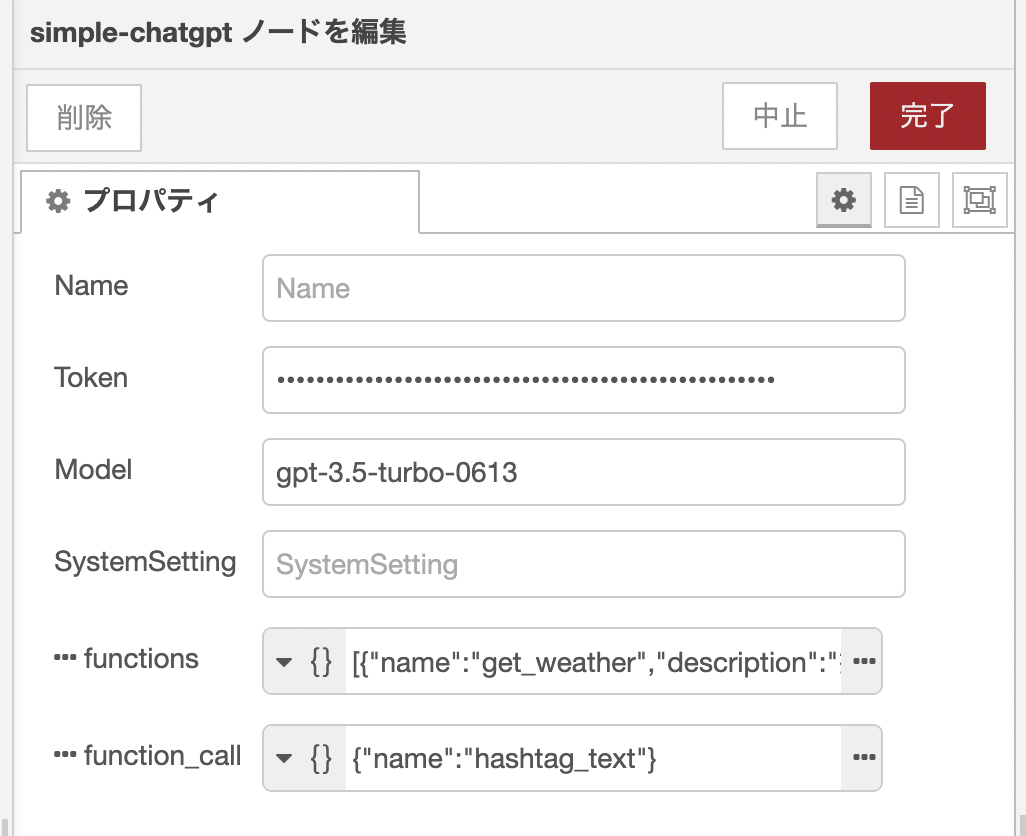
node red contrib simple chatgpt
1.0.0

Query ChatGPT from the payload string.
npm i node-red-contrib-simple-chatgpt
or
Install from the Admin tab
| item | explanation |
|---|---|
| Token | Set the API key for OpenAPI. |
| Model | Specifies the model name to use. The default is gpt-3.5-turbo . |
| SystemSetting | Describes settings for AI assistants, etc. For example, you can always specify "tehepero" at the end of the word. |
| pastMessages | Pass the conversation history. It is necessary to continue the conversation. |
| functions | Can be used from gpt-3.5-turbo-0613 onwards. Specified samples are separately available. |
| function_call | You can force the function name specified in functions. If you use auto , the function will be automatically determined and called. It's not called none . Specifying {name: 関数名} forces the target function to be executed. |
| item | explanation |
|---|---|
| payload | I'll get a ChatGPT response. If Function is executed, null will be returned. |
| pastMessages | Returns a history array of conversations. |
| payloadFunction | When executed with FunctionCalling, the name of the function you executed and the arguments that have been parsed JSON are returned. |
A sample of Functions is as follows: Specify function names, function details, and parameters in array format.
| item | explanation |
|---|---|
| name | The name of the function. You can choose your favorite name. |
| description | Detailed description of the function. It is better to write in some detail. |
| parameters.properties | Parameter details. This will list the property name, type and description that you want to set. |
| parameters.required | Specifies the required property name that you want the property to return. |
[
    {
        "name" : " get_weather " ,
        "description" : "指定された場所と日付の天気を取得する" ,
        "parameters" : {
            "type" : " object " ,
            "properties" : {
                "location" : {
                    "type" : " string " ,
                    "description" : "都道府県や市、町の名前, e.g. 東京都文京区"
                },
                "date" : {
                    "type" : " string " ,
                    "description" : " Date formatted in YYYY/MM/DD, e.g. 2023/06/13 "
                }
            },
            "required" : [
                " location " ,
                " date "
            ]
        }
    },
    {
        "name" : " recommend_book " ,
        "description" : "おすすめの本を1冊紹介する" ,
        "parameters" : {
            "type" : " object " ,
            "properties" : {
                "title" : {
                    "type" : " string " ,
                    "description" : "本のタイトル"
                },
                "description" : {
                    "type" : " string " ,
                    "description" : "本の内容"
                }
            },
            "required" : [
                " title " ,
                " description "
            ]
        }
    },
    {
        "name" : " hashtag_text " ,
        "description" : "ユーザから与えられたテキストからハッシュタグを出力してください。 " ,
        "parameters" : {
            "type" : " object " ,
            "properties" : {
                "tag" : {
                    "type" : " string " ,
                    "description" : "ハッシュタグを最低でも3つ以上出力してください。 "
                }
            },
            "required" : [
                " tag "
            ]
        }
    }
]
Please see here for details on how to specify.
In addition to auto or none as a string, specify the name of the function to be forced to be executed on a Json object. Here is an example when the above Functions is given. hashtag_text is now forced.
{
    "name" : " hashtag_text "
}