YandexStation
v3.18.0 - 2024-12-24

A component for managing the Yandex.T. and other devices of a smart house with Alice from Home Assistant.

The text often uses the terms local column, local mode and local control (they carry the same meaning). Carefully study which columns support him. The functions and capabilities of local control are greatly superior to cloud management. Cloud management is supported on all columns, but is not supported on modules. The local mode is automatically turned on on supported columns.
Cloud control does not have feedback from the column. It is not known whether the column plays something or stands on a pause, and what is its current volume. So the state of the column in Home Assistant may differ from the current state of the column if you gave her commands not from the component.
The possibilities of local and cloud management:
Additional features of local control:
The possibilities of all columns
The possibilities of local speakers
Other functions
Not all of these components behind my authorship!
Method 1. Hacs> Integration> Add> Yandex.Station> Install
Method 2. Manually copy the yandex_station folder from Latest Release to the Directory /config/custom_components .
Attention: for each of your columns in the Yandex mobile application, a service scenario will be created. Do not touch it. If you accidentally removed, restart Home Assistant.
Method 1. GUI (recommended)
Settings> Integration> Add Integration> Yandex Station
If there is no integration on the list, clean the browser cache.
There are several ways to authorize:
As a result, the component will receive the Yandex token and preserve it, your password is nowhere to remain.
Method 2. Yaml (outdated)
 yandex_station :
  username : myuser
  password : mypass
The text often gives different examples of scripts and automation. They can be used:
The full condition and available attributes of your speakers can be seen here.
Some examples use event_type . Their triggering can be monitored here.
In case of errors, their list and description can be viewed here.
This documentation is not designed to teach you the basics of working with Home Assistant.
Works on all columns
Attention . The team always goes through the cloud, even on the local speakers, so that the station does not continue to listen to after TTS.
There are two restrictions in cloud mode:
The component will automatically remove prohibited characters from the text and limit the length of the text to the permissible.
 script :
  yandex_tts1 :
    sequence :
    - service : media_player.play_media
      entity_id : media_player.yandex_station  # замените на вашу колонку
      data :
        media_content_id : ' Температура в комнате {{ states("sensor.temperature_hall")|round }} градуса '
media_content_type : text Supported:
The following effects, a library of sounds, configuration of speech and voice are available:
Setting up the generation of speech
media_content_id : смелость sil <[500]> город+а берётVoice effects
media_content_id : <speaker effect="megaphone">Ехал Грека через реку <speaker effect="-">видит Грека в реке ракWhisper
media_content_id : <speaker is_whisper="true">Хозяин, уже утро, пора вставать!Library of sounds
media_content_id : <speaker audio="alice-sounds-game-win-1.opus"> У вас получилось!You can upload your audio audio files to 120 seconds . To play a loaded audio file, there is no need to use Yandex.Dialog, in the context of which the file is uploaded.
media_content_id : <speaker audio="dialogs-upload/5d77ecc4-b781-4baa-abdd-bd0127553b97/081b7f9e-e708-499c-a907-264e33f28ecd.opus">Different voices can be seen here. Not all voices work. If you specify the wrong voice, the column is bursting. Then you need to send a stop command or restart it to it.
media_content_id : <speaker voice="zahar">Всем привет. Меня зовут Захар... script :
yandex_tts :
alias : TTS c эффектами
sequence :
- service : media_player.play_media
entity_id : media_player.yandex_station # замените на вашу колонку
data :
media_content_id : <speaker audio="alice-sounds-game-win-1.opus"> sil <[500]> Объявление погоды на сегодня...
media_content_type : dialog # работает только на локальной колонке Phrases on bells with Alice can be sent both from automation and from the Home Assistant interface. Starting with version V2022.3 TTS menu was transferred to the media section, before that it was in the media player window.
If desired, you can configure this section through Yaml:
If the team contains media_content_id or in template there is no word message - the message entry window will be missed.
Here are a few examples:
 yandex_station :
  media_source :
    - title : Произнеси текст  # обязательное поле
      media_content_type : text  # обязательное поле
      thumbnail : https://brands.home-assistant.io/_/tts/icon.png
    - title : Выполни команду
      media_content_type : command
      thumbnail : https://brands.home-assistant.io/_/automation/icon.png
    - title : Включи любимое
      media_content_id : Включи моё любимое вперемешку
      media_content_type : command
    - title : Произнеси шепотом
      template : ' <speaker is_whisper="true">{{ message }} '
      media_content_type : dialog
      extra :
        volume_level : 0.2
    - title : Статус эквалайзера
      template : ' Эквалайзер установлен на {{ states("select.yandex_station_equalizer") }} '
media_content_type : text 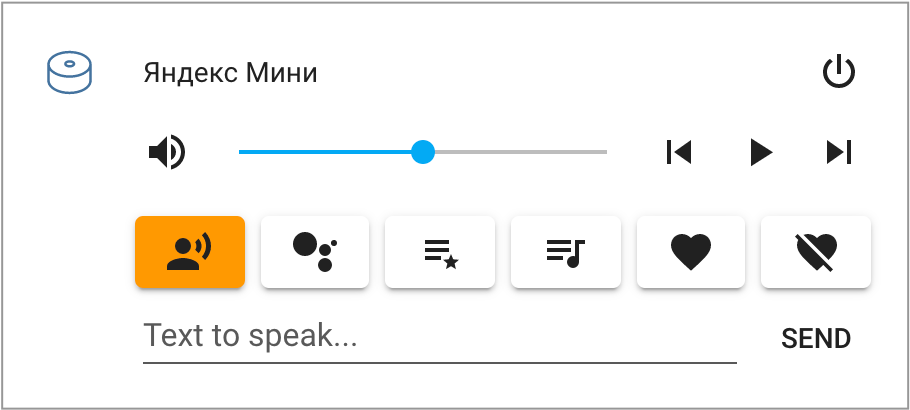
An example of a player card. Attention : this card is not in Home Assistant by default. It is easily placed through HACS. If you have difficulties with installation, just use a standard card. She also works.
Beautiful Yandex devices icons can also be installed through HACS.
Works on all columns
 script :
  yandex_command :  # работает и в локальном и в облачном режиме
    alias : Выполнить команду
    sequence :
    - service : media_player.play_media
      entity_id : media_player.yandex_station  # замените на вашу колонку
      data :
        media_content_id : Включи мою любимую музыку вперемешку
media_content_type : command Teams at several stations are supported at the same time (both TTS and Media_Player).
Works on all columns
 script :
  yandex_volume_set :  # в локальном или облачном режиме
    alias : Меняем громкость нескольких станций
    sequence :
    - service : media_player.volume_set
      data :
        entity_id :
        - media_player.yandex_station_12345678901234567890
        - media_player.yandex_station_98765432109876543210
        volume_level : 0.5
Only for the local regime!
 script :
  yandex_play_album :  # только в локальном режиме!!!
    alias : Включить Би-2 на Станции
    sequence :
    - service : media_player.play_media
      entity_id : media_player.yandex_station  # замените на вашу колонку
      data :
        media_content_id : 60062    # ID альбома в Яндекс.Музыка
media_content_type : album # album, track or playlist Works on all columns
Next, you can choose “answer the question or complete the command”, “read the text aloud”, “lose sound” and so on.
If you want the team silently go to Ha - indicate to execute the team ничего не делай .
When the column performs such a scenario, two events with additional parameters will appear in the Ha::
yandex_speaker - works only on the "execution of the command" and may not work if the beta Yandexgpt 2 is enabled instance : text_action
value : ничего не делай # фраза колонке из раздела То
entity_id : media_player.station_mini # ID колонки в ХА
name : Яндекс Мини # имя колонки в ХАyandex_scenario - works for almost any action in "then" instance : sound_play
value :
sound : boot-1
sound_name : Загрузка (8 бит)
entity_id : media_player.station_mini # ID колонки в ХА
name : Яндекс Мини # имя колонки в ХА
scenario_name : Тест # имя сценария в ЯндексеFor any of the events, you can create automation:
 automation :
- alias : Расскажи шутку
  trigger :
  - platform : event
    event_type : yandex_speaker
    event_data :
      value : ничего не делай  # фраза из Сценария Яндекса (раздел То)
  action :
  - service : media_player.play_media
    target :
      entity_id : ' {{ trigger.event.data.entity_id }} '  # ответить той же колонкой
    data :
      media_content_type : text
      media_content_id : ' {{ ["На связи", "Смольный слушает", "Тут я"]|random }} '
  mode : single
Unfortunately, you can’t find out the phrase that the column said. You can find out only the phrase that the column has completed.
To create several scenarios with a "frantic execution", use punctuation signs -,!.:=? And ничего не делай???!!! . The effect will not change, and in Ha you can distinguish what phrase the reaction occurred to.
In the trigger: > event_data: You can filter speakers to perform different automation for different rooms on the same phrase.
Attention! TTS call from the HA also activates these events.
To debug the events, go to the developer of your HA at http://192.168.1.123:8123/developer-tools/event , in the "Subscribe to the event" Indicate yandex_speaker and click "Subscribe".
PS. There is also a stubborn way to obtain commands only for advanced users!
The component supports integration with my other component - Yandexdialogs. If you have it, functions are available to you:
Works on all columns
Supports TTS special effects. There is no restriction on 100 characters. The TTS post does not listen to the user.
In media_content_type you must indicate the name of your Yandex.Dialogo through a colon without gaps. The register is unimportant.
 script :
  yandex_tts3 :
    sequence :
      - service : media_player.play_media
        entity_id : media_player.yandex_station_irbis
        data :
          media_content_id : <speaker is_whisper="true">Хозяин, пора бы спать
media_content_type : text:умный домWorks on all columns
You can start a dialogue with the user, get an answer to it and perform the actions you need, depending on the answer of the user.
In media_content_type you must indicate the name of your Yandex.Dialogo through a colon without gaps. The register is unimportant. And through the second colon, a certain “tag” of dialogue, in order to then understand in automation, to which question you answered you.
 script :
  yandex_dialog :
    sequence :
      - service : media_player.play_media
        entity_id : media_player.yandex_station_mini
        data :
          media_content_id : <speaker is_whisper="true">Хозяин, уже утро, пора вставать!
          media_content_type : dialog:умный дом:утро
An example of a reaction to the user’s response can be viewed here. This approach is easy to use both in Home Assistant automation and in Node-C.
The component supports notifications and warnings.
Notifications are an alternative way to call TTS. Notifications are configured in configuration.yaml . Minimum, you must indicate the name of the new notification and the list of the columns where it should sound. A separate service will be created for each notification. Next, you need to call this service with the message parameter.
Optionally notifications support the title parameter. To support it, you can use a template from an example below.
When setting notifications, media_content_id and media_content_type parameters are optional.
Notifications can be used in warnings. For example, if you forgot to close the output door, the warning will send you a notification with a given interval until the problem is resolved.
 notify :
  - name : alice_alert  # любое название
    platform : yandex_station
    data :
      entity_id : media_player.yandex_station_mini  # замените на вашу колонку
      media_content_id : >-
        {% if title is defined %}<speaker effect="megaphone">{{ title }}<speaker effect="-"> sil <[200]>{% endif %}{{ message }}
      media_content_type : dialog

input_boolean : # просто для примера
  garage_door :
    name : Дверь гаража

alert :
  garage_door :
    name : Гараж открыт
    done_message : Гараж закрыт
    entity_id : input_boolean.garage_door
    state : " on "  # опционально, потому что "on" это значение по умолчанию
    repeat : 5  # как часто повторять, в минутах
    can_acknowledge : true  # разрешить выключить уведомления вручную
    skip_first : true  # пропустить первое (мгновенное) уведомление
    notifiers :
- alice_alert # название, которые указали выше The management of alarm clock installed at the stations is supported.
Only for the local regime!
Continues to listen to after pronouncing the text! But there is no restriction on the number of characters. Supports special effects.
 script :
  yandex_tts4 :
    alias : TTS только для локального режима
    sequence :
    - service : media_player.play_media
      entity_id : media_player.yandex_station  # замените на вашу колонку
      data :
        media_content_id : <speaker effect="megaphone">Объявление погоды на сегодня...
media_content_type : dialog Only for the local regime!
The column will utter a text with a given volume and will return the volume to the previous level.
 script :
  alice_custom_volume1 :
    sequence :
    - service : tts.yandex_station_say
      entity_id : media_player.yandex_station  # замените на вашу колонку
      data :
        message : Внимание! Важное сообщение...
        options :
          volume_level : 0.8
Or so
 script :
  alice_custom_volume2 :
    sequence :
    - service : media_player.play_media
      entity_id : media_player.yandex_station  # замените на вашу колонку
      data :
        media_content_id : Внимание! Важное сообщение...
        media_content_type : text  # поддерживается text и dialog
        extra :
volume_level : 0.8 Only for the local regime!
Streaming (broadcast) of music from the Yandex column to smart speakers of other manufacturers is supported. The conditions are:
sync_volume: False )sync_volume: "{{ volume_level / 2 }}" )Integration support has been tested:
media_content_type: urlAttention. For the correct operation of some integrations, your Ha server should be available in the local network on the HTTP and IP address:
Settings> General> URL for home network> http://192.168.1.123:8123/
It should be understood that with the correct configuration of external access through various addons, you can use the HA at the address https://myhome.duckdns.org/ . And with proper settings, such a link will work both in the external and local network. And the link of the type HTTP/IP will be used only by local media players.
The component will automatically find all theoretically suitable media_player and add them to the source_list list from the column. If you wish, you can manually indicate the list of speakers in configuration.yaml :
 yandex_station :
  media_players :
    - entity_id : media_player.yas_306
      name : Yamaha
    - entity_id : media_player.mpd
      name : MPD
      speaker_id : [media_player.yandex_station]  # опциональная привязка к конкретным колонкам Яндекса
    - entity_id : media_player.yas_306
      name : Yamaha (no sync)
      sync_volume : False                         # опциональное отключение синхронизации громкости звука
    - entity_id : media_player.yas_306
      name : Yamaha (no sync)
      sync_volume : " {{ volume_level / 2 }} "      # использование Jinja2 для синхронизации громкости
    - entity_id : media_player.samsung
      name : SamsungTV
      media_content_type : url                    # важно для интеграции SamsungTV из HACS
    - entity_id : edia_player.nest_hub
      name : Chromecast
      quality : lossless                          # варианты качества - lossless / nq / lq
      codecs : flac,mp3                           # поддерживаемые кодеки - flac,aac,mp3
Choosing the quality of broadcasting:
lossless + mp3 = 320 kbpm has been selectedflac - not all songs are in this formatYou can switch the broadcast through:
source switch in the Mini Media Player cardsource switch in the standard window of the media player columnOnly for the local regime!
For each column, camera is created (turned off by default), which can display the text of the current song in karaoke mode.
The flow with the text can be sent to the TV, for example Chromecast:
 alias : Включить караоке на ТВ
sequence :
  - service : media_player.play_media
    target :
      entity_id : media_player.mibox
    data :
      media_content_id : >-
        http://192.168.1.123:8123/api/camera_proxy_stream/camera.hall_speaker_lyrics?token={{ state_attr('camera.hall_speaker_lyrics', 'access_token') }}
media_content_type : image/jpeg Only for the local regime!
Only links that Yandex devices are able to!
Only on devices with a screen (large station or module)
This works, including from GUI, if you insert a link in the "Play Text" field.
 script :
  yandex_play_url :
    alias : Проигрывание медиа по ссылке
    sequence :
    - service : media_player.play_media
      entity_id : media_player.yandex_station  # замените на вашу колонку
      data :
        media_content_id : https://music.yandex.ru/album/2150009/track/19174962
media_content_type : xxx # тип не важен, но должен быть! Only for the local regime!
Attention: Around the summer of 2024, the column returned the text response to any request. After the next update in Yandex, the column began to return the text answer only to a limited list of phrases (weather, time, smart house, etc.).
Option 1. Through yandex_station.send_command service.
 script :
  example1 :
    sequence :
      - action : yandex_station.send_command
        data :
          entity_id : media_player.yandex_station  # замените на вашу колонку
          text : какая погода?
        response_variable : response
      - action : notify.persistent_notification
        data :
          message : " {{ response }} "
Option 2. Via Conversation Entity .
 script :
  example2 :
    sequence :
      - action : conversation.process
        data :
          agent_id : conversation.yandex_station_mini  # замените на вашего агента
          text : какая погода?
        response_variable : response
      - action : notify.persistent_notification
        data :
message : " {{ response }} " Only for the local regime!
You can communicate with your Alice through Telegram. And she will answer you in Telegram! You can ask the weather, call a taxi, turn on the song, play cities or manage your smart home (if you tuned integration with the Yandex smart house). No telegram slash command, communicate with Alice with the usual text.
At the same time, Home Assistant does not have to "throw" on the Internet. Telegram in polling mode can work without external access.
At the same time, playing the media by links will also work. Just share with your Telegram a link to the film KinoPoisk, YouTube video or song/album/playlist on Yandex music - and they will start on your column!
 telegram_bot :
- platform : polling
  api_key : TELEGRAM_BOT_API_KEY  # создайте своего Телеграм бота
  allowed_chat_ids :
  - TELEGRAM_USER1_ID  # укажите ID своего аккаунта
  - TELEGRAM_USER2_ID  # при желании, поддерживается несколько аккаунтов

automation :
- trigger :
    platform : event
    event_type : telegram_text
  action :
  - service : conversation.process
    data :
      agent_id : conversation.yandex_station_mini  # замените на вашу станцию
      text : " {{ trigger.event.data.text }} "
      conversation_id : " {{ trigger.event.data.chat_id }} "
    response_variable : response
  - service : telegram_bot.send_message
    data :
      target : " {{ trigger.event.data.chat_id }} "
      message : " {{ response.response.speech.plain.speech }} "
To send Telegram messages to various stations @Prostomakss offered such a solution.
Only for the local regime!
Double -sided synchronization of the Alice purchase list and the standard Shopping List component is supported. You can add and delete the list elements from both the HA and the voice from the column.
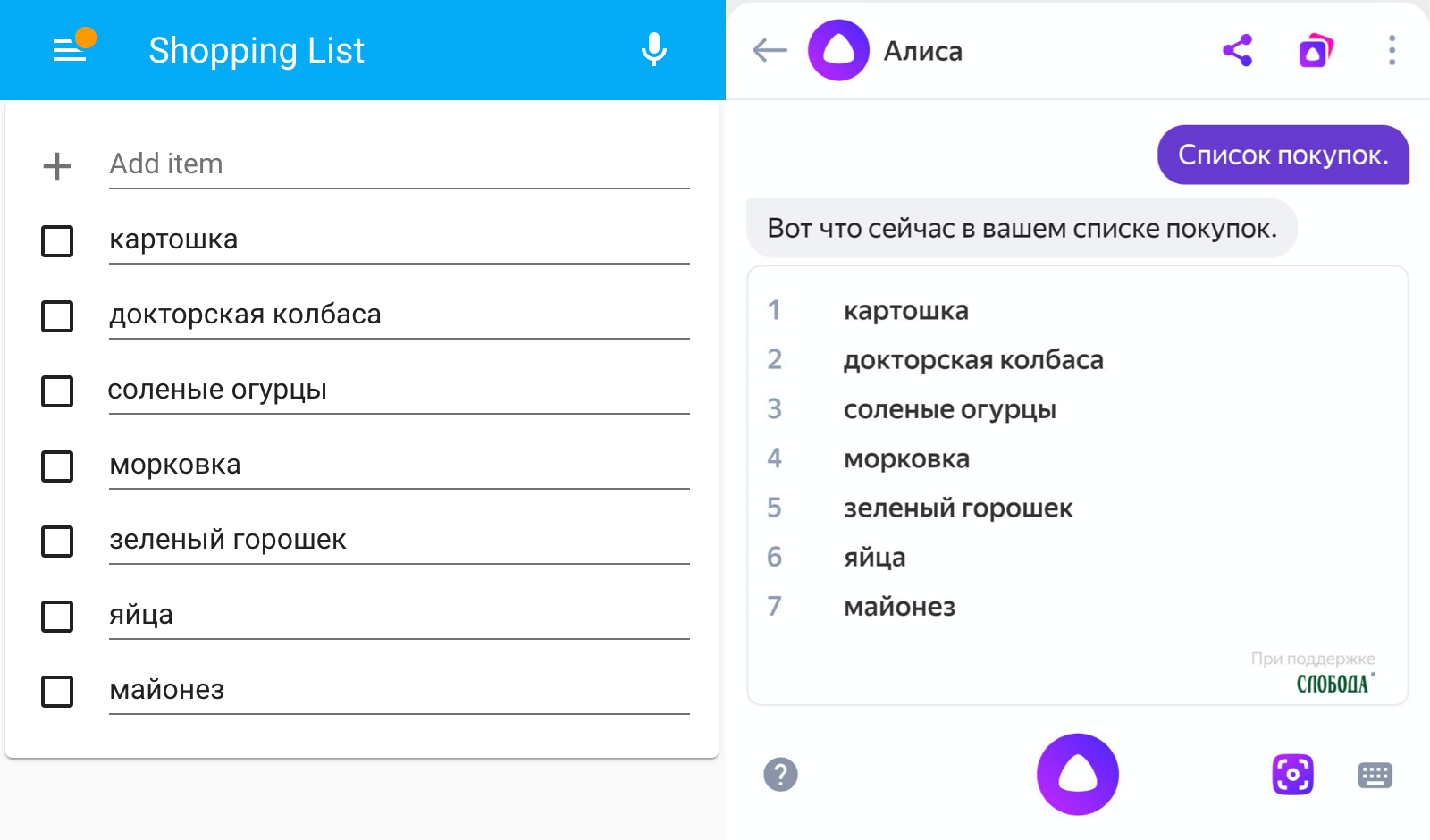
Previously, you need to add a standard component through GUI or YAML.
For synchronization of lists, it is necessary to call the next service. If desired, the call of this service can be performed in a voice from the column through receiving commands from the station.
 script :
  update_shopping_list :
    alias : Обновить список покупок
    sequence :
      - service : media_player.play_media
        entity_id : media_player.yandex_station_mini  # замените на вашу колонку
        data :
          media_content_id : update
          media_content_type : shopping_list
After synchronization, you can remove the elements with a voice on the column. Such elements will be removed from the HA for the next synchronization, even if they do not stand a dump on them.
Or you can note the elements as completed in the HA interface. Such elements will be removed from Yandex in the next synchronization. Just do not manually clean the list of completed elements in Ha before synchronization! Otherwise, synchronization will be disturbed.
Synchronization occurs according to the following rules:
It should be borne in mind that some names Yandex cannot add to its list. Therefore, they can disappear without a trace.
Only for the local regime!
Проще всего проверить работу локального режима - запустить на колонке песню и посмотреть, отображается ли обложка в Home Assistant.
Локальные устройства ищутся автоматически по протоколу mDNS (zeroconf). Он не будет работать, если вы открыли только один порт для Home Assistant. Например, установка в Docker (в Hass.io всё хорошо) без настройки network=host или виртуальная машина с NAT.
Если у вас есть с этим какие-то проблемы - можно указать для колонок статический IP-адрес на роутере и в конфиге Home Assistant. device_id вашей колонки можно посмотреть в мобильном приложении Яндекса.
 yandex_station :
  devices :
    12345678901234567890 :  # device_id вашей колонки
      host : 192.168.1.123
name : Яндекс Станция # имя можно задать и тутswitch , sensor , select , number )В качестве ИК-пультов можно использовать Яндекс Пульт или более дешевую версию от Tuya (добавляется напрямую как родной пульт Яндекса).
В конфиге нужно перечислить имена ваших устройств:
 yandex_station :
  include :
    - Кондиционер                                                 # добавить ВСЕ устройства с этим именем
    - name : Очиститель Xiaomi
      properties : [ "temperature", "humidity", "pm2.5_density" ]  # опционально создать сенсоры
    - name : Чайник Polaris
      capabilities : [ "mute", "keep_warm" ]                       # опционально создать контролы
    - name : Увлажнитель Polaris
      capabilities : [ "mute", "controls_locked", "ionization", "backlight" ]  # опционально создать контролы
      properties : [ "temperature","humidity" ]                                # опционально создать сенсоры
    - name : Кондиционер
      room_name : Зал                                              # опционально указать комнату
      capabilities : [ "temperature", "fan_speed", "thermostat" ]  # опционально создать контролы
      current_temperature : " {{ states('sensor.temperature') }} "   # опционально указать сенсор температуры
    - name : Увлажнитель
      current_humidity : " {{ states('sensor.humidity') }} "         # опционально указать сенсор влажности
    - room_name : Ванная                                           # добавить ВСЕ устройства из этой комнаты
    - type : devices.types.sensor                                  # добавить ВСЕ устройства такого типа
    - id : 96581cf1-dad4-4329-bbe9-0c843128f60a                    # добавить устройство по ID
Кондиционер будет добавлен как термостат:
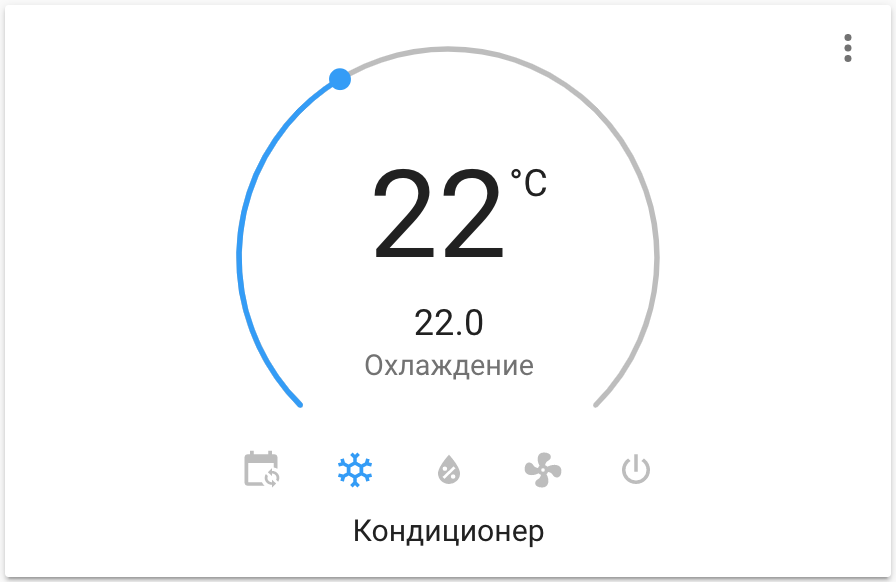
Настроенное вручную ИК-устройство будет добавлено как Remote. Команды отправляются через сервис remote.send_command . Можно отправить несколько команд за раз, настроить задержку и количество повторов. Пример вызова.
 script :
  change_settings :
    alias : Изменение настроек Алисы
    sequence :
      - service : media_player.play_media
        data :
          entity_id : media_player.yandex_station  # замените на любую вашу колонку
          media_content_id : ' без лишних слов: да '  # пробел после двоеточия
          media_content_type : settings
Поддерживаемые значения:
без лишних слов: да/нетответить шепотом: да/нетанонсировать треки: да/нетскрывать названия товаров: да/нетзвук активации: да/нетодним устройством: да/нетпонимать детей: да/нетрассказывать о навыках: да/нетвзрослый голос: умеренный/семейный/безопасный/без ограниченийдетский голос: безопасный/семейныйимя: алиса/яндексадаптивная громкость: да/неткроссфейд: да/нет Переключение выбранной колонки на другие языки. Начинает отзываться на Ясмина!
 action : media_player.play_media
target :
  entity_id : media_player.hall_speaker  # замените на вашу колонку
data :
  media_content_type : locale
media_content_id : ru-RU # ru-RU en-US ar-SA kk-KZ tr-TR Если в Home Assistant подключены несколько TTS-сервисов - из карточки медиа-плеера будет вызываться самый первый из них (сортировка по имени). Например, tts.google_translate_say будет приоритетнее tts.yandex_station_say . А tts.yandex_station_say будет приоритетнее tts.yandextts_say .
Компонент Яндекс.Станции умеет поддерживать другие TTS, а вот другие колонки могут не поддерживать TTS yandex_station_say . При необходимости вы можете:
 yandex_station :
tts_service_name : alice_say Только для станций с HDMI
Функция переключения выхода звука находится у Яндекса в бете. На телевизор выводится только звук видео (например YouTube). Звук музыки и голос Алисы остаются на Станции.
Раньше функция включалась в конфиге. Теперь включена по умолчанию для всех владельцев больших Станций.
 script :
  yandex_hdmi_sound :
    alias : Звук Станции на HDMI
    sequence :
    - service : media_player.select_source
      entity_id : media_player.yandex_station  # поменяйте на вашу станцию
      data :
source : HDMI Только для Яндекс.Станции Макс
 script :
  yandex_brightness :
    sequence :
    - service : media_player.play_media
      entity_id : media_player.yandex_station_max
      data :
        media_content_id : 0.5  # допустимые значения от 0 до 1, или -1 для включения авто режима
media_content_type : brightness #257 #263 #518 #552
Использование другого домена Яндекса
 yandex_station :
  domain : yandex.com
Подключение HTTP-прокси
 yandex_station :
  proxy : http://username:[email protected]:3128
Отключение проверки HTTPS сертификатов
 yandex_station :
ssl : False Поиск и устранение проблем
 logger:
  default: info
  logs: { custom_components.yandex_station: debug }







