node red contrib yandex station management
Base release

Using the module, you can control the API in a local API in Yandex's devices:
Work is possible only with devices that at the same time:
The work requires a token from Yandex.Music. In the module, in experimental mode, the possibility of obtaining a token from a login-paralle (thanks to send here) is implemented. If the receipt of token does not work out, then you should try to turn on and disable two-factor authentication in the Yandex settings. Source. You can verify the safety of using the accounting data by looking at the code
The second of the varinates of its receipt is described in the FAQ
The third of the options for obtaining token is described here
It is possible to work with several devices (tested) and several accounts (tested).
It consists of 4 NODs that allow flexibly adjusting automation and using voice notifications:
Installation is carried out through the Manage Palette section in Node-Red or using NPM. In the catalog with Node-Red (usually ~/.node-red ) to execute the command:
npm i node-red-contrib-yandex-station-management
After installation, to start work, add any node, enter the accounting data (token) to the login section, save and press deploy (mandatory!). How to get a token - written in FAQ.
After the wipes in the Noda settings in the Station Field, stations are available for control.
If the station did not appear on the list, then you can wait a couple of minutes or restart Node-Red.
Additional settings for the station. It is optional, that is, everything will work without this node, but it can be more interceptic. The node is placed outside the flow and has no entrances and outputs.
Dressing to the station. If for some reason it is necessary to ensure that the connection is not made - put it in Disabled.
In the state of Manual, it becomes possible to manually indicate the station address and the port for connection. It is recommended if Docker, Homeassistant, and other cases in which it does not work out automatic determination of network details for connection are used.
The possibility of restrictions on time for listening to songs, radio, fairy tales is implemented, so that small lovers of night stories fall asleep as soon as possible. It is tuned for each day of the week. If you do not cost a jack of Active, then for this day restrictions do not work. Phrase to Say is a phrase that Alice will say instead of music :) At the same time, skills, alarm clocks, weather, news and so on work.
It is placed at the start of the Flow and automatically sends data on the current status of the column in the "cheese" format and Homekit.
It issues data without transformation, that is, in the form in which they are received from the device. Message structure:
    { "aliceState" : " IDLE " ,
    "canStop" : false ,
    "hdmi" :
        { "capable" : true ,
        "present" : false },
    "playerState" :
        { "duration" : 180.91 ,
        "extra" :
            { "coverURI" : " avatars.yandex.net/get-music-content/2383988/de45408f.a.9039208-1/%% " ,
            "stateType" : " music " },
        "hasNext" : true ,
        "hasPause" : false ,
        "hasPlay" : false ,
        "hasPrev" : true ,
        "hasProgressBar" : true ,
        "liveStreamText" : " " ,
        "progress" : 20 ,
        "showPlayer" : true ,
        "subtitle" : " Крематорий " ,
        "title" : " Мусорный ветер " },
        "playing" : false ,
        "timeSinceLastVoiceActivity" : 30454 ,
        "volume" : 0 }
Messages from the device can come several pieces per second, so you should think about the need to put the standard RBe Node to filter duplicates according to the content (Payload.playerstate.title), the name of the performer (Payload.playerstate.subtitle)).
Inside, the transformation of the issued format under Homekit and the Noda can be joined directly with the Homekit-Noda, as a result of which Flow is significantly simplified. Yuzkes can be found at the end of the documentation.
There are options for Homekit Formatted:
Homekit Formated - Smart Speaker:
{ "CurrentMediaState" : 0 , "ConfiguredName" : " International String Trio - Tarantella " }Homekit Formated - Television:
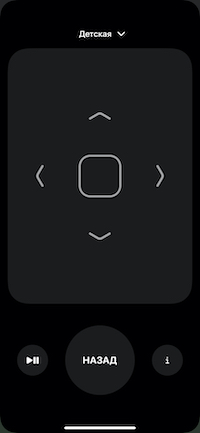
{ "Active" : 1 }When using the Television device, it becomes possible to use the "remote control" on iOS.
It is placed in the middle of the Flow and, with any incoming message, sends the last status of the device to Payload. The structure of the issuance is similar to Full Status Message Nodes in.
It is placed at the end of the Flow and used to send messages to the device. It is allowed to use several NODs for the same device, while the data will be transmitted from them through one connection with the device.
Management of the reproduction of the column. Node waits for Payload by a line one of the following commands will come: Play, Stop, Next, Prev, Forward (10 seconds ahead), Backward (10 seconds back), Volumeup, Volumedown
Sending the team, instead of telling her column in a voice: “Turn on the light”, “Turn on the music”, “Turn on my playlist”, “Disconnect in 15 minutes” and so on.
Reproduction by the voice of sent phrases - Text to Spech. It has no symbol restrictions. TTS parameters can be set both in the settings and some of them can be redefined by an incoming message.
There are a number of options:
If necessary, shock vowels in words should be noted “+”, for example:
 остр+ота
м+ука
Long words can be divided into words shorter and stress for each of these short words, for example:
Mn+wow pr+officer C+EMI PAL+Atinsk
Some words can be tried to write as they are heard:
 «ненастный» — нен+асный
«пожалуйста» — пож+алуста
To pause between the words, use SIL syntax <[number_millisect]>. For example:
смелость sil <[500]> город+а берёт
Each punctuation mark separated by spaces is indicated by a pause of 50-100 ms.
<speaker audio="alice-sounds-game-win-1.opus"> У вас получилось!
It catches the output from Homekit from SmartSpeaker devices (VCL/OKL) and Television (VCL/Off + remote control) of the NRCHB module. The HAP.CONTEXT verification function is built, preventing bloating. It joins directly with the Homekit node. The "Default Command" option indicates which voice command to launch if there is no current track for the start of playback, but you need to play something. For example, "Turn on my music" or "Turn on children's songs."
He receives a message in the JSON format inside Payload and transfers it to the column without processing. It is possible to send several messages in one message by Payload in the form of an array. Famous teams:
{
    "command" : " rewind " ,
    "position" : 120
}{
"command" : " play "
}{
"command" : " stop "
}{
"command" : " prev "
}{
"command" : " next "
}{
"command" : " playMusic " ,
"id" : " 2 " ,
"type" : " artist "
}{
"command" : " playMusic " ,
"id" : " 44731403 " ,
"type" : " track "
}{
"command" : " playMusic " ,
"id" : " 44731403:1234556 " ,
"type" : " playlist "
}{
"command" : " setVolume " ,
"volume" : 0.2
}{
"command" : " playRadio " ,
"id" : " detskoe "
}{
"command" : " repeat " ,
"mode" : " One "
}{
"command" : " shuffle " ,
"enable" : true
}{
"command" : " showAliceVisualState " ,
"aliceStateName" : " LISTENING " ,
"recognizedPhrase" : " "
}{
"command" : " sendText " ,
"text" : " Повторяй за мной 'Текст' "
}{
"command" : " sendText " ,
"text" : " Включи музыку "
}{
"command" : " serverAction " ,
"serverActionEventPayload" : {
"type" : " server_action " ,
"name" : " on_suggest "
}
}{
"command" : " serverAction " ,
"serverActionEventPayload" : {
"type" : " server_action " ,
"name" : " update_form " ,
"payload" : {
"form_update" : {
"name" : " personal_assistant.scenarios.repeat_after_me " ,
"slots" : [
{
"type" : " string " ,
"name" : " request " ,
"value" : " <speaker effect='megaphone'>Ехал Грека через реку <speaker effect='-'>видит Грека в реке рак "
}
]
},
"resubmit" : true
}
}
} "value" : " <speaker voice='kostya'>смелость sil <[500]> город+а берёт "Supported Voices: Jane, Oksana, Omazh, Zahar, Ermil, Levitan, Ermilov, Silaerkan, Kolya, Kostya, Nastya, Sasha, Nick, Erkanyavas, Zhenya, Tanya, Anton_samokhvalov, Tatyana_Abramova, Voicesesearch, Ermil_with_tuning, Robot, Dude, Zombie, Smoky, Alyss, Nick. (The list is taken here)
"value" : " смелость sil <[500]> город+а берёт " "value" : " <speaker effect='megaphone'>Ехал Грека через реку <speaker effect='-'>видит Грека в реке рак " "value" : " <speaker audio='alice-sounds-game-win-1.opus'>У вас получилось! " "value" : " <speaker is_whisper= " true"'>Я говорю тихо-тихо!" "value" : " <speaker voice='kostya' audio='alice-sounds-game-win-1.opus' effect='megaphone'>добро пожаловать "{
"command" : " serverAction " ,
"serverActionEventPayload" : {
"type" : " server_action " ,
"name" : " update_form " ,
"payload" : {
"form_update" : {
"name" : " personal_assistant.automotive.greeting "
},
"resubmit" : true
}
}
}{
"command" : " serverAction " ,
"serverActionEventPayload" : {
"type" : " server_action " ,
"name" : " update_form " ,
"payload" : {
"form_update" : {
"name" : " personal_assistant.scenarios.bluetooth_on "
},
"resubmit" : true
}
}
}{
"command" : " serverAction " ,
"serverActionEventPayload" : {
"type" : " server_action " ,
"name" : " update_form " ,
"payload" : {
"form_update" : {
"name" : " personal_assistant.scenarios.bluetooth_off "
},
"resubmit" : true
}
}
}Forced interruption of Alice's "Hearing" with any message in the Node. Similarly 12 teams of the previous section
Stop playing music and say text with a volume of 0.8
[
{ "command" : " stop " },
{
    "command" : " serverAction " ,
    "serverActionEventPayload" : {
        "type" : " server_action " ,
        "name" : " on_suggest "
    }
},
{ "command" : " setVolume " , "volume" : 0.8 },
{
    "command" : " serverAction " ,
    "serverActionEventPayload" : {
        "type" : " server_action " ,
        "name" : " update_form " ,
        "payload" : {
            "form_update" : {
                "name" : " personal_assistant.scenarios.repeat_after_me " ,
                "slots" : [
                    {
                        "type" : " string " ,
                        "name" : " request " ,
                        "value" : " <speaker effect='megaphone'>Ехал Грека через реку <speaker effect='-'>видит Грека в реке рак "
                    }
                ]
            },
            "resubmit" : true
        }
    }
}
]There are a number of ways to manage music playback on columns.
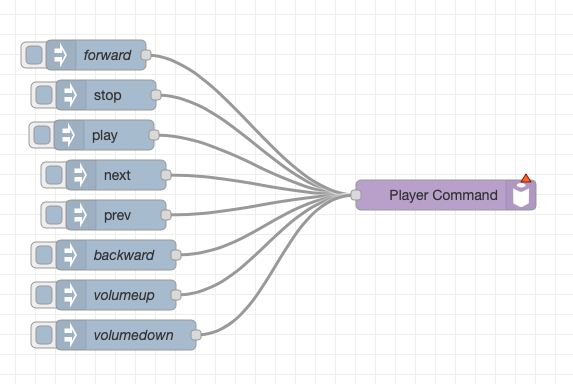
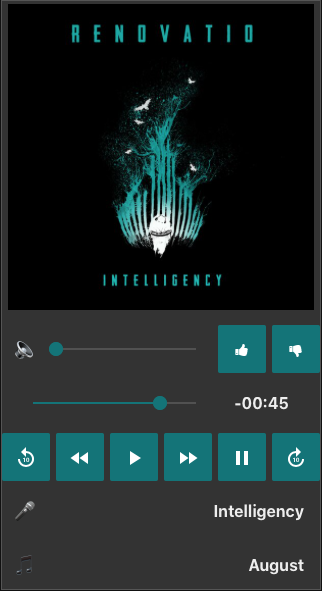
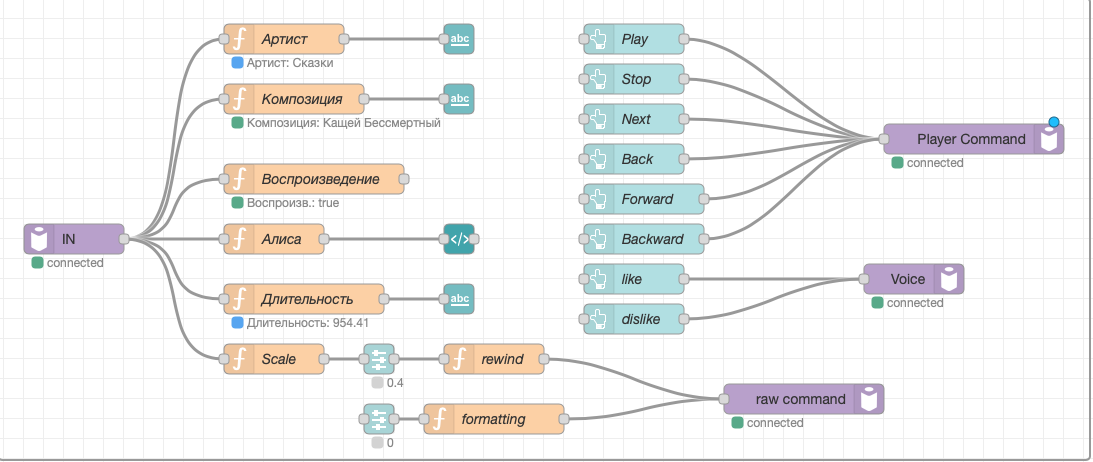
There is another option from @twocolors, in examples.
Added by a simple Flow and looks great)
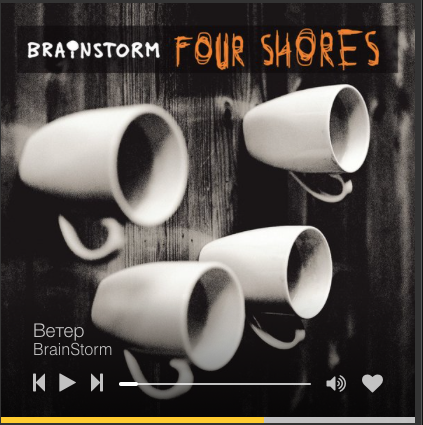

The list of NRCHB devices has Smart Speaker. From the box with a simple Flow, you can control the state of the vocal reproduction and see the name of the track. It only works on iOS 14 or MacOS Big Sur. Management elements inside Homekit do not work , they have not yet been brought by the Homekit Node.
If you need to work on old versions of iOS/MacOS or you need to control the reproduction from the standard tool of the remote control from the control panel, then you can assemble the Flow on the basis of the Homekit-Nod TV, the nodes in in the corresponding format and OUT. At the same time, Out-Noda in Homekit format knows how to “understand” the entrance from SmartSpeaker, Television and both together. Checking messages for a mockery is built into the Noda OUT. 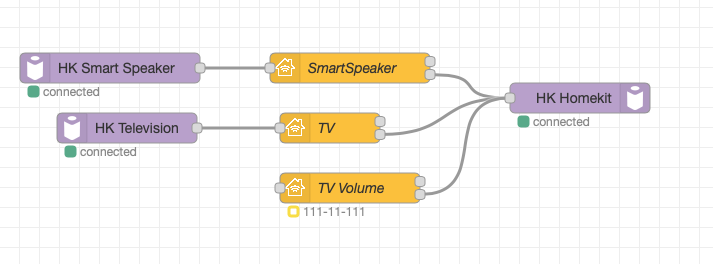
Q: How to get an OAUTH-TOKEN?
A: As one of the options-https://music-yandex-bot.ru
Q: How to get a track cover?
A: You can take a link to the Yandex music cover from the status message: Payload.playerstra.coveruri
In the beginning, add https: // and at the end instead of %% the cover size, for example 600x600. https://avatars.yandex.net/get-music-content/2383988/de45408f.a.9039208-1/600x600
Q: How to find out the station of the station? This may be needed to distinguish the stations if there are not one.
A: Yandex Appendix on the phone - Devices - Device Management - Select the station - Additional information
Q: Why does the name of the track in Homekit do not change immediately after switching?
A: This is normal, since the name of the device is used for display, and the changes in the names in Homekit are reflected, as they have the smallest priority before statuses and conditions.
Q: Management elements inside Homekit are "stuck" and do not work
A: If the type of SMART Speaker device is used, then yes, they do not work there and I did not find how to make them active. If someone can make them active, then creating Issue will help the rest. Now the alternative is a TV device and the conjunction of the remote control to it. Received as appletv. An example is inside nrchb
Q: After starting the Node-Red, the device/device is not visible.
A: This happens if the device is not found on the network. It should be understood that the ZeroConf protocol, which is used to search, gives out not a stable result. One search of 5 ends in the absence of found devices. As a solution - just wait a couple of minutes and a second search will find all the missing people from the radars
Q: How to add an example from a node?
A: In the Node-Red menu there is an Import item, and in it the ExamPles section. Inside the folder with the name of the plugin there are all examples.
Teams for managing the station are taken here. Thanks to the author.
 - Yandex Station(tested)
- Yandex Mini(tested)
- Yandex Station Max(tested)
- Yandex Module(not tested)
- JBL Link Music(not tested)
- JBL Link Portable(tested)
 Run the following command in your Node-RED user directory - typically `~/.node-red`

npm i node-red-contrib-yandex-station-management
You Need Yandex Music Token to work Propertly.







