ANetty
1.1.0


ANetty for Android is an Android link communication library based on Netty secondary packaging to quickly develop high-performance and high-reliability network interactions. While ensuring ease of development, it also ensures its application performance, stability and scalability.
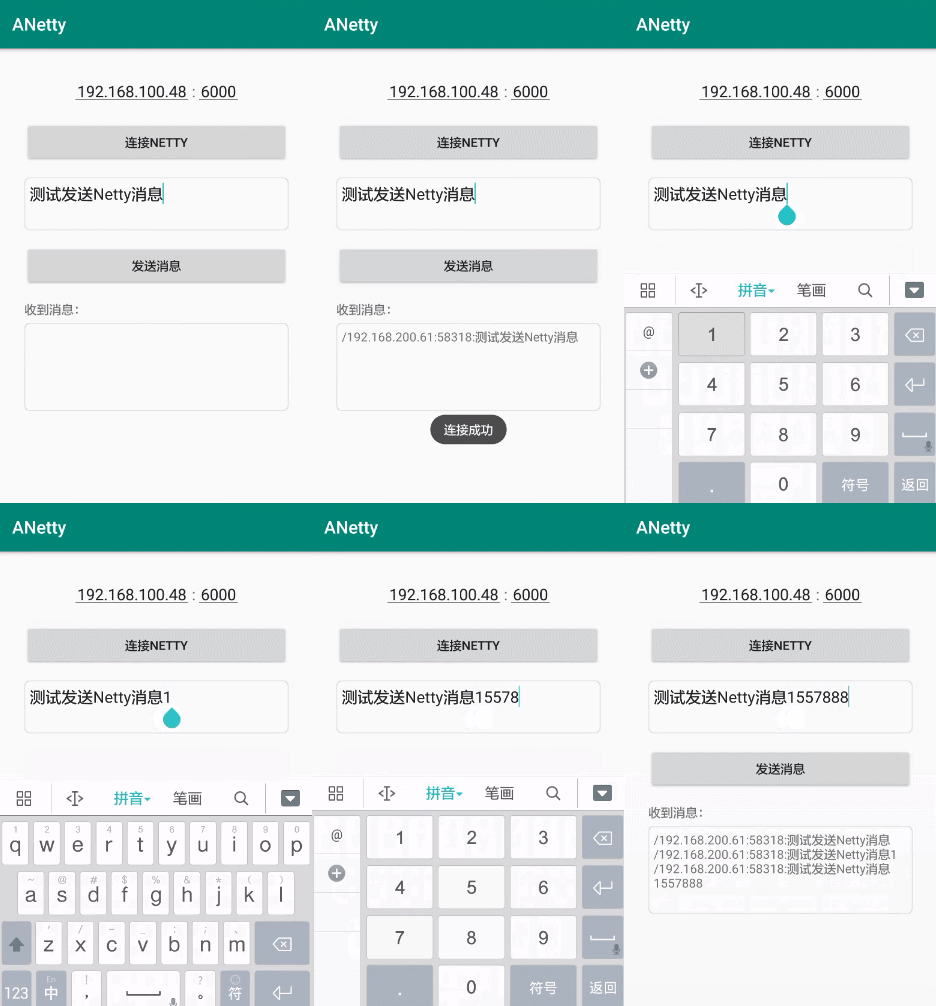
You can also directly download the demo app to experience the effect
Add remote repository in project's build.gradle or setting.gradle
 repositories {
    // ...
    mavenCentral()
}
Adding the import dependencies in the build.gradle of the Module
 // ANetty
implementation ' com.github.jenly1314:anetty:1.1.0 '
ANetty does not provide Netty server-side encapsulation library for the time being, because in real scenarios, the server generally relies on the corresponding business of the project. In order to facilitate the demonstration of the ANetty client, a simple server demo is provided here; directly run ANettyServer directly in the main method in Java to start the Netty service. (This demo is mainly for the convenience of testing and communication with ANetty's client)
Netty server:
   // 初始化并启动服务
   new ANettyServer (). start ( port );
Netty Client:
    // 初始化Netty
   Netty mNetty = new ANetty ( new Netty . OnChannelHandler () {
      @ Override
      public void onMessageReceived ( ChannelHandlerContext ctx , String msg ) {
         // TODO 接收到的消息
      }

     @ Override
     public void onExceptionCaught ( ChannelHandlerContext ctx , Throwable e ) {
         // TODO 异常
     }
   }, true );
   // 设置连接监听
   mNetty . setOnConnectListener ( new Netty . OnConnectListener () {
      @ Override
      public void onSuccess () {
         // TODO 连接成功
      }

      @ Override
      public void onFailure ( Throwable e ) {
         // TODO 连接失败
      }

   });
   // 设置发送消息监听
   mNetty . setOnSendMessageListener ( new Netty . OnSendMessageListener () {
      @ Override
      public void onSendMessage ( Object msg ) {
         // TODO 发送的消息
      }

      @ Override
      public void onException ( Throwable e ) {
         //TODO 异常
      }
   });

   // 初始化后,建立连接
   mNetty . connect ( host , port );

   //---------------------
   // ...
   // 发送消息
   mNetty . sendMessage ( msg );

   //---------------------
   // ...
   // 断开连接
   mNetty . disconnect ();

   //---------------------
   // ...
   // 重连
   mNetty . reconnect ( delayMillis );

   //---------------------
   // ...
   // 关闭连接
   mNetty . close ();
If you need to test, you can start on the Netty server; then use the Netty client to enter the corresponding connection address and port to communicate with the server. (You can also use the demo app to test directly.)
For more usage details, please check the source code usage examples in the app or directly view the API help documentation.
If you like ANetty, or feel that ANetty has helped you, you can click "Star" in the upper right corner to support it. Your support is my motivation, thank you?
You can also scan the QR code below and ask the author to have a cup of coffee☕
| My blog | GitHub | Gitee | CSDN | Blog Park |
|---|---|---|---|---|
| Jenly's Blog | jenly1314 | jenly1314 | jenly121 | jenly |
| WeChat public account | Gmail mailbox | QQ Email | QQ Group | QQ Group |
|---|---|---|---|---|
| Jenly666 | jenly1314 | jenly1314 | 20867961 | 64020761 |







