OrionChat
1.0.0

Orion is a web-based chat interface that simplifies interactions with multiple AI model providers. It provides a unified platform for chatting and exploring multiple large language models (LLMs), including:
With Orion, you can easily navigate and assess the strengths and limitations of different AI models through an intuitive, user-friendly interface.
Your API keys are stored locally using localStorage, and requests are sent directly to the official provider's API
(OpenAI, Anthropic, Google, Groq, Cerebras) without routing through any external proxy.
Some companies offer free API access. Check their terms and conditions before you get started.
Use special commands to perform an action quickly and easily.
Translate: Translate text with ease using special command.
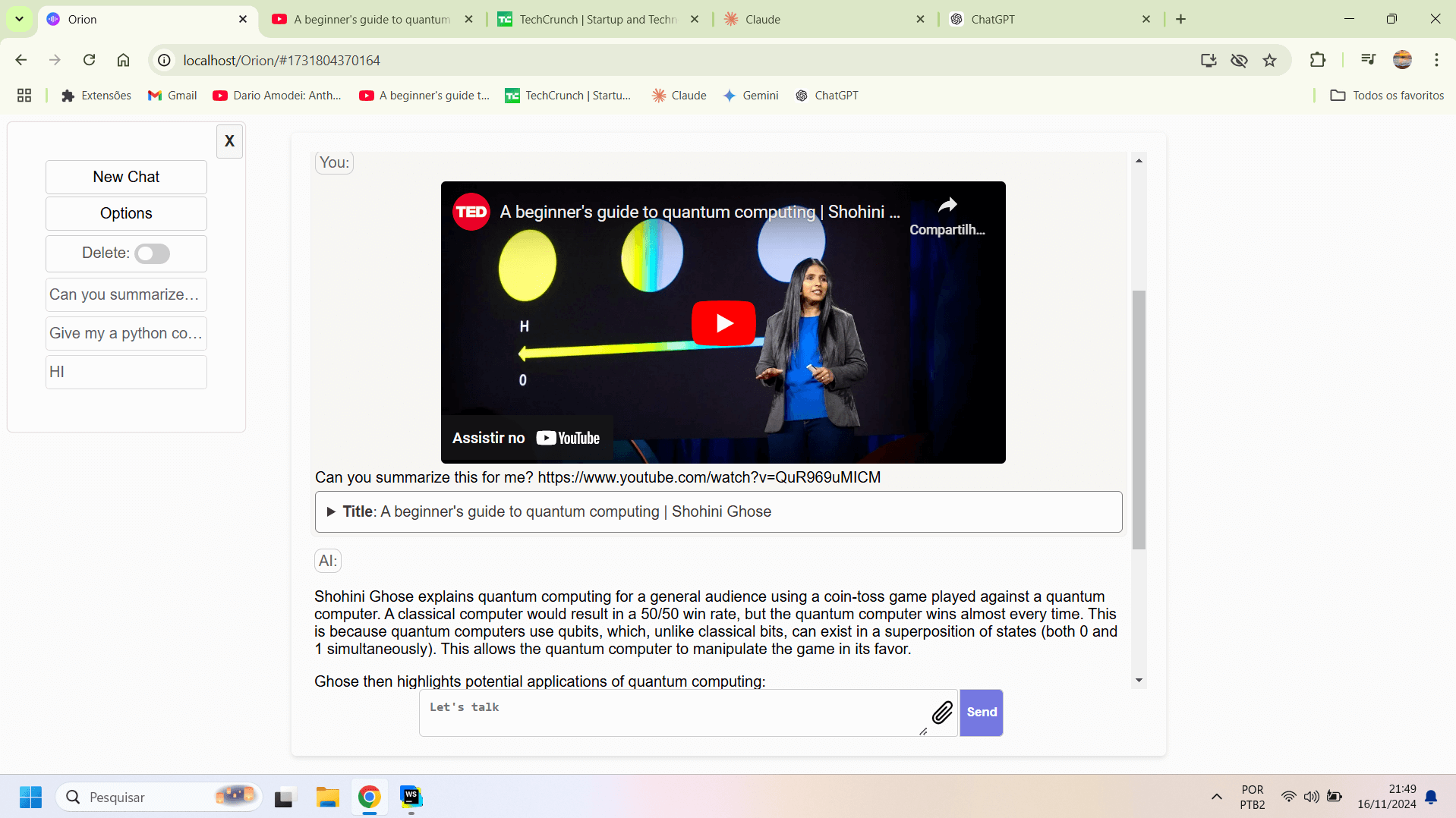
translate:spanish Hello everyone! or its short form t:spanish Hello everyone!.YouTube Summary Ask AI to summarize a YouTube video or answer any question based on the video caption. See an example of use below.
Summarize this video https://www.youtube.com/watch?v=r7pEdhnS3tIWhat is this video about? https://www.youtube.com/watch?v=qQviI1d_hFA
It is recommended to use a larger context window model when using this functionality, such as Google Gemini.Press Ctrl + Q to close the current chat and start a new one.
Search: Perform quick searches and retrieve relevant information with ease from Google.
search: What is the latest news? or s: What is the latest news?Please perform this functionality with caution and always check code before accepting execution.
javascript: How Many R's in 'Strawberry'? or js: How Many R's in 'Strawberry'?py: Run a python code to write "tseb eht sI noirO" in the inverse orderpy: The United States has a population of 342,524,968, of which 480,000 die annually due to tobacco use. What percentage is that?To run Orion first download this repository.
You can download it by running the following command in your terminal:
git clone https://github.com/EliasPereirah/OrionChat.gitOr download the zip file from the repository by clicking on the green button "Code" and then Download ZIP.
After downloading, just open the folder and click on index.html if you don't have a server. If you do, just access the directory where the project was saved. It's that simple.
To search using Google, you will need Google CSE (Custom Search Engine) API Key and CX.
For better search results, you can configure a search endpoint.
A POST request with query will be sent to this endpoint, where query is the search term.
These configurations were created to be compatible with https://github.com/EliasPereirah/SearchAugmentedLLM/ (Not perfect, but better than just Google snippet)
If you want to use any other endpoint, make sure it returns a JSON with the text field, where text will be the content passed to the LLM.
By adding such an endpoint you will be able to use it by writing at the beginning of the chat s: what's the news today
and the answer will be based on the context returning from the "rag endpoint"
An advanced option for those using Google Gemini may be to use "Grounding with Google Search", this feature is not implemented here and has a cost of $35 / 1K grounding requests.
To get around CORS errors when working with SambaNova a proxy may be necessary.
If you are using Orion via localhost or a hosting with PHP support, you can use the PHP proxy code available in this
repository (proxy.php file) for this you will also need to add the following JavaScript code in plugins.
To do this, click on "Options" -> Plugins and paste the JavaScript code provided below:
let proxy_url =  window.location.origin + window.location.pathname + "/proxy.php";
// ^^ This assumes the proxy URL is on the same host, otherwise enter it above. ^^
if(chosen_platform === "sambanova" || chosen_platform === "nvidia"){
  endpoint = proxy_url+"?platform="+chosen_platform;
}
function setProxyEndpoint(event){
  if(chosen_platform === "sambanova" || chosen_platform === "nvidia"){
    let proxy_endpoint = proxy_url+"/proxy.php?platform="+chosen_platform;
    if(proxy_endpoint !== endpoint){
      endpoint = proxy_endpoint;
      removeLastMessage();
    }
  }
}


let button_send = document.querySelector("#send");
chat_textarea.addEventListener('keyup', (event) => {
  if (event.key === 'Enter' && !event.shiftKey) {
    setProxyEndpoint();
  }
});

button_send.addEventListener("click", ()=>{
  setProxyEndpoint()
})
Be careful when using any other proxy as sensitive data will be passed through it like your API key and messages. Use only trusted services.
To enable AI responses based on YouTube video subtitles, set up an API endpoint to get them.
When submitting a YouTube URL in the chat, a popup will open allowing you to set up this endpoint.
This repository already provides this functionality in the plugins folder, to use it you will need to have PHP enabled on your server.
Note: You do not need a server to run this project as long as you do not want to use certain features, such as the one mentioned above.
If you wish, you can implement the following code on another server of your choice and point to the correct endpoint.
Code: https://github.com/EliasPereirah/YoutubeSubtitlesDownloader







