docker emacs
1.0.0

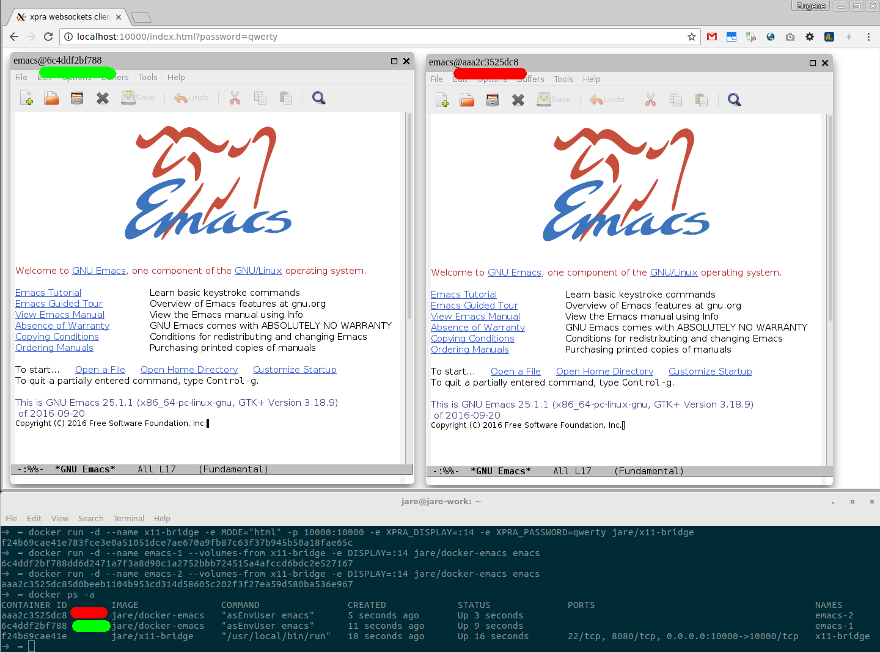
docker-x11-bridge + a web browser
emacs26,emacs25,emacs-snapshot) for debugginglatest dockerfiles/emacs26emacs25 dockerfiles/emacs25testing dockerfiles/snapshotalpine dockerfiles/alpine - Emacs build on Alpine Linux small (around 300mb uncompressed) but can be glitchyIf you need a different Emacs version/configuration checkout Silex/docker-emacs
First get docker for your OS.
Then you can use one of the images as a base(FROM) for your Dockerfile.
Simple example, Spacemacs distribution.
It will allow you to install and backup additional software/package dependencies. With Dockerfile ADD instruction
you can extract your .emacs.d from archives and remote repositories like GitHub using URL.
Also you can simply run one of the images:
Get XQuartz
open -a XQuartz
In the XQuartz preferences, go to the “Security” tab and make sure you’ve got “Allow connections from network clients” ticked
ip=$(ifconfig en0 | grep inet | awk '$1=="inet" {print $2}')
xhost + $ip
docker run -ti --name emacs
 -e DISPLAY=$ip:0
 -e UNAME="emacser"
 -e GNAME="emacsers"
 -e UID="1000"
 -e GID="1000"
 -v <path_to_your_.emacs.d>:/home/emacs/.emacs.d
 -v <path_to_your_workspace>:/mnt/workspace
 jare/emacs emacs
source
other method
Get Cygwin with xinit, xorg-server and optionaly winpty(to run Emacs container with -t)
export DISPLAY=<your-machine-ip>:0.0
startxwin -- -listen tcp &
xhost + <your-machine-ip>
docker run --name emacs
 -e DISPLAY="$DISPLAY"
 -e UNAME="emacser"
 -e GNAME="emacsers"
 -e UID="1000"
 -e GID="1000"
 -v <path_to_your_.emacs.d>:/home/emacs/.emacs.d
 -v <path_to_your_workspace>:/mnt/workspace
 jare/emacs emacs
Or with -ti via winpty
winpty docker run -ti --name emacs
-e DISPLAY="$DISPLAY"
-e UNAME="emacser"
-e GNAME="emacsers"
-e UID="1000"
-e GID="1000"
-v <path_to_your_.emacs.d>:/home/emacs/.emacs.d
-v <path_to_your_workspace>:/mnt/workspace
jare/emacs emacs
source You can use @ninrod 's setup
UID and preferably UNAME should match the host's user id.
Also make sure that $DISPLAY variable is set
docker run -ti --name emacs -v /tmp/.X11-unix:/tmp/.X11-unix:ro
 -e DISPLAY="unix$DISPLAY"
 -e UNAME="emacser"
 -e GNAME="emacsers"
 -e UID="1000"
 -e GID="1000"
 -v <path_to_your_.emacs.d>:/home/emacs/.emacs.d
 -v <path_to_your_workspace>:/mnt/workspace
 jare/emacs emacs
That's it! Now you should see Emacs window.
You may need to allow local connection for the user
UNAME should match the hosts user id.
xhost +si:localuser:<UNAME>
Or allow local connection from the container's hostname(This should work with any UID)
xhost +local:`docker inspect --format='{{ .Config.Hostname }}' emacs`
source
docker rm -f emacs - remove emacs containerdocker restart emacs - restart emacs containerdocker rmi -f jare/emacs - remove jare/emacs imagedocker pull jare/emacs - get newer jare/emacs versiondocker images -a - list all imagesdocker ps -a - list all containersdocker run ... jare/emacs - run the default commanddocker run -ti ... jare/emacs /bin/bash - start bashdocker exec emacs /usr/bin/emacs - start /usr/bin/emacs in the running emacs containerdocker logs emacs - print emacs container's logsdocker run ... -p 8080:8080 ... jare/emacs - access container's server from localhost:8080docker cp <from_my_local_machine_path> emacs:/<to_my_emacs_container_path>docker cp emacs:/<from_my_emacs_container_path> <to_my_local_machine_path>docker volume create --name my-workspace
- docker run ... -v my-workspace:/mnt/workspace ... jare/emacs
- docker run ... -v my-workspace:/home/developer/workspace ... jare/vim-bundle





