LittleOrion Engine
C++ 3D Engine developed during the Master's Degree in AAA Videogames Development
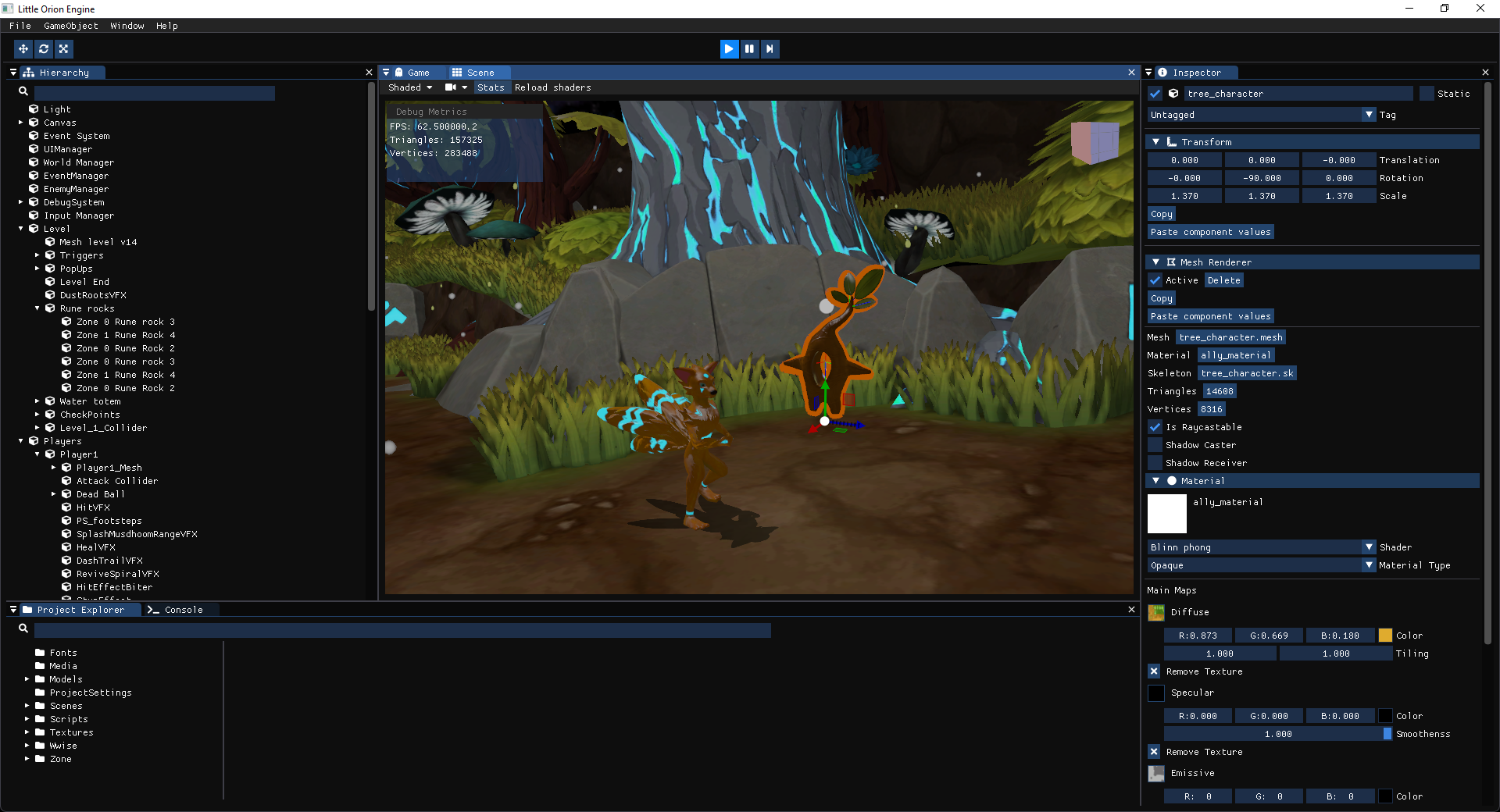
Highlights
- Create, save and load scenes.
- Create GameObjects and modify their behaviours using Component system.
- Explore the scene using a Unity-like camera.
- Configure different engine properties: renderer, time management, ...
Installation
- Download the last release (or whatever release you want) from the Releases section.
- Extract
Build.zip.
- Execute
LittleOrionEngine.exe.
Usage
Please refer to our Wiki in order to learn how to use the engine.
Development setup
In order to do that assure that you have the following:
- A computer.
- A graphic card with OpenGL support.
- VisualStudio 2017 or above.
Contributing
Because this is a academic project is not possible to contribute directly to this repo. Said that, feel free to fork it (https://github.com/Unnamed-Company/LittleOrionEngine/fork) and to expand it in your own way!
Authors
Mario Fernández Villalba
|
Anabel Hernández Barrera
|
Enrique Alexandre González Sequeira
|
Joan Ginard Mateo
|
Jordi Sauras
|
Jordi Romagosa
|
Toni Ferrari Juan
|
Luis Moyano
|
Marco Rodríguez
|
Artemis Georgakopoulou
|
Pau Casas Garcia
|
Raúl González
|
Ricard Vivó
|
Vidal Melero
|
Developement methodology
This project was developed following agile methodologies philosophy. If you are interested to know the tasks distribution don't hesitate to visit our Trello board!
Built With
- SDL 2.0 - Used to manage window creation and input.
- glew 2.1.0 - Used to manage OpenGL extensions.
- MathGeoLib 3.0.0 - Used to do the maths.
- Dear ImGui 1.73 - Used to build the GUI.
- ImGui filebrowser - Used to open file directory with imgui.
- DevIL 1.8 - Used to load images.
- assimp 5.0 - Used to load 3D models.
- Font Awesome 5 - Used to display fancy icons.
- Icon Font Cpp Headers - Used to import Font Awesome icons in C++.
- PCG - Used to generate good random numbers in C++.
- rapidjson 1.1.0 - Used to handle json files.
- Debug Draw - Used to draw basic shapes.
- par_shapes - Used to generate basic primitives.
- ImGuizmo - Used to draw gizmos.
- PhysFS 3.0.2 - Used to manage file system.
- Bullet Physics - Used to simulate physics.
- spdlog - Used to log stuff.
License
This project is licensed under the MIT License - see the LICENSE file for details.
Release History
- [1.0.1] Erradicating the bugs and polishing
- Lots of bug fixes.
- Tuned up controls in order to give best user experience.
- Performance improvements when loading resources.
- [1.0.0] v1.0.0 release is here!
- Mesh materials. It mesh has its own material, that stores different textures and light parameters.
- New
ComponentLight, that represents a light source for the scene. It's used along the mesh materials.
- Mouse picking. Game objects can be selected clicking on them in scene window.
- Gizmos. They are used to modify the transform of the selected object.
- [0.2.2] Binary files and scene serialization
- Better resources management.
- Assets are transformed to less space-consuming format.
- New cache that avoids duplication of resources.
- Serialization of a scene, that allows loading and saving scenes.
- [0.2.1] Speeding up the engine!
- New module ModuleCamera. It contains camera frustums that can be attached to GameObjects.
- Two new tabs, Scene and Game. The former contains the scene seen from the editor camera while the later contains the scene seen from the game camera.
- Frustum culling. With this improvement meshes that are outside camera frustum are discarded in the render process.
- Camera clear modes. Camera can be cleared into a skybox or a plain color.
- Texture is rendered using a texture instead of OpenGL primitives.
- Quadtree and OctTree. With this improvement we can speed up even more the render process by reducing the number of checks.
- New module ModuleDebug. It contains usefull Debug functions.
- [0.2.0] And there were GameObjects
- GameObjects come in. Each GameObject represents an entity that can be modified using components.
- Components are objects that contain different entities parts, like meshes, materials, etc.
- New hierarchy window that represents the scene GameObject hierarchy.
- Revamped properties window. Here component parameters can be modified.
- [0.1.5] Final 0.1 version (this is the one teachers)!
- Fixed various bugs.
- Several refactors in order to follow good C++ practises.
- Super cool README.
- [0.1.4] New LOG, preparations for final 0.1 alpha version!
- Revamped log. It displays messages in a clearer and more readable way.
- Debug messages are captured from Assimp and OpenGL.
- Filter messages by soruce!
- Model texture can be overwritten dragging and dropping a png file into the engine window.
- [0.1.3] wow UI, so much configuration options
- New gorgeous GUI.
- Lots of new configuration options for different modules (camera, render, ...).
- Scene is rendered in a separate window.
- Model properties are shown in a new window.
- Camera speed and focus is calculated regarding the loaded model size.
- [0.1.2] Time starts to flow, impending new GUI shows in the horizon...
- Added time module, that controls time flow. It implements two clocks, the real time clock and the game clock.
- Time can be paused and stepped foward one frame. Also time scale can be changed.
- FPS can be limited.
- Started new implementation of GUI. Added some new info to camera config.
- [0.1.1] This is about model loading and a camera
- Improved model loading. Is possible to load models dragging and dropping their .fbx files into the engine's window. Camera will be scaled accordingly to new model dimensions.
- Improved camera controls. Pressing F will focus the camera on the loaded model. Also, pressing Alt will make the camera orbit around the current model.
- Added bounding box. Pressing B will enable/disable the bounding box of the current model.
- [0.1.0] Here comes the base version!
- It can load models from fbx files using a diffuse texture.
- Camera can be controlled in Unity-like style.
- Engine has basic UI with several config and debug options.







