vue iconfont
1.0.0

Use Iconfont.cn more elegantly, and supports both font-class 引入and symbol 引入.
 # Yarn
yarn add vue-iconfont

# npm
npm i vue-iconfont
CDN: jsDelivr | UNPKG (can be used via window.VueIconfont )
First install VueIconfont using Vue.use :
 import Vue from 'vue'
import VueIconfont from 'vue-iconfont'

Vue . use ( VueIconfont /*, options*/ )

// ......
Then it can be used in the component like this:
< icon name =" right " /> | Options | type | default value | illustrate |
|---|---|---|---|
| tag | String | icon | Icon component label. |
| type | font | svg | font | font : represents the font icon introduced with font-class.svg : represents the SVG icon introduced with symbol. |
| prefix | String | - | Represents a class name prefix or an SVG icon name prefix. |
| Family | String | = prefix | Only valid when type is font , indicating a class with font-family style set. |
| sprite | String | - | Only valid when type is svg , it means SVG Sprite, which will be automatically loaded, such as: <svg><symbol id="ok">......</symbol></svg> |
| component | { name: String, 'props': Object, beforeRender: context => void } | { name: 'Icon', 'props': {}, beforeRender: () => {} } | name represents the name option of the component, props represents the props option of the component, beforeRender is a function that receives the context of the render in the Vue function component, and you can apply changes to the context. |
Open图标管理> 我的项目and select a project.
Click更多操作> 编辑项目:
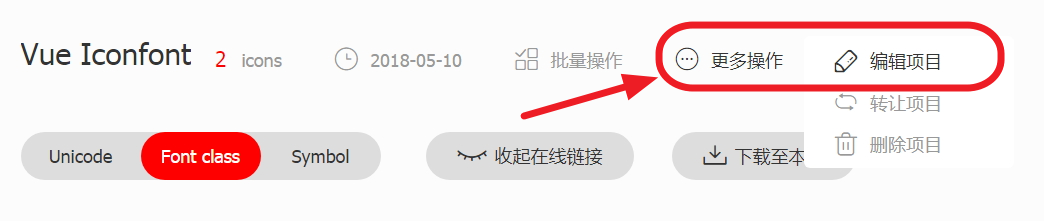
FontClass/Symbol 前缀and Font Family form item to the same value, and this value is prefix in the above options : 
下载至本地to extract the icon file download into the project folder. You can use Vue.use(VueIconfont, [options1, options2, ..., optionsN]) to define different icon components as needed.
 // index.js
import Vue from 'vue'
import VueIconfont from 'vue-iconfont'
import App from './app.vue'

// 引入上面下载得到的使用 font-class 图标必须的 css 文件
import './iconfont/iconfont.css'

// 引入上面下载得到的使用 SVG 图标必须的 js 文件
import './iconfont/iconfont.js'

Vue . use ( VueIconfont , [
  // 定义 v-icon 组件以使用 font-class 图标
  {
    tag : 'v-icon' ,
    prefix : 'v-icon' ,
    type : 'font'
  } ,

  // 定义 v-svg-icon 组件以使用 SVG 图标
  {
    tag : 'v-svg-icon' ,
    prefix : 'v-icon' ,
    type : 'svg'
  }
] )

new Vue ( {
  el : '#app' ,
  render : h => h ( App )
} ) <!-- app.vue -->
< template >
< div >
< v-icon name =" right " />
< v-svg-icon name =" right " />
</ div >
</ template > Just set its CSS:
 < v-icon name =" right " style =" color: red; font-size: 2em; " />
< v-svg-icon name =" right " style =" color: blue; font-size: 14px; " />







