open_green_compute
1.0.0

Note: work in progress.
Simple Rust based application to measure (and maybe later control) power inputs (e.g. from a solar panel) and output (e.g. the power used by a RaspberryPi of VisionFive 2 single board computer. Goal is to see if we can run a single board computer 24/7 on green energy.
This was initially created to measure the power consumption of a Raspberry Pi 4 which was powered by a battery bank which in turn was powered by a set of solar-panels. It has also been tested with the RISC-V based VisionFive 2.
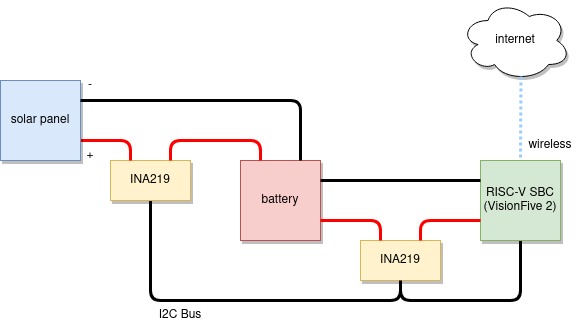
The power sensors make use of INA219 based sensors over an I2C bus. While the weather data is collected through Weather API.
Reason for collecting both power and weather data is to better understand the behaviour of the solar panels under various weather conditions. This should enable better forecasting of the amount of power that will be available in near future, given the current weather.
The following block diagram shows the system setup:
In reality this all looks a bit more boring:

The collected data will look like the table shown below - this data in turn can be used to train a forecasting model that should help build a model based feedback control bases system.
| timestamp | compute_voltage | compute_current | compute_power | solar_voltage | solar_current | solar_power | owa_temperature | ... | owa_cloud_coverage |
|---|---|---|---|---|---|---|---|---|---|
| 21:36:58 | 4.708 | 1174.71036585366 | 5563.71951219512 | 0 | 0 | 0 | 11.92 | ... | 75 |
| 21:37:02 | 4.724 | 1164.74085365854 | 5502.43902439024 | 0 | 0 | 0 | 11.91 | ... | 75 |
| ... | ... | ... | ... | ... | ... | ... | ... | ... | ... |
By default, the configuration file is loaded from defaults.toml. You can set an environment variable called OGC_CONFIG to load it from any other path.
An example configuration file can be found here.
To run this as a service using systemd use the following unit file:
[Unit]
Description=Open Green Compute
After=multi-user.target

[Service]
ExecStart=/<path to>/open_green_compute
WorkingDirectory=/home/ubuntu
Restart=always
RestartSec=10s

[Install]
WantedBy=multi-user.target
Make sure the right target toolchain and compiler are installed on your host:
rustup target add riscv64gc-unknown-linux-gnu
apt-get install gcc-riscv64-linux-gnu





