solcast go
Initial Alpha

Go client library for querying the Solcast API
This module allows a registered users to query the Solcast API https://api.solcast.com.au. You will need to register your user account to obtain an API key https://solcast.com.au/api/register. Without an API key you will not be able to successfully obtain valid API results.
go get github.com/Siliconrob/solcast-go/solcast
Read GoDoc
Setup System/User environment variable. Details on advanced editing StackOverflow superuser walkthrough
WinKey + R
Copy and Paste the following text to the Open: input text box for the Run Dialog
%windir%System32rundll32.exe sysdm.cpl,EditEnvironmentVariables
That will present this screen
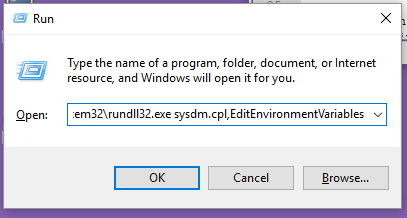
Add a USER or SYSTEM environment variable to hold the Solcast API key. User environment variables will only be available to your particular user, system environment variables are shared for all users on the system
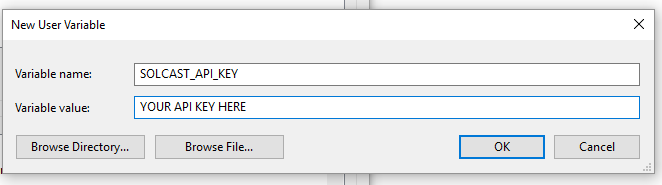
After you have added the environment variable you will see the key listed in the current variables

NOTE: To reference this key you will need to reopen your shell prompt to read these variables again from the system (cmd, command.com, powershell, etc)
Open a terminal prompt
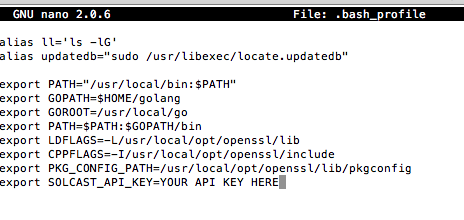
terminalbashnano .bash_profile
If you do not have nano it is a simpler text editor than vi. Use your package manager to download and install or use vi. The preferred package manager for mac OS is Homebrew and once installed on your system you can issue similar commands to Linux apt-get and yum with the brew package manager.
Add the Solcast API Key to your user profile variables.
Clarification as I often forget the coordinate planes of Latitude and Longitude along with bounds.
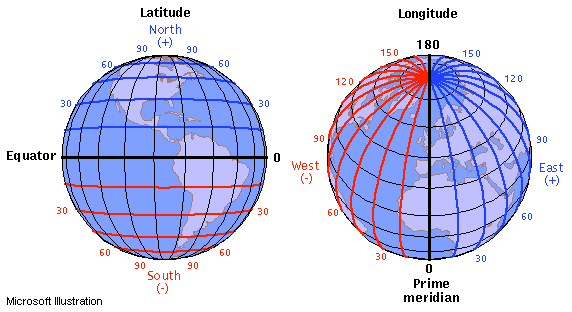
Credits - Learner.org
The Solcast API expects West for Longitude and South for Latitude to be expressed as a negative numbers
Example Locations on the Globe
| Name | Latitude | Longitude |
|---|---|---|
| Sydney, Australia | -33.865143 | 151.209900 |
| Mumbai, India | 19.228825 | 72.854118 |
| Tokyo, Japan | 35.6895 | 139.69171 |
| Paris, France | 48.864716 | 2.349014 |
| Los Angeles, USA | 34.052235 | -118.243683 |
import (
	solcast "github.com/Siliconrob/solcast-go/solcast"
	datatypes "github.com/Siliconrob/solcast-go/solcast/types"
)

rad_forecasts := solcast.RadiationForecast(datatypes.LatLng{Longitude: -97, Latitude: 32}){ forecasts:
[ { ghi: 0,
ghi90: 0,
ghi10: 0,
ebh: 0,
dni: 0,
dni10: 0,
dni90: 0,
dhi: 0,
air_temp: 10,
zenith: 103,
azimuth: -88,
cloud_opacity: 3,
period_end: '2017-08-31T19:30:00.0000000Z',
period: 'PT30M' },
...
]
}
You can use standard environment variables to hold your API key and not need to pass the optional apiKey to the current methods
Environment variable name if you care to work with it directly
SOLCAST_API_KEY
Accessible through process environment variable directly or with helper API method.
License can be found here: LICENSE





