MultithreadingFireDAC
1.0.0

In a multithread application, a good practice is to isolate the components of access to the database, the violation of this practice can generate Access Violation errors among other errors. To help solve this problem, Embarchadero has made available the component, FDManager , which is responsible for the definition and management of connections and is thread-SAFE (safe use in multithread environments).
Source: https://docwiki.embarcadero.com/radstudio/sydney/en/multithreading_(FIEDAC)
Advantages of FDManager use
Library Definition Customer access to the database. [OPTIONAL]
Centralization of connection settings with the database.
Centralization of Parametrizations of the TFDConnection component. (This configuration extends to all the fdconnection used in the application)
In addition to using FDManger a good practice and the use of the technique of optimizing the database connection, called the connection pool .
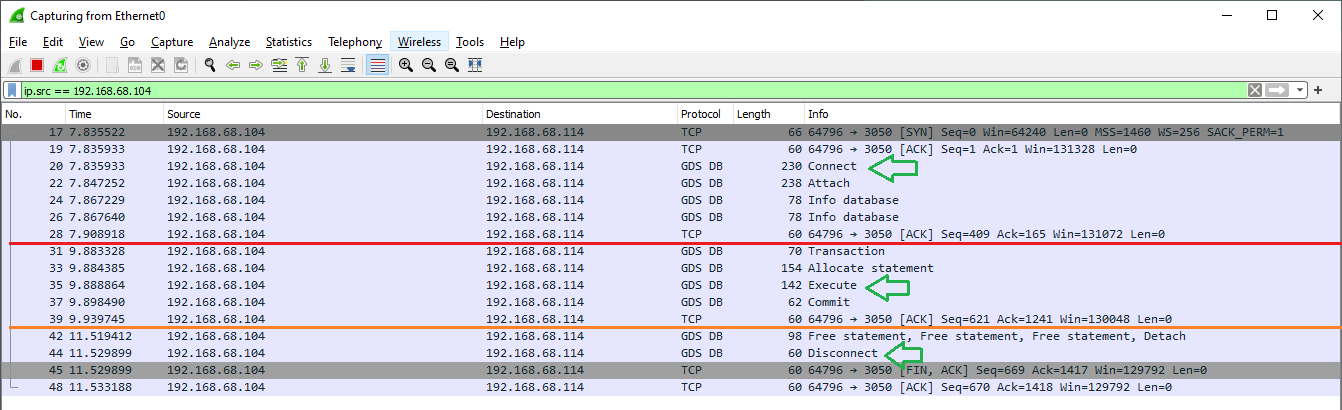
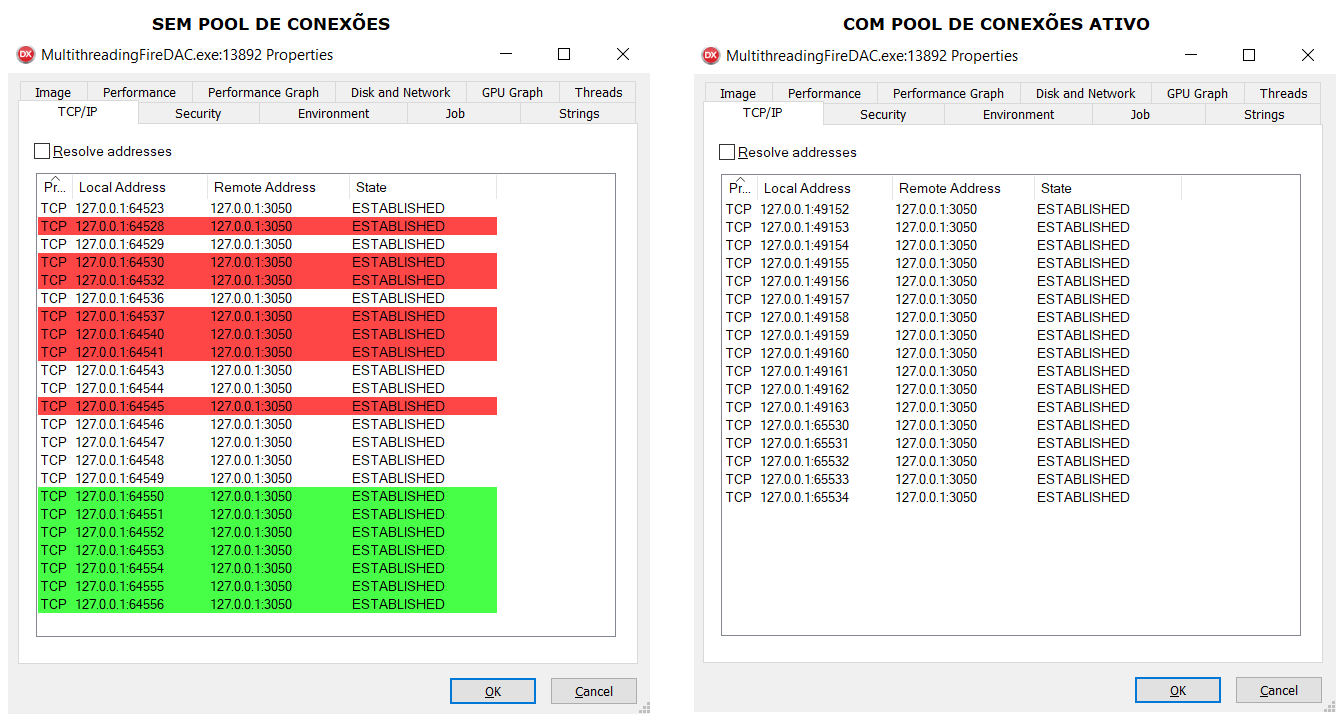
When we need to perform any operation on a database it is first necessary to establish a connection with it, the establishment of this connection usually occurs through the TCP/IP protocol, involving the cost of opening and closing the connection. This cost is particularly significant in web applications where you can have a flow of thousands of constant requests, and each will generate the opening and closing of the database connection. A simple technique to avoid this constant "fucking" of connections is to maintain a certain number of connections always open (a connection pool ) and simply reuse when necessary, so you decrease both the machine's resource spent and your application response time.
This cost to establish a database connection can be seen in the image below using the Wireshark tool we can see the amount of packets that is used to perform a simple select.
We can see in the image below the behavior of database queries using connections pool:
To configure a connection pool we will use the FDManager , and the pool properties.
| Parameter | Description | Example |
|---|---|---|
| Pooled | Activates the connection pool for a connectionondefname informed in FDMANAGER.Connectationndefs. To use a connection pool, the connection definition must be persistent or private. | True |
| Pool_cleanuptimeout | The time in milliseconds until Firedac removes connections that were not used until pool_expiretimeout time. The default value is 30000 ms (30 seconds). | 15000 ms 15 s |
| Pool_expiretimeout | The time in milliseconds, after which the inactive connection can be excluded from the pool and destroyed. The default value is 90000 ms (90 seconds). | 60000 ms 60 s |
| POOL_MAXIMUMEMTES | The maximum number of connections in the pool. When the application requires more connections, an exception is generated. The default value is 50. When the total number of connections specified on this property is reached, an exception is generated: 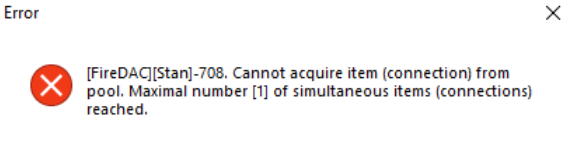 | 100 |
In general, the fdmanager keeps a pool of "physical" connections open when:
To use FDManager with other databases, check the link: Database Connectivity (Firedac) #driver Linkage
| Database | Driverid | TFDCONNENEONDEFPASS | Units |
|---|---|---|---|
| Microsoft SQL Server | MSSQL | TFDPHYSMSSSQLONNEONEFPASS | Firedac.phys.MSSQLDEF, Firedac.stan.intf, Firedac.phys, Firedac.phys.odbcbase, Firedac.phys.MSSQL |
| Oracle Server | Now | TFDPHYSORACLECONNECONTEFPASS | Firedac.phys.oracledef, Firedac.stan.intf, Firedac.phys, Firedac.phys.oracle |
| PostgreSQL | Pg | TFDPHYSPGCONNEONECENDEFPASS | FIEDAC.phys.pgdef, Firedac.stan.intf, Firedac.phys, Firedac.phys.pg; |
| Mysql server | Mysql | TFDPHYSMYSQLCONNEONEFPASS | Firedac.phys.MYSQLDEF, Firedac.stan.intf, Firedac.phys, Firedac.phys.mysql |
| IBM DB2 Server) | DB2 | TFDPHYSDB2ConNectionAndeFParams | Firedac.phys.db2def, Firedac.stan.intf, Firedac.phys, Firedac.phys.odbcbase, Firedac.phys.db2 |
| Firebird | FB | TFDPHYSFBCONNEONTEFPASS | Firedac.phys.fbdef, Firedac.stan.intf, Firedac.phys, Firedac.phys.ibbase, Firedac.phys.fb |
| Interbase | Ib | TFDPHYSIBCONNEONECENDEFPASS | Firedac.phys.ibdef, Firedac.stan.intf, Firedac.phys, Firedac.phys.ibbase, Firedac.phys.ib |
| SQLite | SQLite | TFDPHYSSQLITEconnectionAndefparams | FIEDAC.Stan.EXPrFuncs, Firedac.phys.Sqlitedef, Firedac.stan.intf, Firedac.phys, Firedac.phys.sqlite |
| Mongodb | Mongo | TFDPHYSMONGOCONNEOTTONDEFPASS | Firedac.phys.mongodbdef, Firedac.stan.intf, Firedac.phys, Firedac.phys.mongodb |
| ODBC | ODBC | TFDPHYSODBCCONNEONECENDEFPASS | Firedac.phys.odbcdef, Firedac.stan.intf, Firedac.phys, Firedac.phys.odbcbase, Firedac.phys.odbc |
Attached on the project there are two examples of using the database connection in multithread environments.
1st example, using connections in a multithreading environment for desktop .
2nd example, using connections in a multithreading environment for web server with Horse.
Both examples use the Firebird database