class helpers
1.0.0

Make Delphi code more readable using class helpers:
Classic call:
StoreDataset (1, mysqlDataSet, true);More readable call:
mysqlDataSet.StoreSelected_StopAfterFirstError(
   function():boolean
   begin
     Result := mysqlDataSet.FieldByName('Status').Value = '1'
end), fDataStorer);TBytes Helper - Generate numbers, ZLib compress, Base64 encode, Calc CRC32
uses
  Helpers.TBytes;

type
  TUploadImageCommand = record
    Image: string;
    ControlSum: integer;
  end;

procedure SendCommandToRestServer(const aCommand: TUploadImageCommand);
begin
  writeln('Use RestClient or IdHttpClient to send POST request');
  writeln('POST /rest/upload-image/ TUploadImageCommand');
  writeln('TUploadImageCommand:');
  writeln('    ControlSum = ', aCommand.ControlSum);
  writeln('    Image Length = ', Length(aCommand.Image));
  writeln('    Image = ', aCommand.Image);
end;

var
  bytes: TBytes;
  idx: integer;
  memoryStream: TMemoryStream;
  command := TUploadImageCommand;
begin
  bytes.Size := 1000;
  for idx := 0 to bytes.Size-1 do
    bytes[idx] := idx div 10;
  memoryStream := TMemoryStream.Create();
  bytes := CompressToStream(memoryStream);
  command.Image := bytes.GenerateBase64Code();
  command.ControlSum := bytes.GetSectorCRC32(0, bytes.Size);
  SendCommandToRestServer(command);
end.
TBytes Helper: Store and Load TBytes from Stream or File. Load and verify PNG image
uses
  Helpers.TBytes;

var
  bytes: TBytes;
  idx: integer;
  memoryStream: TMemoryStream;
  command := TUploadImageCommand;
begin
  bytes.InitialiseFromBase64String('U2FtcGxlIHRleHQ=');
  bytes.SaveToFile('notes.txt'); // save: Sample text
  memoryStream:= bytes.CreateStream();
  // memoryStream.Size = 11
  memoryStream.Free;
  // -----------------
  s :=  bytes.GetSectorAsString(0, 6);  // ASCII only text
  bytes := [0, 0, 15, 16, $A0, 255, 0, 0, 0, 0, 1];
  if bytes.GetSectorAsHex(2, 4) = '0F 10 A0 FF' then
  begin
    memoryStream := TMemoryStream.Create();
    memoryStream.LoadFromFile('small.png');
    memoryStream.Position := 0;
    signature.LoadFromStream(memoryStream,8);
    if (signature.GetSectorAsHex = '89 50 4E 47 0D 0A 1A 0A') and
       (signature.GetSectorAsString(1, 3) = 'PNG') then
    begin
      memoryStream.Position := 0;
      pngImage := TPngImage.Create;
      pngImage.LoadFromStream(memoryStream);
      // Image1.Picture := pngImage;
      pngImage.Free;
    end;
    memoryStream.Free;
  end;
end;
TDateTime Helper: Informations about TDateTime
uses
  Helpers.TDateTime;

var
  date: TDateTime;
begin
  date := EncodeDate(1989, 06, 04);
  writeln(date.AsYear);  // 1989
  writeln(date.AsMonth);  // 06
  writeln(date);  //  06/04/1989
  writeln(EncodeDate(2017, 10, 24).DayOfWeek);  // 3
  writeln(date.IncMonth(5).ToString('yyyy-mm-dd');  //  1989-11-04
  writeln(date.AsStringDateISO);  //  1989-06-04
  date := EncodeDate(2019, 10, 24) + EncodeTime(18,45,12,0);
  writeln(date.AsStringDateISO);  //  2019-10-24T18:45:12.000Z
end.
TDataSet Helper: ForEachRow, LoadData<>, SaveData<>
uses
  Helpers.TDataSet;

type
  TCity = class
  public
    id: Integer;
    City: string;
    Rank: Variant;
    visited: Variant;
  end;

var
  dataset: TDataSet;
  cityNames: TArray<string>;
  idx: integer;
  cities: TObjectList<TCityForDataset>;
begin
  dataset := GivenDataSet(fOwner, [
    { } [1, 'Edinburgh', 5.5, EncodeDate(2018, 05, 28)],
    { } [2, 'Glassgow', 4.5, EncodeDate(2015, 09, 13)],
    { } [3, 'Cracow', 6.0, EncodeDate(2019, 01, 01)],
    { } [4, 'Prague', 4.9, EncodeDate(2013, 06, 21)]]);
  SetLength(cityNames, dataset.RecordCount);
  idx := 0;
  dataset.ForEachRow(
    procedure
    begin
      cityNames[idx] := dataset.FieldByName('city').AsString;
      inc(idx);
    end);
  writeln(string.Join(', ', citiecityNamess));

  cities := dataset.LoadData<TCityForDataset>();
  witeln(cities.Count);  // 4
  witeln(cities[0].City);  // Edinburgh
  witeln(cities[3].Rank); //  4.9

  cities[2].Rank := 5.8;
  cities[2].visited := EncodeDate(2020, 7, 22);
  cities.Add(TCity.Create());
  cities[4].id := 5;
  cities[4].City := 'Warsaw';
  dataset.SaveData<TCity>(cities);
  // SaveData updated Cracow record and added Warsaw
end
TStringGrid Helper: Fill and Resize TStringGrid
// StringGrid1: TStringGrid;
// StringGrid2: TStringGrid;

procedure TForm1.Button1Click(Sender: TObject);
var
  structure, rows: string;
begin
  StringGrid1.ColCount := 4;
  StringGrid1.RowCount := 3;
  StringGrid1.ColsWidth([40, 100, 90, 110, 80]);
  StringGrid1.FillCells([
    ['1', 'Jonh Black', 'U21', '34'],
    ['2', 'Bogdan Polak', 'N47', '28']]);

  structure :=
    '{"column": "no", "caption": "No.", "width": 30}, ' +
    '{"column": "mesure", "caption": "Mesure description", "width": 200}, ' +
    '{"column": "value", "caption": "Value", "width": 60}';
  rows :=
    '{"no": 1, "mesure": "Number of DI Containers", "value": 120},' +
    '{"no": 2, "mesure": "Maximum ctor injection",  "value": 56}';
  data
  jsData := TJSONObject.ParseJSONValue(Format(
    '{"structure": [%s],  "data": [%s]}', [structure, rows])
    ) as TJSONObject;
  StringGrid2.FillWithJson(jsData);
end;RTL Helpers:
| Unit | Helper description |
|---|---|
| Helper.TBytes | Allows to manipulates arrays of bytes: size, load & save, getter & setters |
| Helper.TDataSet | Additional TDataSet functionality like: iterating through dataset or LoadData / SaveData - allows to map a list of objects to the dataset |
| Helper.TDateTime | Methods that allow easily manipulate date and time |
| Helper.TField | Allows to load Base64 data into Blob Field or verifying signature of the stored data |
| Helper.TJSONObject | Methods reading data or storing in the JSON DOM structure, like IsValidIsoDate(fieldName) |
| Helper.TStream | Methods which facilitate reading and writing data to streams |
VCL Helpers:
| Expanded class | Helper description |
|---|---|
| TApplication | Sample helper containing experimental method like: InDeveloperMode. |
| TDBGrid | Methods manipulating DBGrid columns, like: AutoSizeColumns - automatically arranging with of each column |
| TForm | Methods managing timers: SetInterval and SetTimeout |
| TPicture | Allow to assign TBytes and TBlobField to TPicture with automatic image format recognition |
| TStringGrid | Filling and configuring String Grid control: loading data, setting columns width, clearing content of cell or row |
| TWinControl | Utility methods for searching child controls by type or by name. Visible for all TWinControl descendants: TForm, TPanel, etc. |
Other Helpers:
| Expanded class | Helper description |
|---|---|
| Helper.TFDConnection | |
| Helper.TFDCustomManager |
Helper naming convention is to add suffix Helper to the name of the expanded class, what means that class helper for TDataSet will has a name TDataSetHelper.
Each helper is stored in a separate file and unit its name is Helper.<ExpanedClassName>.pas.
All helper units are stored in the src subfolder - go to that location.
examples/01-playground/ - go to that locationHelperPlayground.dprHelper.TStringGrid.pasHelper.TDataSet.pas and Helper.TDBGrid.pasHelper.TBytes.pas and Helper.TStream.pasexamples/02-formhelper/ - go to that locationHelpersMiniDemo.dprHelper.TForm.pas and usage of timer a helper methodsThe huge amount of VCL (FMX) code can be cleared using class helpers, which are actually an easy refactoring technique with low risk for complex projects. Using this method, teams can start upgrading their legacy projects even without unit tests safety net. Moreover the verification of newly created helpers can be easily done with unit tests. This approach allow to teach developers how to write unit tests in a correct way (learn in practice F.I.R.S.T principles or other). Teams can also easily apply TDD development process (write tests first and then implement functionality) in a fun and non-invasive way.
Sometimes class helpers could be also dangerous if they are used improperly. For this reason it is required to apply a little more disciplined development and delivery process, suggestions connected with that area are covered in the following sections.
Class helpers benefits:
From the very beginning (Delphi 2006) till Delphi Berlin / 10.1 version there was quite popular class helper bug, which allows to access private fields and private methods using helpers. Because of this bug many developers identified this interesting language extension with such hack. The misuse of class helpers has caused that value of this super powerful solution is underestimated.
One of the important purposes of using class helpers is ability of extract useful and reusable code, and then cover them with unit tests. Developers can even easily employ TDD, test driven approach in which first we need to write unit tests and then implement logic
That repository is demonstrating how to practice TDD approach. Each class and record helper has DUnitX test. Unit test sets can be easily expanded to provide better test coverage. To have better unit testing experience it's recommended to install the best TDD Delphi IDE extension TestInsight - free and a very productive platform created by Stefan Glienke. Glory to the author! Link to the TestInsight repo: go to the Bitbucket site
Sample unit test can be found in tests repository folder - go to that location
Sample test of TStringGrid class helper ColsWidth method:
procedure TestTStringGridHelper.FiveColumns_ColsWidth;
begin
  fGrid.ColCount := 5;
  fGrid.ColsWidth([50, 100, 90, 110, 80]);
  Assert.AreEqual(110, fGrid.ColWidths[3]);
  Assert.AreEqual(80, fGrid.ColWidths[4]);
end;
Class helpers looks really promising in the begging and actually there are great solution, but as you create and use more and more of them, you'll start to notice some obstacles. For this reason, good practices should be adapted from the beginning to help avoid potential problems.
One of the recommended practices when using class helpers is to plan good project maintenance, including version control and release management. Proven steps including two important point:
This GitHub project is live example of such deployment techniques. We are using branching model inspired by Vincent Driessen blog post: A successful Git branching model together with planing and delivery model inspired by Kanban method.
Class helpers project branching model
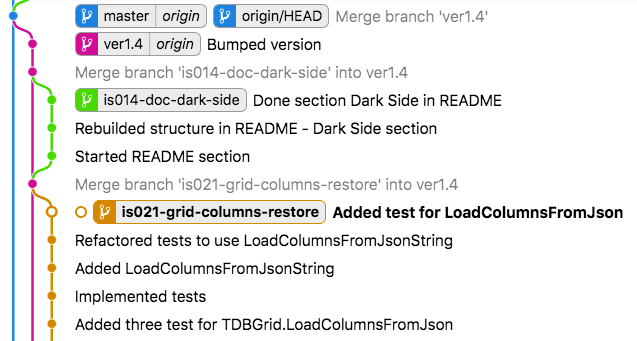
is021-grid-column-restore is for new feature: method LoadColumnsFromJsonString in TDBGrid class helper, which allows to restore column configuration (order, title caption, width and visibility) stored in JSON string. Feature definition is written in GitHub Issue #21is014-doc-dark-side is new documentation section in main README.md file.Class helpers project Kanban board
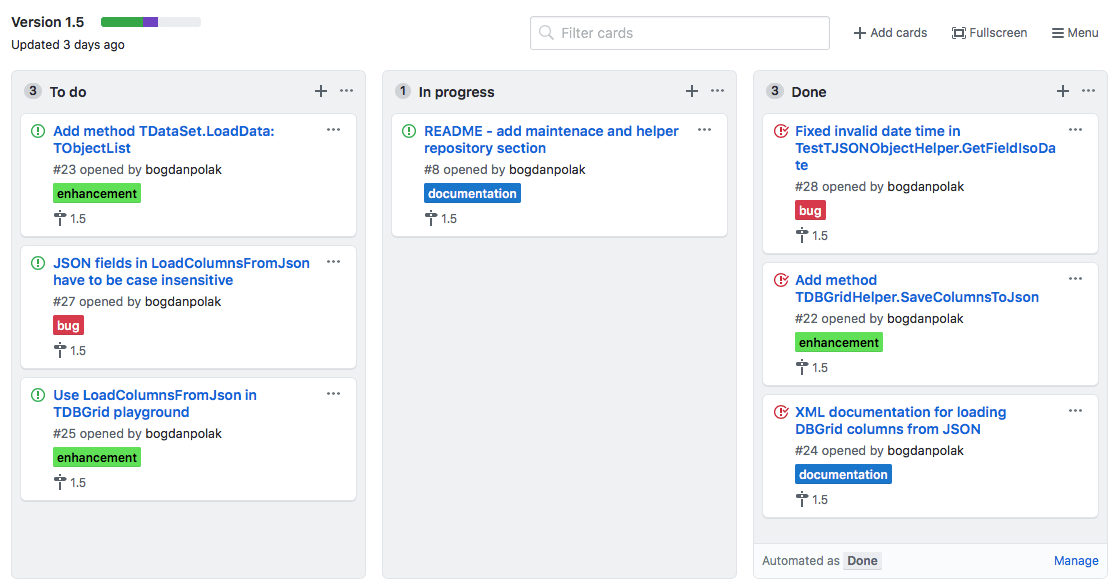
Kanban board and planning sessions are suggested techniques to achieve - incremental delivery. Class helpers project can't be delivered too often, because of integration cost (integration class helper repository with final Delphi projects). And from the other side delivery of the new version shouldn't take too long, because all projects should use advantages of new helpers (high reusability).
Class helpers are look really nice on the first contact, but they have some dangerous side effects. In this section you able to better understand the weaknesses of this solution. If you try to define two class helpers expanding the same base class you will see that only one of them will be visible. More to that you are not able to expand class helper functionality with inheritance. Also you are not able to define additional memory (fields) in the class helper.
You can protect your project against the effects of these weaknesses. Before defining a new class helper you should ask yourself a few questions:
TButton) not for more general (TControl, TComponent, etc.).






