PIMinfo Powershell
1.0.0

Two separated powershell's
Code results one or more csv files. That means some "extra info".
Requires Powershell AzureAD preview 2.0 (30.05.2022 - v2.0.2.149)
There is still few things in code that are "under construction". So that explains few extra parameter reservations.
And I know.. this code is not optimized + some parts of the code.. just bare with it..
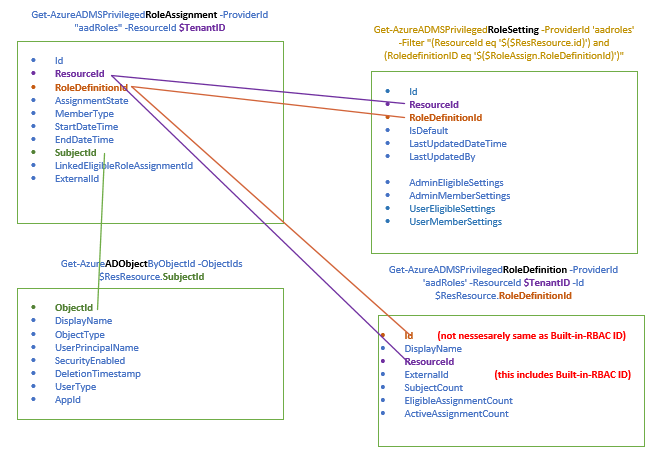
AzureAD is bit more straightforward - And remember Privileged role assignments are unique Id:s in each azure tenant.
But getting Roles from Azure is bit more comlicated
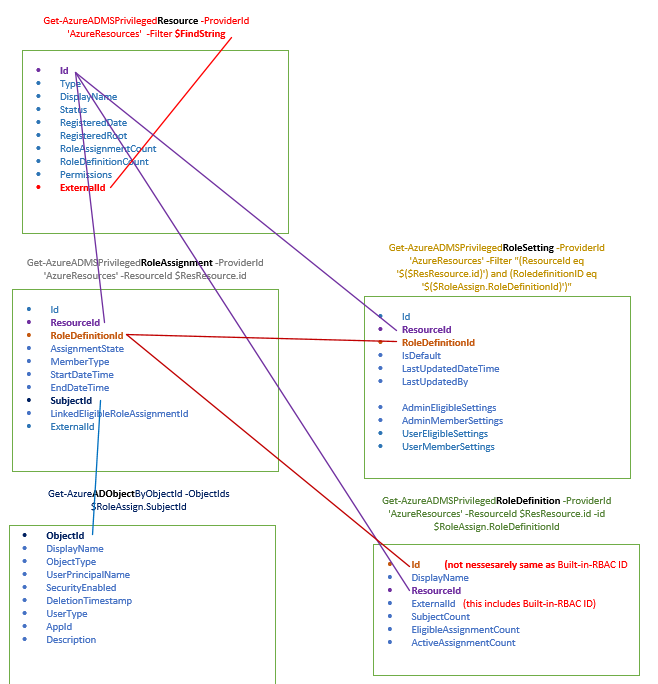
First of all.. dont get confused with different ID strings and names of those strings.
Get-AzureADMSPrivilegedResource -ProviderId 'AzureResources' -Filter $FindString #picks up just desired resource based on filter
Get-AzureADMSPrivilegedRoleAssignment -ProviderId 'AzureResources' -ResourceId $ResResource.id #Gets role assignments from ResourceID from previous command -- result is mainly different ID information
Get-AzureADMSPrivilegedRoleSetting -ProviderId 'AzureResources' -Filter "(ResourceId eq '$(
Get-AzureADMSPrivilegedRoleDefinition -ProviderId 'AzureResources' -ResourceId $ResResource.id -id $RoleAssign.RoleDefinitionId #Gets more readable Roledefinition info based on ResourceID and Roleassignment RoledefinitionId
Get-AzureADObjectByObjectId -ObjectIds $RoleAssign.SubjectId #Gets more readable Roledefinition info from AzureAD based on Roleassignment SubjectID (AzureAD ObjectID)
Resulting csv:s can be used to figure out current roles. And use filtered info as input to clean up current environment.
It is also possible to maintain Roles with powershell.. But maybe more about that later.
31.05.2022 Added collection of Azure RoleSettings information (still work to do to get actual settings out) and updated Azure picture. 03.06.2022 Updated Pictures and .ps1 files (updated RoleSettings info pickup and added AD objectinfo). And I did found out that RoledefinitionID is not allways same as BuiltInRBAC Id (in some cases yes it is, but at least older PIM configurations - do not trust that). 03.06.2022 Added ReadAzurePIMRoleSettings.ps1 to list every MG, Subscription and ResourceGroup PIMRoleSettings 16.06.2022 changed powershells - mostly reports and how to connect (make sure you have .done and .latest folders )





