MVVMFrameComponent
1.0.0


Componentization solution built based on the MVVMFrame framework as the core basic library
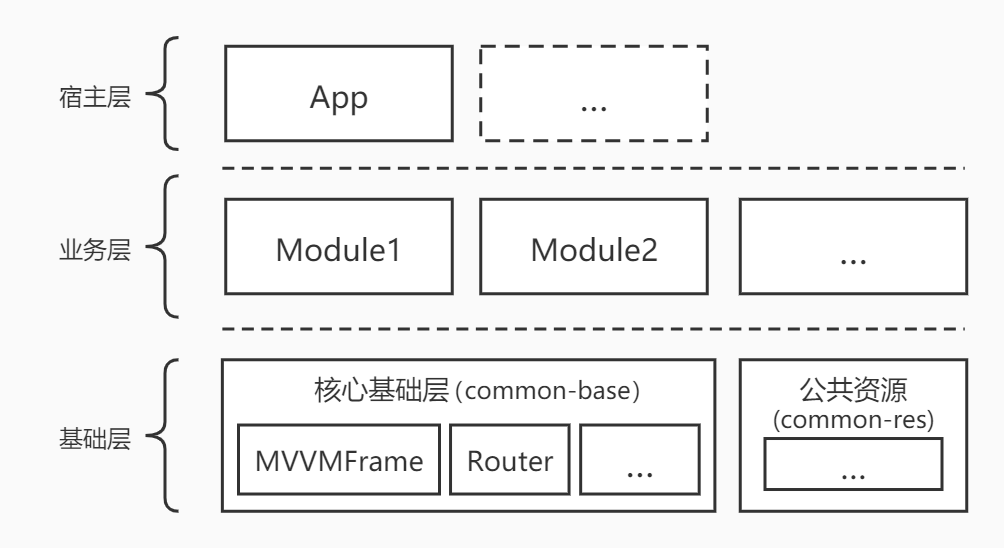
The componentized architecture diagram of MVVMFrameComponent is layered as follows:
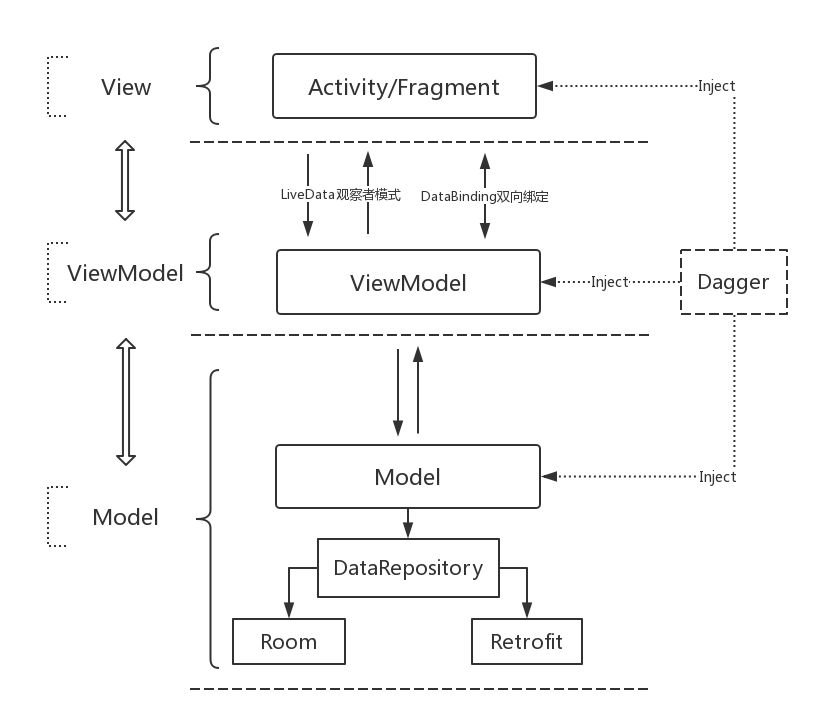
Because the core basic library of componentization is based on MVVMFrame , the architecture diagram of MVVMFrame is posted here as follows:
A simple summary of componentization is to split a complete app or module into multiple submodules, so that each submodule can be compiled and run independently, or merged into the host app as a library to form a complete app for compilation and running. Each module can be non-dependent and can interact with each other.
As a project goes by, demands continue to change and iterate. Each module will also become relatively complex. Maintenance difficulty will also increase accordingly, and over time, it may cause some new problems. At this time, we need componentization.
When an App uses a component-based development solution, the main advantages are: after the component-based split of each module, each submodule can be compiled and run independently, so that when developing and tuning a certain module, the compilation speed and development efficiency can be greatly improved. When multi-person development, each person is responsible for independent modules, which is more conducive to collaborative development of multi-person teams. In addition, the code boundaries between each module are relatively clear and easier to maintain in the later stage.
MVVMFrameComponent = MVVMFrame + Component . That is, MVVMFrameComponent adopts the componentization solution of the MVVM pattern architecture.
Host App: When each child Module is a library , all components can be integrated into the host App . At this time, the host app is a complete app with all the component function collections.
Componentized public basic library: mainly includes the MVVMFrame rapid development framework and some public core basic libraries as componentized, which facilitates the rapid construction of componentized Project .
Componentized public resource library: It is mainly convenient to manage some public resource related aspects in each module .
A simple joke function module: mainly used to demonstrate the implementation of component development based on MVVMFrame , as one of the Module implementation examples for component development.
A simple news function module: mainly used to demonstrate the implementation of component development based on MVVMFrame , as one of the Module implementation examples for component development.
Project -> Custom variables in build.gradle isBuildModule
Custom variable isBuildModule to uniformly manage each child module to facilitate switching between application and library
When isBuildModule = true , it means that each submodule is application , that is, the module can be run independently. When isBuildModule = false , it means that each submodule is library , that is, the module is merged into the host App as a library
Project -> module-build.gradle
Component module universal build.gradle for convenient unified management
According to isBuildModule , we can uniformly manage each child module to switch between application and library .
Because the core basic library of MVVMFrameComponent is based on MVVMFrame , you need to have a certain understanding of MVVMFrame to be more handy when using MVVMFrameComponent . Here I will no longer introduce the use of MVVMFrame related. For details, you can directly view MVVMFrame.
For modules that are common, you can try to write them in BaseApp . For modules that are relatively independent, you can write them in the implementation class of the corresponding IComponentApp of the module.
Special note: The implementation of IComponentApp is only a solution to your corresponding needs and is optional. Use as needed.
Here are examples of IComponentApp implementation classes for each module for reference:
The implementation class of IComponentApp in module-joke is JokeComponentApp
The implementation class of IComponentApp in module-news is NewsComponentApp
Below is a code example in module-joke
 class JokeComponentApp : IComponentApp {

    override fun onCreate ( app : BaseApp ) {

    }

}
Configure the IComponentApp implementation class corresponding to meta-data in Manifest , the example is as follows:
        <!-- name为:IComponentApp的实现类,value固定为: ComponentApp -->
        < meta-data android : name = " com.king.mvvm.joke.JokeComponentApp "
            android : value = " ComponentApp " />
When you want to get the IComponentApp implementation class of each module, you can obtain it through the getComponentApp method of BaseApp .
For more details, please check the source code usage examples in the app
If you like MVVMFrameComponent, or feel that MVVMFrameComponent has helped you, you can click "Star" in the upper right corner to support it. Your support is my motivation, thank you?
You can also scan the QR code below and ask the author to have a cup of coffee☕
| My blog | GitHub | Gitee | CSDN | Blog Park |
|---|---|---|---|---|
| Jenly's Blog | jenly1314 | jenly1314 | jenly121 | jenly |
| WeChat official account | Gmail mailbox | QQ Email | QQ Group | QQ Group |
|---|---|---|---|---|
| Jenly666 | jenly1314 | jenly1314 | 20867961 | 64020761 |








