YOLOX
YOLOX 0.3.0



YOLOX is an anchor-free version of YOLO, with a simpler design but better performance! It aims to bridge the gap between research and industrial communities. For more details, please refer to our report on Arxiv.
This repo is an implementation of PyTorch version YOLOX, there is also a MegEngine implementation.
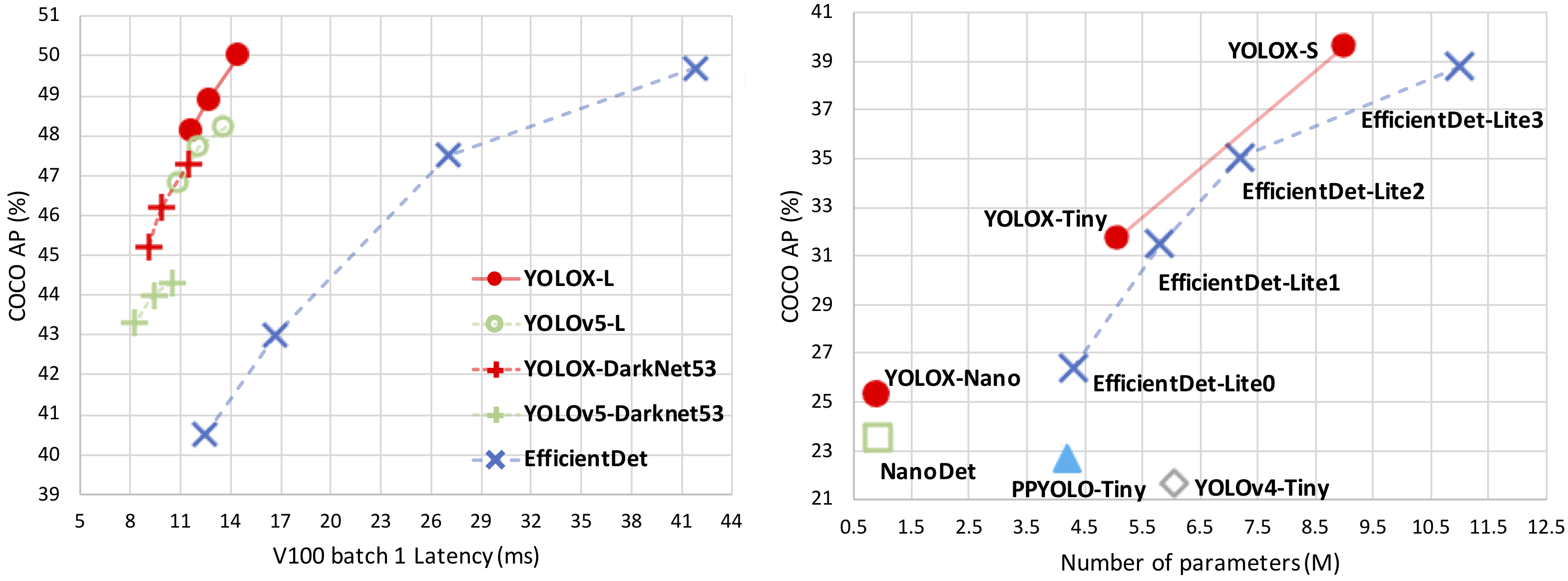
| Model | size | mAPval 0.5:0.95 |
mAPtest 0.5:0.95 |
Speed V100 (ms) |
Params (M) |
FLOPs (G) |
weights |
|---|---|---|---|---|---|---|---|
| YOLOX-s | 640 | 40.5 | 40.5 | 9.8 | 9.0 | 26.8 | github |
| YOLOX-m | 640 | 46.9 | 47.2 | 12.3 | 25.3 | 73.8 | github |
| YOLOX-l | 640 | 49.7 | 50.1 | 14.5 | 54.2 | 155.6 | github |
| YOLOX-x | 640 | 51.1 | 51.5 | 17.3 | 99.1 | 281.9 | github |
| YOLOX-Darknet53 | 640 | 47.7 | 48.0 | 11.1 | 63.7 | 185.3 | github |
| Model | size | mAPtest 0.5:0.95 |
Speed V100 (ms) |
Params (M) |
FLOPs (G) |
weights |
|---|---|---|---|---|---|---|
| YOLOX-s | 640 | 39.6 | 9.8 | 9.0 | 26.8 | onedrive/github |
| YOLOX-m | 640 | 46.4 | 12.3 | 25.3 | 73.8 | onedrive/github |
| YOLOX-l | 640 | 50.0 | 14.5 | 54.2 | 155.6 | onedrive/github |
| YOLOX-x | 640 | 51.2 | 17.3 | 99.1 | 281.9 | onedrive/github |
| YOLOX-Darknet53 | 640 | 47.4 | 11.1 | 63.7 | 185.3 | onedrive/github |
| Model | size | mAPval 0.5:0.95 |
Params (M) |
FLOPs (G) |
weights |
|---|---|---|---|---|---|
| YOLOX-Nano | 416 | 25.8 | 0.91 | 1.08 | github |
| YOLOX-Tiny | 416 | 32.8 | 5.06 | 6.45 | github |
| Model | size | mAPval 0.5:0.95 |
Params (M) |
FLOPs (G) |
weights |
|---|---|---|---|---|---|
| YOLOX-Nano | 416 | 25.3 | 0.91 | 1.08 | github |
| YOLOX-Tiny | 416 | 32.8 | 5.06 | 6.45 | github |
Step1. Install YOLOX from source.
git clone [email protected]:Megvii-BaseDetection/YOLOX.git
cd YOLOX
pip3 install -v -e . # or python3 setup.py developStep1. Download a pretrained model from the benchmark table.
Step2. Use either -n or -f to specify your detector's config. For example:
python tools/demo.py image -n yolox-s -c /path/to/your/yolox_s.pth --path assets/dog.jpg --conf 0.25 --nms 0.45 --tsize 640 --save_result --device [cpu/gpu]or
python tools/demo.py image -f exps/default/yolox_s.py -c /path/to/your/yolox_s.pth --path assets/dog.jpg --conf 0.25 --nms 0.45 --tsize 640 --save_result --device [cpu/gpu]Demo for video:
python tools/demo.py video -n yolox-s -c /path/to/your/yolox_s.pth --path /path/to/your/video --conf 0.25 --nms 0.45 --tsize 640 --save_result --device [cpu/gpu]Step1. Prepare COCO dataset
cd <YOLOX_HOME>
ln -s /path/to/your/COCO ./datasets/COCO
Step2. Reproduce our results on COCO by specifying -n:
python -m yolox.tools.train -n yolox-s -d 8 -b 64 --fp16 -o [--cache]
                               yolox-m
                               yolox-l
yolox-xWhen using -f, the above commands are equivalent to:
python -m yolox.tools.train -f exps/default/yolox_s.py -d 8 -b 64 --fp16 -o [--cache]
                               exps/default/yolox_m.py
                               exps/default/yolox_l.py
                               exps/default/yolox_x.py
Multi Machine Training
We also support multi-nodes training. Just add the following args:
Suppose you want to train YOLOX on 2 machines, and your master machines's IP is 123.123.123.123, use port 12312 and TCP.
On master machine, run
python tools/train.py -n yolox-s -b 128 --dist-url tcp://123.123.123.123:12312 --num_machines 2 --machine_rank 0On the second machine, run
python tools/train.py -n yolox-s -b 128 --dist-url tcp://123.123.123.123:12312 --num_machines 2 --machine_rank 1Logging to Weights & Biases
To log metrics, predictions and model checkpoints to W&B use the command line argument --logger wandb and use the prefix "wandb-" to specify arguments for initializing the wandb run.
python tools/train.py -n yolox-s -d 8 -b 64 --fp16 -o [--cache] --logger wandb wandb-project <project name>
                         yolox-m
                         yolox-l
                         yolox-x
An example wandb dashboard is available here
Others
See more information with the following command:
python -m yolox.tools.train --helpWe support batch testing for fast evaluation:
python -m yolox.tools.eval -n  yolox-s -c yolox_s.pth -b 64 -d 8 --conf 0.001 [--fp16] [--fuse]
                               yolox-m
                               yolox-l
yolox-xTo reproduce speed test, we use the following command:
python -m yolox.tools.eval -n  yolox-s -c yolox_s.pth -b 1 -d 1 --conf 0.001 --fp16 --fuse
                               yolox-m
                               yolox-l
yolox-xIf you use YOLOX in your research, please cite our work by using the following BibTeX entry:
 @article{yolox2021,
  title={YOLOX: Exceeding YOLO Series in 2021},
  author={Ge, Zheng and Liu, Songtao and Wang, Feng and Li, Zeming and Sun, Jian},
  journal={arXiv preprint arXiv:2107.08430},
  year={2021}
}Without the guidance of Dr. Jian Sun, YOLOX would not have been released and open sourced to the community. The passing away of Dr. Sun is a huge loss to the Computer Vision field. We add this section here to express our remembrance and condolences to our captain Dr. Sun. It is hoped that every AI practitioner in the world will stick to the belief of "continuous innovation to expand cognitive boundaries, and extraordinary technology to achieve product value" and move forward all the way.