mathebuddy
0.5.0

Official website with simulator and playgrounds: https://mathebuddy.github.io/mathebuddy/
This project is funded by "FREIRAUM 2022" (Stiftung Innovation in der Hochschullehre), Germany.
If you only like to use playgrounds or test the simulator with example files, there is no need to install anything. Just visit https://mathebuddy.github.io/mathebuddy/
If you like to create and test your own courses, visit the website, head to simulator and click on button http://localhost:8271. Then follow the instructions listed.
This repository implements all components of the matheBuddy app.
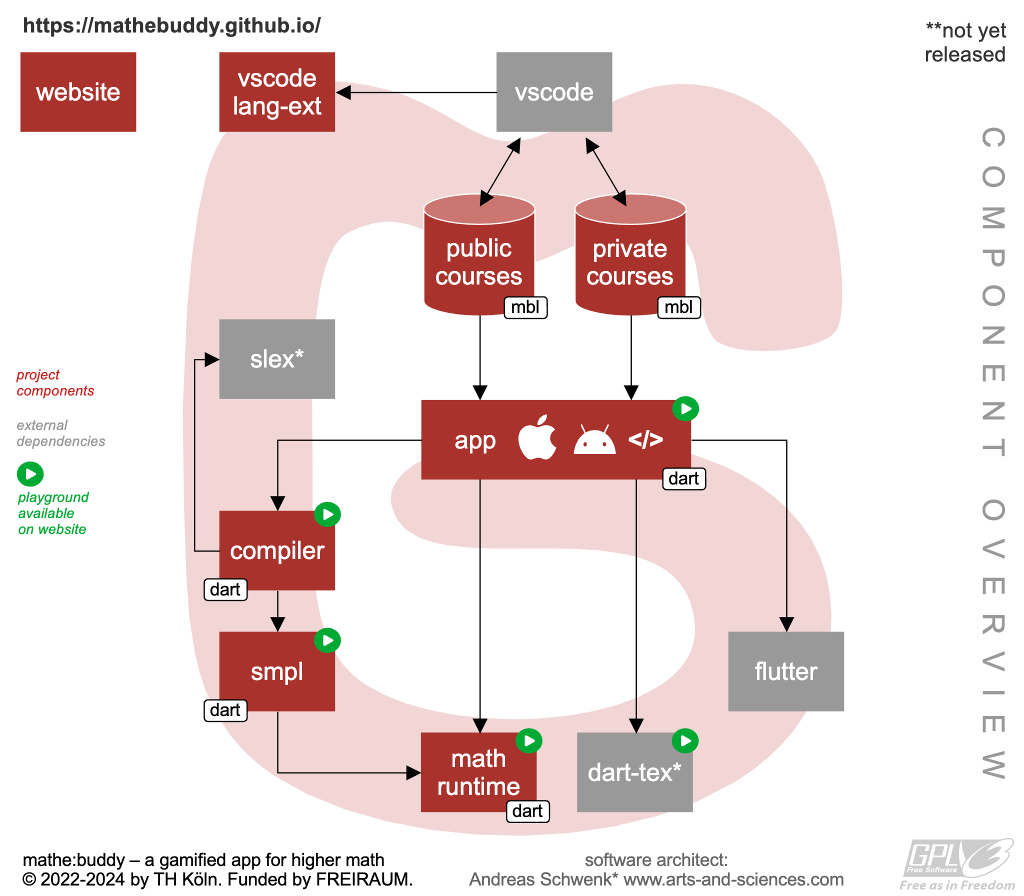
| Path | Description |
|---|---|
| .vscode/ | Visual Code Project Settings |
| app/ | Implementation of the App with Flutter |
| bin/ | Scripts |
| docs/ | Website: https://mathebuddy.github.io/mathebuddy/ |
| docs/doc/ | Documentation of SMPL, MBL, MBCL |
| ext/ | External Components |
| img/ | Original image files |
| lib/ | Implementation of components (math-runtime, ...) |
| cmd.sh | Administration script for developers |
| web.sh | Starts the webserver locally |
| mathebuddy.code-workspace | Workspace for VSCode |
Head to the README.md files in the subdirectories for more information.
Other operating systems than Debian and macOS are not yet supported. Only macOS allows to build an iOS version of the app.
IMPORTANT: If you only like to run the webserver locally (including all playgrounds and the simulator), you only need to install Python 3. The repository delivers up-to-date built libraries in the docs/ directory.
Note: Android and XCode can be skipped, if you only like to compile and run MatheBuddy simulator. pandoc can be skipped if you do not intend to build the manuals.
Debian based Linux (e.g. Ubuntu)
sudo apt install python3 snapd pandoc
sudo snap install flutter --classic
macOS
First install the brew package manager.
brew install git python3 flutter pandoc
Then run flutter doctor in a terminal window and install all listed dependencies.
macOS
Install Xcode from the App Store and start the application to complete the installation.
Then run the following commands from a terminal.
xcode-select --install
sudo gem install cocoapods
brew install --cask android-studio
brew install bundletool
Run the application Android Studio.app, agree to the licenses and complete the setup.
In Android Studio Settings, Choose Appearance & Behavior, System Settings, Android SDK and select in tab [SDK Platforms] (e.g.) Android 13. Then select in tab [SDK Tools] Android SDK Command-line Tools (latest). Click on the Accept button to start the installation.
In a terminal, run flutter doctor --android-licenses and accept each license with y. Then run flutter doctor again to check installation.
In case that you do not have no Java runtime, run brew install openjdk to install it. Homebrew will output that you have to run echo 'export PATH="/opt/homebrew/opt/openjdk/bin:$PATH"' >> ~/.zshrc. Do it!
A recent bug (flutter/flutter#118502) may list Java Errors. Run the following (ugly!) fix:
cd /Applications/Android Studio.app/Contents
cp -r jbr jre
You now need to clone the following MatheBuddy repositories. Replace YOUR_FAVORITE_DIRECTORY by a local directory on your disk.
TIP: use GitHub Desktop to clone the repositories (refer to the end of this document).
cd YOUR_FAVORITE_DIRECTORY
git clone https://github.com/mathebuddy/mathebuddy.git
git clone https://github.com/mathebuddy/mathebuddy-public-courses.git
Developers of the core team should use a SSH key pair; see https://docs.github.com/en/authentication/connecting-to-github-with-ssh; and also clone the private repository:
cd YOUR_FAVORITE_DIRECTORY
git clone [email protected]:mathebuddy/mathebuddy.git
git clone [email protected]:mathebuddy/mathebuddy-public-courses.git
git clone [email protected]:mathebuddy/mathebuddy-private-courses.git
WARNING: Never(!!) clone to iCloud / GoogleDrive / OneDrive / NextCloud / Sciebo / ...!
Run the following commands:
cd YOUR_FAVORITE_DIRECTORY/mathebuddy/docs
python3 -m http.server 8314
Open http://localhost:8314/ in your favorite browser. You may choose some other port than 8314.
Alternatively, you may also use script ./web.sh (or the admin tool ./cmd.sh) in the root directory of the repository.
cd YOUR_FAVORITE_DIRECTORY/mathebuddy
./web.sh
We use VSCode for editing source code.
Make sure you install ALL recommended extensions: Open the mathebuddy repository in VSCode, then click on Extensions on the left symbol div. Type @recommended in the search field. Then click on Install on each extension that is not yet installed.
(TODO: this section will be extended soon...)
https://github.com/mathebuddy/mathebuddy
iOS and Android App (implemented with Flutter)
https://github.com/mathebuddy/mathebuddy-public-courses
Free and Open Source Math Courses







